
下载应用程序




🛠️ Label like a pro, work like a boss.
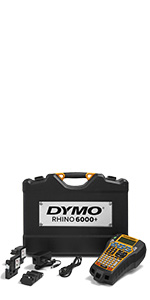
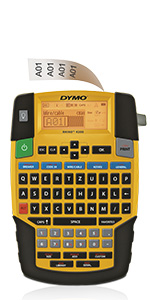
The DYMO Rhino 4200 Industrial Label Maker combines a fast QWERTY keyboard with smart Hot Keys and customizable memory to streamline heavy-duty labeling tasks. Engineered for professionals, it prints durable, industrial-strength labels up to 3/4" wide on a variety of materials, including heat-shrink tubes. Its rugged build and job-site tested labels ensure longevity and reliability in demanding environments, making it the go-to tool for electricians, AV/security pros, and facilities managers who refuse to compromise on speed or quality.






| ASIN | B005MR516Y |
| Additional Printer functions | Print Only |
| Batteries | 6 AA batteries required. (included) |
| Best Sellers Rank | #26,634 in Office Products ( See Top 100 in Office Products ) #31 in Label Makers |
| Color Depth | 1 bpp |
| Compatible Cartridge | Thermal ink cartridge for DYMO Rhino 4200 |
| Compatible Devices | PC |
| Control Method | App |
| Customer Reviews | 4.6 4.6 out of 5 stars (1,847) |
| Date First Available | September 13, 2011 |
| Department | Unisex Adult |
| Dual-sided printing | No |
| Duplex | Simplex |
| Global Trade Identification Number | 00071701059598, 00071701063496 |
| Hardware Interface | USB |
| Included Components | Printer Accessory |
| Initial page print time | 1 minute or more |
| Ink Color | Black |
| Is Discontinued By Manufacturer | No |
| Item Weight | 1.19 pounds |
| Item model number | 1801611 |
| Language | English, French |
| Manufacturer | E7QYL |
| Max Input Sheet Capacity | 4200 |
| Max copy resolution black-white | 200-300 dpi |
| Max copy resolution color | 200-300 dpi |
| Maximum Black and White Print Resolution | 200-300 dpi |
| Maximum Color Print Resolution | 200-300 dpi |
| Maximum Media Size | .24 |
| Maximum copies per run | 1 |
| Memory Storage Capacity | 256 MB |
| Model Series | Rhino 4200 |
| Number of Trays | 1 |
| Number of USB 2 Ports | 1 |
| Print media | Labels |
| Printer Ink Type | thermal black |
| Processor Count | 1 |
| Product Dimensions | 5.1"D x 6.88"W x 2.28"H |
| Series Number | 4200 |
| Sheet Size | .75 |
| Specific Uses For Product | industrial labeling jobs, job sites, electrical work, pro AV/security, facilities management, inventory tracking, asset tracking, identifying components |
| Total USB Ports | 1 |
| UPC | 071701059598 071701063496 |
| Warranty Type | Limited Warranty |
T**S
Excellent choice
Excellent product and easy to use. Options for printing the labels are ideal for the purpose. I have already changed batteries and the cartridge, and the machine continues to work very well.
R**S
Durable and Reliable Labeler for Professional Use
As a technology integrator, we rely on this labeler as a standard issue for our technicians in the field, and it has consistently exceeded our expectations. We have over 20 units in active use, many for several years, and the durability and longevity of this product are remarkable. Even under heavy, regular use in demanding environments, we've only encountered minor issues with a handful of units. The labeler's build quality is solid, and it withstands the wear and tear of daily professional use. Another standout feature is the availability of tape refills. They're easy to find, and we've successfully used several off-brand options without any problems, which adds to the product's overall value. This labeler is a dependable workhorse and a worthwhile investment for any professional needing a reliable labeling solution. Highly recommended!
T**B
Rhino is the best!
Excellent label makers. I use one at work and it has never let me down. I decided to buy one for the house. It was open box and has zero issues. Unbeatable price because of that.
P**N
Better than the 5200 in most way!
I have used the Rhino 5200 in the security industry for over a year now. I decided to get the 4200 for home and side jobs. Having both really helps me to help you decide which to get. 5200 Pros: Larger screen, good lithium rechargeable battery life, better ribbon cutter. 4200 Pros: way lighter weight, QWERTY keyboard!, Price! I use the label maker at work like crazy, especially in networking, im always traveling usually with the labeler in a backpack. I really like the 5200 larger screen so you can see the entire label you are printing, the 4200 really needs to compact things or just get a larger screen because using the arrow up or down to see the entire label is my biggest complaint. Besides that I really like the 4200 the most. It's more compact and much lighter weight which really helps a mobile tech. Also the qwerty keyboard allows me to type labels so much faster than on the 5200 which apart from weight is its greatest drawback. I do a lot of electronics so the first thing i did when I got the 4200 was build my own 18650 battery pack and solder it in. It may not be pretty but it fits tight and gives me twice the battery life and only cost $5. The expensive Rhino battery pack is 7.4v, 1500 mAh, my battery pack is 2800mAh. The bottom right spring is positive, the top right is negative. I had to easily modify the door with side cutters to allow for a little extra space to fit my battery. Instead of buying a charger, i just use a step down driver to lower 12v to 9V and a 5mm jack to plug it in. Rhino makes an excellent, very rugged product. Only issues with feeding i have had was with 1 bad ribbon and I go through ribbon packs like crazy so it has been very reliable for me. Next I will be gluing Neodymium magnets under the case so I can stick it on panels. I probably prefer the 4200 over the 5200.
E**N
Lots of Features - Great for Reloading
The Rhino 4200 is great. I reload rifle rounds and wanted a 1/2" label with at least 3 lines. I bought the 1/2" D1 label cartridge and it prints perfectly. The user interface is very simple and easy to navigate. Saving labels in memory is easy and it remembers the size, justification, and rotation. There is a user manual online that is pretty good, just Google "Rhino 4200 Manual". If you want to change the text size, rotation, or justification it can be done with the touch of a button. It also indicates on the display the current text size, rotation, justification, total number of lines, current line number, and battery level. You add lines by simply pressing enter on the keypad. Then there is a scroll bar to the right of the text line. Based on the size and position of this scroll bar you can easily tell the number of lines and the position of the line displayed on the screen. It only shows one line at a time, but the user interface is so slick that it doesn't matter. Here are some tips for this label maker: 1) When printing 1/2" labels it will allow you to print in 32pt point, but there is not enough room to allow lowercase letters to print properly (the tails of j, p , q, and y get cut off) so it prints in uppercase only, even if you have typed lowercase letters. If you print in 22pt it does lowercase and is plenty large for a 1/2" label. I think 18pt is the sweet spot for short readable labels. The sizes it lets you choose are 50 (19mm/0.75" width only), 32, 22, 18, 12, 8 and 6 pt letters. You can choose a "narrow type", but it is much harder to read and is not significantly shorter. I think a smaller font is easier to read. 2) When the label cartridge is inserted it asks what size it is. I am using metric units so I put 12mm (1/2"). When I went to print 3 lines it would only allow me to print 6pt characters. They were legible, but were quite small and left a margin on the top an bottom. I went into the settings and changed the label width to 19mm, then it allowed me to change the font size to 8pt (and 12, but 12 gets cut off top and bottom). The 8pt font size is perfect for 3 lines on 1/2" labels. If you want to print 4 lines on a 1/2 label, just set the label width to 19mm and the font size to 6pt and you can squeeze in 4 lines without a problem. (I have uploaded a picture of a few labels.) 3) I wanted cheap removable labels for my ammo boxes so I bought the 1/2" D1 label cartridges and they print perfectly. The Rhino labels are bit more expensive and more industrial than I need. The guys at Dymo probably could have made a few tweaks to make the unit better, like allowing three 8pt lines or four 6pt lines on a 1/2" label, but once you trick it into thinking it has a wider label everything works fine. Considering that this is by far the best label maker in this price range, and it can do more lines on a 1/2" label than the user manual claims, I'm giving it 5 stars. The features, user interface, and ease of use are enough to make up for some of it's minor shortcomings.
S**D
Unit is fine, but there is no lithium battery included as promised. You can use AA batteries instead.
P**L
Easy to use but also has a ton of options and can print many different characters. Easy to replace the labels. Uses a lot of battery but it can also be plugged directly in the wall which is what I use, no need for batteries that way even though they last a long time in the unit. After powering on, the first label that comes out will be too long, you have to first print just one letter, cut it and then print what you want, no big deal.
M**L
Funciona muy bien, la persona que la utiliza esta encantada con ella.
M**O
Adquiri esse produto e, é um excelente produto mas, eu tenho muita dificuldade em operar para ter acesso aos recursos e a DYMO. Não oferece suporte no Brasil para a utilização a contento e, se eu soubesse que seria tão difícil adquiri material didático em português para ele, pensaria muitas vezes antes de adquiri, na realidade eu deveria ter visto antes de comprar.
M**.
utiliser pour le travail deja une dizaine de ruban de passer et toujours sur la charge initiale Wow rapide avec le clavier Qwerty c'est magique!
TrustPilot
4天前
2天前