We remain fully operational. Our teams are working around the clock to ensure your deliveries continue safely.

下载应用程序


Buy anything from 5,000+ international stores. One checkout price. No surprise fees. Join 2M+ shoppers on Desertcart.
Desertcart purchases this item on your behalf and handles shipping, customs, and support to Taiwan.
❄️ Keep Cool, Stay Ahead: The Ultimate SSD Heatsink for Next-Level Performance
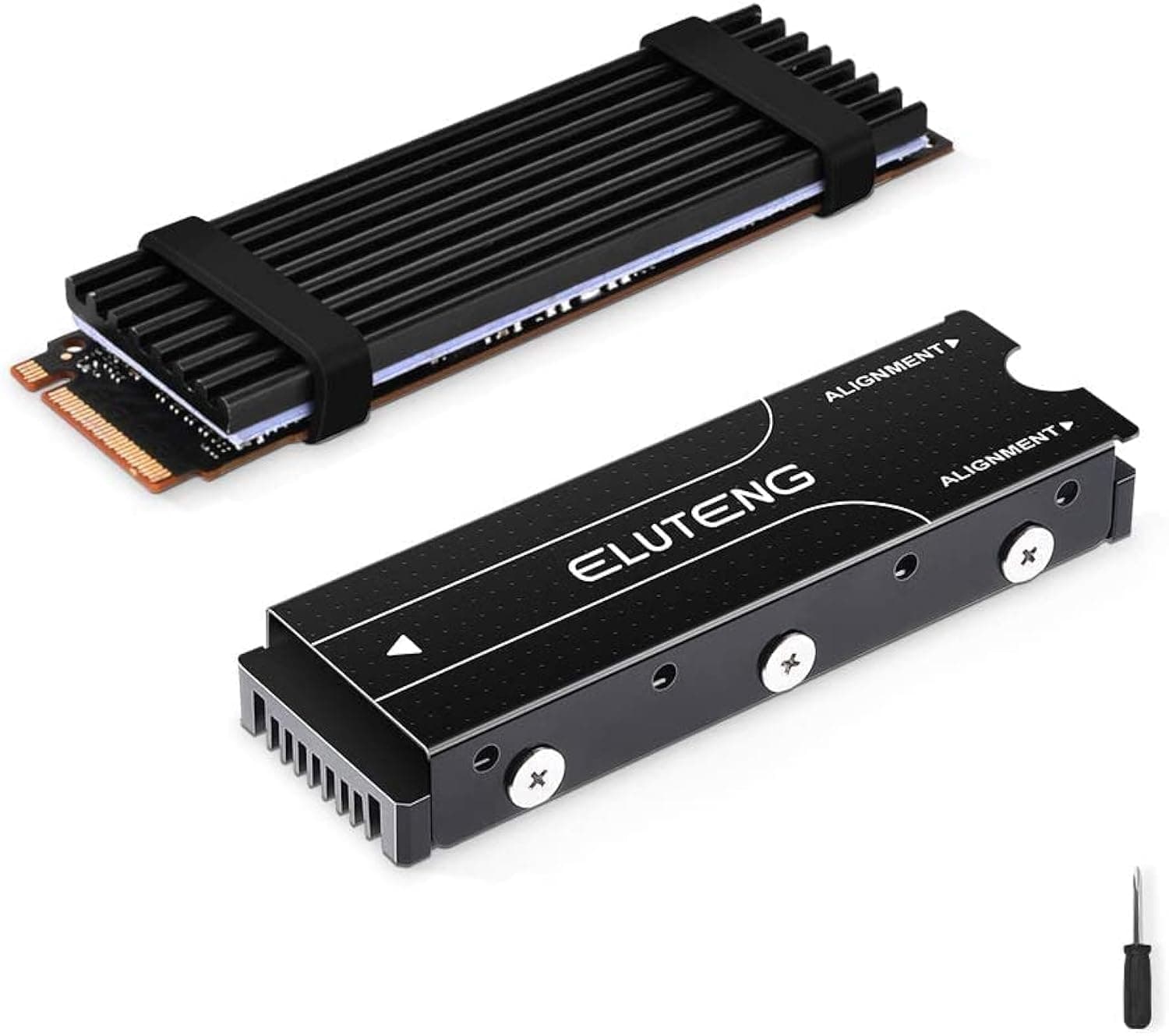
The ELUTENG M.2 SSD NVMe Heatsink 2280 is a high-quality aluminum cooling solution designed to reduce SSD temperatures by up to 20°C. Compatible with both NVMe and SATA M.2 2280 SSDs, it fits perfectly in PS5, PS5 Slim, and PC setups. Featuring thermal silicone pads and secure mounting options, it ensures easy installation and reliable heat dissipation, extending your SSD’s lifespan and maintaining peak performance under heavy loads.


| ASIN | B07RZ8BJ92 |
| Best Sellers Rank | 13,191 in Business, Industry & Science ( See Top 100 in Business, Industry & Science ) 24 in Computer Heatsinks |
| Brand | ELUTENG |
| Cooler Heatsink Compatibility | M.2 2280 SSD |
| Cooler Heatsink Material | Aluminium |
| Cooler heat sink material | Aluminium |
| Cooler heatsink compatibility | M.2 2280 SSD |
| Country Of Origin | China |
| Customer Reviews | 4.6 out of 5 stars 2,844 Reviews |
| Item Dimensions L x W x H | 7L x 1.9W x 1H centimetres |
| Item Weight | 50 Grams |
| Item weight | 50 Grams |
| Manufacturer | ELUTENG |
| Mounting Type | SSD Mount |
| Mounting type | SSD Mount |
| Product dimensions | 7L x 1.9W x 1H centimetres |
D**E
Does the job
Large heatsink fitted ok to 2TB drive and PC. Also recently used the small heatsink and rubber band on a 1TB drive in another PC and full load temperature of NVME reduced from 62 degrees to 42 degrees, well worth the effort.
A**Y
Does the Job
When I looked at the kind of temperatures M2 SSD cards generated, especially under stress, it was a bit scary. I know full well that consistent high temperatures on any computer component causes both performance issues, and to seriously shorten the lifespan of the component itself. There are many reports of cards running at 80 degrees C, such isn't doing anything any good. I installed a Crucial P5 Plus SSD in my PC, and shared three decision to add the Eluteng heatsink at the same time. I have no point of reference as to what temperature the P5 Plus would run at without but, with the heatsink, it "idles" at 35 degrees C, and never got about 55 degrees C even under stress testing. I consider these readings to be perfectly acceptable, and well under the reported temps for a bare P5 Plus, without a heatsink. To me, it is obvious that the Eluteng is doing it's job well, and is doing it at very little cost. It was really easy to install, and the provided heat pads/tapes are very low tack, so there's no risk of damage to the SSD card. The construction of the Eluteng means the pads and card are held very securely. I used the full, screw fixing, method, so I can't speak for how stable it is if you use the rubber band fixings, but I imagine it will do perfectly well. I can't say more than that, other than I'm very happy with it so far
K**E
Good
Easy to install I will see how is when I will install on my laptop
K**E
Not a perfect solution, but am improvement, and great value
I put this on a Crucial P3 4TB, which was hitting throttling temperature (about 65C) in a few minutes under full disk load. With the heatsink it still hits throttling temperature under sustained full load, but it takes a lot longer (many minutes) to get there. Under what I think of as normal application load, the temperature usually settles at 40-45C, which I take to be acceptable. Unfortunately, the SSD is right next to the PSU (and that's not easy to change), and the problem with a heat sink is that it will collect heat as well as dissipating it. So I suspect that the low-load temperature is being influenced by the PSU. In addition, the top (cooled) surface of my SSD is not completely flat. I suspect that the squishy blue pad is not squishy enough to make perfect contact with all the SSD components. I'm reluctant to press the heat sink down really hard, for fear of damaging the SSD. It's plausible that passive cooling is not sufficient for this arrangement and, perhaps I'll need a fan on the SSD eventually. But at present it seems acceptable with just the heat sink, and it's hard to complain about the heat sink at this price. One slight niggle: it's hard to arrange all the different bits, and the instructions aren't particularly clear. But perhaps there are so many different designs of SSD that it's difficult to give exact instructions.
S**S
Good quality bit of kit
It's great that you get 2 NVMe heat sinks - 1 is low profile metal with 2 thick rubber bands - the other is a higher profile with top and bottom metal bits fitted around the NVMe card, and screwed together at the sides. Good quality for the price. The pack had 7 screws in the high profile kit - the seventh screw attaches the NVMe to the motherboard. Follow the diagrams on Amazon on the item webpage, for instructions how to fit with the right pad in the right position. According to Youtube, these heat sinks do have an effect, and NVMes work better with a heat sink. Youtube also says the NAND needs to be warm, and the controller needs to be cold, so ideally maybe only the controller needs a heat sink, which may need some creative work with the heat pads on the controller only, and somehow support the rest of the metal bit away from the NAND. I will experiment. The NVMe card I got is a bit thin, not like they used to be, so the heat sinks add extra body to the card. This is a really good kit with plenty of heat pads, including one that is pre-cut into sections. Thoroughly recommended.
F**E
This Works
It does work, it keeps the ssd cool
K**S
PS5 compatible, simple to fit.
Great product, great price. Perfect for PS5 expansion. Easy to fit, no issues found.
R**S
Keeping Cool
This arrived as an apparently comprehensive solution to keeping my new SSD cool. There were no instructions and it took a few minutes to decide which of the parts were most suitable and how they slotted together but they proved a good fit for the M2 Solid State drive and when the six screws were tightened up I had a solid, secure item to slot into the circuit board. The kit even supplied a screw to secure the SSD to the board. Windows 10 was restored via a backup USB and 1.5 GB of data transferred non stop. I did not hear the desktop fan whilst it worked and opening the computer and physically checking the inside temperature was low. A success and highly recommended.
TrustPilot
2 周前
3 周前