We remain fully operational. Our teams are working around the clock to ensure your deliveries continue safely.

下载应用程序


🚀 Elevate your workspace with speed, smart tech, and savings!
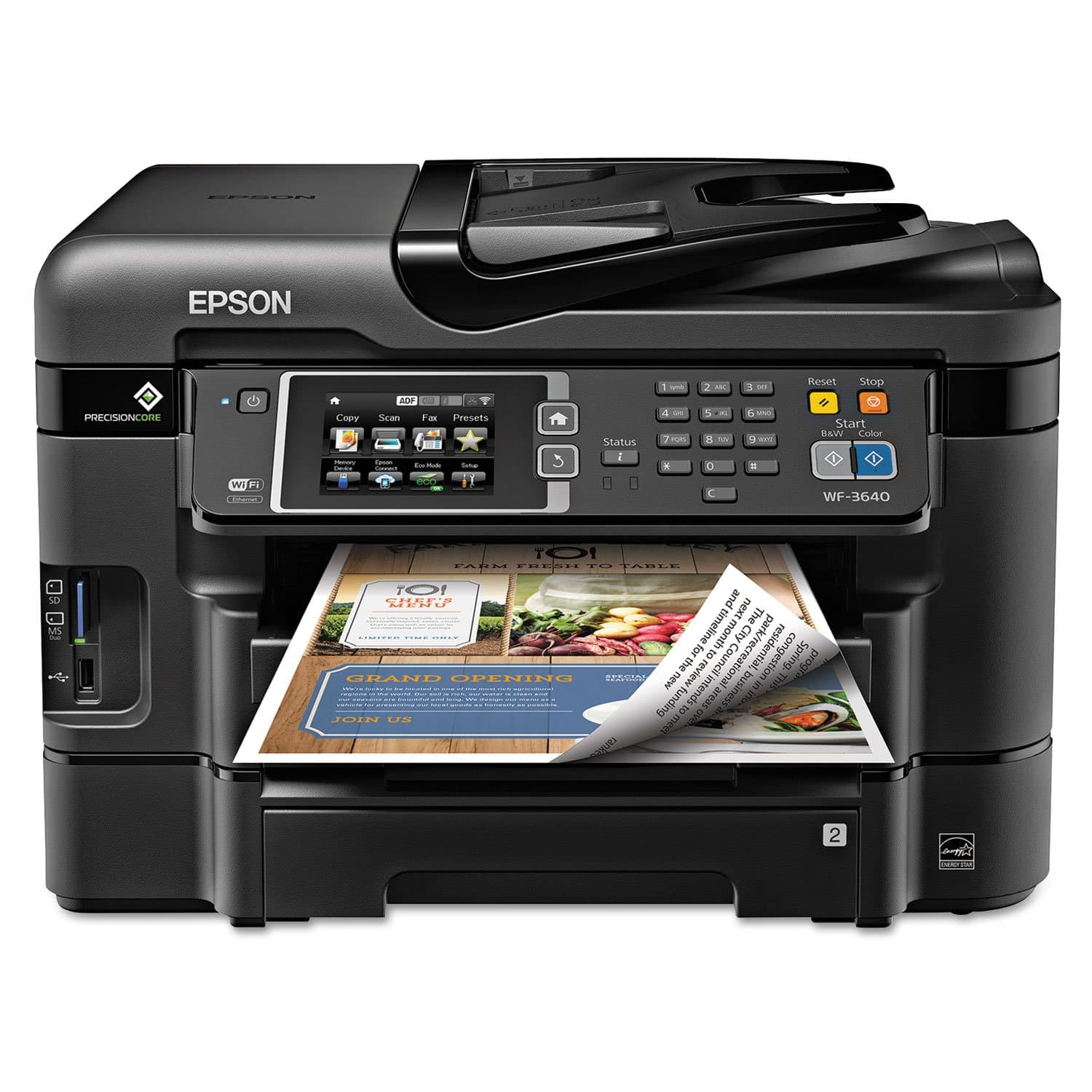
The Epson WorkForce WF-3640 is a wireless all-in-one inkjet printer designed for busy professionals seeking fast, high-resolution color and black prints at a fraction of laser costs. Featuring PrecisionCore technology, it supports mobile printing, duplex functions, and a 35-page auto document feeder. Integrated Dash Replenishment ensures ink is always stocked, making it a smart, cost-effective choice for small offices and home workspaces.
| ASIN | B00JXLGEUC |
| Additional Printer Functions | Copy |
| B&W Pages per Minute | 19.00 |
| Best Sellers Rank | #171,999 in Office Products ( See Top 100 in Office Products ) #128 in Ink Tank Printers |
| Brand | Epson |
| Built-In Media | Printer Accessory |
| Color | Black |
| Color Depth | 24 bpp |
| Color Pages per Minute | 10.00 |
| Compatible Devices | Laptops, PC, Smartphones |
| Control Method | Voice |
| Controller Type | Amazon Alexa, Vera, iOS |
| Customer Reviews | 3.7 3.7 out of 5 stars (1,794) |
| Display Type | LCD |
| Dual-sided printing | Yes |
| Duplex | Manual |
| Global Trade Identification Number | 00010343908161 |
| Hardware Interface | USB |
| Ink Color | Color |
| Item Dimensions D x W x H | 20.2"D x 21.1"W x 15.6"H |
| Item Weight | 30.2 Pounds |
| Manufacturer | Epson |
| Maximum Copies Per Run | 35 |
| Maximum Copy Resolution Black and White | 19 |
| Maximum Copy Resolution Color | ≥ 5760 x 1440 dpi |
| Maximum Media Size | 8.5 x 11 inch |
| Maximum Print Resolution Black and White | ≥ 5760 x 1440 dpi |
| Maximum Sheet Capacity | 500 |
| Maximum print Resolution Color | ≥ 5760 x 1440 dpi |
| Model Name | WF-3640 |
| Model Number | C11CD16201 |
| Model Series | WorkForce |
| Number of Ethernet Ports | 1 |
| Number of Trays | 1 |
| Other Special Features of the Product | Auto Document Feeder |
| Paper Size | 8.5 inch x 14 Inches |
| Print media | Envelopes, Paper (plain) |
| Printer Connectivity Type | Ethernet, USB, Wi-Fi |
| Printer Output Type | Color |
| Printer Type | Inkjet |
| Resolution | 5760 x 1440 |
| Scanner Type | Sheetfed |
| UPC | 010343908161 |
| Warranty Description | 1 year limited |
| Warranty Type | Limited Warranty |
| Wattage | 100 watts |
B**S
If only the rest of my life were this simple.....
Update, August 18, 2015 I had a strange thing happen with my printer that I still don't fully understand. I'm using the WF-3640 completely wirelessly. Even my desktop prints via the wireless router. I had to replace my router. I bought a combination Wi-Fi router and cable modem. Right after I installed the new router/modem, I printed a 92 page booklet from my desktop. Again, printing via the new router. No problem whatsoever. BTW, the duplex printing is pretty doggone amazing! The next morning, however, I could get nothing to print. I checked the router, the printer showed up as a connected device but no test page, nothing. I wound up having to completely uninstall the printer & all Epson software, then reinstall all of it. Now it works fine. Strange. ******************************************************************************************************************************************************************* If only the rest of my life were this easy. I went a little overboard on this because I don’t fax a lot, nor do I do an inordinate amount of scanning or copying. Just fits & starts of scanning photos for family albums, a couple of copies three or four times a week. But at this price & the packed feature list, how could I say no? This is my first Epson printer since, oh, about 1997 when I bought my first-ever inkjet. (Lord, has it been that long ago?!?) I really loved that printer and it lasted me quite a few years but, eventually, cartridges became harder and harder to find. Since then, I guess I slipped into some kind of printer coma and punished myself with another, more bloated brand that shall remain nameless. I'll just say that every subsequent model by that manufacturer became more and more of a Hideous Product. Anyway, my last AIO bit the dust about a year ago. I postponed replacing it because there just didn’t seem to be any decent models in my price range. The scanning & copying I needed to do I could accomplish using my phone. This week, however, that all changed. I suddenly had quite a bit of scanning that I really needed to get done. I just couldn’t make it work with my phone so I started shopping for a new AIO. I was trying to get the most bang for my buck while doing my best to stay below $150 with shipping. Another critical criterion was the device’s ability to use re-manufactured cartridges, something my old printers refused to accept. An expensive proposition, at best. No matter how positive the review, I purposely avoided my old brand. I did look at similar models from Brother, Lexmark & Canon but the reviews here on Amazon & elsewhere gradually eliminated all of them from the running—Sorry, Billy Blanks, I really liked those ads! I was leaning first toward the WF-3520 before I stumbled across a glowing review of the 3540 which, at the time, was linked to another online retailer with the lowest price of $129. I followed the link only to find that the 3540 was no longer available and had been replaced by a link to the 3640. Fully expecting a case of bait-and-switch sticker shock, I followed the link to find the new latest model had the same price! After comparing the price with Amazon, I placed my order. After all was said and done, the WF-3640 came in at $155 & change with tax, next day shipping & a 2-year extended warranty. Add another $17 for a set of remanufactured cartridges, each with 1100 page capacity. I have finished the initial setup of the printer. I have to say I honestly can’t remember ever having any initial device setup be such a breeze. Setting up our two laptops for wireless connection to the printer was simplicity itself, too, I’m happy to report. With one laptop I simply used the software disc that came with the printer. The other has a dead optical drive so I just downloaded the software from Epson’s support site. Setting up Epson Connect for email printing was a snap, too. Just had to change the default email address for the printer to something easier to remember. Getting the phones ready for cloud printing was just a matter of downloading & installing the free app. I haven’t done a lot of printing just yet but what I have printed has yielded crisp, sharp text that just blows away my old AIO, not to even mention my current inkjet. Is it better than a color laser? I can’t make that distinction right now. I’ll have to do some comparisons with docs here and at the office where there is a 10-month-old $900+ AIO model. Scanning performance is breathtaking, for me, anyway. I was astounded at how quickly the WF-3640 scanned the forms I needed to add to one of my web sites. It took literally less than 5 seconds from the time I clicked "Scan" for each form to appear in the directory. While there are far more features than probably I will ever need or use, for the price of this machine you simply can't go wrong. Could my needs have been adequately met with the WF-3620? Probably. But for the higher capacity paper trays, the price difference is negligible.
A**L
Stellar specs - but proved to be unreliable and did not last long
This printed was a great printer - while it lasted! I would have given it 5 stars if I had written a review within the first year of use. My given mine (and especially my wife’s) frustration, in dealing with the 0x97 error, I couldn’t give it more than 1 due to its poor reliability. I bought it from Amazon in March 2015. I really liked the quality of the prints, including plain text graphics and hi def photos as well as the scanning. We liked the ability to print wirelessly from any device in the house including from smart phone and tablets. I would consider our use light to modest. Since we bought it until February of 2017 we bought (from Amazon) 5 B&W cartridges (4 of those were XL) and 5 3-packs of color cartridges, about $300 cost. Around the fall of 2016 (after the 1 year warranty expired), we started getting the “0x97” error. At first, just turning the printer off and on took care of it. After a while it would take several power cycles, when eventually it would just print about 1/3 of a page and give the dreaded error. Of course this would happen at the most inopportune times. I did some searching on line back in the fall of 2016. The Epson website has absolutely NOTHING regarding this error, even though this error appears directly on the printer’s LCD. Other sources on the web pointed to corrupt files on the (Windows) computer (but that wouldn’t explain why you’d get the error from your smartphone, or directly from the printer itself, just running the on-board diagnostic programs and then attempting to print their output. Others pointed to dirty print heads, I followed a procedure to clean the print heads, as well as running the on-board program. Still no joy. Another web source pointed to faulty hardware. I accepted that this must be it. So I just ordered a new printer. Interestingly enough, while I was in the midst of my research, Amazon sent me an email to pick another Epson WF printer! Sorry, but based on my experience, I am staying as far away from Epson as possible. I don’t expect printers to last forever, but essentially only 1 and half years of use is really really short. My previous HP printers have lasted much much longer. In fact I still have them after 10 years. If it weren’t for the need to have wireless printing capability I would stick with them. In any case, I am going with a wireless HP printer this time. In short, this printer has stellar specs and lived up to them initially, but proved to be unreliable and had an early death. Epson on-line support is nonexistent; I don’t have time to stay on the phone forever, so I expect them to have solutions posted on their website.
P**R
This is great for the price I paid. I got on sale for $99 and 10 pk ink for $29.99. I never liked inkjet printers before, always used Laser color printer and the ink cost was $100 for refill even using refurbished cartridges. This is half the cost for printing and the quality compare with my HP color Laser printer which I purchased at $500 two years ago. This is work horse. If you have small business or even for personal use it is a great machine. It has two trays one I use for paper and the second for envelope. easy to setup and it works like a charm wireless, I can also print from my phone on this printer. Excellent.
V**1
Excelente artículo
A**R
I want to try and save people from wasting their money on this product. I started having issues with this printer right from installation but since I was eventually able to get it to install I decided to give it a try. In the first couple months the print quality was extremely good but went down hill from there. I have probably used more ink trying to unclog the printer heads then actually used for printing and after no more then 6 months this became a routine problem where I would have to unclog the printer heads almost every time I wanted to print. I would like to also mention even with spending hours trying to unclog the printer heads I can now only get the print quality to passable but not great. The WiFi worked for a day with my HP Pavilion laptop. I found that every time I turned off the printer or my laptop I would have to go through the WiFi set up all over again and eventually it stopped working all together. This was something I was willing to oversee at the time because of the print quality. The scanning feature only worked once on my laptop and that was it. I have to scan documents to a USB and then transfer them to my computer from there. Lastly, when you do run into problems you will find that most of the help offered through their support will not actually solve anything or it might the first time but that's about it. What you will get if you purchase this printer: hours spent trying to fix an array of problems, poor support, lots of frustration. I wish more people would come back to change their review after the initial purchase of this product because I believe the star rating of this product would be completely different and would save a lot of people from purchasing it. I truly hope this review will save someone else from going through the same frustration that I did.
D**E
Great value for the money and works well [once I get everything figured out] ; however, I have to clean the ink jets often which I didn't have to do with my other Epson. This could be the ink that comes with it [ old perhaps ?] so I will wait until I try new ink before I complain; cleaning jets very easy with the push of a button although it uses up ink with each cleaning. Setup would be easy for my grandson but very time consuming for me especially since this one is wireless and my last one wasn't ; I like the good old days of receiving a written set up manual instead of getting instructions off the computer but Epson tech people very fast to reply to my email questions although they probably have had a few chuckles from them.
C**N
Je l'ai essayé et vraiment, elle est superbe. Je n'ai pas imprimé à date de photos, mais la digitalisation, les copies et les impressions se sont exécutées sans problème. De même la fonction WiFi a fonctionné dès le premier essai. Je n'ai pas, pour l'instant, de commentaires négatifs. C'est vraiment une belle acquisition qui semble vouloir être très versatile. Je n'ai pas essayé non plus la fonction fax.