We remain fully operational. Our teams are working around the clock to ensure your deliveries continue safely.

下载应用程序


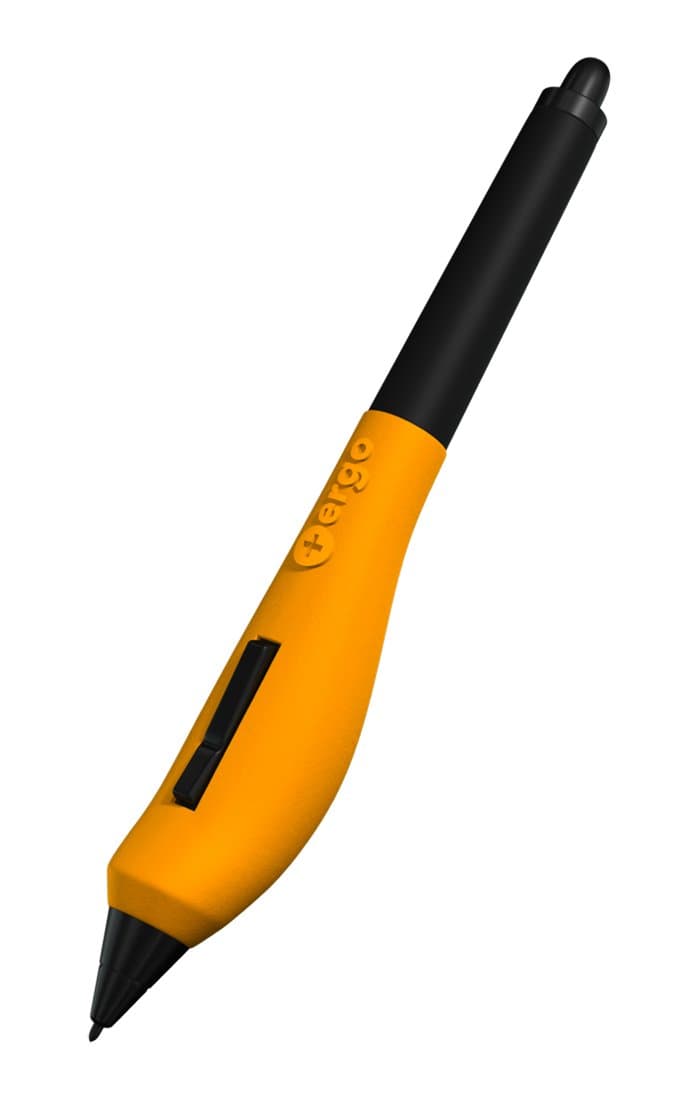


✍️ Elevate your digital artistry with comfort that sticks!
The Plus Ergo Grip is a precision-engineered silicone grip designed exclusively for Wacom Pro and Grip Pens. It features an asymmetrical, twice-as-wide design that enhances comfort and reduces hand strain during extended use. Compatible only with Wacom Grip Pen, Pro Pen, and Pro Pen 2, this grip improves control and versatility without compromising pen holder compatibility. Assembly is required, and the stylus is sold separately.
| ASIN | B0111LLPH8 |
| Are Batteries Included | No |
| Are Batteries Required | No |
| Best Sellers Rank | #123,547 in Cell Phones & Accessories ( See Top 100 in Cell Phones & Accessories ) #2,425 in Styluses |
| Brand | Plus Ergo Grip |
| Color | Orange |
| Compatible Devices | Tablet |
| Customer Reviews | 4.4 4.4 out of 5 stars (574) |
| Enclosure Material | Plastic |
| Item Dimensions | 3 x 0.89 x 0.98 inches |
| Item Weight | 0.05 Pounds |
| Manufacturer | Noon Enterprises, LLC |
| Mfr Part Number | BC79437 |
| Model Number | grp101 |
| UPC | 865549000108 |
| Unit Count | 1.0 Count |
A**Y
Ergonomic grip allows instant comfort and relaxed finger position for drawing without pain.
This product is oddly shaped so one might think that it might be hard to get used to, but it is not. The grip adds just the right shape and volume to the grip area of the Wacom Pro Pen 2 to make it feel completely natural to use. In minutes the pen was more comfortable to use and feeling more natural than with the original grip. Install the grip by following the instructions (which are to remove the pen tip and washer, remove the control button (and on my Pen 2 the metal insert around the button) and slide the old grip off the pen, then slip the Ergo Grip over the pen (it does not need pressure to do this as the fit is perfect with a little tolerance) and reinstall the pen tip (sans washer) and reinstall the button. (without the metal insert). The parts can be stored in the Ergo Grip's tube for later use.
W**G
Really cool looking grip that felt immediately comfortable. (Update, fit and finish)
Was looking for additional ways to improve the ergonomics of my workspace setup. Since I've been using Wacom tablets instead of a mouse for a pointer, I found that I had a tendency to grip the narrow stylus a bit tightly, causing some tension in my hand. While googling for ergonomic solutions, I came across this Plus Ergo Grip for Wacom Pro. I just got it and swapped out the original grip with this replacement grip. First impressions: It looks like a banana slug is getting a bit friendly with my stylus. :/ But that aside, I like the feel of it. While holding the stylus with the grip, the "bulge" ends up resting under my pointer and middle finger, almost as if cradled. My thumb then naturally fits into the nook formed by the grip to operate the toggle switch. The grip comes in an awesome looking battery shaped cardboard tube container. Definitely a nice touch and it super easy to open. The instruction pamphlet that came with the grip did a great job of explaining how to swap out the grip. Though in my excitement, I forgot to remove the switch before trying to slide my original grip off and the switch went flying... so yeah, something to keep in mind for when someone else gets one. With the Plus Ergo Grip on, it will still sit in the pen holder, so for folks who like using the pro holder, another plus there. I only just got it, so can't comment on long term use yet, but will update this review once I've clocked some time with it. Update: So I've been using it on and off for a couple of days. And here are some additional thoughts: 1) The fit and finish of this silicone grip is a bit loose in the front and in the back. So as a result, there is some bulging on the narrow side because it's not tight to the tube of the stylus like the original Wacom silicone grip is. 2) The opening for the rocker switch is fine, until you screw down the stylus nozzle tip. Once it's screwed in, the front portion of the silicone grip pushes against the rocker switch button, causing difficulties in actuating the rocker switch. 3) The original Wacom silicone grip had a bit of a bridge that slid under the rocker switch. This grip does not have that, so it can be prone to rolling and potentially dislodging the rocker switch. Not sure what can be done about this, but it's something to note. 4) The front portion of the silicone grip isn't thick enough, so when you have the tip of the wacom stylus screwed in, the colored disc is just ever so slightly protruding so if your finger grip slides towards the tip of the stylus/grip, it will rub against the rough edge of the colored disk. Otherwise, it's comfortable and works well.
C**E
Nice but more firm than I expected it to be
It's really nice to avoid hand cramping, but I wish it were a little softer. I have a slightly unusual pen grip, so I'm forced to wear band-aids on the base of my thumb and my forefinger to avoid chafing while using it, which I guess is more on me than the grip but I think it could still stand to be a little less hard, personally. Still like it a lot, though!
K**H
SO FAR, SO GOOD !! ♡ 27 October 2022 (May Update)
Anybody who finds this grip hard to put on is a dummy (like me) and tried to do such without reading the instructions first. Trying to apply this grip without the instructions initially made my life excessively harder; do NOT be like me. Because WITH the instructions, this was way easier -- Who would have thunk it. (PSA: I do have outside accessories that helped me like this product better, and I will list their titles and sellers at the end.) I have a Wacom Pro Pen and I use a Wacom Mobile Studio Pro 16", so I had to remove (permanently, ideally) the silver bit around the two buttons, the washer, and the original grip (as per the instructions... that I did eventually read. Don't be a dummy like me). I really admire the packaging of this product because I could fit all these items in the Ergo cylinder and easily fit it in my pink case I carry my Wacom in, just in case I end up disliking this product in the future or need to return the pen or anything else. It is unobtrusive in my pink case, and I keep the items in question with my back-up washers and pen tips (and instructions and cleaning cloth) that Wacom provided with my original purchase. I don't entirely know if such was a purposeful design choice, but the sturdiness of the packaging along with this convenience charmed me endlessly. I did not want to have to use a ziplock or purchase something similar to hold these items. Giving this silent benefit in exchange for asking for items of your Wacom to be removed was a fantastic idea and I adore it ♡ I will admit I am nervous about my Pro pen's two black buttons being looser without the silver trim around them, but the instructions did not list placing the silver trim back and, quite frankly, I don't imagine it would fit if I tried. So that is some comfort. The grip being too snug around the buttons for the trim to fit back in implies good things about its stability. If I edit this review in the future, I will be sure to mention if this was a further issue. (If I forget to edit it, then that means I'm very likely doing great and this worry was needless.) For now, I'll give my new grip the benefit of the doubt. Like many others, I am not a fan of the color. If the picture didn't allude to it, I like things to match and would have preferred pink or brown (or even black since the pen itself is such) so it could jive with the "color scheme" of what I am traveling with. However, I do recognize that I am an artist and I will likely have spraypaint in my hands in the future for some project or other, or else a peer I can borrow some from will. It's a nitpick and not one worthy of a reduced star. As far as the actual comfortablity of the grip, I am having a far better time with this than what my pen originally came with. I tend to press my pen too hard against the screen; in addition, I have chronic pain issues as part of my disability's symptoms that do impact my wrists. This grip makes Wacom way easier for me to use, period, as well as easier to use for a longer amount of time. It does not impact my ability to draw or interact with my Wacom product at all. So far, I'm greatly enjoying the product and find that it, not only enhances my experience, but betters the Wacom product I have. This is definitely something I'm going to recommend to anyone I know who uses a Wacom! ♡♡♡ --- OUTSIDE ACCESSORIES FEATURED IN REVIEW: --- PINK PADDED CASE: Bought on Amazon, from a seller called "CaseDeer" or "CaseDeer Direct", depending. The exact case's official title is listed as "Waterproof Drawing Tablet Sleeve with Strap for Huion Kamvas Pro 16, Wacom Cintiq 16/Cintiq Pro 16, Wacom Intuos Pro PTH860, Wacom Carrying Case Sleeve with Pockets (Pink)" by the seller. --- BROWN LEATHER TRAVEL-BAG: Bought on Etsy, from a seller called "TheBigApparel". The exact bag's official title is listed as "18 inch Large Retro Laptop Messenger Bag Office Briefcase College Bag Portfolio Work Bag Large Satchel Mothers Day Gift Convertible Backpack" by the seller.
M**G
Also fits Huion stylus!
I am a full-time digital artist, and art streamer on Twitch. After eight hours, my hand was hurting badly from gripping even a decently-thick stylus. Adding this to my Huion stylus made a massive difference, and my hand no longer aches! It does take a day or two to get used to, but now I can't go back to the standard stylus. It's overpriced for what's basically a dollar worth of silicone, but the comfort and lack of pain is begrudgingly worth the extortionate $30 price tag!