We remain fully operational. Our teams are working around the clock to ensure your deliveries continue safely.

下载应用程序



Buy anything from 5,000+ international stores. One checkout price. No surprise fees. Join 2M+ shoppers on Desertcart.
Desertcart purchases this item on your behalf and handles shipping, customs, and support to Taiwan.
🚀 Unlock Next-Level Storage Speed & Capacity — Because Your Data Deserves the Fast Lane
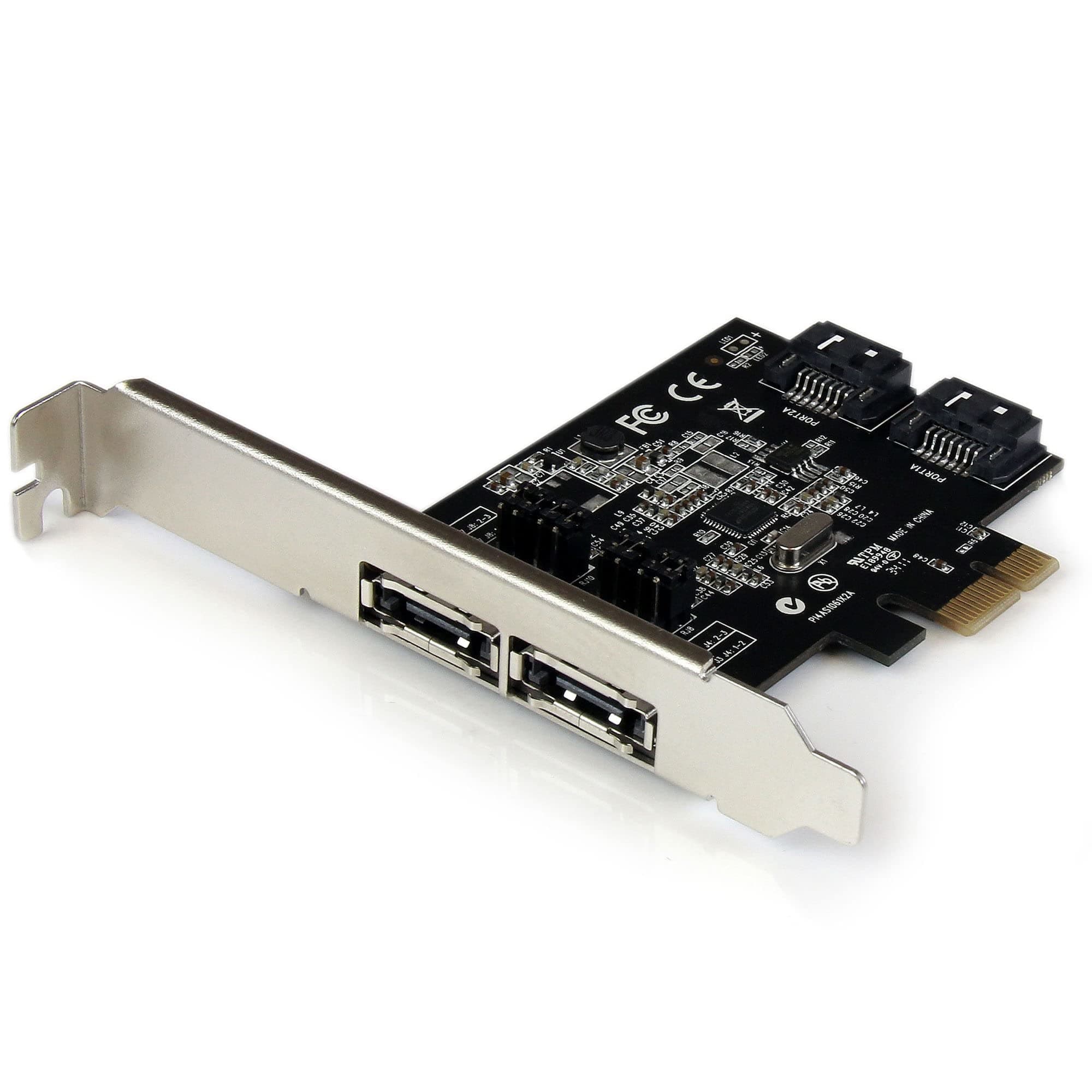
The PEXESAT322I is a professional-grade 2-port PCIe SATA III controller card delivering 6Gbps transfer speeds. It supports both internal SATA and external eSATA drives, compatible with Windows and SATA SSDs/HDDs. Featuring the ASM1061 chipset, it offers advanced features like NCQ and Port Multiplier for optimized performance. Designed for easy installation with full and low-profile brackets, it’s backed by a 2-year warranty and lifetime tech support, making it the go-to choice for IT professionals seeking reliable storage expansion.


























| ASIN | B00952N2DQ |
| Best Sellers Rank | #102 in Internal Computer Networking Cards |
| Brand | StarTech.com |
| Built-In Media | PCIe SATA Controller, SATA Cable, Low Profile Bracket, Driver CD, Manual |
| Compatible Devices | Personal Computers, Laptops |
| Customer Reviews | 4.4 out of 5 stars 1,531 Reviews |
| Global Trade Identification Number | 00065030848428 |
| Hardware Interface | ATA, PCI, eSATA |
| Item Weight | 0.05 Kilograms |
| Manufacturer | StarTech.com |
| Model Number | PEXESAT322I |
| Operating System | Windows |
| Style | 2x eSATA | 2x SATA |
| Style Name | 2x eSATA | 2x SATA |
| UPC | 065030848428 |
| Unit Count | 1.0 Count |
| Warranty Description | 2 Years |
S**M
Good product
I used this to hook up two external SATA drive enclosures to my new computer. The card fit perfectly in my computer. I installed it and plugged in my drives and started up my machine. I then installed the latest driver from the startech.com site (nice site, BTW). Some of my drives were not recognized. I had to go into Windows Disk Management, where they were listed as Foreign Disks. Once they were "imported" Windows read the disks just fine. Everything seemed to work fine. But then, after working on the computer for about 15 minutes, got a blue screen of death. The error shown as DRIVER_POWER_STATE_FAILURE. After rebooting, got another BSOD, and another, and another. Every 15 minutes or so. This on a brand new computer. So I figured it must have something to do with the card since that was the only thing I had changed about the computer. I decided to walk it backwards one step at a time. I didn't want to uninstall the whole thing and start all over. So I went to the driver in Device Manger and just disabled it, then rebooted. Hmm, no more BSOD! What happens if I re-enable the driver now. Will the BSOD come back? It did not. So it seems like disable/enable the driver solved the issue. In retrospect, I should have installed the card, turned on the computer, installed the driver, then reboot. Then, shut down the computer, hook up the drives, and turn the computer on. I did these two steps as one. I highly recommend that you take it one small step at a time. Easier to sleuth problems that way. Other than that, this card has worked perfectly.
C**S
Worked Flawlessly
Needed to add a PCIe interface to my PC to connect an external drive docking station ... any USB is just to slow. Didn't have any issues with it.
Z**O
Supports PMP on *both* eSATA ports!
This is one of the few eSATA cards I have been able to find that supports having multi-bay eSATA docks connected to *both* eSATA ports simultaneously. These docks use SATA port multipliers (PMPs), and most motherboard chipsets do not support the PMP functionality well, even if they support eSATA. Even a lot of generic PCIe eSATA cards using this same Asmedia 1061 chipset don't always work well with PMPs, especially multiple ones attached to the same card. But this card works great! It's a little pricey compared to the generic alternatives, but worth every penny when you consider that it's a component that *needs* to be reliable. I am using it with a pair of Startech's SDOCK2U33RE dual-bay duplicator docks under Debian Linux 13, and it performs flawlessly. Seems to have no problem with big SATA disks (tested with disks up to 18 TB). You'll want to ensure the kernel limits the speed of the SATA link to 3.0 G, especially if you are using longer eSATA cables, like I am. But this combination is working flawlessly and I highly recommend this eSATA card.
D**D
It does support Linux better than windows
Here's the thing. This product is supposed to be compatible with Windows. And it is, just not the way it should be. Port multiplier which is the main reason I imagine most people by this product is flawed in Windows 10 and 11. By flawed meaning several of the drives refused to show. I've tried every configuration you can think of in the drives are just not present. And I know it's not the card It's the driver for Windows. That's right The driver is flawed How do I know it's the driver for windows? Because when the computer boots up all drives show. I have mine configured to use one external port, one internal port. After reading I came to learn that when it comes to the esada each side supports and eight drive Bay, each The external port is for an 8-Bay eSATA enclosure. The internal is for a internal drive. However and oddly enough The operating system that it claims to not support is the one operating system that port multiplier operates perfectly in, in fact all features of the device operate perfectly in this operating system and that operating system is Linux. That's right in Linux the driver is installed automatically no need for the CD or nothing additionally all drives in my media Sonic 8 Bay enclosure loads right up via eSata and internal. No fuss no muss. So perhaps StarTech needs to update their data to reflect that this card is indeed proper for Linux. They may not support it for Linux, But it works so perfectly What support does it need for Linux. I am using mine to power a plex media server, and might I say it runs solid as a rock in Linux that is
K**S
Working flawlessly for my FreeNAS
I have this low power Mini ITX mobo with 4 SATA ports on it. All of them are in use on the FreeNAS. I was using the suggested setup of mirrored USB drives. 2 little Sandisk Cruisers. After about a year one of them failed. I replaced it then a few months later the other one failed. I don't think they are bad devices, they just aren't rated for 24/7 use. Anyway I needed another solution. I had a single PCI-e slot to work with. I picked up some cheapo M.2 "controller" not realizing it needed SATA cables to work. Oops. So I did some more digging and found this. I didn't need the speed of NVMe. I mean this system was running off 2 USB sticks just fine. Given how cheap SATA controllers are I felt this was a little expensive. I mean I could get a 2 port PCIe SATA controller for like $12 USD. Anyway I've worked with StarTech stuff before and it's always seemed to be good quality. After some reading it looked like the controller chip on this would be happy to play with FreeNAS. I installed this 32GB Trancend SATA M.2 drive, installed the card in the machine and re-installed FreeNAS. Imported my 2 mirrored arrays, tweaked some settings, let it reboot like 6 times as I changed things and it did it's import process, make sure all my imported settings worked, then shut it down, installed the other M.2 drive, booted back up, setup the boot drive mirror and boom, perfection. No more USD drives hanging out of the back and it works great. Final thoughts. I think for the money, it's worth it. There are more expensive solutions out there but the instructions are great and it seems well made. I waited 4 months before I wrote this review. Card length is a consideration as well. My FreeNAS machine is in a Fractal Design Node 304. The case itself has room, But there are a lot of power supply and SATA cables running around in there. It was a little tight. Warning: Some BIOS's don't like to boot off PCIe devices. Try and do some research before buying this. If you happen to have a cheapo PCIe SATA controller laying around. Put a bootable drive on it, even a CD-ROM/DVD and see if it boots. Generally if you're in the BIOS and you can see it as a boot option, you're golden. All that said, if you're reading this review and considering buying one of these, you probably know what you're doing. Hope this was helpful.
J**A
Add (2) x SATA SSDs to your Dell PowerEdge as a Boot Device to save space and make it neat!
I bought this (2) x SATA M.2 + (1) X NMVe M.2 SSD adapter/controller card and have been very pleased. I bought this to use in a Dell PowerEdge T320 server. My use case is probably a bit different than most. I was switching my main Hypervisor install/boot drive from SD card (Dell ISDM) to SSD -- for performance and reliability reasons. I wanted to utilize the onboard SATA connectors to connect SSDs to, however, I didn't want 6-inches of SATA power adapters, a poorly fitting 2.5" cage or 2.5" SSDs sitting somewhere they shouldn't be. I love the thought of the Dell BOSS (Boot-Optimized Storage Solution) cards, but that's only validated and available on 14th Gen and up Dell. I am running a pretty old 12th Gen PowerEdge. Nice thing is that for SATA M.2 drives, this adapter polls power from the PCIe port. When no NMVe/PCIe SSD is installed in the adapter card, this card is completely transparent to the host/workstation -- which is significant for some servers where PCIe lanes or bus priority is a concern. I populated the adapter card with (2) x 256GB SATA SSDs, connected two SATA cables from the card to the Onboard SATA ports and installed the card in an unused slot. Works flawlessly. Very neat and no spaghetti. I am very pleased with this. The two SATA M.2 drives showed up as any SSD to the Onboard PERC S110 RAID controller. I created a RAID 1 array for the boot drives and had no problem installing my Hypervisor OS. Great device!
T**N
Tips for the faint of heart
I ran into numerous issues, here's what I did: BSOD: Blue screen. Installed the card into my computer and installed the drivers (ASMedia) from the Startech.com website. Rebooted only to find everything was corrupted. I could not boot back into windows. Removed the card and still couldn't boot. Had to re-install windows from my backup partition. Solution: Run ASMedia driver install as Admin. When I got everything back up and running I figured what else do I have to lose at this point? I read the README file in the drivers folder and the Windows installation PDF to find out I needed to install this as Administrator. Reinstalled and no BSOD. Card not recognized in Device Manager / Windows 10: its your UEFI bios security protection. Once I disabled the security around my bios (I have a Dell Optiplex) it allows PCI cards to boot / be recognized as drives. If you're having other issues, see the other reviews. UPDATE: Looks like I got ahead of myself. After an extremely frustrating hours and hours of testing and research, it just won't work. The tips above only allowed me read-access. The card was working under the MS Sata drivers and never showed up as a "storage controller" or "SCSI controller". Ultimately I believe this comes down to if you're using UEFI bios on a 7th generation Intel or newer, it won't work unless you're willing to downgrade to legacy bios with MBR instead of UEFI and GPT. I haven't verified this but this is the last option and it involves a complete re-do of my entire setup.
D**E
Works well
Using it my Lenovo mini-server and has been working flawlessly to enable external SATA connections for software RAID on my OMV server. It's nice can work with SATA and eSATA connectors.