
下载应用程序




🚀 Elevate Your Home Network to Pro-Level Speed & Security — Stay Connected, Stay Ahead!
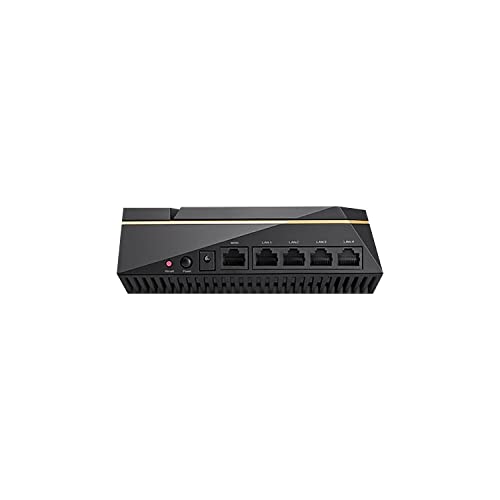
The ASUS RT-AX92U (2 Pack) is a powerful AX6100 tri-band WiFi 6 mesh router system designed for expansive, high-speed home coverage. Featuring AiMesh technology for seamless multi-router networking, it supports OFDMA and MU-MIMO for efficient multi-device performance. Built-in AiProtection Pro ensures enterprise-grade security and parental controls at no extra cost. Gamers benefit from integrated wtfast VPN for reduced latency, while adaptive QoS lets you prioritize traffic effortlessly. Ideal for large homes and tech-savvy users seeking a future-proof, secure, and ultra-fast wireless experience.


| ASIN | B07RBBX5ZW |
| Batteries Included | No |
| Batteries Required | No |
| Best Sellers Rank | #767,092 in Electronics ( See Top 100 in Electronics ) #529 in Routers (Computers & Accessories) |
| Brand | ASUS |
| Compatible Devices | Laptop, Personal Computer, Smart Television, Smartphone, Tablet |
| Connector Type | Wireless |
| Customer Reviews | 4.3 4.3 out of 5 stars (1,222) |
| Data Transfer Rate | 1 Gigabits Per Second |
| Date First Available | 22 May 2019 |
| GSM frequencies | 2.4 GHz |
| Generic Name | WIFI ROUTER |
| Hardware Interface | USB, USB 2.0 |
| Importer | Rashi Peripherals P Ltd ,Rashi Complex A Bldg,Survey 186 ,Dongripada,Poman Village , Vasai Bhiwandi Road ,Dist Thane - 401208 |
| Item Dimensions LxWxH | 39.2 x 22 x 10.8 Centimeters |
| Item Weight | 2 kg 330 g |
| Item model number | RT-AX92U 2 Pack |
| Manufacturer | Asus |
| Model | RT-AX92U 2 Pack |
| Model Name | 2019-20 |
| Mounting Hardware | Router -2pc /Power cord-2 /Quickstart guide/warranty card |
| Net Quantity | 2 Count |
| Number of Ports | 4 |
| Number of items | 2 |
| Operating System | RouterOS |
| Packer | Rashi Peripherals P Ltd ,Rashi Complex A Bldg,Survey 186 ,Dongripada,Poman Village , Vasai Bhiwandi Road ,Dist Thane - 401208 |
| Product Dimensions | 39.19 x 22 x 10.8 cm; 2.33 kg |
| Special Features | QoS |
| Total USB ports | 2 |
| Voltage | 240 Volts |
| Wireless Type | 802.11ax |
A**R
We gave away all our failed routers(this is oir third in a year) This one is really functional and easy to setup. Don't be fooled by fancy looking ones that will ask you to pay for any other feature (parental features with subscription? Wtf netgear orbi?). This one gives it for free. Speed test it with others and you will see the difference.
P**R
There are many reviews regarding the RT-AX92U routers that have a lot of either dis- or mis-information, so I'd like to clarify things with this review. First of all, I've been dealing with networking of all sorts for several years -- even have a degree in this stuff (though, presently, I'm in the world of quality assurance, so I really do understand what it means to not only break things but also why something is breaking). This doesn't mean I know it all, but it does mean I'm pretty familiar with the intent behind much of the tech being dealt with here. Next, the hardware itself is at least to the caliber of pro-sumer with this product -- it appears to fit somewhere on the high end of consumer and very low end of professional. Admittedly, I had been skeptical that something the size of one of these routers could really pull off any sort of practical, whole-home WiFi, but that's exactly what it does. In fact, the only downside to these routers that I've found is they do get pretty warm as they work, but that's why they're designed the way they are -- with enough venting to keep the devices from locking up (and after having ran them for several weeks, they're still doing quite well). Out of the box, you're going to have to update the firmware on these devices. It's as simple as that if you want the latest in bug fixes and security to be applied. Fortunately, ASUS makes this a pretty simple process if you know how to navigate their UI (which, by the way, is a pretty nice UI, though it won't win any grammar awards, hence my four star rating on that aspect). Further, on the UI part, since this really is more of a pro-sumer product, if you don't already understand the differences between 2.4Ghz and 5Ghz networks and which standards of the IEEE 802.11 apply to which band, you'll likely want someone you trust to go through and really help you set this thing up. Granted, the "intro wizard" (as I call it) will get you through the very basics of setup when first turning on or resetting the router, you'll really want to know what you're doing if you want to expand/customize the system to your own liking. I prefer to follow along with folks over at snbforums.com (where they even have forums that ASUS employees frequent) to really get into the nitty-gritty of settings. However, in the interest of those of you who are trying to decide which is the best router for the money, I'll let you know in the following paragraphs, because you likely are wanting a setup similar to how I've set my own pair up. Our setting? A 4k-square-foot house across two floors. Plenty of walls that really attenuated (broke down) the signal of the previous mesh system we used that I tested from at least 5 years ago (Linksys Velop). They were good for a while, but after we moved into our present house, even with gigabit fiber Internet to the house, they couldn't keep up with internal demands. So, it was time for me to look. I set up the first router pretty much straight out of the box with little customizing (as much as I just went on about it, it's nice to know they're highly configurable). We're choosing to keep one SSID for all three bands. However, on attempting to set up the second router as an AIMesh system, that's where personal preferences had me back off. It isn't that the mesh topology doesn't work; it's because I would have had to use the second 5Ghz band (the band used for 802.11ax, the latest wireless standard) as both backhaul (direct communications between both routers) as well as a separate SSID for devices like our iPhone 11 devices that take advantage of the AX standard. Further, while it is true that you can set up a wired Ethernet connection between the two, there's currently no way to "make" the routers use this as main backhaul and completely "let go" of the 5Ghz band. Some folks might not care about that, but single SSID convenience was better for us. Also, even with a singular router, we were able to get twice as much coverage as we had with our previous mesh system, so even if we had to stick with one router, that would have been more than sufficient for multiple Apple devices, such as phones, TVs, watches, a few IoT (Internet of Things) devices, computers, etc., and not a blip of buffering anywhere. After performing some searches on the aforementioned snbforums.com, there was another alternative whereby the second router could be set up for AP (Access Point) mode. Since I wanted to use Ethernet backhaul exclusively for router-to-router communications, I thought I'd give this a shot. This setup allows your primary router to handle all administrative functions (more on that shortly) while the second AP node essentially handles device (or "clients," as they're called in networking) WiFi needs from a "roaming" perspective. Regarding Ethernet backhaul, I chose to use our unused coaxial cable outlets to make this happen. I used two Ethernet over Coax (MoCA 2.0) adapters from Actiontec (they work flawlessly) in order to then connect CAT5e cabling between the adapters and the LAN port on the main router to the WAN port on the AP router (important to plug into the right ports). After setting all of this up, we are now more than fully blanketed with WiFi throughout our house, and even have excellent 2.4Ghz range outside on our driveway for when we watch movies outside under the stars :) An important note to customize the AP setup between both of these routers. If you click on the Professional tab in the UI, make sure that you disable roaming (there's a specific setting for this) under each of the radios that you're using (all three bands in our case). While this might sound unintuitive, the truth is that ASUS has integrated the standards 802.11k/v/r (roaming standards) into the router, and I have to say -- roaming is flawless with our "clients!" The included AiProtection Pro is great for us -- has already protected from a potential attack or two. This is an anti-virus/intrusion service provided by Trend Micro for free for the life of the product. Also, baked in is parental controls, which we absolutely love and work well. Also, the QoS (Quality of Service) functionality is great. If you ever have "that" much traffic on your network, ASUS allows you to set either categories of traffic type (such as for work from home, learning, gaming, etc.) that it can prioritize, and/or you can also assign specific devices on a scale of who would get the available bandwidth first. Again, after monitoring our own network traffic when we go full-tilt (even at gigabit Internet speeds), we've never come close to really maxing this out. This also includes a security system with cameras and that barely puts a dent into our usage. Speaking of which, how's the Internet coming into the router? Typically we're reaching speeds of ~800Mbps which, for a gigabit WAN port, is what you'd expect (we use the router as a PPPoE modem as well, so there are no intervening devices to our service provider). There's a lot more functionality that's available with this device, but the above can get you more than going for whatever your needs are. For those who have had major issues with the device, I'd suggest that (1) they might be "astro-turfing" for competing products; (2) didn't plug the right cables in the right ports; (3) haven't properly customized their own settings; (4) haven't properly updated to the latest firmware; and/or (5) could have a legitimate hardware issue (as good as ASUS is, they're not perfect). I would not hesitate to recommend this set to anyone looking for a router that should cover your needs for the next five years. And the great thing is that if you're willing to learn, ASUS has a fantastic array of features that you can learn about as you're using the router. Just make sure you back up your settings before making changes (which can be done over PC, Mac or mobile device).
A**.
I got these as I needed more coverage around the house. I am really happy as it gave me great speeds. I got a notebook and walked around the home and I could get very good signal strength and sustained transfer speeds. The lowest speeds on the graph image were on the corners of the basement.
S**N
ESTE TOUTER LO ESTOY USANDO PARA EL WIFI DE MI CASA 300 METROS CUADRADOS Y FUNCIONA MUY BIEN
J**E
To start with this AX6100 combo (two AX92U's) is probably one of the best mesh setups I have configured. Very pleased with the performance and coverage. These things provide signal all over my property and even all the way to the back of my back yard, full signal and full speed- great to not have to rely on my cellular data plan while out with the dogs all the way back in the yard. The features are pretty nice too for this setup, it's so easy to configure any Asus router period. If you are familiar with Asus routers, these are really no different. You do all the work on the single router and then just add the AI mesh node and voila, done. Here's just a few noted items: -Third band (2nd 5 ghz band) can be utilized for the back haul between the nodes, which is great because all you need is a power outlet. The downside to this? you can't really use that AX band because it's dedicated for this backhaul. If you don't want to go that route then you are going to have to do a wired back haul. This isn't a con for me at the moment because I don't have any AX capable devices so the AC band works just fine for me currently and gives me full subscribed speed on both nodes with just the wireless backhaul -As usual Asus makes it SUPER convenient and easy to add network storage, you literally just follow the instructions on the router and suddenly you have an FTP drive or a Samba file share. -A.I. Security: This is a pretty cool feature and its' new to me being my last router did not have any kind of security built in. basically to summarize these feature sets include inspecting incoming packets to determine if there is anything malicious and will block the connection if deemed a risk, there's also a feature that will email you upon notification of a security breach/compromise. -There are various game modes which i haven't felt the need to utilize but it's nice to know you get a complimentary service included such as WTFast GVPN (gamer vpn) whatever people have to say about it, negative or positive it's free and included. -Very easy and simple to tune your frequency bands and channels, I notice in a lot of reviews people often say things like "2.4 ghz band can't get above 80 mbps " etc. This is simply not true, what you need to do is use something like Wifi Analyzer and change and test. I get the full subscribed speeds on my 2.4 ghz band by using Channel 11 and just the 40mhz bandwidth channel (don't let this stuff be set to auto, you aren't helping your self at all) There's plenty of other features i haven't covered but you're getting something that is pretty feature rich which it should be at the price point these things are at, they aren't exactly cheap. What I can say is that they are totally worth it if you need to cover your whole house and well...your entire property for that matter. I haven't had a single issue with these, the devices carry over 100% seamlessly from node to node, the speed is incredible and I honestly can't picture ever going back to a single router setup. I was VERY skeptical of making the jump to a mesh system, not that I dislike them but often they have speed issues and they struggle staying on a particular band for the backhaul and sometimes i notice most mesh systems don't handle device juggling as well as they should. These perform beyond my expectations, I really didn't know what to expect with these but I am beyond amazed. Asus has a pretty wicked product with this kit! FYI: UPDATE THE FIRMWARE BEFORE YOU SET THESE UP!
TrustPilot
1天前
2 个月前