We remain fully operational. Our teams are working around the clock to ensure your deliveries continue safely.

下载应用程序




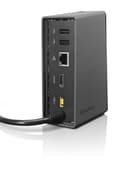

🔗 Dock into the future of connectivity!
The Lenovo ThinkPad One Link Dock (4X10A06077) is a versatile docking solution that provides data transfer, video output, and power through a single connector. It features multiple USB ports, an HDMI output, and Gigabit Ethernet, making it ideal for professionals seeking efficiency and convenience. Compatible with ThinkPad X1 Carbon models, this dock enhances your workspace while keeping your devices charged and connected.
| ASIN | B00CMB57H6 |
| Brand | Lenovo |
| Built-In Media | Docking Stations |
| Color | Black |
| Customer Reviews | 3.6 out of 5 stars 66 Reviews |
| Global Trade Identification Number | 00132018281000 |
| Hardware Interface | Ethernet, HDMI , USB 2.0 |
| Item Weight | 0.66 Pounds |
| Manufacturer | Lenovo Direct |
| Number of Ports | 6 |
| Total Number of HDMI Ports | 1 |
| Total USB Ports | 4 |
| Total Usb Ports | 4 |
| UPC | 801940111494 887770517057 803982754387 132018281000 809392590843 |
| Wattage | 65 watts |
G**D
Great simple-to-use plug-and-play solution
Although I've only had my OneLink Dock hooked up for one day, it's been totally great. It's quite small (only 5.5" tall) and is incredibly simple to use. I just plugged my external keyboard and mouse into the USB ports in the back of the dock, and an HDMI cable for my external monitor into the HDMI port in the back of the dock, and then the OneLink cable directly into my laptop (ThinkPad E540), and I was up and running immediately. I keep my laptop closed, and to turn it on I simply touch the power button on the OneLink dock and it turns my computer on. My only gripe, which others have also noted, is that some of the ports -- the audio and two USB 3.0 ports -- are on the front of the OneLink Dock, so if you want to use any of those (I've hooked external speakers into the audio port), some of the wires will be sticking out of the front of the dock, which isn't as attractive. But otherwise, it's really great and simple to use, and I recommend it highly. (Note that the dock only supports one monitor and HDMI, not VGA. If you want to hook up two monitors, you'll need to get the OneLink Pro Dock.)
G**S
Works well with Yoga Thinkpad
I went through two other third-party docking systems before I discovered that this would work with the Yoga Thinkpad. So much for Lenovo providing good documentation. It turns out it's a natural pairing, and the system has run relatively reliably for more than 6 months. I wish it had more USB ports, more like the Dell docking station I had for half a dozen years before switching computers.
K**R
A perfect compliment to my thinkpad
The Thinkpad Yoga doesn't have many ports, so docking it when it's on a desk is pretty useful. I've got a second monitor, webcam, speakers, CD drive, an external hard drive, and a USB hub plugged into the dock at all times. Since the dock only has one connection to the laptop (power and data) I can easily just grab and go. It's sturdy and functions exactly like it should. One thing to note is that the cable it uses to connect to the laptop is pretty stiff, so the combo takes up a little bit more space than I feel like it should.
V**S
Not a quality product
I bought this docking station to replace the last one that I had only had for 9 months before it stopped allowing the laptop to display on my monitor. This one lasted approx 10 days before it too stopped displaying. I had to buy a separate cable so I could connect the monitor's HDMI cable directly to my laptop. The Lenovo laptop does not have an HDMI port. The cable hookup worked perfectly. Clearly, the issue is with the Docking station. UPDATE:8/11/2016 Both USB ports on the docking station have now stopped working as well. What a piece of garbage! Lenovo just can't make a good product!
9**0
It Works.
It works, but we really like conventional docking stations better. Messing with the cord that plugs into the laptop - not as tidy as a dock.
A**R
Perfect
Just what I needed for my Thinkpad Yoga. Excellent add on, turns my Yoga into a desktop machine. What's great is you can turn on and off the Yoga without just by using the dock. Once connected, no need to touch the yoga. All devices plug into the dock. Very happy with it, works great highly recommended.
H**E
Don't buy if you want 4K (UHD) monitor resolution support.
Maximum resolution is 1920 x 1080, and does not support the new UHD monitors. This information is nowhere to be found on the product specs. All that I read is that it supports "native resolution", but the native resolution of my ThinkPad is 3840 x 2160. Seems a little deceptive. And now this investment is basically unusable with my expensive monitor. What's the point?
F**J
Good seller
I bought a new old stock lenovo docking station for my 5 yr old X1 carbon. But after a week the screen would periodically go blank which was difficult during meetings. This was a common issue with these older docking stations. I returned it and was credited immediately, although the status in Amazon is not closed yet.
TrustPilot
2天前
2 周前