We remain fully operational. Our teams are working around the clock to ensure your deliveries continue safely.

下载应用程序



⚡ Bridge the past and future—power your legacy gear with modern speed!
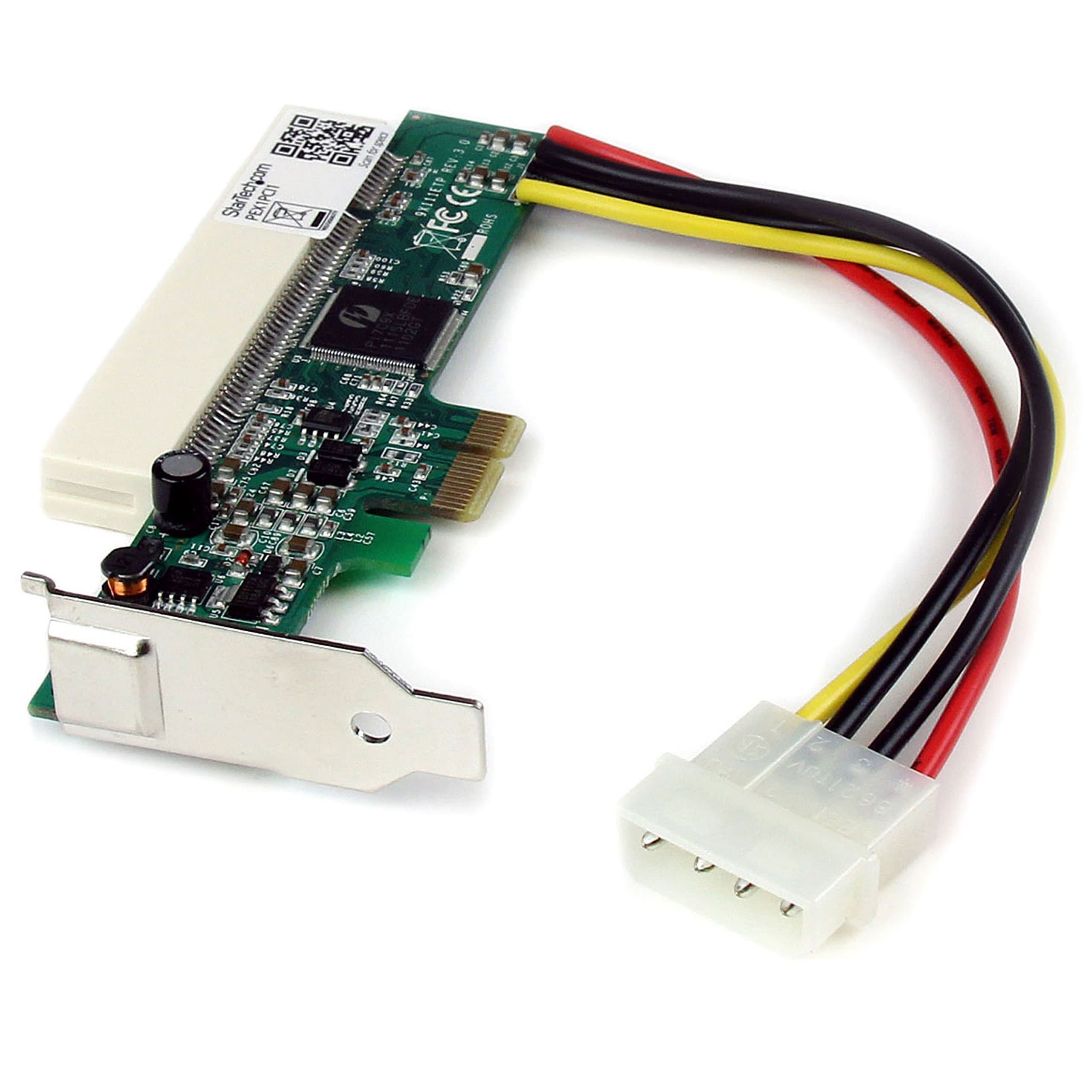
The StarTech.com PCI Express to PCI Adapter Card (PEX1PCI1) is a low-profile, driver-free converter that enables the use of legacy PCI and PCI-X cards in PCIe 1x slots. Supporting up to 250MBps bandwidth and universal 3.3V/5V power via an LP4 connector, it offers a cost-effective, space-efficient solution for professionals needing to extend the life of their existing PCI hardware in modern desktops or servers.


| ASIN | B0024CV3SA |
| Best Sellers Rank | #238 in Internal Computer Networking Cards |
| Brand | StarTech.com |
| Compatible Devices | Desktop |
| Customer Reviews | 4.0 out of 5 stars 318 Reviews |
| Global Trade Identification Number | 00065030834629 |
| Hardware Interface | PCI |
| Item Dimensions L x W x H | 5.3"L x 2.8"W x 0.8"H |
| Item Weight | 0.05 Kilograms |
| Manufacturer | StarTech.com |
| Model Number | PEX1PCI1 |
| Operating System | OS Independent; No additional drivers or software required |
| Product Dimensions | 5.3"L x 2.8"W x 0.8"H |
| Style | PCI Express to PCI |
| Style Name | PCI Express to PCI |
| UPC | 065030834629 |
| Unit Count | 1.0 Count |
| Warranty Description | 2 Years |
T**R
Works With No Drivers
Works as promised With no drivers. Installed on a Windows 11 system. The card was recognized at boot. Be advised: this adapter will raise your card by about an inch and a half and may not work in some installations without case modification (butchering one of your card slots). However, in my situation that wasn't the necessary because I have a D-Sub and four proprietary firewire slots. Fortunately I only needed one slot and only one was available after the card installation. Therefore, I didn't have to cut out the card slot. I have some photos to show how I mounted the card. I use number six screw electrical screw kit! Save lots of money on this deal. Was either spend $350 on an outdated proprietary PCIe card, or 1500 to 2 grand on a new USB IO system. With this card I was able to use my old legacy PCI card and everything is beautiful? The Big Beautiful Card Installation😂
J**.
It works! (with an E-MU 1212m soundcard...)
Well, it works! That's a good start. I'll update this review if it suddenly stops working, but so far I have an E-MU 1212m soundcard working perfectly with this adapter. What I like: It works. What I don't like: I had to destroy my computer case to "install" it. Yes, you could neatly drill out a hole or modify your case, but since I don't know how to do any of that, I just took pliers and wretched around and wretched it. Looks hideous but the card is in and works, that's all that matters to me. In other words, it would be cool if you could use this adapter without adding the extra couple of inches of height. Apparently you could use a riser cable, sold separately, and then connect that to the adapter and the other end to your component. I was worried that might have been "one too many" adapter connections, but looking back it would probably work. One thing to note, if you have to use this adapter because your motherboard lacks PCI slots, you may want to just spend a bit more and upgrade your motherboard in general. I could have bought a second hand, very high end motherboard for $50-75, but I just paid $38 for this adapter. So I saved some money as well as having to install a new motherboard. But if you're hurting for PCI slots, you may want to consider a used motherboard upgrade. Glad I got it working. The soundcard is a beast!
C**R
May work for you, depends on your situation.
I do not write reviews very often. I felt compelled to write one for the PEX1PCI1 in hopes it will help others. Background: I purchased the PEX1PCI1 to overcome my motherboard's limited PCI slot issue. Most motherboard manufacturers are slowly phasing out PCI slots and adding PCIe slots. My ASROck H67M motherboard only has one PCI slot. The PCI slot is populated with my Promise SATA controller card to control 4 of the 5 hard drives in my software Raid-5. I also wanted to use my Audigy 2 ZS sound card. In comes PEX1PCI1 from stage right to possibly fix my problem. The computer I am using the PEX1PCI1 in runs Ubuntu 10.04 64-bit. Problem: Based upon another review mentioning the PEX1PCI1 working in Linux, I decide to buy this and give it a go. I did realized the PEX1PCI1 is low profile and did not have a problem with that for what I was doing. I used this in my Ubuntu 10.04 64-bit computer. My problem came about when trying to use the PEX1PCI1 card with the Audigy 2 ZS in it AND the Promise SATA controller card in the PCI slot on the ASROCK H67M. I am not sure what was conflicting, but the sound card was not being recognized. The PEX1PCI1 was being recognized, but not the Audigy 2 ZS that was in it. Here is the kicker: if I unplugged the 5th hard drive of the Raid-5 array (which was plugged into the H67M's SATA connector) the sound card would be recognized and work perfectly. Of course this meant I could no longer access my files which I wanted to use. I powered down my pc and reconnected the 5th raid hard drive to the H67M's SATA connector. I powered the pc on once again, what do you know the raid is seen and the sound card is no longer functioning. For kicks and giggles, I switched the Promise SATA controller card into the PEX1PCI1 and the Audigy 2 ZS into the motherboard's PCI slot. I powered on my pc and it had no video coming from the video card. My dream of using both the Promise SATA controller card and my sound card came crashing down. Obviously something "wonky" was happening. Yes, "wonky" is a very technical term :D Other Thoughts & Findings: I contacted StarTech's technical support and told them my situation. StarTech was quick to give me a response of: "Thank you for your inquiry! We are sorry to hear about your technical difficulty. It sounds like there may be a conflict between the PEX1PCI1 and something with your PC. First, if possible attempt to install the PEX1PCI1 into a different Windows based PC to test if the PEX1PCI1 is functional. If the card functions in the different PC the drivers for devices on the original PC such as video card, bios etc. may need to be updated. If the card does not function with the original PC please navigate to the link below to begin the exchange process." Per their request, I did test the PEX1PCI1 in a Windows pc (Windows 7 64-bit) and it worked as it should of. The Audigy 2 ZS sound card was recognized. Super awesome fun time! Heck it does me no good if it works, but not 100% in the pc I needed it to. Another thing to note is I didn't have space to put my Promise SATA controller card in the Windows pc. I am not sure if that would of effected the results. The StarTech response was not what I was looking for, but did help me come to a conclusion. Conclusion: I will go out on a limb and say if your using the PEX1PCI1 for a Windows pc you "should" have no issues. The PEX1PCI1 in a Linux pc "could" or "may" work for you, but depends if the motherboard chipset will play nice. For example, if the motherboard's chipset controlling the PCI/PCIe slots will play nice with the PEX1PCI1 and whatever you have populating the PCI/PCIe slots. The cheapest non-creative labs sound card with SPDIF output which is fully supported in Linux is anywhere from $90+ to $180+. I am in the process of RMAing this back to Amazon for a refund. I hope this review is helpful in some way. I wish the StarTech PEX1PCI1 would of worked for me. $35 for the PEX1PCI1 is a paltry sum compared to replacing a $200 sound card. Hopefully it can work for you for your situation.
M**N
Works great in Windows XP and 7 but...
I ordered 2 of these adapters because I wanted to use an old SCSI PCI card and a Sound Blaster Audigy 2ZS in motherboard which has no PCI slots. I was skeptical at first because many interface adapters I've used in the past "partly" work at best. I was pretty worried when I opened the boxes for these adapters and neither had a driver disk. However, I simply plugged the adapters in with the two PCI cards and the PCI cards were detected and installed flawlessly. It's been alittle over a month since I started using them and I've encountered no problems. I will note that if your PCI cards are not "low profile" You WILL need to cut away part of your case if there are multiple ports on the back of the PCI card. I used tinsnips to do this but a dremel would also work. Overall for windows XP/7 they work great, but the physical attributes of this adapter are clumsy. Just make sure you have a big enough case for this adapter before order. I didn't measure it exactly but I'd eyeball this adapter at raising the PCI card 1.5 to 2.0 inches away from the motherboard.
G**T
Works with UAD-1 PCI cards
I bought this ages ago, but now I'm finally reviewing it. It works fine with Universal Audio UAD-1 cards, which is a pretty good indicator that it will work with anything since UAD-1s are notoriously finicky. There are two potential issues of which to be aware. First, since this adapter sits between your card and the motherboard, it adds about an inch to the overall height of the card. This could be a problem if your case is small and there isn't enough clearance. Luckily my 4U rackmount has plenty of space. Also, the card will flop around unless you find a way to secure it. I used a 2-inch long 6/32 screw and some spacers, but you may improvise with some cable ties or whatever else comes to hand. Second, this was not an issue on the UAD-1 card since it has no ports or LEDs, but if your card has a crowded backplane with ports, leds, breakout cables or whatever, it's possible that by adding an inch in height to it the ports could become inaccessible (or the card impossible to fit) without some not-so-minor case modifications. This is something to consider if you're hoping to salvage a pricy old sound card that has tons of breakout cables and/or ports.
J**N
May not work in your 64-bit machine!
This PEX1PCI1 adapter might work perfectly fine in your system, but beware! It may mysteriously disable other peripheral devices in your 64-bit capable system. This adapter was purchased to adapt an RME PCI host card to a PCIe based system running Windows 7 Pro 64-bit on a H67 Sandybridge mobo with 16GB RAM, and three SATA 3 drives. The RME card is a low-profile card, and fits in the adapter with room to spare with the end plate removed. Great! This saved me having to shell out $500 for a new RME card. Wait... Where'd my network card go? The adapter disabled the Realtek Gigabit Ethernet adapter built into the mobo! After some slot juggling, several reboots, and some scans with PCIScope, I discovered the PEX1PCI1 uses a *32-BIT* Pericom PCI bridge, which is very picky where it lives in a 64-bit environment, and to make the problem worse, it requests a 1M memory window from the BIOS. This means it doesn't play nice with 64-bit systems, and can disable other devices in the system. The RME card works fine in my system with I hacked-together PCIe bridge made with a PLX PEX8111 demo board, and it works perfectly, even at 32 samples buffers. Only problem is it's big and has to sit outside the case. Back it goes...
J**Z
IT SAVED MY RME SYSTEM !!!
Just Purchased the Statech PCI Express to PCI Adapter for my old RME Multiface HDSP PCI. I thought I would never be able to use my RME HDSP PCI any longer with the new motherboards not having the PCI slots, but this adapter changed this problem. It worked like a charm with out any hick ups or glitches the adapter card fit perfectly with the HDSP PCI card and The Drivers installed with out any problems. Pro sound is back on my PC with only spending a mere fraction of what the RME HDSPE PCI Express card cost. I am using an Asus X99 motherboard, Intel I7 processor and on a Windows 10 64bit OS. This adapter is worth every penny.
E**F
Works in any system
The most important thing to know about this product is it will work in every system I am aware of regardless of BIOS/EFI or OS support. If you’re wondering why I can make such a claim its because your system already has these bridges in it; even if they are not currently in use. Most common modern chipsets and all current OSes (except perhaps a custom build) already implement this. This device simply adds another bridge through an expansion card device; instead of being on the mainboard itself. This also means any classic PCI compliant device should also works. But we know that’s not always the case. But don’t blame this adapter; if your addon card doesn’t work try it (and this adapter) in another computer. There’s also the possibility your card uses some odd sideband signaling or other uncommon features and may not work. In this case its unlikely even an onboard PCI slot in a modern computer will work. The downside of this adapter is its really only made to work with low profile PCI cards. If you’re looking to make this work with a full height card you’ll need to do some case modifications. I am currently using this in an external enclosure by means of a PCIe extender. I’m having good success with this method since the PCI bridge only operates over Gen.1 PCIe signaling.
TrustPilot
2 周前
2 周前