We remain fully operational. Our teams are working around the clock to ensure your deliveries continue safely.

下载应用程序


Buy anything from 5,000+ international stores. One checkout price. No surprise fees. Join 2M+ shoppers on Desertcart.
Desertcart purchases this item on your behalf and handles shipping, customs, and support to Taiwan.
🚀 Stream Like a Pro, Anywhere, Anytime!
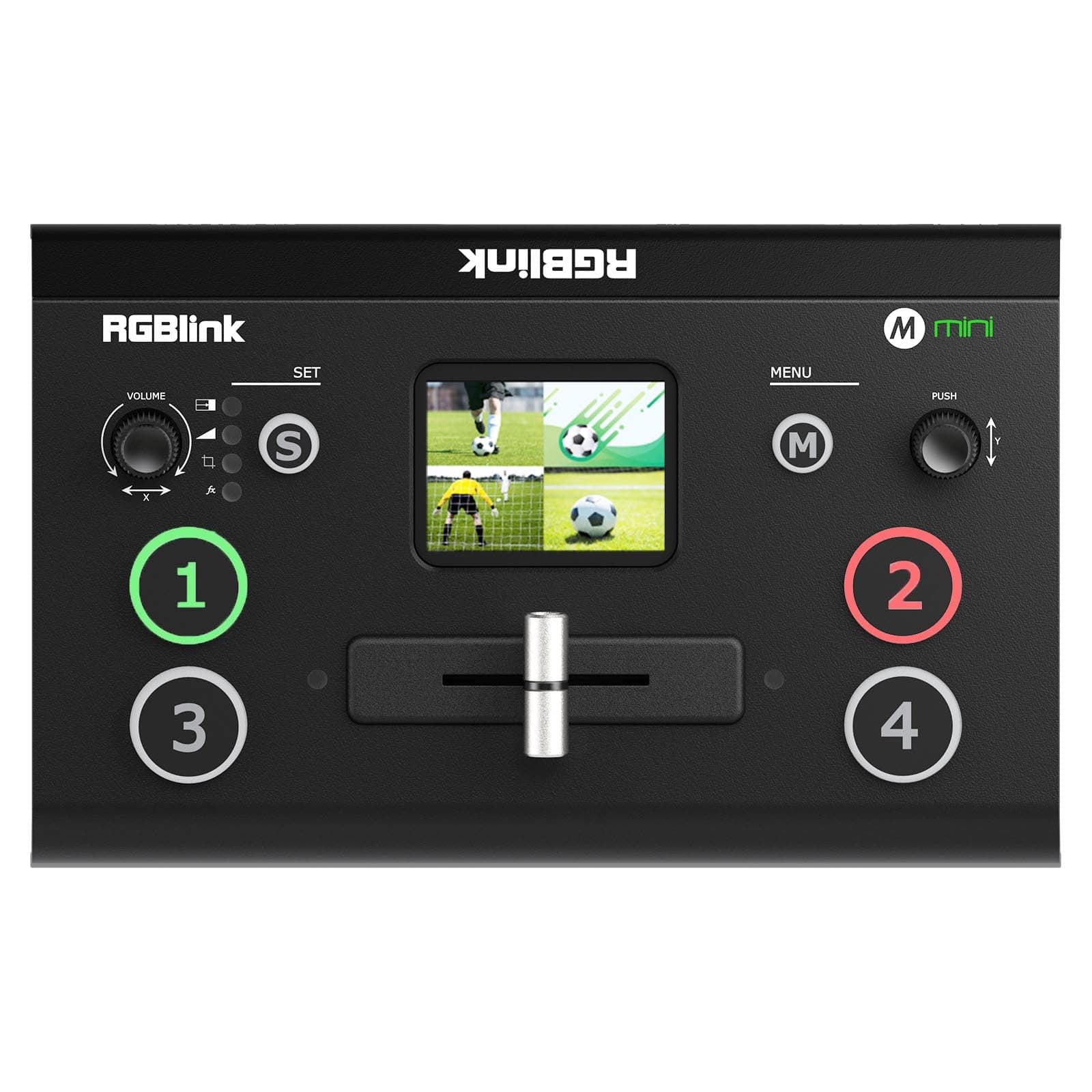
The RGBlink Mini Video Mixer Switcher is a compact, professional-grade live streaming tool featuring 4 HDMI 2K inputs, real-time 6-picture preview/program output, and USB 3.0 webcam compatibility. Designed for solo streamers and multi-camera setups, it offers 14 transition effects, 9 picture-in-picture layouts, and remote control via LAN, making it ideal for seamless, high-quality broadcasts on Facebook, YouTube, Instagram, TikTok, and RTMPS platforms.


| ASIN | B08LD65DC7 |
| Best Sellers Rank | #55 in Audio & Video Selector Boxes |
| Brand | RGBlink |
| Cable Type | USB |
| Color | mini v2 |
| Compatible Devices | Camera, Personal Computer |
| Connector Type Used on Cable | HDMI |
| Customer Reviews | 4.2 4.2 out of 5 stars (168) |
| Item Weight | 1 Pounds |
| Manufacturer | Xiamen RGBlink Science & Technology Co.,Ltd. |
| Number of Ports | 4 |
| UPC | 779880338335 |
A**O
Seamless live streaming
The RGBlink Mini Video Mixer Switcher is a dream tool for content creators and live streamers who need professional-grade control in a compact form. With 4 HDMI inputs and 2K input/output support, it handles multiple sources effortlessly—perfect for switching between cameras, presentations, or media feeds in real time. The interface is intuitive, and transitions are smooth with zero lag. Build quality is solid, and it’s portable enough for mobile setups or tight studio spaces. Whether you're streaming events, gaming, or producing webinars, this switcher delivers crisp visuals and reliable performance every time.
S**N
Great product
Just a beautiful device. Source buttons are big and easy to select. The preview screen is just wonderful. No additional monitor needed to take up desk space Wish List: Each video input should have its own audio input and switch
B**G
Works well! Just a learning curve.
At first, I was about to write a bad review because the product kept glitching on the output. This, after updating it via Ethernet port (?!!) and trying it on Streamlabs Desktop and switching between my iMac and Mac Studio Pro. Also updated the OS on the Macs. But I found out I had the output set to 30 FPS and my cameras set to 60FPS. There were other little details in the USB output I had to set as well for the 1080P output. There's a learning curve to make things work correctly so look out for YouTube vids and the instructions. But once it works, it's solid. I'm using this for my Podcast and just needed a smooth way to go between cameras. This device does the job! I'm pleased with it.
M**H
For the price, and the size, this packs a TON of features!
It can be used directly out of the box, with the basic options, but when you read the manual the thing is fairly easy to program and then you get some fantastic "professional level" control abilities. AND, you can actually control the unit via an attached computer, using the app! Allows you to record everything directly to a USB stick as well!
A**S
Sketchy company with no support...
There's a review here titled "Zero Customer Support" ...that review is spot on! Absolutely can not get any software to work on my brand new HP Envy...(HP flagship laptop) not can I get the app to work on my cell! So aor the basic functions seem to work on the unit but without the app it can't be upgraded and can't access some of the functions like wireless or any form of remote. I have tried to contact RGBLink and the response received matches the other reviewers experience. I am not impressed... This appears to be a somewhat sketchy Chinese company ...I saved a few bucks on the purchase which in the end ...turns out..."You get what you pay for"
M**Z
Very good machine.
Even tough there is many different models on this fixture, it works perfectly. I would recommend to any one.
D**E
works as advertised.
Finally, a way to seamlessly switch from one HDMI source to another without the tv's going through the setup each time. Not only does this switcher do it instantly and without readjustment of the tv's, it offers numerous transitions and PIP options. It's like a broadcast switcher at a consumer price point. Well done!
G**G
More junk
This was my second attempt at using this product. Both failed both in different ways. The first one the output would just drop signal. I would have to unplug it and plug it back in numerous times to get it to finally work. The second one there was no frames around the input pictures on the the video monitor. The T-bar was backwards, And again I had to do hard reboots numerous times to get it to finally not drop signal. The audio input and outputs are so recessed. In. You can only use their 3.5 mm plugs. I was unable to use any of my existing adapters or cables with it.
A**R
到着し電源入れたところ、本体の2インチモニターに起動画面は表示されるがそのあとすぐ黒画面になり、HDMI入力1~4全てに映像を入れてもなにも映らない。 メニュー画面などは映ったので、メニューからinputを確認したところ、メニューのinputには入力が認識しているようだが、マルチビューにはなにも映らない(4画面の枠線もでない) HDMIアウトもモニターに接続してもなにも表示されず、USBでパソコンと繋いでもOBSで認識せず。 ファームウェアをアップデートしても改善されずでしたので、返品しました。 個体差なのかもしれませんが、こういう事もあったという事実をご報告です。
ا**ح
غير مطابق للمواصفات و الكود لا يعمل المطلوب v2 ليس v3
J**A
Excelente opción para hacer streaming con switcheo en vivo de diferentes fuentes de HDMI
J**P
VERY POOR SUPPORT FROM COMPANY... SOME TIME HANGING THIS SWITCHER.....
E**N
habia oido hablar mucho del producto y me decidi a adquirirlo, apenas lo estoy probando pero me ha fascinado pues puedo hacer muchas de las cosas que haría c un equipo de mayor costo y mas grande... sobretodo me interesaba el streaming y no he tenido problema ni por la resolucion ni por la compatibilidad con otros equipos de computo, por eso lo llamo el pequeño gran gigante
TrustPilot
2 周前
2 个月前