We remain fully operational. Our teams are working around the clock to ensure your deliveries continue safely.

下载应用程序




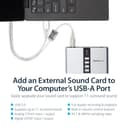
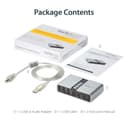
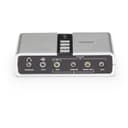
🎶 Upgrade your audio game—because your ears deserve the best!
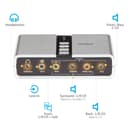
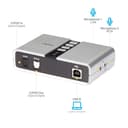
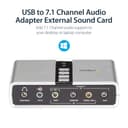
The Startech.Com 7.1 USB Sound Card is a compact external audio adapter that upgrades any laptop or desktop with immersive 7.1 channel surround sound via USB. Supporting both analog and SPDIF digital outputs at up to 48KHz sampling rate, it delivers professional-grade audio quality with easy plug-and-play installation on Windows platforms. Ideal for audiophiles and professionals seeking enhanced multimedia experiences.


| ASIN | B002LM0U2S |
| Audio Output Mode | Stereo |
| Best Sellers Rank | #24,652 in Computers ( See Top 100 in Computers ) #46 in External Sound Cards |
| Brand | StarTech |
| Built-In Media | 1xUSB Cable,1xInstallation CD,1xInstruction Manual |
| Compatible Devices | Laptop |
| Country of Origin | China |
| Customer Reviews | 4.1 4.1 out of 5 stars (2,978) |
| EU Spare Part Availability Duration | 2 Years |
| Global Trade Identification Number | 00065030835466 |
| Hardware Connectivity | USB |
| Hardware Platform | Personal Computer |
| Item Dimensions L x W x H | 9.9L x 6.1W x 2.5H centimeters |
| Item Type Name | External Sound Box |
| Item Weight | 0.09 Kilograms |
| Manufacturer | StarTech.com |
| Maximum Sample Rate | 48 KHz |
| Mfr Part Number | ICUSBAUDIO7D |
| Model Name | 7.1 USB Audio Adapter External Sound Card |
| Model Number | ICUSBAUDIO7D |
| Platform | Windows 10, Windows 11, Windows 8, Windows 8.1, Windows Vista, Windows XP |
| Signal-to-Noise Ratio | 120 dB |
| Surround Sound Channel Configuration | 7.1 |
| UPC | 065030835466 |
| Unit Count | 1.0 Count |
S**M
Perfect for my Creative old fasion Speakers
I loved this audio card it worked perfectly. I connected my old pin5.1 speakers to my Alienware pc.
F**T
Working perfectly. Works super with 7.1 movies. So happy with it that i actually bought one extra.
Download software from the website. VLC Media player need some configuration to allow surround sound. Very nice product
F**Y
Excellent
Excellent
S**R
It stopped working in a weeks time
Stopped working within a week
B**A
Pour un vieux PC Core 2 duo HP qui tourne sous Windows 10 avec un petit disque SSD. Seule l'audio n'est plus supportée par le tout dernier Windows 10. Solution ? Cette carte PCI à 21,xx €, qui supporte en plus le format low profile. (L'unique port PCI-Express du PC étant déjà occupé par une carte graphique, il ne restait qu'un emplacement PCI.) Cette carte fait très bien le job, avec des enceintes que j'avais déjà. Pas de craquements, c'est appréciable !
B**A
Cette carte audio externe est pile ce que je recherchais. Le pris est correct (des cartes similaires chez Creative coûtent plus de 100 euros en moyenne). Le bouton sur le boîtier est un plus, même si je ne m'en sers pas, ça fait quand même trois possibilités de moduler le son (réglages Windows, le bouton sur les enceintes et ces boutons sur le boîtier). Le son est très bon puisque j'ai un système 5.1. Cela m'a permis de récupérer du son sur un PC où la carte son interne et intégré à la carte mère a lâché. Le produit est arrivé dans les délais annoncés et bien emballé. Ce fut une joie que de retrouver du son sur mon PC.
R**I
Compatta, solida e soprattutto perfettamente funzionante. Io la uso per giochi e musiche in 5.1 ed è tutto ok, suono e localizzazione perfetti. Per istallarla ho scaricato dal sito (come consigliato nel manuale cartaceo incluso nella confezione) il software "Xear Audio Center" che permette di gestire facilmente input e output. Consigliatissima.
C**H
Device as expected and was extremely reasonable priced. The programs and drivers seem old and the UI looks like its from win95. It isn't necessary for use and can just be a generic usb 2.0 device configured thru windows. It takes a min to configure in win11 but does produce 5.1 surround. Isn't just plug and play, you have to configure it in windows and windows doesn't seem to want to allow you to the menu necessary (No fault of device). I couldn't find the location of the configs in basics system settings menus. WHERE YOU HAVE TO GO TO CONFIGURE: 1-"Open Sound Settings: Type mmsys.cpl into the Windows search bar and press Enter to open the classic Sound control panel.". 2-click on device. 3-configure. Device is great for my use. Computer->EKL Switch->This Device - to transfer my surround between 2 computers using a Logitech 5.1 THX surround. From a gaming standpoint, this functions great and I don't notice a difference between direct motherboard and device sound output. Device shows as DVD quality output.
W**T
DACの問題なのか検証できたら評価を更新したい。 やはりマイクの入力品質が悪かった。聞くだけなら問題ないが、それなら大抵のPCには出力がついてるから必要性がなくなる。