We remain fully operational. Our teams are working around the clock to ensure your deliveries continue safely.

下载应用程序



Buy anything from 5,000+ international stores. One checkout price. No surprise fees. Join 2M+ shoppers on Desertcart.
Desertcart purchases this item on your behalf and handles shipping, customs, and support to Taiwan.
🌐 Tiny device, massive network impact — stay connected, stay ahead!
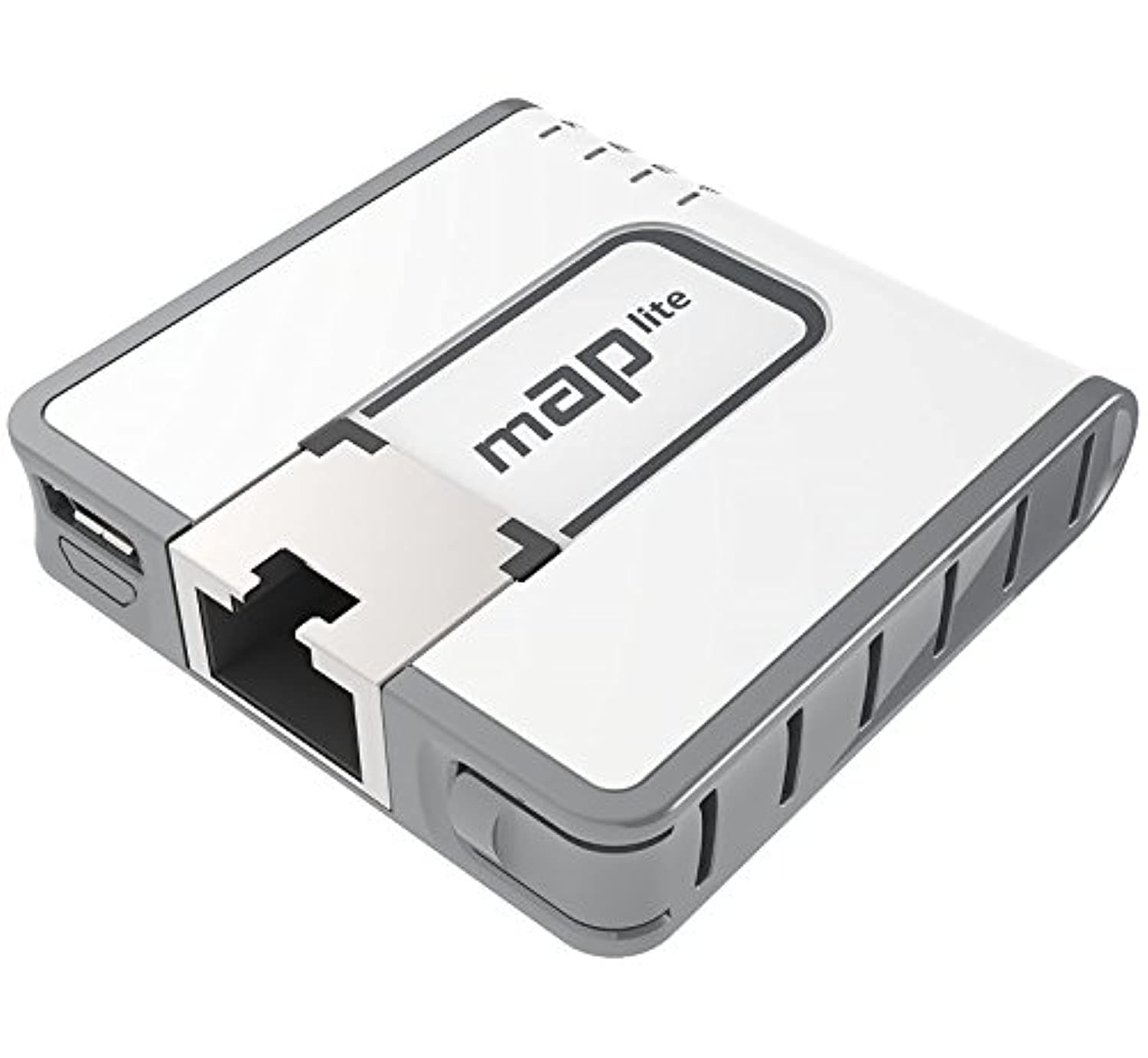
The MikroTik RBmAPL-2nD mAP lite is an ultra-compact 2GHz dual-chain 802.11b/g/n wireless access point with a unique slim Ethernet port and PoE support. Designed for professionals on the move, it extends WiFi coverage, boosts laptop signal range, and serves as a versatile network configuration tool—all in a matchbox-sized form factor.
| ASIN | B01BMMJVLI |
| Are Batteries Included | No |
| Best Sellers Rank | #61,623 in Computers ( See Top 100 in Computers ) #234 in Wireless Access Points |
| Brand | Mikrotik |
| Color | White |
| Customer Reviews | 4.3 4.3 out of 5 stars (315) |
| Date First Available | 3 February 2017 |
| Item Weight | 120 g |
| Item model number | RBMAPL-2ND |
| Manufacturer | Mikrotik |
| Number of Ethernet Ports | 1 |
| Operating System | RouterOS |
| Product Dimensions | 4.9 x 1.1 x 4.8 cm; 120 g |
| RAM Size | 0.06 GB |
| Series | RBmAPL-2nD |
| Wireless Type | 802.11b, 802.11g, 802.11n |
K**N
Tiny, honestly Tiny, amazing little device, remember if you are using this to extend your wireless network set it up as a bridge not an access point or a router, I use mine hard wired in to a poe net switch, the device does come with a PSU though if you need it. I'm getting 60mbs which is more than fast enough for my phone when sat out in the garden. Connect the device directly in to your ethernet port on your computer for setup and follow the instructions, any questions simply ask an ai chat bot, quicker than anything these days although I would avoid asking the chatbot on here as it's limited. Overall I can highly recommend this, if you wanted an outside access point this would easily fit inside a small plastic terminal box. It's highly configurable via the in built web server or the software, I used the web interface and it was quick and simple. Note that out of the box mine was set with no WiFi password! Make sure you change this, look for the little padlock next to the WiFi symbol on your phone, if you don't see it, connect to your pc and set a password for access.
C**N
Performance et compact peut être un peu complexe pour les novices ,route OS marque que je conseille AU TOP TOP
J**R
werkt goed. verwacht geen wonderen. maar voor kleine ruimtes prima te gebruiken en makkelijk mee te nemen.
D**Q
The MikroTik mAP Lite is the adorable cousin of the mAP 2n—the one that shows up with half the features, a third of the weight, and still somehow manages to be useful in situations you didn’t see coming. With only a single Ethernet port, you lose a big chunk of the Swiss Army knife tricks the larger mAP can pull off, but what remains is still a shockingly capable lab and field companion. In the right hands, it’s the fastest way to pop up a Wi-Fi network when you’re tired of standing in front of a rack, need to reach gear from across the room, or want to stop leaning over a switch like you’re trying to smell the firmware. In the lab, the mAP Lite earns its keep over and over. Need a quick test SSID to validate DHCP, DNS, or captive portal behavior? Done. Need to figure out what a device is doing before you commit it to the production stack? This thing will happily give you a clean, isolated wireless bubble to experiment in. And the “one Ethernet port” limitation actually simplifies certain workflows—you plug it into something, it becomes the gateway drug for diagnostics. No bridging tricks, no inline MITM setups, just a tiny radio that gives your laptop or tablet the wireless rope it needs to poke at devices hiding behind racks, under desks, or in the dreaded top-of-ladder zone. In everyday tech work, the mAP Lite is basically a get-out-of-jail card for laptops without Ethernet. That single port becomes your emergency NIC, your temporary portal into stranded VLANs, your way to SSH into switches that live in awkward corners of MDFs. It’s not winning any throughput awards and it’s very much a “2.4 GHz only” child, but for powered-from-anything PoE-in convenience and dead-simple portability, it’s a tool that quietly becomes part of your standard kit. It doesn’t replace the full mAP, but it fills a niche you don’t appreciate until you’re on-site, stuck on Wi-Fi-only hardware, and wishing you had just one more wired hop. This is that hop. ⸻ Pros • Tiny, featherweight, and ridiculously easy to toss in any toolkit • Great for lab testing, quick SSIDs, and isolated “what is this device doing?” scenarios • Perfect workaround for laptops with no Ethernet port • PoE-in makes it deployable anywhere a switch or injector exists • Incredibly cheap for the utility it provides Cons • Only one Ethernet port—no bridging, no inline MITM, limited tricks • 2.4 GHz only, with all the crowding and interference that implies • RouterOS depth is still there if you stray beyond simple configs • Throughput capped by both hardware and physics • More limited Swiss Army knife than the full mAP
B**O
Questo marchio mi ha da subito entusiasmato, quando ho iniziato ad impiegarlo un anno e mezzo fa. La configurazione dei dispositivi di questo brand richiede però un'ottima conoscenza delle reti ed una certa dimestichezza riguardo al modus operandi di RouteOS. Una volta acquisita si possono però implementare delle funzionalità piuttosto avanzate, contando anche su un'ottima affidabilità. Questo dispositivo non fa eccezione, ha le dimensioni di una scatola di cerini, è dotato di una porta ethernet con un "vero" PoE (IEEE 802.3af) e funziona bene. Sono comunque impazzito un giorno intero prima di riuscire a farlo funzionare come Access Point base, cioè senza routing tra le due interfacce. Questa semplice configurazione necessita di impostare un bridge software tra la porta wlan e quella ethernet, ma non appena includevo la ethernet nel bridge, questa cessava di funzionare. Il problema si manifestava solo connettendo il dispositivo con il mio switch a 24 porte MikroTik CSS326-24G, che gestisce diverse reti tramite le VLAN (con porte comunque untagged). Con altri switch, anche managed ma senza VLAN, era tutto OK. Alla fine è stato sufficiente impostare nel bridge, sezione STP, protocol=none, invece che RSTP (impostazione predefinita) e tutto è andato a posto
TrustPilot
4天前
1 个月前