We remain fully operational. Our teams are working around the clock to ensure your deliveries continue safely.

下载应用程序


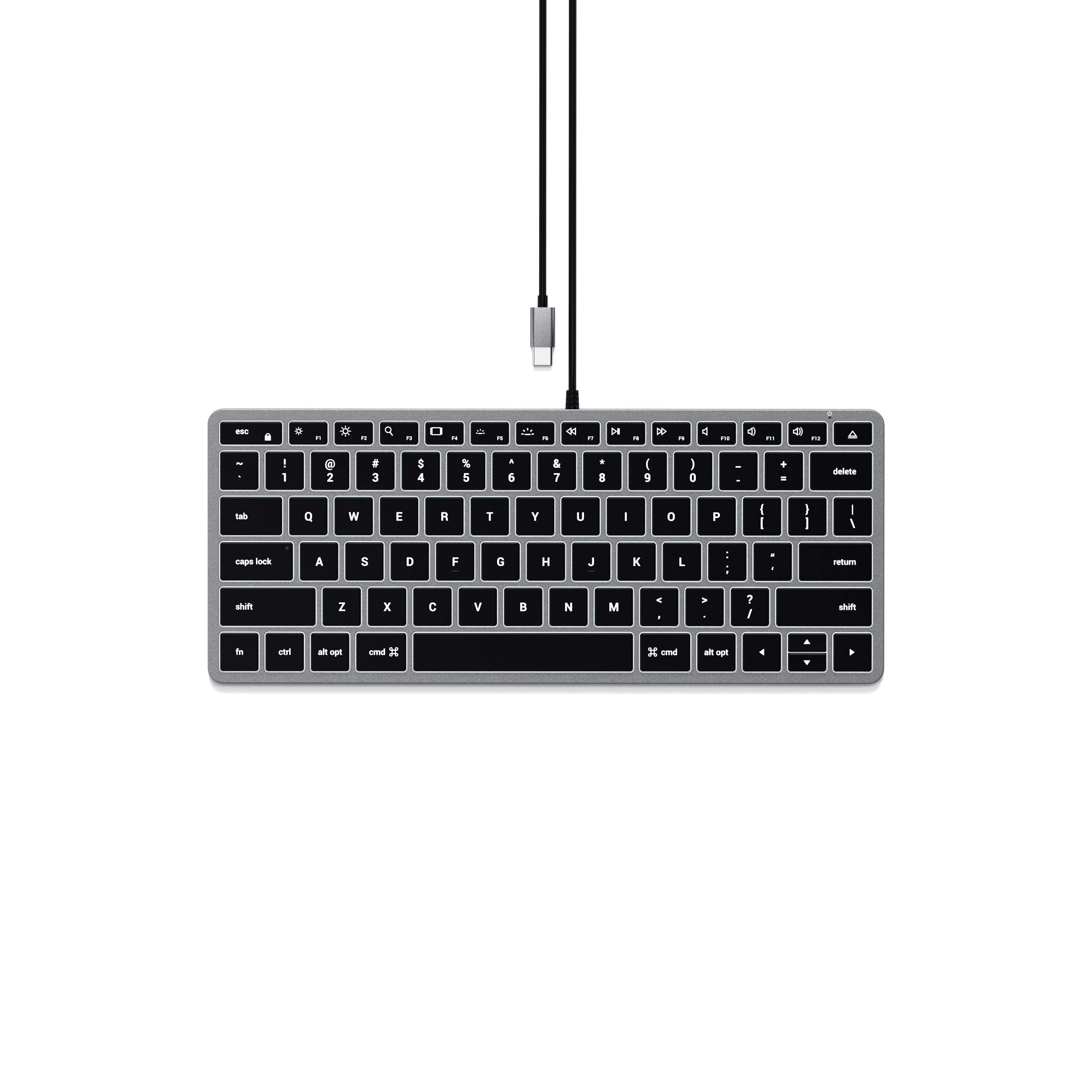

⌨️ Light up your productivity with style and precision!
The Satechi Slim W1 Wired Backlit Keyboard is a premium, compact keyboard designed specifically for Apple users and compatible devices. Featuring a USB-C plug-and-play connection, adjustable backlit keys, and a sleek aluminum build, it offers a quiet, tactile typing experience with MacOS-optimized function keys. Perfect for professionals seeking a stylish, reliable, and ergonomic typing solution backed by a 2-year warranty.


| ASIN | B08Q23G9QW |
| Antenna Location | Multimedia |
| Best Sellers Rank | #724 in Computer Keyboards |
| Brand | Satechi |
| Built-In Media | User Manual |
| Button Quantity | 78 |
| Color | Space Gray |
| Compatible Devices | MacBook Pro 14/16-inch (2025 M5/M4/M3/M2/M1), MacBook Air 13/15-inch (2025 M4/M3/M2/M1), iPad Pro 11/13-inch (2025 M5/M4/M2/M1), iPad Air 11/13-inch (2025 M3/M2/M1), iPad Mini (2024 A17/6th Gen), iPhone 17, iPhone Air, iPhone 17 Pro, iPhone 17 Pro Max, iPhone 16/15/14/13/12 Series, Mac Mini (2024 M4/M2/M1), iMac (2024 M4/M3/M1), Mac Studio (2025 M4/M3/M2/M1), Lenovo ThinkPad, Microsoft Surface, Google Pixelbook, Google Pixel Pro 8/9, Samsung S24/Z Flip 5 Compatible Devices MacBook Pro 14/16-inch (2025 M5/M4/M3/M2/M1), MacBook Air 13/15-inch (2025 M4/M3/M2/M1), iPad Pro 11/13-inch (2025 M5/M4/M2/M1), iPad Air 11/13-inch (2025 M3/M2/M1), iPad Mini (2024 A17/6th Gen), iPhone 17, iPhone Air, iPhone 17 Pro, iPhone 17 Pro Max, iPhone 16/15/14/13/12 Series, Mac Mini (2024 M4/M2/M1), iMac (2024 M4/M3/M1), Mac Studio (2025 M4/M3/M2/M1), Lenovo ThinkPad, Microsoft Surface, Google Pixelbook, Google Pixel Pro 8/9, Samsung S24/Z Flip 5 See more |
| Connectivity Technology | USB-C |
| Customer Reviews | 4.1 out of 5 stars 569 Reviews |
| Enclosure Material | Aluminum |
| External Testing Certification | 16364859011 |
| Global Trade Identification Number | 00879961009069 |
| Hand Orientation | Ambidextrous |
| Item Dimensions L x W x H | 11.18"L x 4.49"W x 0.43"H |
| Item Weight | 299 Grams |
| Keyboard Backlighting Color Support | Single Color |
| Keyboard Description | Wired |
| Keyboard Layout | QWERTY |
| Manufacturer | Satechi |
| Mechanical Keyboard Switch Model | Cherry MX Tactile |
| Model Name | Slim W1 Wired Backlit Keyboard |
| Model Number | ST-UCSW1M |
| Number of Keys | 78 |
| Number of Sections | 1 |
| Power Source | Corded Electric |
| Recommended Uses For Product | Multimedia |
| Series Number | 11 |
| Style Name | W1 |
| Switch Type | Tactile |
| Theme | Modern |
| UPC | 879961009069 |
| Warranty Description | 2 Years Manufacturer Warranty |
A**R
Great keyboard with a minor backlight issue
I put my laptops in vertical stands and was looking for a replacement keyboard. I have both a Mac and Windows PC. First I tried a mechanical keyboard, the the Keychron C2 with the blue switches and that was loud. It’s a really high-quality keyboard and I’d highly recommend it if you don’t mind the click-y noise of a mechanical keyboard. Then I tried the Cherry 6000 which was quieter but made a tinny noise when I typed. It was a good keyboard for typing and seemed to be well-made, but the noise was annoying. Maybe it was just defective, I don’t know. Finally I tried this one and I really like it. Its solid and has all a full keyset, but it’s a compact form factor, so it fits on my desk really well. It’s flat and heavy and I don’t mind the risers for a little angle. It’s very quiet and the key action is really good—it’s great for typing on. The only minor issue is the backlighting. The light is really bright under the top rows of keys and bleeds through under the key caps. It also flickers randomly when the computer is asleep, which is kind of weird. (This doesn’t happen if you keep the backlighting turned off, which I do, unless I really need it late at night.). The keys are very easy to see, even in low light. Bottom line: I’d definitely buy this keyboard again and would recommend unless the backlight is really important.
Z**C
Excellent alterative to Magic Keyboard.
Excellent keyboard. Feels very much like Apple's Magic Keyboard. I actually prefer typing on this keyboard more than Apple's keyboard, and I love that I don't have to worry about batteries or annoying Bluetooth notifications. Keyboard lighting also works great. My only complaint is that it doesn't have a dedicated Launchpad button, like Apple's keyboards. Unless this one thing is a big deal to you, save yourself 70%, and buy this keyboard.
R**T
Great but Satechi needs to make a couple of small adjustments
Overall very happy with the keyboard, but there are two points of pain that Satechi needs to address. Both have to do with the backlight. First, they need to lower the keys. With the light on, and the keyboard laying flat, the backlight is glaring under the function keys. One should not see the lights coming from under the keys. It does ruin the aesthetic and is annoying at times. The second item is the backlight timer. Satechi needs to make a small change in the firmware to either allow control over the backlight from the system (macOS) or have an 'always on' option mechanically. Nothing more annoying than to have your backlit keyboard go dark after just a few minutes. It's wired, so energy should not be a worry. Beyond those two things the feel is good, looks good, and so far I have had no issue with response or function in the myriad of things I do at the keyboard.
W**D
Compact, good key travel (touch) and backlight works well.
The "s" and "g" on may M1 MacBook Pro quite responding and before I could get it to Apple I spilled some liquid on it which met it wouldn't qualify for warranty. I tried the Macally full size USB keyboard I had for my Mac Mini but it was too cumbersome, the key travel is too long and it lacked backlighting. The SATECHI is compact and the key travel is very close to the same as the MacBook Pro and the backlighting works well. I purchase the SATECHI mouse at the same time. The mouse connector is quite a bit longer than the keyboard connector and doesn't fit as snuggly in the port. (see image) The mouse works OK but I prefer the feel and responsiveness of my Microsoft mini laser mouse. The cables for both the mouse and keyboard are pretty stiff which means they don't lay flat and look a messy on the desk.
V**R
Not fully compatible with PCs
I've got the model wide W3 w/numeric pad, grey color, backlight feature. The Pros: The touch and the material are great, the feel, the color, the font size and boldness on the keys are great. The Cons: This KB is not fully compatible with a PC, you cannot use it from right out of the box, you need to get a USB-C to USB interface, not a big deal but if you don't have it at hand, I have just one USB-C port in my PC but I'm using it for an external SSD drive, The Windows key is next to the space bar, on both sides, so if you're used to use the Alt key you're going to have to get used to that, or you can use the PowerToy tool from Windows to switch them but it doesn't work for all the commands (as Win+R for running commands, etc.) but it'll work for switching between windows and menus short-cuts. One of the problems I had also was that the Num keys from the right side didn't work (I almost return it because of that), they run like the cursor arrow keys, as when you have Numlock Off. I changed the regedit to have the NumLock On, it didn't work, and I did it also on the BIOS/UEFI screen but it didn't work either, but I call to Tech Support to see if they have a solution, otherwise I'd return it, (the people of Tech Sup attended me quite well), so they told me to go to On-Screen keyboard and enable it there, and it worked!, it is a good product, great if you have a Mac but for a PC you'd better think it twice, because it is not cheap. Other thing is that the light underneath the key glares higher than the keys, so if you used to work in a dark room could be a down side, you have to have the keyboard at an angle about 90-110 degrees from your face so the glare does not affects you. For me the solution is simple, to make a PC layout keyboard
C**.
Excellent Apple Keyboard
This is the keyboard Apple should make. Great backlit keyboard with chiclet keys.
T**E
left shift key no longer works
this keyboard has a nice feel and the backlighting is nice. the only problem is that this keyboard doesn't last very long. i understand that the warranty is 2 years but for the price i would have hoped that it would have lasted longer. after almost exactly 3 years of light use, the left shift key no longer works as evidenced by the lack of capitalization in this review. i don't think i'll be purchasing this again.
A**B
Great product!
I am so thankful that I found this keyboard! I looked through so many different options both on and off Amazon, and I’m very happy I went with this one. I recently purchased a MacBook Air M2, and although the keyboard works perfectly, I have long, fake nails and needed a keyboard with a little “deeper” keys (hopefully that makes some sense). It connected seamlessly to my MacBook when I plugged it in, and I can type so much easier on it with my nails. It’s not the most ergonomic keyboard, it’s just flat, but nothing a padded mousepad can’t fix. It’s very sturdy and solid material. I love that it has 10-key ability too. I guess I didn’t pay close enough attention to the attachment cable, and I thought I’d have to purchase an adapter for it to plug in to my laptop, but thankfully, that wasn’t the case! Highly, highly recommend.
TrustPilot
5天前
1天前