We remain fully operational. Our teams are working around the clock to ensure your deliveries continue safely.

下载应用程序




🎶 Upgrade your audio game — because your ears deserve the VIP treatment.
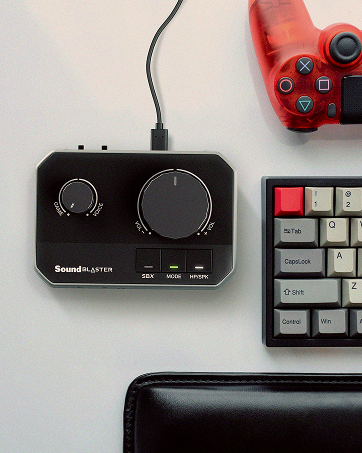
The Creative Sound Blaster Play 4 is a compact, USB-powered external DAC and amplifier delivering high-resolution 24Bit/192kHz audio. It features dedicated EQ modes, a mic mute button, and SmartComms noise cancellation for superior sound and communication on Windows 10+ devices, consoles, and more. Lightweight and driver-free, it instantly upgrades headphone and speaker audio quality, making it an essential accessory for professionals and audiophiles seeking premium sound on the go.

| ASIN | B08T9LM3LM |
| Are Batteries Included | No |
| Brand | CREATIVE |
| Colour | With Auto Mute and Two-way Noise Cancellation |
| Customer Reviews | 4.2 4.2 out of 5 stars (1,077) |
| Date First Available | 8 Jan. 2021 |
| Guaranteed software updates until | unknown |
| Hardware Platform | USB |
| Item Weight | 45 g |
| Item model number | 70SB186000000 |
| Manufacturer | Creative Labs |
| Operating System | windows 10 |
| Product Dimensions | 13.79 x 1.6 x 0.79 cm; 45 g |
| Series | Sound Blaster Play! 4 |
N**R
This little miracle will transform the sound from your computer.
Every computer must have a Digital Analogue Coverter (DAC) to convert digital audio signals into waveforms you can hear. Also, the tiny signal must be amplified. A sound card or equivalant chips will be fitted by the manufacturer to do this but are typically poor quality, a neglected component set. This little miracle from Creative plugs into USB and will transform the sound from your computer. Speakers or headphones then connect to the Play4 using your 3.5 mini jack. The whole thing is barely bigger than a USB flash drive. If you have never considered trying to improve your computer's sound, you will be amazed at the difference. It is worth reading the FAQ on the Creative website, the instructions on the product page of Amazon and some of the tips in other reviews here to make sure you understand the available settings. But the overall process is straight forward, there are only 2 buttons. It is also well worth downloading the free software which will provide additional enhancements. If your machine came with standard Realtek processing, this Play4 will knock spots off it. For the price this little device from Creative is an astonishing bargain and represents a quick and easy means of dramatically improving the sound from a computer, especially from a lap top in which the installed components are most likely to be poor quality to start with.
S**J
Excellent low price external DAC that enables higher volume levels than default from the PS4 & PS5.
After trying a few external DACs for the PS5 to get stereo analog, all suffered from the USB sound output from the PS5 being capped at 50% volume or lower. Thankfully the Sound blaster Play 4 (with the latest firmware 2.2.0.0 installed from their creative App on PC) allows for the volume level to be increased using the button on the unit. As a result analog output seems to match the volume level of taking a pure digital audio out from the console (such as from the PS4 optical out). The Play 4 also retains the higher volume settings when powered off and on again. The unit needs to be put into mode 1 for consoles, but it also has a mode 2 for PC (which it defaults to out of the box) with the higher fidelity option up to 24 bit/192 kHz if needed. I've only connected it to my loudspeakers, so can't say how it performs with headphones, but so far no issues found and sound quality seems excellent. (Also thank you to an earlier reviewer for mentioning the compatibility and improved volume option with the PS4/PS5). Also tested on the Nintendo Switch and the Sound Blaster Play 4 works fine.
H**R
It improves the sound quality of standard laptops etc.
It works fine.
P**Y
Good sound but you can't customise it on the creative app on your phone.
Build is quite sturdy. It appears to improve the sound of my music on my pixel phone- adding a bass boost or overall improvement in the music. Sadly it won't link with the creative software on my pixel phone which is annoying so I can't make any specific modifications to the sound. It will link to the app on my computer though with the usb adapter, and it will probably work better through my laptop. I seem to get better quality sound with it by using the Hiby music player you can download from the Google play store. Hoping that a new updated version of the creative app will recognise it and I will be able to customise the sound to a degree.
P**S
Works well even with corporate controlled laptop
Worked out of the box even in a corporate controlled environment. Allows me to connect a corporate laptop into my computing sound system with no hassle and no annoying ground loops that cause irritating audio effects.
R**J
Clean audio, no noise
On my IEMs, this Sound Blaster Play!4 delivers clean audio with no hisses, no crackling, no noise or popping. Bass is tighter and more punchy. Vocals are clear and full of depth. And most importantly, volume is consistent without stuff being too loud or too quiet. Bear in mind the dongle has 2 USB modes. USB Mode 1 intended for simpler devices but limited to 96KHz. And USB Mode 2 (default) intended for PC/Mac with 192KHz support. If your device isn't being recognised, you'll need to switch between modes. Just hold the EQ button for 3 secs and the LED will flash 5x to indicate it's changed modes. It flashes blue for Mode 1 and white for Mode 2. Personally, I found that I had to use Mode 2 for my PC to recognise it. Strange because my smartphone works with both modes. It must be a Windows thing :/ Also, make sure to download the Creative app for Windows from their website. This will let you update the firmware + drivers. Another reviewer mentioned the "hardware volume control" tip with the new firmware. It's basically maxing out the hardware volume on both modes when plugged into a smartphone (not PC because Windows hijacks volume control). This will boost the power output and save it onto the device memory for better sound quality. Hope this helps!
M**D
Decent usb sound card
Bought as built-in sound card in laptop started failing. This just worked, so plug and play. Not much else to say.
K**R
Cutting Out
The sound quality is very good but my headphones keep cutting out - disconnecting. Apparenlty this is a known problem and has not yet been fixed. I cannot return the item as I destroyed the packaging!
A**O
Lo compré para tener mejor sonido en el ordenador del trabajo, cuya tarjeta de sonido integrada es muy pobre. La diferencia se nota desde el primer momento: el sonido es mucho más detallado, con menos ruido de fondo y mayor volumen en unos auriculares de 32 ohmios (unos Samson SR850). Donde de verdad se nota una gran mejora es en la entrada de micrófono, que se escucha mucho más alto y con menos ruido de fondo que con la tarjeta integrada. Además trae funciones para reducir el ruido de fondo, tanto el que entra por el micrófono como el que se recibe por los auriculares, aunque esta opción reduce algo la calidad del sonido y, a menos que estés en un entorno ruidoso, no creo necesario utilizarla. También se nota la diferencia al conectarlo a unos altavoces y, aunque no soy partidario de utilizar efectos, la función Crystalizer mejora mucho el sonido en este caso. Respecto a la función DAC para teléfono móvil, he probado a conectarlos a un Xiaomi Mi A3 y no he notado demasiada diferencia en la calidad de sonido respecto a la salida normal de auriculares. Además, el volumen es más bajo que al utilizarlo en PC, no se si esta limitación es a causa de Android o del voltaje del USB del móvil, por lo que si queremos utilizarlo como amplificador, creo que es mejor buscar otra alternativa. Por el precio que tiene, es una estupenda tarjeta para escuchar música con calidad y tener un buen sonido en las videoconferencias.
S**H
Tut was es soll (hatte Probleme mit Sound an Mainboard - kein Sound unter Win 11(Treiber-Problemm)) Diese an USB A angeschlossen (USB C auf USB A Adapter war dabei) und es funktioniert nach dem PC-neustart sofort und ohne Probleme. (musste nichts installieren). Preis-Leistung - Top!
E**H
Very good DAC dongle, pairs great with HD599 on a Iphone(will not handle well HD600’s series). The bass boost is well balance. Works straight from the box, there is a firmware update available for some features.
N**E
I got this to see if i can get more out of my Logitech z313 system off my desktop,as i felt the onboard audio from my asus z590 prime a wasnt the best,mahor difference in bass, clarity,easy to install the software and use. I did uninstall the Realtek audio and dtsx drivers, restarted the system, installed the creative sound app and drivers, updated the firmware and restarted the system again,i could not feel the subwoofer or any bass before but now i can, footsteps are alot clearer in games like fallout series,cs2, cyberpunk, games like nfs even had better clarify. watching YouTube or playing music even sounded better then my sony headphones. I also did change the frequency in yhe app to the 24bit 192khz frequency, adjusted the mixer to my liking which the app is very easy to use. Highly recommend for anyone wanting better audio
N**I
Excellent device, the sound is beautifull with the bass + cristal settings. I use it on a USB C port. Got a firmware update. Much much better than the Realtek mother board chip together with the headset Philips Fidelio X3/00 Hi-Res Audio X3 . Recommended!
TrustPilot
1 个月前
1天前