We remain fully operational. Our teams are working around the clock to ensure your deliveries continue safely.

下载应用程序




Buy anything from 5,000+ international stores. One checkout price. No surprise fees. Join 2M+ shoppers on Desertcart.
Desertcart purchases this item on your behalf and handles shipping, customs, and support to Taiwan.
📞 Elevate your calls—where vintage charm meets modern convenience!
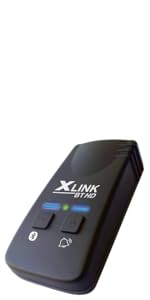
The XLink BT2 is a sleek Bluetooth adapter that connects up to two cell phones to traditional home telephones, delivering enhanced audio quality with echo compression. Compatible with both Android and iPhone, it automatically pairs within Bluetooth range, enabling seamless calls on vintage or cordless phones. Ideal for professionals blending classic style with modern communication needs.



| ASIN | B08RXF16XD |
| Best Sellers Rank | #52,699 in Office Products ( See Top 100 in Office Products ) #20 in VoIP Telephone Adapters #55 in Bluetooth Network Adapters |
| Brand | XLINK |
| Color | Black |
| Compatible Devices | Cell Phones, Home Telephones |
| Conference Call Capability | Single Line |
| Customer Reviews | 4.4 4.4 out of 5 stars (430) |
| Dialer Type | Single Keypad |
| Enclosure Material | Plastic Metal |
| Is there Caller ID | Yes |
| Item Dimensions | 2.25 x 1.25 x 4.25 inches |
| Item Weight | 0.19 Kilograms |
| Manufacturer | Xtreme Technologies |
| Multiline Operation | Single-Line Operation |
| Power Source | Corded Electric |
| Telephone Type | Corded / Cordless |
| UPC | 627987194975 |
| Warranty Description | 1 Year Manufacturer LImited Warranty |
T**M
Just what I wanted
Fast delivery. Simple instructions. Product easy to activate and use. I had a question about my iPhone features and XLink support went above and beyound to help. Product functions as advertised.
N**K
Works with vintage 70s and 80s phones
Amazing device - works with several of my vintage telephones. My western electric model 500 works perfectly along with my 1987 cordless telephone. Supports caller ID as well. Because this works with both Android and iPhone, I am able to take teams and zoom calls with this. The reaction to colleagues hearing me on either vintage phone is priceless.
F**T
This Xlink BT2 is a well designed and implemented device. Highly Recommended.
If you’re like me and want to put those old home phones back to good use, or are an old phone collector who wants to more than just display your old home phone collection by using them too, this is the device to get. I especially like the ability of this Xlink BT2 model because it can connect simultaneously to 2 separate cell phones for incoming and outgoing calls to ring and talk on multiple older style home phones simultaneously. I have my Xlink BT2 connected to an RJ11 jack splitter device adapter (1 incoming RJ11 phone jack combined into 2 outgoing RJ11 phone jacks) adapter to connect both an old 1960’s rotary pulse-type dialing Western Electric model 500 desk phone, and a 1990’s cordless touch-tone type dialing phone base and handset. Yes, this device supports dialing out from both touch tone and rotary pulse type old home phone types simultaneously. So when a call comes in to either mine or my wife’s cell phone, we can pick up the calls from any of the nearby old home phones. When we come home with our cell phones after being away, we just place them at their cell phone chargers within 10 feet or so of this Xlink BT2, and when home just take or make all of our calls on the old home phones. The automatic Bluetooth connection and disconnection from our cell phones to this Xlink BT2 when we leave or return home works great. Useful tips for new buyers: 1. Place (and leave) your Bluetooth connected cell phone within 10 feet of Xlink BT2 when at home for best connectivity and voice call quality on your old home phones. 2. Don’t use the cell phone for answering or making calls when at home while Bluetooth connected to the Xlink BT2. I know that can be a difficult change, but because the Xlink is Bluetooth connected to your cell phone, it’s purpose is to “hijack” your cell phone when your cell phone and the Xlink BT2 are Bluetooth connected. I have experienced loss of 1 or 2 way audio on iPhones when taking or making calls on my cell phone while Bluetooth connected to the Xlink BT2. This happens because using the cell phone while Bluetooth connected to the Xlink BT2 and moving around both into, and out of, the Bluetooth range of the Xlink BT2 causes automatic Bluetooth disconnection and reconnection between your cell phone and the Xlink BT2. This will cause audio issues if you’re directly using your cell phone while Bluetooth connected to the Xlink BT2. So If you must make or answer calls on your cell phone while at home, then it is best to manually disable your Bluetooth service on your cell phone to then be disconnected from the Xlink BT2. Unfortunately, that defeats the whole purpose of this Xlink BT2.
A**N
Amazing!
I wanted a rotary phone for nostalgia, but I don't have a landline. I found this item and decided to give it a try. It installs easily and works well. You can connect two mobile phones to it via Bluetooth. When my mobile phone is called, it rings with the classic ring. When my spouse's phone is called, it gives a slightly, yet discernibly different ring. It's interesting that I am able to dial out using the rotary phone. Sometimes I have to reboot the device, or reconnect to it, but that is not often. When I cannot connect to it, I receive pop-up on my phone that says "Cannot connect to XLink Gateway". That's when I either reconnect to it via Bluetooth or reboot the device. I liked it so much, I bought another.
T**Z
The easiest way to use a real, old-fashioned phone, without a lot of technical hassle
About a year ago, I decided I was sick of cell phones and wanted to be able to talk on a "real, old-fashioned" phone. At first I bought a MagicJack and plugged it into my computer, which worked fine with an 2002 SW Bell phone I bought on Ebay. However, when I decided to switch to a 1978 Princess phone (not the one in the picture, which I have since traded for the yellow, 2003 Crosley Princes repro), I found that the phone emitted a high-pitched whine when hooked up to the MagicJack. Since I had really fallen in love with the idea of a Princess phone, I began to search for a MagicJack alternative. After considering a variety of options, I decided that since, for practical reasons, I can't really ditch my cell phone entirely, this XLink BT2 might fit the bill. And it does! So easy to set up: just plug in the XLink to a power supply, plug the phone into the XLink, and push one of the buttons to pair it (via Bluetooth) with my mobile phone. In fact, it is paired with two different phones. It worked great with my original Princess phone and now works great with my Crosley Princess reproduction. When my cell phone and I are out and about, (out of Bluetooth range) my "real" phone doesn't ring, so it's not a bother to others in the house. Sound is very good, and I can use it to answer any calls that come in on my cell phone, including those that ring my MagicJack android app and my Google Voice app -- so it's like having an entire switchboard attached to my little Princess. I wish I'd done this a year ago.
J**N
This works as it says and easy connection
I had a land line at my house with many home phones through out the house. It was getting expensive. I was able to convert the landline number to a cell phone line that cost me nothing to have. But I wanted to be able to use all my house phones being they were already here. Bought this device and plugged my multiple phone lines into this device and within seconds all my house phones were usable again. I’m not one that writes reviews but this was so easy and works well I had to say something. If you are thinking about buying this stop thinking about it and buy it. It’s a good investment.
K**K
So easy to install and works perfectly!! I had been wanting to use my old rotary phone for years and could not imagine paying for a landline…then I stumbled on this and was hopeful but still a bit wary until it arrived. It took a minute to set up and to my very pleasant surprise worked exactly as advertised!! I can receive calls on the old phone (oh that classic ring!!!) and also make calls with it! Yes! The rotary dial makes the phone call. I was so excited and now I just have to convince more people to call vs text :)
K**A
Worked great. Hooked it up to a rotary phone and had the teenagers to make a phone call.
L**U
Good product, very effective, just be careful or rather make sure to keep the adapter close to your smartphone so that the signal remains strong.
C**8
Mes anciens téléphones fonctionnent comme quand ils étaient sur ligne fixe. Configuration BT ultra simple. Plug and play!
S**6
This works exactly as it should. I'm in nostalgia heaven! Using my old northern telecom phone! It's great because I get to use it and don't need to give people another phone number to call me on! Love this so much!🎉🎉🎉🎉
TrustPilot
3 周前
1天前