We remain fully operational. Our teams are working around the clock to ensure your deliveries continue safely.

下载应用程序


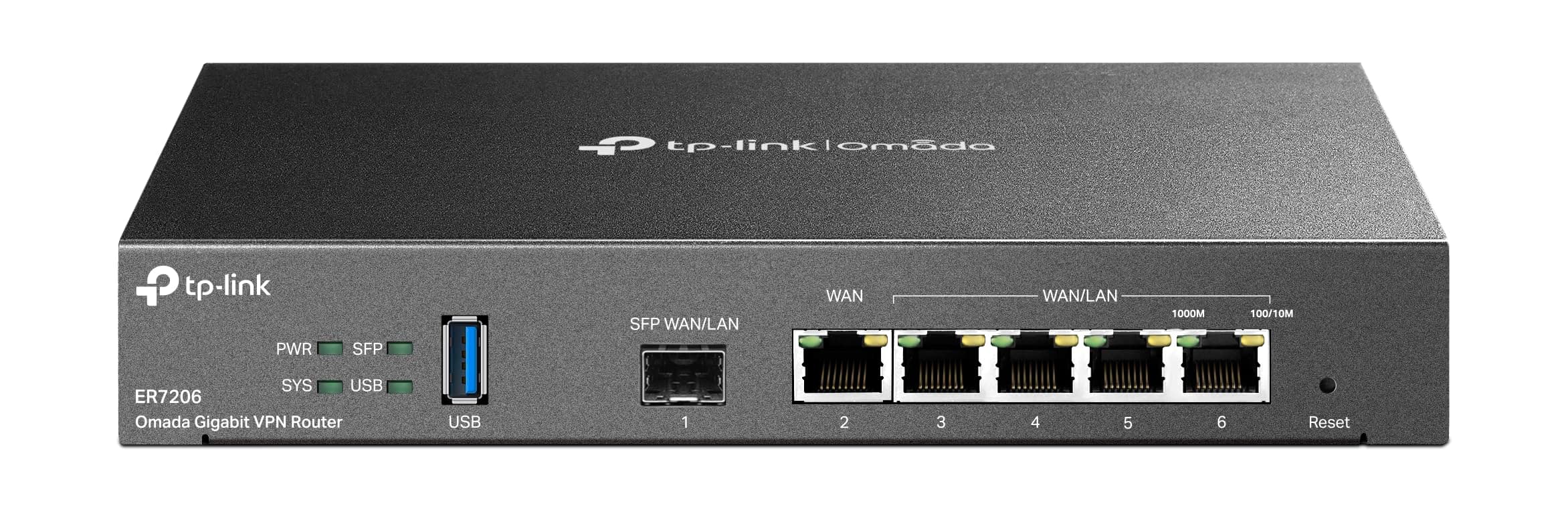

🚀 Elevate your network game with pro-level speed, security, and control!
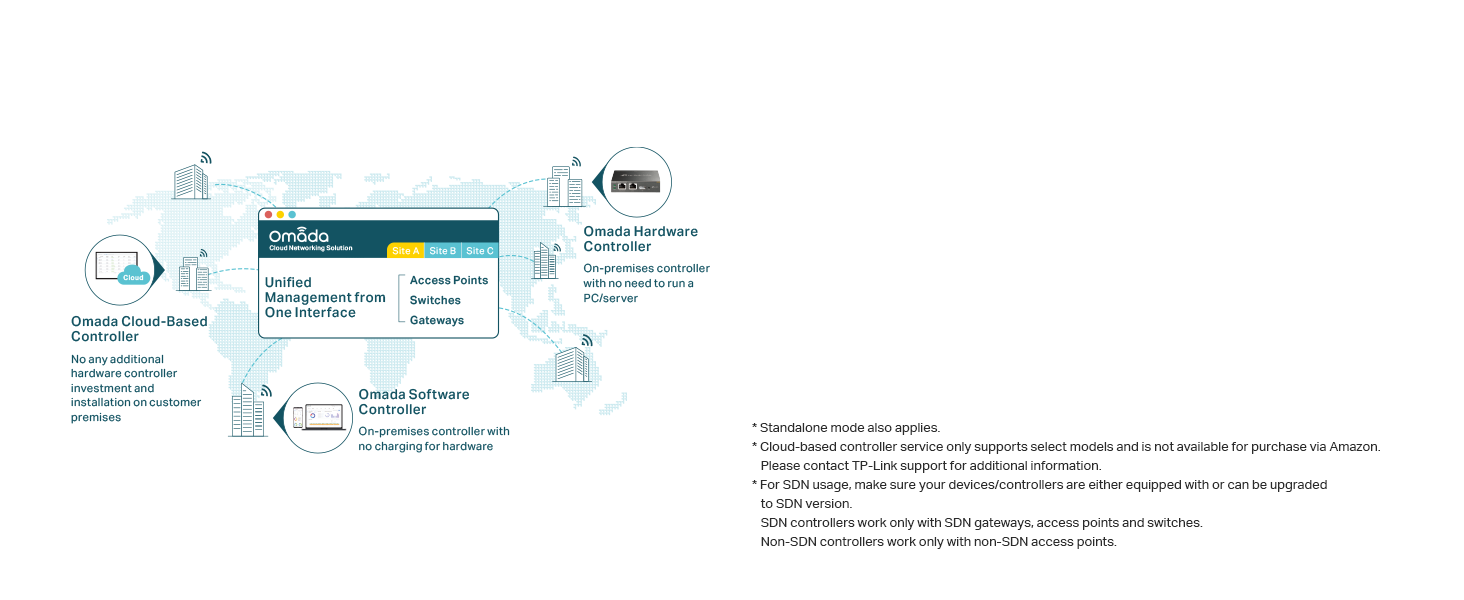
The TP-Link ER7206 is a professional-grade multi-WAN gigabit VPN router designed for high-capacity networks. Featuring 4 flexible WAN/LAN ports, it supports up to 150,000 client devices and 700 concurrent clients. Integrated with Omada SDN, it offers centralized cloud management and advanced security features including a robust firewall and support for over 250 VPN connections. Ideal for managers and IT pros seeking scalable, secure, and seamless network performance.




| ASIN | B08TQN7NMG |
| Best Sellers Rank | #4,018 in Electronics ( See Top 100 in Electronics ) #34 in Computer Routers |
| Customer Reviews | 4.5 4.5 out of 5 stars (906) |
| Date First Available | January 23, 2021 |
| Item Weight | 2.01 pounds |
| Item model number | ER7206 |
| Manufacturer | TP-Link |
| National Stock Number | 0 |
| Product Dimensions | 8.9 x 5.17 x 1.38 inches |
D**N
Dual WAN Setup in Rural Area: Starlink + T-Mobile with ER707-M2
I live in a rural area and recently added Starlink alongside T-Mobile Home Internet. To make the most of both connections, I picked up a Dual WAN router—the ER707-M2—to combine the two ISPs and load balance traffic while I test and decide which one to stick with. The price was excellent, and so far, the router has been performing flawlessly. Setup can be as simple as plug-and-play, but if you dive into advanced features like Policy Routing and group configurations, it might be a bit complex for some users. That said, if you’re a Hulu user, brace yourself—streaming can be finicky without proper routing. Thankfully, Policy Routing can help smooth out those issues and save you a lot of frustration. Updating firmware was easy and I appreciate the auto backup option of settings to an external USB drive. Only frustration is being an Amazon Prime member and here of late, deliveries that say 2 days turns in to a week. This is happening more and more on my end.
J**S
Great product and excellent tech support
I purchased this product, hardware version 1.6, more than 2 years ago, and it has been performing perfectly since then without any issues. The product has a good look of design as usual in a rectangular shape that is constructed proportionally so-called Golden Ratio - visually appealing. It supplies a web platform for administrators to manage networks via a very clean visual design of the user interface as well - actionable items or tasks are categorized and arranged very clearly for the administrators quickly locating the tasks to perform such as monitoring the runtime issues or solve specific problems in configurations. I use this product constructing my home network that is pre-wired in Cat. 6 Ethernet in every room, and VLAN segmenting Wi-Fi network from the wired network, my home office, children, and guest accesses. Technically, my review only pertains to the features of WAN/LAN, not VPN yet. This product provides what I need and performs well as expected without any issues. I haven't had chances to try out the other features such as VPN as mentioned before, including Omada SDN Integrated Load Balancer but the load balancing in software configuration will be my next plan to implement. I am definitely confident in its functionality. Also, the manufacture's tech support is very responsive in communications and the solution provided to solve the issue of the firmware update is efficient and quick. Overall, great product and the customer services, two-thumbs up!
M**R
Working non-stop for 18 months.
Bought mine on June 2024. Year and a half later no problems at all. The room is air conditioned and the router is supplied by an UPS. Working non stop. Excellent piece of equipment.
K**N
Outstanding Value for a well designed Wired (not WiFi) VPN Router
This offers much better VPN speeds (throughput) than the TP-LInk TL-ER605 so if someone is considering buying that model, they should consider this instead for a few dollars more it is much faster with more memory and processing power. Although considered a business product it is well suited for the home. I see many "VPN routers" advertised which actually only support VPN connectivity for connecting into the network where the router resides ONLY as a VPN SERVER - for people to connect to it from the outside through a VPN tunnel - NOT for their router to connect as CLIENT to a VPN tunnel where the other end is a VPN server (for example connecting to an office remotely FROM this router, or connecting directly to an external VPN server for internet access through a VPN service provider). This router does both. For people using a VPN provider for security this is a good option especially as it is smarter to split the WiFi and VPN processing work across two devices so as to minimize the processing load on any one piece of networking equipment. However, at this time, it does not yet support acting as VPN CLIENT to connect to a VPN provider or external VPN server using the OpenVPN standard (that is coming shortly through a firmware update as this is a new product). Note, although the support staff is very responsive in a timely manner, they sometimes do not correctly answer complicated technical questions - for example saying something cannot be done when I have found a way to make it work. Until a recent firmware update which was available a few days ago, this unit would run very hot although it does not anymore after the update. Also this router does not support WOL (Wake On Lan) but for what can be considered a business class Wired VPN Router, that is typically not a requirement. The interface takes a little getting used to, although it does work quite well. This is a quality product, they only reason why I did not give it 5 stars is because of the tech support item mentioned earlier. However, if you have this router you should strongly consider getting the TP-Link Controller (model OC200 (home) or the newer OC300 (business)) - please see my review for the OC300 which I also own.
M**R
Super fast easy to install/setup.
Works very well, was relatively easy to set up. I'm using Wireguard and I'm getting 500u/d on gigabit fiber.
L**S
Bien.
Excelente.
S**A
balanceador de carga entre 2 ou mais links de Internet e pode utilizar 2 ou mais como redundância. links até 2.5 Gbps
A**R
If you’re looking to upgrade your home or small office network to a more robust customizable network the Tp-Link ER707 m2 paired with the Omada controller, access points and switches is the way to go. Right out of the box swapping it in for my old ER605 V1 gateway was straightforward and the multi-gig 2.5 Gbps ports give your network the future proofing it needs to survive the ever-changing landscape on networking. Paired with the Omada controller, the whole ecosystem really shines as the centralized dashboard, remote access, and monitoring tools that gives you visibility into devices, traffic, and usage without drowning you in complexity. One of the standout features for me is the VPN flexibility. The ER707-M2 supports IPSec, OpenVPN, L2TP, PPTP, and, best of all, WireGuard, which has quickly become my go-to for secure and efficient client to server connections. Add in VLANs, ACLs, and advanced monitoring, and you have all the tools to build a robust, segmented, and flexible home network to isolate IoT devices, hosting a media server, or just keeping the kids’ devices in check. There is also the USB port that allows you to plug in a cellular/LTE USB modem that gives you a backup internet connection if your main WAN goes down or just use it use it for USB storage or file sharing. Overall, the ER707-M2 is a versatile well-rounded gateway that is flexible, fast, and packed with advanced security and traffic control, enterprise grade tools, all at a price that doesn’t require raiding the retirement fund. If you want an upgrade that still suits the home network needs that powerful yet approachable, with WireGuard VPN, VLAN control, with Omada’s centralized management to tie it all together, this router is hard to beat.
P**N
Good unit. I have managed to set up a VPN after trial an error. There is not enough tutorial and support information to configure the system. Poor menu system. Really should be USB power supply by now.
J**N
Had a issue with bell new giga hub. It has a software glitch. Tech's at bell know this and are waiting for a update. I had tried to use the ethernet 10gig jack. Bypassing the router. Using it as a modem. Had to call bell to down grade to bell hub 3000. Once it arrived bell tech showed up next day with the sfp adapter. Used the bell hub for one day making sure no dropping of internet. Once all was good I installed the sfp into the er8411 router. Had to update firmware and the speed jumped to above 1.5 gbe. Hit 1800 download and 1100 upload. Wow. It has sfp+ input and multi wan configurable inputs. I can use the tc4000 dual link wan connection. Trying to get my cable provider to allow this. This router is fantastic. Only wish it had a qsfp output. A 40 gbe lan. You can use the multi wan as a 4 link aggregation to a tp link switch and really move data from point to point. The unit also has usb 3.0 for printer or better yet a USB lte stick. Wish tplink has a USB lte 5g coming soon. If you want me to test one i am happy too try.
V**A
very bad experience i had with tp-link omada and er7206 vpn router...totally waste of money. i would like to send it back to the supplier but i dont know i could get refund or no? can the supplier let us know about the refund.
TrustPilot
1天前
2 个月前