We remain fully operational. Our teams are working around the clock to ensure your deliveries continue safely.

下载应用程序



🚀 Scan Fast, Scan Smart, Scan Anywhere!
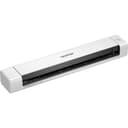
The Brother DS-640 is a lightweight, ultra-compact portable document scanner designed for professionals on the move. With USB 3.0 power, it delivers high-quality scans at 15 pages per minute, handling A4 documents, receipts, and ID cards effortlessly. Its included advanced software streamlines document management, making it an essential tool for efficient, paperless workflows in tight spaces or remote environments.
| ASIN | B083ML7X9B |
| Best Sellers Rank | #24,799 in Computers ( See Top 100 in Computers ) #33 in Document Scanners |
| Brand | Brother |
| Built-In Media | 1 piece |
| Color Depth | 48 |
| Connection Type | USB |
| Customer Reviews | 4.5 4.5 out of 5 stars (1,885) |
| EU Spare Part Availability Duration | 2 Years |
| Global Trade Identification Number | 04977766800495 |
| Greyscale Depth | 8 bits |
| Item Dimensions D x W x H | 5.1D x 30.1W x 3.7H centimeters |
| Item Type Name | Portable Document Scanner |
| Item Weight | 390 Grams |
| Manufacturer | Dell |
| Media Type | Business Card, ID Card, Paper, Photo, Receipt |
| Minimum System Requirements | Windows, macOS |
| Model Name | DS-640 |
| Optical Sensor Technology | CIS |
| Paper Size | A4 |
| Resolution | 1200 |
| Scanner Type | Document |
| Standard Sheet Capacity | 1 |
| Unit Count | 1 Count |
| Warranty Description | 1 Year Manufacturer |
| Wattage | 2.3 watts |
Y**D
Good
Excellent
P**O
Sorprendente , muy rápido, sencillo y no ocupa espacio Más complicado descargar los drivers, pero es difícil !!!
N**H
سعر مناسب وشركة عريقة و عمليه
S**7
einfach in der Einrichtung Scannt geht super und in guter qualität
E**O
Mto bom .
C**H
I confess to being sceptical, having read a few reviews of this, but overall I've been impressed. The unit is highly portable. As another reviewer mentioned, there's no case (not even a cloth one) to protect it, which might be a detractor given its intended portability. I bought this as a cheap scanner to digitise a number of reports more quickly than using my existing (old) flatbed. Windows 11 recognised the device immediately, but I downloaded the software bundle from the Brother website in order to use the main scanning utility and update the firmware, the latter of which was quick and simple. I didn't install either the PaperPort software or Kofax Power PDF standard, the latter of which is only a free trial. Changing the scanning settings is really easy in the iPrint&Scan software, and creating a single document from multiple pages is straightforward having ticked the Continuous Scan option in the settings under Feed Control. Using this, it's a simple case of pushing the next page into the scanner after the last and the unit automatically pulls it in. Once you're done, hit Finish and the PDF save options appear. I scanned a 50 page (single sided) report, generating a single searchable PDF, in about 5 minutes. This is much quicker than the hour or so I'd anticipate it would take to do the same on my flatbed scanner. The quality of the document at 300x300 dpi was good; plenty sufficient for a document. Invariably a flatbed scanner (and one more modern than mine) would produce higher resolution images, which is possibly an advantage for scanning photos, but for quick and decent scans of documents and images this is perfect. I only have two "niggles" with this product: a) the paper guide slider moves very easily, which can make the paper feed in slightly crooked, although the de-skew function is good here, and with a little practice it didn't prove and issue. I used a small piece of blu tack just to hold it in place, which worked fine. b) the PDF creation software doesn't have a great compression algorithm. The 50 page PDF I created was 20mb. I ran it through ABBYY PDF editor and even on high quality it shrunk it down to around 4mb. Overall, I would recommend this product if you want a decent portable scanner that'll make digitising documents quick and easy. If you want high resolution scans of photos, you're going to want a flatbed.
TrustPilot
1天前
1 个月前