We remain fully operational. Our teams are working around the clock to ensure your deliveries continue safely.

下载应用程序


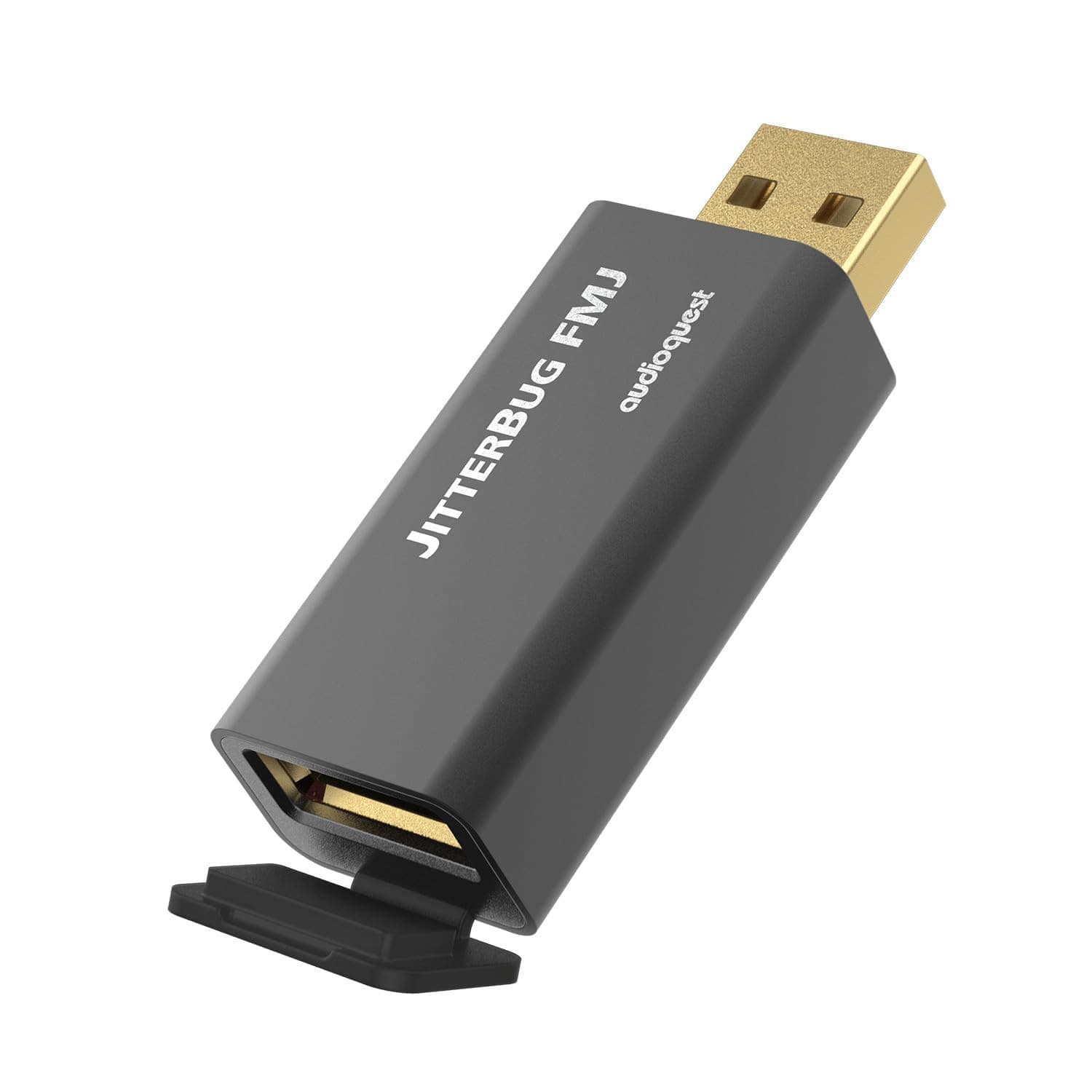
🎧 Elevate your sound—ditch jitter, embrace clarity, and join the audiophile elite!
The AudioQuest JitterBug FMJ is a USB noise filter designed to reduce radio frequency interference and jitter in digital audio signals. Featuring dual noise dissipation circuits and a full metal jacket for shielding, it meets USB 2.0 standards with 480 Mbps data transfer. This compact device enhances audio clarity, stereo separation, and soundstage by delivering a cleaner, more realistic listening experience for personal computers and compatible USB audio setups.


| ASIN | B08YDFH63B |
| Best Sellers Rank | #5,386 in USB Cables |
| Brand | AudioQuest |
| Brand Name | AudioQuest |
| Cable Type | USB |
| Color | Black red |
| Compatible Devices | Personal Computer |
| Compatible Phone Models | Probably compatible with smartphones, specific models not listed |
| Connectivity Technology | USB |
| Connector Gender | Male |
| Connector Type | USB Type A |
| Customer Package Type | Standard Packaging |
| Customer Reviews | 4.2 out of 5 stars 369 Reviews |
| Data Transfer Rate | 480 Megabits Per Second |
| Included Components | jitterbug |
| Indoor Outdoor Usage | Indoor |
| Item Shape | Round |
| Item Type Name | consumer electronics |
| Manufacturer | AudioQuest |
| Maximum Voltage | 5 Volts (DC) |
| Model | JITTERBUGFMJ |
| Model Name | JitterBug FMJ |
| Number of Items | 1 |
| Number of Pins | 4 |
| Other Special Features of the Product | Data Transfer |
| Outer Material | Metal |
| Recommended Uses For Product | Personal Computer |
| Special Feature | Data Transfer |
| Specification Met | USB-IF |
| UPC | 092592016125 |
| Unit Count | 1.0 Count |
M**Y
Improves Sound Quality Substantially
I am 60 years old and have been an audiophile for 50. Always trying to improve the sound quality of my audio system. Although I never went crazy and purchased audio equipment in the 10K+ range, I have heard many hours of what expensive audio sounds like. I have found most of it out there is snake oil, but every once in a decade or so, you find a diamond worth it’s value. The JitterBug FMJ is a diamond, not snake oil. It really works. I’d actually pay 10x its value for what it does. It improved the sound of my digital music 25%-50%, along with an AudioQuest (Cinnamon) USB cable, a computer/music server, a DAC with a Saber chip and a Vac-Tube Amp. I have yet to compare headphone sound quality. Everything musical has: more stereo separation, clarity and imaging detail along all frequencies more realistic and open sounding (out of the speaker box sound) a little more soundstage (surrounding sound outside the speaker edges) most all Music Genres sounds more balanced and open Musical Instruments will have: more analog sounding realism, while still retaining its digital sharpness less digital jitter and muddiness (its most noticeable feature) string vibration- can be heard more (guitar, piano) percussion- is clearer and stands out more voices- have more authentic raspiness and realism Synthesized Waveforms- you will hear more- wobble during smooth wavy sequences graininess during distorted sequences You will also get Black as Pitch quite parts, with zero background noise. Your music collection will sound noticeably different…better.
B**R
It definitely works, however...
It's not snake oil. It works. I think some of the negative reviews are reacting to the fact that the Jitterbug seems to reduce the overall signal by a couple db. I can't really explain it technically. When it comes to digital signals I was always under the impression that a digital signal is either on or off, you get all the packets or you don't. I've used this with a Schiit Bifrost 2 and a Chord Mojo through couple different laptops, desktops, and phones. The unfiltered bitstream without the Jitterbug is louder and has some forward frequencies depending on the source/monitor. Some people no doubt find the straight bitstream more pleasing to their ear. If you listen closely, though, you might hear jitter/noise particularly around vocals and dialogue. You might not even notice it unless you can A/B test what you are hearing against a clean bitstream. The Jitterbug solves the noise issue. As best as I can explain, it reduces jitter/noise and either by design or as a byproduct of reducing jitter/noise, also flattens the frequency curve a bit. If you are using an amp/headphones/speakers that you like because they emphasize some particular frequency, you might have a negative initial reaction to the Jitterbug results. It might flatten the signal in a way you don't like. It's most definitely a cleaner signal, though, even on a DAC that's supposed to have an isolated USB input. If you use the Jitterbug, you'll either love it, have to learn to love it, or use an EQ to get the sound you want. I'm in the love it camp.
M**.
Does the job
Full disclosure, I was on the fence about this product for a long time. The Internet is full of back-and-forth debates on whether it does anything. My best advice is, everyone's situation and issue is different - try it without any prior expectations and return it if it didn't help. This solved an unstable-handshake issue I encountered with a high-end DAC (AudioGD R27-RE) connected to my PC that's physically quiet but spews electrical noise. The DAC was unable to decode any PCM streams with >48kHz sample rate until I added this to the chain. In the past solving this kind of issue would have required a full digital interface unit with galvanic isolation between the input and output ports, or changing the connection to Toslink (which can present its own issues because it adds electrical/optical conversion steps using mass-market components). I won't share my personal opinion regarding changes this made to my music quality. If the result of suppressing noise and jitter is your DAC getting a clean digital stream that decodes more accurately to the original encoded sound, then yes, the signature can change. But there are many factors involved in this that determine whether any difference will be audible.
E**S
Perfect for Car Audio
I bought this to use in my Ford Explorer 2013 Limited with Premium Stereo. I upgraded my system to a Sync 3, changed all of the speakers and tweeters to Infinity Kappas, kept the OEM amp, and downloaded my music to Lossless files. I wanted to make sure I was getting the best sound, I wasn't hearing interference, or hums only it was hard to bare when playing the music loud due to the treble and bass, vocals sounding out of place, I just felt that this could improve the sound. And it did, I upgraded the iPod wire to an audiophile cord, connected this and it made a major difference. The Bass was tighter, the treble was calm and not over bearing, the mids finally matched up well. I did many comparisons with and without it, and I have no doubt in my mind and ears that it made a difference. I'm an audiophile, well anyone that mentions lossless files has to be 😂 Will someone who uses mp3's notice a major difference, maybe not. But this indeed made a major difference to me. It was worth it.... No, the seller I originally bought this from shipped it without placing it in an Amazon bag or box, so my first one was stolen from the box. Had to get another one, so be careful from which seller you buy this from. Other than that, it was worth it
S**E
SumBeatch worked
I do audio mastering. I just got a new computer and I have migrated my work to it. The computer generated noise floor increased on on my audio interface to a level that was detectable. I could handicap the system by gain staging things differently but that meant that my two sets of monitors had slightly different levels when switching from monitor A to monitor B. So I thought I'd try this computer band-aid. It worked. The computers audio noise floor dropped to a point that is lower than the one my old system exhibited. I'm not going to measure the drop in quantization trash coming through the sound system but a good guess is between 2 and 3 db. Well worth the money.
C**D
Quality Construction - Expensive and Partially Effective for My Issue
I have my Focusrite Scarlett 2i2 connected via a USB hub that has 5vAC power. I was getting weird "old school audio modem" sounds when running Microsoft Flight Simulator. I tried connecting the Scarlett to a USB port on the back panel of my PC, no improvement. The sounds persisted after installing this device (both thru the powered hub and PC USB outlet), however, the music coming out of my KRK monitors does sound more crispy and clear. I ended up deciding to take the risk of using a 3-wire to 2-wire adapter to remove the ground from my monitor AC plugs...that took care of the problem (please don't tell the fire marshal). I had to give 3 stars overall and 3 stars for value because this is a pricey little piece of kit the results in a very subtle improvement in sound quality for my music playback. I can't speak for "durability" as this is permanently installed on a desktop setup.
E**B
Disappointing, Overrated
2020 imac into Marantz hd amp1 into dynaudio emit 20 speakers. Wireworld usb and audioquest speaker cables. PS audio powerport. Tidal streaming. Positives: There was a decrease of high end harsh peaks with low quality recordings. Resolution and detail of the music improved slightly. There seemed to be more ‘air’ around mostly the vocals and the midrange. Negatives: The highs are blunted so there was a loss of edge, or aggressiveness to tracks. There is a loss of dynamics in the overall sound. Tracks sounded more attenuated or compressed. Loss of bass and bass detail was very pronounced. My system needs all the bass it can get, since I don't use a sub. And this unit tightened and reduced the bass in a very unpleasant way. This was the biggest reason I did not like this product. In terms of reducing high end peaks or harshness, just repositioning the speakers was more effective for me. The IFI silencer I tried as well, and that compresses the the sound even more. Dynamics, punch suffer even more with that unit.
D**Z
Doesn't fix ground loop issues
I bought this unit because I thought it would lift the ground using separate power, and so clear up video interference in the power amplifier caused by a ground loop in the audio interface USB connection. It didn't. The headphone audio doesn't use the power amp connection, though, so it's very clean.
TrustPilot
1天前
1 周前