We remain fully operational. Our teams are working around the clock to ensure your deliveries continue safely.

下载应用程序




⚡ Power up your smart life—control, schedule, and protect with Meross!
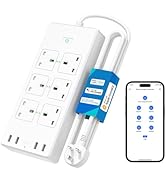
The Meross Smart Power Strip offers 6 individually controllable AC outlets and 4 USB ports delivering up to 20W total charging power. Compatible with Alexa, Google Assistant, and SmartThings, it connects via 2.4GHz WiFi for remote app and voice control without needing a hub. Featuring smart scheduling, surge protection, and a flame-retardant design, it’s engineered for safe, efficient, and convenient power management in home or office environments.










| ASIN | B09CH3WCDX |
| Amperage | 13 Amps |
| Best Sellers Rank | 11,329 in DIY & Tools ( See Top 100 in DIY & Tools ) 41 in Smart & Remote Controlled Plugs |
| Brand Name | meross |
| Colour | White |
| Compatible Devices | [Lamp, Juicer, Router, E-Reader, Light, Speaker, Coffee Machine, MP3 Player, Television, Personal Computer, Set Top Box, Mixer Grinder, Audio Sound System, DVD Player, Scanner, Hair Dryer, Camera, Fan, Radio, Cellular Phone, Tablet, Noise Maker, Toaster, Gaming Console, Smartphone, Smartwatch, Microwave Oven, Projector, Modem, Printer, Rice Cooker, Laptop] |
| Country of Origin | China |
| Customer Reviews | 4.3 4.3 out of 5 stars (956) |
| Enclosure Material | Polycarbonate |
| Item Dimensions L x W | 24.8L x 11W centimetres |
| Item Type Name | Smart plug, Wi-Fi plug, WIFI socket with USB Ports |
| Item Weight | 712.6 Grams |
| Manufacturer | meross |
| Manufacturer Part Number | MSS426(UK) |
| Maximum Current | 13 Amps |
| Model Number | MSS426(UK) |
| Number of Outlets | 6 |
| Number of Ports | 10 |
| Other Special Features of the Product | Timer |
| Plug Type | Type B |
| Power Plug Type | Type G |
| Recommended Uses For Product | Office,Home |
| Shape | Rectangle |
| Smart Energy Saving | No |
| Total USB Ports | 4 |
| Voltage | 240 |
C**Y
Works well
I bought the 6 plug 4 USB extension lead. I will describe below what I think and also how to set it up and link it to Amazon and some basic uses, though not all, because you don't get instructions... It arrived next day with prime. It has a good length lead, very sturdy lead too. Set up; Set up was quite easy but instructions were non existent, all that was in the box was a warranty slip (2 years) and a piece of paper yelling you to download the app, I even downloaded the PDF called " user guide" from within the app...it was just a PDF of the same piece of paper with nothing useful on it at all, so as there is really no information given I will outline the steps here if it might help someone; 1: make a note of your broadband password, you will need it. 2: Download the app from Apple or Google Play store, search for "MEROSS" 3: ensure location and Bluetooth are enabled on your phone ( just for the set up, you can turn those off after setup and it still works fine) 4: create an account in the app. 5: pick a socket near your broadband for the set up, you can move it later. 6: go to the Homescreen of the app by pressing the house symbol bottom left, and the press the plus sign (+) top right corner to add your new device and follow the instructions. important: this 6 plug extension lead is listed as "surge protector", and then scroll down to the model number which is written on the top left corner of the front of the box. Set up is simple, switch on the socket when the app tells you, agree to the temporary Internet connection with a weird name ( connects automatically when you say yes, and then drops it later when you add your broadband info, this is pretty standard, my Google, Amazon and other smart items all do the same), enter your broadband password when asked) wait for it to pair, and then give it a name. Using: If you want to use Alexa to control the socket, allow linking with Alexa when the meross app asks for it. Then go to your Alexa app and you should, if you have the 6 plug, see 8 new devices listed, the extension as a whole, the 6 individual sockets, and all the usbs as a single USB switch. You cannot control the usbs individually, it does say that in the item listing information, but you can control the plug sockets individually. Go back to the meross app, click on your now listed device, it brings up a control Menü for you to control in the app, click the three lines top right which gives a new page and at the top where it says " device name" and lists the name you give it, click the right-hand arrow.. This loads a new page and allows you to name each socket individually, by giving each an individual name you can use voice control on Alexa to turn each on and off without opening any apps. You can, once you have done this, groups some or all sockets into a group on Alexa, so instead of saying " Alexa turn on socket one, Alexa turn on socket two" etc, you can turn on 4 sockets for example ( or off) at once by saying, for example " Alexa turn off Hifi", if you named that group hifi Alexa will be able to control it. Timings: In the meross app or Alexa ( I haven't tried Google yet, even thought it gave me a button to click to link it, I went alphabetically so did Alexa and then when I went back to the meross app I couldn't find an option yet to link it to Google as well, it must be there somewhere though). So, in both the meross app and/ or Alexa you can set timings, For example if you want the radio to come on at 6 am, if you plug it into this extension lead, you can set timings. One is called sunrise/ sunset in the meross app and Alexa, and in Alexa you can also set it up any time you like. Say you go to bed and want to turn everything off, but you want your phone to charge between midnight and 4 am, a four hour charge, and then power off again, simply set that up in Alexa for that socket. It's all very clever, I am sure there are more features I haven't used yet, if anyone knows where the " link with Google" setting is in the app I would be grateful to know. One last thing, you can of course turn the sockets on and off as and when you choose through the meross app, and as long at you leave the Internet on and connected, you could turn everything on or off whilst you are away from home, like on holiday, as long as your phone connects to the Internet wherever you are, and at the same time back home the Internet is on, you can freak out the neighbors turning the lights on and off from Australia....not that you would do that, of course. I hope this waffle is helpful to some.
Z**N
Quality smart strip
I've been using two Energenie 4 gang smart strips to control my media set up, plus a few Energenie smart plugs for other devices. The Energenie system requires their control hub, needing an Ethernet connection close to a router (or an Ethernet hub) and for their server to be up online. That proves problematic and somewhat frustratingly slow compared to other smart plugs. So... I've replaced them with a Meross 6 & a 4 gang strips. These importantly work without a hub (as per T Link, Kasa, Techin, Amazon plugs etc), appear very responsive and give me 2 additional sockets and 4 USBs .... one handy for that LED light strip round the back of the TV. I assume the USB sockets wouldn't power a Firestick for example, but they'll be handy I'm sure. Set up was relatively straightforward, tho I recommend you take note of setting up near your router. I have essentially 3 separate home wifi networks, a 5G, a 2.4G and a wireless access point in my garage. I was too near the garden on first attempt, my phone kept switching to the access point wifi in the garage and the strips wouldn't "see" the 2.4G! Moved away and quick success when aligning to 2.4G! Much easier to rename the individual sockets on the Meross app than the Energenie. And Alexa found them all immediately. Just a quick change of group settings and done. These may appear somewhat expensive at first for the two strips, but the Energenie kit was on initial purchase too. The Energenie system often went offline for a day at a time! Plus that needed a socket to plug their hub into. And the Meross kit appears a lot more substantial too. My only slight criticism would be I'd prefer the 6 gang in a long strip instead of a 3x2 block. Luckily none of my plugs/adapters blocked the opposing socket. Reviewed within hours of set up.... I'm sure it'll all work correctly as my other smart plugs do. Cheers!
H**S
Good start
The desire was to get such an extension lead with the ability to control the devices being bugged in , remotely . This is because I intended to put it on the floor behind my equipments , and it would hard to reach them every time I wanted to switch on on or off .. That’s in addition to have some features " smart ones" Initially, it was easy to set it up and connect it to my Wi-Fi network. Later one I discovered that every time you switch it off or unplug the extension lead , it looses it refuses to reconnect to my router . I had to reset it and reconfigure it again . Smart features are limited as a stand alone device and relying on its App. I contacted Amazon about the issue of connectivity and they sent me a replacement . The new one had the same issue . This lead me to investigate the matter in depth . I reached to a conclusion that this extension lead has a manufacturer issue with regards to connecting to Virgin Media router . Despite knowing that Virgin routers are crap ! , they connect to devices without any issues as long as its within the Wi-Fi range . The extension lead is 2 m a way from the router, so the range is not an issue here . I had to bring an access point between my router and the lead be able to connect it to my Wi-Fi network . Its not ideal isn’t it !
S**N
Great value
Works perfectly with Alexa and my other smart devices. No need for individual smart plugs with this, I can control which switch is on which is helpful as I always forget to turn things off, I can just ask Alexa or use the app
D**N
Really easy to set up every plug socket of the 8 on the strip is possible to program and label as a specific device but not the USB ports which is slightly disappointing as this would easily make it a 5/5 product and in my opinion is the only negative
V**F
AWESOME GOOD ITEM
F**G
Working flawlessly again
S**D
ممتاز
ا**د
حلوه