We remain fully operational. Our teams are working around the clock to ensure your deliveries continue safely.

下载应用程序


🎶 Elevate your sound game—because your music deserves precision and style.
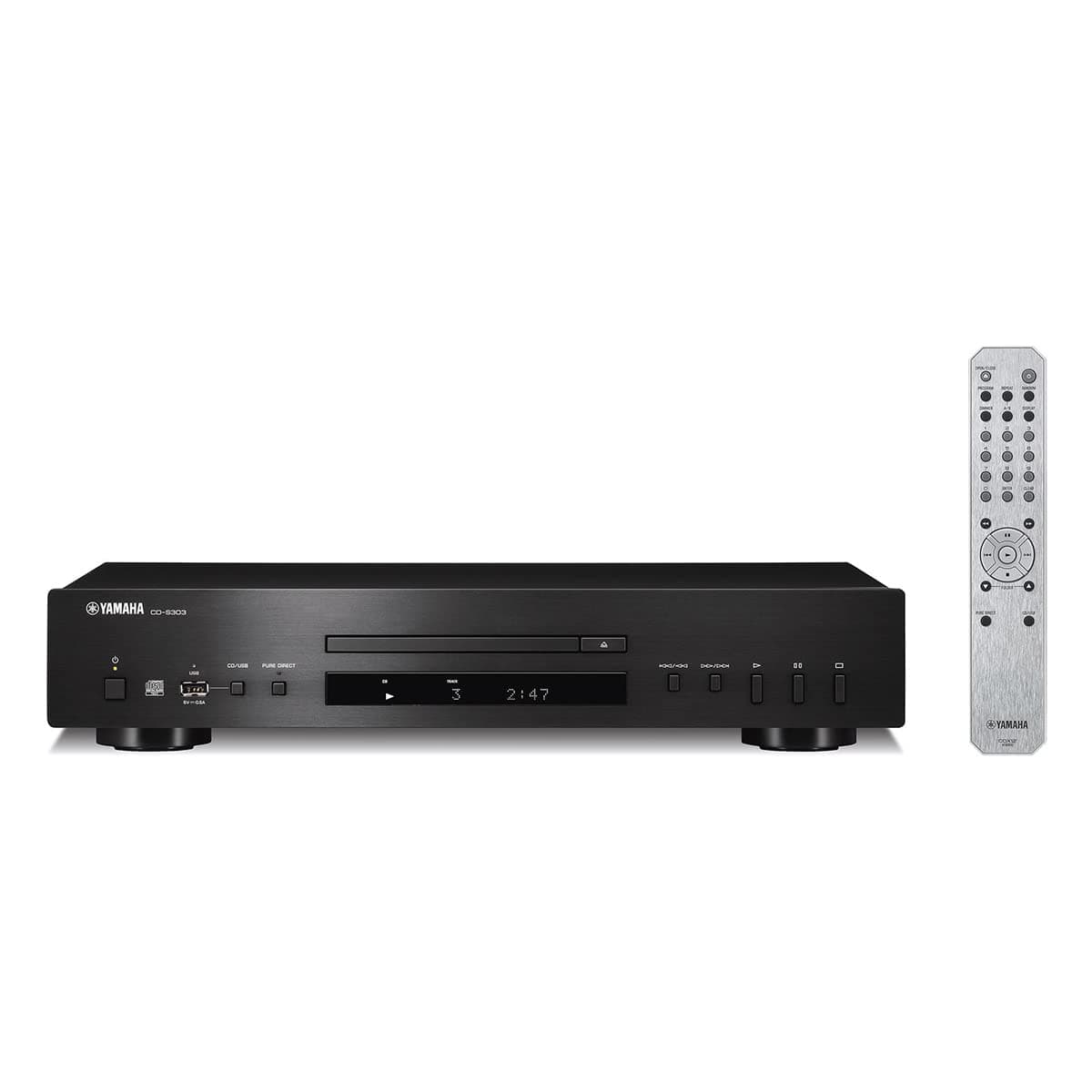
The Yamaha CD-S303 is a sleek, black single CD player designed for audiophiles and music lovers who demand versatility and quality. It supports a wide range of digital formats including MP3, WMA, AAC, FLAC, and CD-R/RW discs, featuring a high-performance Burr-Brown DAC for superior sound clarity. With a front USB port for easy playback and firmware updates, plus an intelligent display and remote control, it offers a seamless, modern listening experience that keeps your music collection vibrant and accessible.


| ASIN | B097S2H1VQ |
| Additional Features | CD-R/RW Compatible, Portable |
| Best Sellers Rank | #19,429 in Electronics ( See Top 100 in Electronics ) #3 in CD Players |
| Brand | Yamaha |
| Built-In Media | Remote |
| Color | Black |
| Compatible Devices | Headphones, Speakers |
| Connectivity Technology | USB |
| Connector Type | USB |
| Customer Reviews | 4.5 out of 5 stars 687 Reviews |
| Headphones Jack | No headphones jack |
| Included Components | Remote |
| Item Dimensions L x W x H | 17.12"L x 10.25"W x 3.38"H |
| Item Weight | 7.7 Pounds |
| MP3 player | Yes |
| Manufacturer | Yamaha |
| Media Format Type | Digital |
| Model Name | CDS303 |
| Model Number | CDS303 |
| Number Of Discs | 1 |
| Number of Batteries | 2 AA batteries required. |
| Number of Channels | 1 |
| Special Feature | CD-R/RW Compatible, Portable |
| Specific Uses For Product | Home |
| Supported Audio Format | MP3 |
| UPC | 027108960043 |
| Warranty Description | 2 year manufacturer |
C**3
A Good Quality, Reliable CD Player. I Like It.
I got this CD player to replace a 6CD carousel player that started to have problems reading several discs. I am using the player connected to a Yamaha RX-A1060 receiver via digital optical connection and output through a pair of Klipsch RP-280 speakers. I am using the DAC of my receiver and can’t say how the sound would be using the player’s DAC and the analog connection, but the sound of the system is great running a digital signal from the CD player to my receiver. If you prefer to use the DAC in the CD player just use the analog connection to hook it up to your receiver. Really just depends on whether you prefer the sound of the DAC in your receiver or the one in the player. The CD player has a display that shows the track number and elapsed time, and if you push the display button it also cycles through the time remaining in the track, the time remaining on the disc, the name of the track, the name of the artist, and the name of the album if the CD includes that information. Only a few of the CD’s that I own have the title of the track, album, and artist, but I can verify that the player will display the information if it is present. The remote is fine, and the commonly used buttons are easy to locate. I’ve had this player for about three months at the time of this review, and it plays everything flawlessly. I have listened to a lot of different CDs on the player during that time, covering a wide range of music. When I first got it I tested the player using some discs that I knew previous CD players had difficulty reading, and initially, this player also had difficulty and would not play some of them. I checked the firmware (press and hold A/B on the remote and the display shows the current firmware version) and it was an older iteration. When I updated the firmware to the current version (1.53 at the time I got the player) it was able to play the same discs that had problems before the firmware update, and it has played everything flawlessly since, including commercially manufactured CDs, CDs that I burned on my laptop, and commercial manufactured on demand CDs, and the CDs that were unplayable on the previous 6CD player. When you do the update, switch the unit to USB mode, be sure that only the firmware update data file is on the USB drive that you are using, and that it is using the correct file format on the drive (fat 16 or fat 32) and no encryption. I used a 3.0 USB drive formatted on my laptop without issue once I only had the firmware update data file on the drive and nothing else. On my first attempt I extracted the update file to a folder on the USB drive and it would not work as the drive must contain only the update data file at the root directory of the drive. If there is anything else on the drive besides the update file it will not work. Note that when you connect the USB drive to the player the display reads UNSUPPORTED. This is not a problem, and once you push and hold the pause button on the remote for a few seconds it switches to UPGRADE (if I remember correctly) and after 20 seconds or so the machine reboots and when it restarts it says UNSUPPORTED on the display again. When you switch back to CD mode and check the firmware it should be updated. Turn off the player and remove the USB drive and it’s done. There is a guide on Yamaha’s website with instructions. If you are looking for a good quality, reliable CD player this is a good choice.
I**T
Excellent CD Player
I recently got back into CDs, I was using a DVD player as a transport to my DAC but I wanted a dedicated CD player. After considering several other players, I chose the Yamaha CD-303 and I'm glad I did! So far, everything has worked flawlessly out of the box. Straightforward remote, simple to use. A huge plus is it's USB playback function, a lot of other players at this price point and higher don't have it. As noted in pervious reviews, there were firmware updates but mine came with the most recent update, VER 1.63. The built in DAC ( Burr-Brown) sounds nice, but I also have it going out via Coaxial and Toslink to my external DAC. Nice to be able to switch back and fourth for depending on what I'm playing. So far, I am very happy with it and would highly recommend it.
E**F
Wonderful Sound Awaits You!
This cd player has really impressed me. I have had a Yamaha CDX 710 since the 80's and loved it for many years with only having to change belts a few times over the years. I was very sad when it stopped working. I wondered how much I'd have to spend to get the quality sound I was used to. Well I took a chance on this one for much less money yet still a Yamaha and with some good reviews. It sounds fantastic! Very warm airy sound with perfect channel separation. I heard what my old Yamaha was missing or....possibly never had. I run this through a Denon receiver and Klipsch Chorus speakers and am thoroughly pleased. Soon I'll have a Sansui 8080 and I can hardly wait to hear it through that. If you want a great cd player with wonderful sound....buy this one! Not a lot of bells and whistles but I don't need them. Being able to play music through a USB port is handy though I didn't really need it. Remote is great with everything you need. One thing you should know....some units do not come with the latest firmware. Mine was one of them but it was easy to update through the USB port. Go to the Yamaha website and you can down load it for free. Follow the instructions exactly and you'll be done in a few minutes. I listened to 6 CD's today in various types of music and each one sounded amazing! I would bet you'll hear things on your recordings you didn't realize were there!
M**G
Well worth the price given the price of most CD players out there
For the price, this is an exceptional CD player. First of all, only what needs to be there is there. No extras. Loading is quick and feels very solid. The whole unit feels solid as well. The only reason for four stars instead of 5 stars has to do with the built in DAC which is only adequate. Sound is muddied and not very clear. However, I use an external DAC and Yamaha provides two ways to connect digitally to my external DAC. With that taken care of, the sound quality is better than from my excellent Qobuz Connect and my Bluesound Node Nano which I find very good. CD's sound better. Very happy with unit. Functionally the only features built in is standard CD Redbook playback and a flash drive insert in front. You do get a good remote as well. Connections are via standard RCA cables and optical and coaxal digital connections.
V**O
I lucked out! I found the best reasonably-priced CD player
The availability of quality CD players is becoming a problem. The industry and the younger generation seem to want to get past CDs and into listening to their music via streaming to their smartphones and streaming devices or reverting back to vinyl, seemingly unaware of the importance of high-fidelity low-distortion - they haven't hurt their eardrums enough yet! OK, audiophile CD players: I prefer not to mention names, but all of the so-called audiophile CD players seem to be ridiculously over-priced. One flagship player (beginning with the letter "M") runs about $800. Check the reviews - lots of purchasers have problems with even $800 players - be it performance or customer service (one reviewer said it well - what good is a five-year warranty if you can't get help with a problem or replacement - it might as well be a 30-year warranty!). OK - this player. Many players insist on showing you an LED display when you don't want to know how many minutes have played or have left. This player doesn't do that with it's "Pure Direct" option, which also can be used to bypass the DAC chip (digital-to-analog). It sounds great with both settings, by the way, even compared to "high-end" players I have had attached to my 180-watt McIntosh amplifier and C38 pre-amp. Another feature on which some players are irritating to me - the often start playing 'track 1' when loaded, whether or not you requested it to do that. This player does not do that. It loads, displays the number of tracks and then waits until you select a track to play. You can monitor the length of track as long as you are not in "Pure Direct" mode, which you can switch in-and-out of on the remote with no ill effects. Another irritation - on a high-end CD player I purchased recently and returned for a refund, if you play a CD and stop playing at the end of a certain track, the player would "mark" that spot. If you a few days or weeks later decided to load that CD again, it would automatically go to the end of the last track you played and start from there. This player does not do that. OK - quality. I previously bought a Yahama CD player (697 model, I believe) 20 years ago. I snobbed out to "audiophile" Emotiva 2 and Emotiva 3 players - which were fine players but now unavailable after purchasing a $4500 McIntosh C152 amp. They died - the lasers eventually burn out with heavy use, and I'm a rock-and-roller. The Yamaha player was my backup player. It sounded better than OK, by the way although an irritating "carousel" 5-CD type which I loathed (the carousel, that is). Well, as I waited for this new Yamaha unit I plugged it in to carry the water. It still sounded good. If I didn't strategize buying a primary player I would have kept it - as I said before, CD player availability is now very low, and 20-year old "audiophile" players are costing a "pretty penny". This player is reasonably priced, has very good sound quality, is rock-solid. If you are looking, the NAD C 538 player was was alternate choice, so give that a look. Bottom line - hesitate to buy a used CD player as you never know how many hours the laser has on it, and they are usually sold by a "car salesman-type" seller, so don't get sharked. Devices do eventually burn out. Even the "audiophile" players have problems, so you need to get lucky buying used or new. But why keep looking - select this player and you won't be disappointed.
B**N
.
Nice Yamaha player
R**.
Sweet sounding
This CD player sounds great - a warm sound with lots of detail almost like vinyl. I am happy that vinyl is back but I have also accumulated a nice collection of CDs over the years and this is a perfect player without breaking the bank. I think you need to spend a lot more to get a player that sounds noticeably better. Maybe I am a throwback but I like having the records and discs of music that is really important to me. I don’t trust streaming services to always have it available. The functionality of this Yamaha is simple and intuitive, the illuminated display is clear and the remote has all the functions you could want and works fine across the room. It has a nice tray and also looks pretty good if you care. Highly recommended.
D**S
Take a BIG pass on this one
Plays cds if it feels like it. Randomly and intermittently skips ahead during a song, stops playing, doesn't recognize disc in tray and other issues. One time will play a cd ok, the next time it does not. Or one time will have an issue on a specific song, the next time it's on a different song. Worked ok-ish for 14 months, it's still in warranty but was told the issue is that if a cd does not have a logo stamped on it that says "compact disc digital audio" they won't do nothing about it. It doesn't meet their standards to play. For the past 2 yrs of buying dozens of factory cds on all kinds of labels from Rhino, Sony, Polydor, UNI, BMG, etc from all kinds of artists like Rolling Stones, Neil Young, Roger Waters, Jack White, Joe Satriani etc from record stores, Amazon, Target and directly online from the artist websites, only 2 have had that stamp on them.