We remain fully operational. Our teams are working around the clock to ensure your deliveries continue safely.

下载应用程序


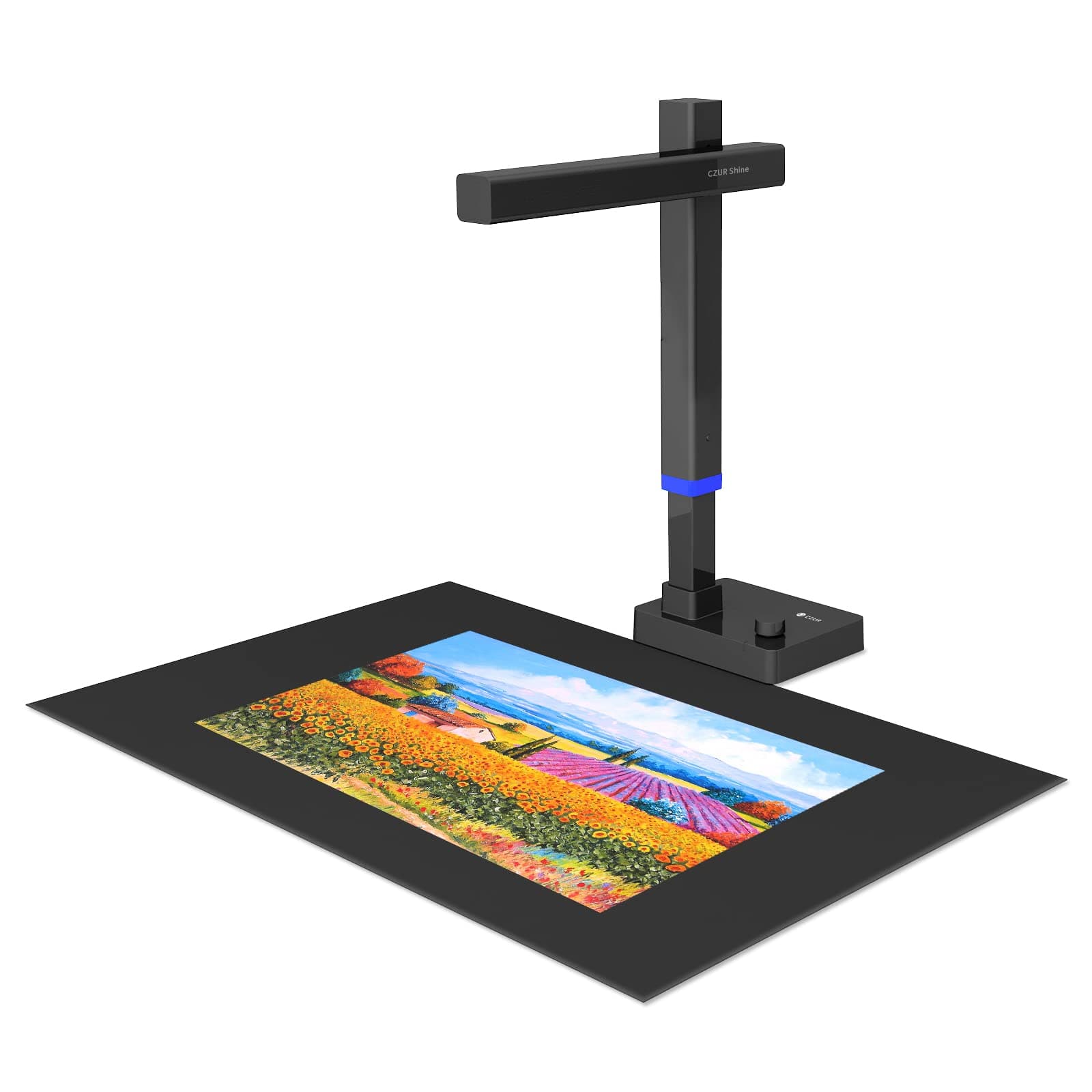
📚 Scan Smarter, Work Faster — The Ultimate Pro Scanner for the Modern Manager
The CZUR Shine Ultra Pro is a portable, high-resolution 24MP document scanner designed for professionals who demand precision and versatility. Compatible with Windows XP through 11 and macOS 10.13+, it features advanced curl-flattening technology for flawless book scanning, supports multiple export formats including searchable PDFs, and integrates seamlessly with popular video conferencing tools. Weighing just 2 lbs with a foldable, height-adjustable design, it’s the perfect blend of power and portability for today’s hybrid work environment.







| ASIN | B09M2L1V4W |
| Best Sellers Rank | #100,538 in Office Products ( See Top 100 in Office Products ) #107 in Document Scanners |
| Brand | CZUR |
| Color Depth | 24 Bits |
| Connection Type | USB |
| Customer Reviews | 4.1 4.1 out of 5 stars (80) |
| Item Dimensions D x W x H | 4.61"D x 11.63"W x 16.12"H |
| Item Weight | 2 Pounds |
| Light Source Type | LED |
| Manufacturer | CZUR |
| Media Type | USB |
| Minimum System Requirements | Windows XP |
| Model Name | Aura Pro / Aura X Pro |
| Optical Sensor Technology | CMOS |
| Paper Size | 16.5*11.69 Inches |
| Resolution | 5696*4272 |
| Scanner Type | Document |
| Standard Sheet Capacity | 10 |
| Warranty Description | 1 year manufacturer |
| Wattage | 12 watts |
C**N
Scanning made easy for even difficult projects like books with thick bindings
What a wonderful product. Easy to set-up and easy to use. I have been looking for something like this for some time to copy some pages in books. This makes it easy.
L**P
Working great for music scanning!
Sad story with happy ending .. After almost 13 years my ScanSnap sheet scanner stop working and was no longer supported, we had a good run together. Being happily retired I no longer needed a fast sheet scanner, but I did want a book style scanner to scan my sheet music to pdf files for use on my iPad While I have yet to read all of the instructions, I was able to scan my copy of a 44 page A3 size (16.5"c11.6") staple bound score almost as fast I could turn pages AND not have to fuss with page curling. The scanner came nicely packed and requires no assembly. It fits nicely between my two monitors on my messy desk. The Included neoprine like scanning mat lies flat and the texture helps hold the book in place. The scanner natively produces jpg files using a variety of filters and has built in curl removal! I used the easy book style scan .. two pages at a time. The software was capable of exporting the jpg files in a variety of formats including optical character recognition. I just pressed the button and got a simple PDF I needed for my iPad. Who knows what I will learn next? Great product!
N**R
OMG - it's perfect
About to start van life - I have a project on the road that I will need it for (and is the reason I bought it), but on a stormy day today, I started to digitize all my financial records to get rid of paper. . . in a marathon session, I got so much done! Half the clutter in my house is paper and financial and medical records. . . well on my way to no more clutter! Perfect results. . . . . it will do a straight pdf or a searchable pdf - the searchable pdf takes longer to process, but that is ok. I gave tech support only three stars because I didn't need it, and haven't tried yet. . . . it was pretty easy to learn - one 10 minute YouTube vid. It is FAST, but it doesn't scan until your hands have cleared the scan area and it can get a clean copy.
C**O
Good scanner for oversized documents.
This is a well-made and sturdy tool that can scan oversized books and magazines. It has a powerful light and the lens can be raised and lowered, depending on the size of what is being scanned. Only drawback is that when you're scanning something on glossy paper, there can be glare and kick-back from the light. You can work around it by turning off the light on the scanner and using only room light.
J**I
Great for black and white matte, useless for glossy. Software is really what you're paying for.
This device is basically a mid-grade webcam; what you're really paying for is the software that (mostly) auto-crops, color-corrects and fixes page deformities. On this note, the features of CZUR's software varies wildly from model to model (even features that are camera-independent, like changing the order of scans before exporting), so make sure you're researching the right scanner or you'll get how-tos with features this model doesn't have. Some things to note: the UI doesn't scale properly, so any screen smaller than 1920x1080 is going to struggle (this ruled my old laptop out). The automatic page detection is...finicky. For the page gutter and L/R edges, it only allows straight lines, and often doesn't properly detect those, forcing you to manually adjust. It doesn't handle abnormal distortion well at all (say, from a tight middle-staple crinkle). If you're mostly scanning single-page documents that are black and white, this thing works a treat. If you're looking to preserve color glossy photos or magazines, keep looking. For the cost, it's just not worth it.
K**N
Worst Purchase Ever
absolutely the worst purchase I've ever made on amazon, there software is unusable on a Mac, don't buy it waste of money. Even when it was working the quality of the scans were pretty abysmal
A**S
Works well, great camera
This product is so cool! It works well and the camera is amazing
R**Y
THIS PRODUCT WILL BREAK YOUR HEART (if you want to scan books)!!
How bad is it you ask?? It is SO BAD that you will have to run two versions of the software package to access all the features when scanning books of any length. The new version sometimes offers the critically important "replace" a scan extra feature, but only sometimes, seemingly at random. But the new version CANNOT output longer (e.g. 200 page) OCR'd PDFs--it usually just fails, either crashing or saying it finished when it did not. If the new version does happen to work to produce an OCR'd PDF, it often sets the page sizes randomly, some pages are 5x the size of others. This is apparently unfixable. To output larger OCR'd PDFs you MUST use the old software--CZUR_Shine_V2.2.230531B. If all you have is the new version--CZUR_Shine_V2.2.240123--you will not be reliably able to make OCR'd PDFs of longer books. If you don't have the old version of the software in the box as a CD when you receive the product, or you can't mount a CD, return it immediately, it is unusable, at least for book scanning. Completely unusable!! I do not exaggerate. So you NEED to use the old version of the software to output bigger OCR''d PDFs. Their installers make it hard to run two instances of the software, but I got it done using a removable pen drive. Simply install one version on a pen drive, remove the drive and install the other version on a regular hard drive. Then plug the pen drive back into the computer and you have two instances of the software, old and new. I got one answer to one question from tech support, it was clear, the device has to be plugged directly into the computer, no USB hubs. Other answers have been of no value, just suggesting downloading the new software, which would be a terrible thing to do. The "Report a problem" function in both versions of the software where you should be able to submit an example of a problem image does not work, and is often not even offered as an option in the new version. A couple of the other "Features" with icons and described in the instructions don't work either, like adjusting the degree of curvature of the book pages. Sometimes it is grayed out, and when it is not, it doesn't work. The hardware is fine, even elegant, within its limitations. Everything about the software is glitchy, unreliable and unstable. Take images too quickly and you get a terminal blue screen of death along with a low frequency roar until you press the button to restart your PC or pull the plug. On some of these crashes it actually disabled one of my peripherals, I had to unplug it and reregister it, and scrambled my 3 monitor arrangement--these are hard, hard crashes. The documentation is terrible. You cannot use the built in light to scan any book with even slightly glossy paper, you either have to arrange a light at a grazing angle or use very diffuse lighting coming from an angle. This is an intrinsic problem of all of these scanners with only an overhead light. Very diffuse lighting might work, as in a library with many overhead fluorescent lights, but I have not tried this. Instead I use a light source aimed low over the surface of the glossy book. The built in lights work fine for matte books. You have to carefully monitor the image of each page you scan by looking at an extra large icon because some are terrible and must be replaced IMMEDIATELY. So you have to have a lot of monitor space--I have two 4K monitors I use at home, I cannot imagine scanning books with a single2K screen as with a laptop. If you don't detect the problem immediately and fix it, it is virtually impossible to repair with the old software and usually impossible to repair with the new software, except when on occasion the new version of the software offers the "repair" option, which is sporadic. Otherwise, you must start over from scratch, rescan the whole book. Yes, really, it is THAT BAD. The variety of ways that the software misfires is mind boggling! Sometimes it will scan all pages crooked for no apparent reason. Rotating the book to compensate does nothing. Relaunch the software and it will stop doing this, most of the time, but not always. The scans themselves can be fine for text but only OK for B&W photos--I have not tried it for color photos. I will say that after 8-10 hours on the learning curve, I can now usually get through a short book (150 pages, mostly only text) from start to finish in about an hour with acceptable results. This accounts for having to rescan 5% of the pages that don't scan correctly the first time, if I catch them on the fly. If not, it is start over from the beginning and one hour may become 2 or 3. Since it is the software that is so bad, all other CZUR products are likely just as problematic. And the competitors get even lower scores. I really don't want to have to go through all of them only to find that they are all terrible. I have ordered the even lower rated IRIScan and will review that. My fear is that both will have to go back. The clock is ticking. I guess the market is too limited for an American vendor to pick out an unit and make it actually work for sale to his or her countrymen. This is my plea to an entrepreneurial US tech person--help the world preserve history! This is what globalization has wrought, people, among other things.
G**Y
So easy to set up the scanner itself. Very easy to use ... my biggest problem is I keep thinking it should be harder. Once I get a rhythm going I can scan 300-500 pages in under a couple of hours. Do the math - that's about 3-4 pages a minute. The product support was excellent. I had some problems with really strange results from the scans - after some back and forth (with quick response time) the tech support worked out that my scanner needed the lens to be cleaned - I had not given this any thought for a straight out of the box scanner. Used a "lens wipe" and I was off and running. Great product. Great support!
S**S
I like how fast it scans the pages .. the manual button it comes with is great . Love it .
K**H
During scanning book the page finger is not remove automatically
G**E
I had been humming and hawing about a book scanner for months, did tons of research and finally decided to go with the shine ultra pro, it arrived a few days ago and I am just digging into the software and what it can do, very impressed so far with it. I was very surprised with the auto scan option, it really speeds up the process, just have to keep up with it myself😄 highly recommend it as an option for making some of your withering books a permanent part of the collection - Greg Berridge
R**Y
I really like the document camera. It has great resolution and the option of automatic scanning simplifies the process of creating an OCR version just by flipping the pages. Quick and efficient. Easy to use. Downloaded the installation package from the CZUR support page as my computer does not have a CD-ROM.
TrustPilot
1天前
2 周前