
下载应用程序



🔑 Own your digital fortress — because your online life deserves elite protection.
OnlyKey is a professional-grade hardware security key and password manager that supports universal two-factor authentication standards like FIDO2 and U2F. Its rugged, waterproof design ensures portability and durability, while PIN protection with auto data wipe safeguards your credentials even if lost or stolen. Compatible across all major OS platforms and websites, OnlyKey automates secure logins, eliminating password hassle and elevating your digital security to enterprise-level standards.
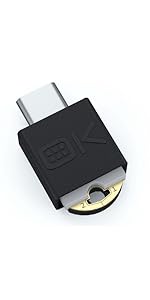
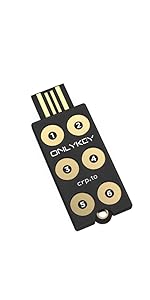


| ASIN | B06Y1CSRZX |
| Best Sellers Rank | #507 in USB Flash Drives |
| Customer Reviews | 4.1 4.1 out of 5 stars (591) |
| Date First Available | April 3, 2017 |
| Flash Memory Type | NAND |
| Hardware Connectivity Technology | USB Type A |
| Hardware Platform | Mac |
| Is Discontinued By Manufacturer | No |
| Item Dimensions LxWxH | 2 x 0.7 x 0.25 inches |
| Item Weight | 0.6 ounces |
| Item model number | EF-7H5W-FQ6I |
| Manufacturer | OnlyKey |
| Product Dimensions | 2 x 0.7 x 0.25 inches |
| UPC | 633832116009 |
C**M
Security on your keyring
Working in fields where confidentiality is a must and security is required by law, this is an awesome tool. For something that doesn't have biometric access, it's wonderful. First, its software and implementation is robust. For passwords, it's basically a keyboard emulator. As long as it can plug into a USB port, it'll type in the password you set. It doesn't need special drivers. Second, it's fail-safe. Forced-entry attempts will wipe out the memory. You only need to memorize 2 or 3 numerical sequences to access it, and they're short ones. Just come up with numerical rhymes or even a set of "dance steps" over the six buttons. If you need to rotate passwords every so often, then as long as you can store a random string in a secure location (even if it's a piece of paper you can lock away) this will let you carry that password without anyone knowing what it is. I dinged it one star, though, because there's something of a learning curve to set it up. If you make a mistake, it won't damage the key, but some newbie users may panic. Lock yourself out during setup? You can reset and try again. Oh, and you can generate encrypted backups of the password data. A few things that would improve the product: -A firmware upgrade to add in a random string generator, perhaps a "floating pin" exposed to ambient EM noise, for password generation. It wouldn't directly update the password, but just provide something a user can pick from. -An extension socket for convenient use. This is a solid device, so I'm worried about breaking any port I use when I tap my PIN. -Some additional programming options for login macros. Sometimes you need to hit the tab key more than once to get into a login or password field.
J**.
The most useful physical private key, due to password manager
YES, BUY THIS KEY, IT IS GREAT, HIGH SECURITY AND NEVER WORRY ABOUT COMPLEX PASSWORDS AGAIN. THE POSITIVES OUT WAY THE NEGATIVES. NEGATIVES Learning curve for people that are good with tech. Definitely should offer a case cover to put entire key inside. I bought a case from another company for key chain. FIDO2 only works for Google, Facebook and other big tech. However, having key to heavily protect only these sites until/unless physical key becomes more standard, for ex. Banks. It's still worth only protecting big tech sites because your life is on them. Making protecting only two or three big tech sites actually very valuable. Plus, that is not only keys fault. Or the fault of any physical private key company. All websites should offer physical private key option. What are Banks waiting for? Big tech offers it because they know it is the most secure option. It's most secure because it's not stored on your computer and you must physically touch key with pin in the only key to use. POSITIVES Password manager works for everything. That is where learning curve is. THE PDF THEY OFFER IS REALLY GREAT, THEY CLEARLY CARE ABOUT THE PRODUCT AND THE CUSTOMERS UNDERSTANDING OF WHAT ALL OF THIS SECURITY STUFF IS. Is this key worth having. I recommend everyone get one. It's hard to get hacked or have identity stolen if you are using this key. DO NOT SET A BACK UP WAY TO GET INTO GOOGLE OR FACEBOOK. THAT WOULD MAKE HACKING YOUR FB GOOGLE EASY. IF PHYSICAL PRIVATE ONLY KEY IS THE ONLY WAY IN THEN HACKERS ARE NOT GETTING IN. BUY TWO OR THREE OF THESE. MIRROR THE KEYS INFO AND PUT ONE KEY IN SAFE. I highly recommend this physical key. The learning curve is worth the trouble.
Z**E
This device is awesome. As long as you use some common sense and take the time to learn it.
This device is like a car... or even a gun. It is either something extremely useful, or it could be dangerous if you don't use common sense in how you use the features it offers: -U2F is great for sites that support it and is zero risk. You assign a button to this and just press it when you need it. If you happen to press it accidentally, nothing happens. -Google Authenticator (or other TOTP authenticator). This works well and zero risk. I have it there as a backup but considering I also have U2F set up, it kind of isn't needed. If you press it accidentally, it just gives you a code that is time based and useless to people who see it. -Storing entire websites, logins and passwords to each key. This is a great feature but I personally don't use it (I have a dedicated password manager for that) IF you do decide to use it, just remember that once you unlock your device, and you press the assigned button, it WILL type everything you have stored to that slot. The idea is if you press the button, it takes you to a url and automatically logs you in. SO keep this in mind if you have your device unlocked that you can accidentally trigger it. Use some common sense, and don't have it plugged in and unlocked while you are doing a presentation or have eyes on your screen other than your own. If you do use this, I recommend only storing part of the password. (see below) -Storing partial passwords to larger master passwords. I use this a lot. And if you get this device, I highly recommend it. You assign a button to type in some of your complex password (preferably the complex portion) than you type in the simpler part of the password that's easily memorized. That way even if you accidentally press a button, it'll just spew strings of complex characters that won't make sense to anyone. Relatively harmless and useless to people who don't know the rest of the password. I've seen about 3 people mention that they're having issues using the keypad. I'll say I have never once mis-typed my PIN on the keys. They're touch sensitive and very responsive. I do use the silicon sleeve that helps keep the touches isolated to the keys so that might be why. Or they might just have faulty keys. All I know is from my experience, if they're working as they should, they're easy to use to enter your PIN. All in all this is a great device. And I'm planning to order another one as a backup. The other keys out there are good as well. But I picked this one because of a few key reasons: a security PIN to unlock (a must for a security related device IMO), an auto-self destruct -- So if someone tries hacking my PIN, it explodes with the force of a small kiloton bomb (kidding but it does wipe out all data) and a few others that I want to keep relatively unknown unless someone reads the instructions ;) Just watch where you point that thing and keep the safety on.
L**8
Sehr gute produkt,ich kann ihnen empfehlen
F**L
Llevo varios meses utilizando mi OnlyKey a diario: con KeepassXC para gestión de claves y para conexiones SSH. Al principio tenía algunos bugs pero tras algunas actualizaciones ahora todo funciona perfectamente. La he usado alguna vez conectada a mi teléfono móvil por USB OTG, pero es algo muy esporádico y es un fastidio tener que andar con un adaptador de USB-A a USB-C. Aprecio mucho que el software para usar la llave sea libre, por un lado me ha permitido arreglar personalmente algunos bugs que me he encontrado y por otro siguen llegando nuevas funcionalidades (como soporte para firmado con claves PGP/GPG). Hay mucha flexibilidad para usar la llave en muchos escenarios diferentes. Un detalle importante sobre esta llave es que las claves privadas no están protegidas contra ataques contra el hardware interno, porque está basada en Arduino y no dispone de un elemento seguro. Esto significa que si alguien se apropia de la llave y dispone de suficientes recursos (miles de euros en equipamiento especializado) probablemente podría extraer los datos. Si este es un vector de ataque del que necesites defenderte entonces mejor busca productos con un elemento seguro que se haya probado resistente contra ataques (aunque en estos casos tienes que confiar en los fabricantes, que no tengan puertas traseras por ejemplo). Dicho esto la OnlyKey es la llave de seguridad más flexible del mercado hoy por hoy. Si tu principal preocupación es proteger tus claves privadas frente a un ataque de malware en el ordenador o un ataque hardware tipo BadUSB entonces OnlyKey es una buena opción.
S**I
La prima cosa da dire, per evitare malintesi, è che si tratta di un dispositivo che non è assolutamente plug & play. Per utilizzarlo appieno e quindi apprezzarne l'effettiva utilità è necessario avere buone conoscenze e manualità informatiche. In parole povere: è un dispositivo adatto ad un professionista o per uno smanettone, decisamente più difficoltoso altrimenti. La configurazione, specie le prime volte, è un po' macchinosa. In particolare, visto che i valori si possono scrivere ma non leggere, è consigliabile farsene una brutta copia su un file di testo per evitare di dover reinserire tutto daccapo a mano se si deve cambiare solo una virgola. Unico neo per esperti: è un peccato che il supporto PGP si limiti ad una WebApp e si appoggi troppo ed esclusivamente su Keybase.
S**E
Use it daily both at home and work. With 12 spots and 2 profiles (24 secrets), it saves me a lot of time. Easy to use and works on windows and linux and through RDP.
D**E
Après 3 ans d'utilisation, je reviens sur mon appréciation pour dire que sur ce produit est, selon moi, l'un des meilleurs (sinon le meilleur) de sa catégorie. Point 1 L'accès à la clé est protégé par un code que vous entrez via un clavier physique directement sur la clé. La présence d'un clavier physique directement sur la clé est un avantage énorme comparé aux produits concurrents qui n'en possède pas! L'entrée d'un code PIN via une application (logiciel) est intrinsèquement non sécurisée : Si la sécurité de l'ordinateur que vous utilisez pour entrer le code PIN est compromise, alors le code PIN peut être intercepté. Le cas échéant, si on vous vole votre clé, rien n'empêche le voleur de l'utiliser pour vous nuire. Avec OnlyKey, il est impossible d'intercepter le code PIN (car ce dernier ne "transite pas par l'ordinateur"), même si la sécurité de l'ordinateur que vous utilisez est compromise ! Si on vous vole votre clé, le voleur ne pourra pas l'utiliser pour vous nuire ! Pourquoi les produits concurrents ne sont-ils pas équipés de claviers physiques pour entrer le code PIN ? Pour faire des économies... probablement. Point 2 Contrairement à de nombreux produits concurrents (pour ne pas dire la majorité), OnlyKey permet de sauvegarder la configuration de la clé et de restaurer la sauvegarde sur une autre OnlyKey. Cela vous permet d'avoir une (ou plusieurs) OnlyKey "de remplacement" si vous en perdez une, par exemple. C'est absolument indispensable ! Remarque : De plus la technique implémentée pour produire la sauvegarde est très pratique (je passe sur ce détail technique cependant). Point 3 OnlyKey permet de signer et de chiffrer des documents ou des messages via l'application disponible. Le seul petit défaut est qu'il s'adresse à un public plutôt "averti" (capable d'apprécier la qualité du produit, mais qui possède un certain bagage technique). Je suis ingénieur en développement et en cybersécurité depuis 26 ans. Et, pour moi, OnlyKey est la plus avancée des clés disponibles aujourd'hui. Je recommande ce produit à tous les ingénieurs en informatique, et à tous les amateurs "avertis". À noter : le logiciel est libre, ce qui est un très gros point positif. De plus, les concepteurs répondent aux questions (sur le forum technique).
TrustPilot
1 个月前
4天前