We remain fully operational. Our teams are working around the clock to ensure your deliveries continue safely.

下载应用程序



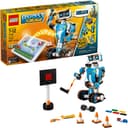





🚀 Unlock your child’s inner innovator with LEGO Boost — where play meets future-ready skills!
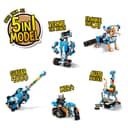
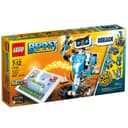
The LEGO Boost Creative Toolbox is an 847-piece STEM building and coding kit designed for kids aged 7-12. It features 5 multifunctional robot models including Vernie the Robot and the AutoBuilder, controlled via a free app using Bluetooth 4.1+. This award-winning set combines hands-on LEGO building with interactive programming challenges, fostering creativity, coding skills, and problem-solving in a fun, engaging way.


| ASIN | B06Y6JCTKH |
| Age Range Description | 84 months to 144 months |
| Best Sellers Rank | #289,106 in Toys & Games ( See Top 100 in Toys & Games ) #8,666 in Toy Building Sets |
| Brand Name | LEGO |
| Color | Multicolor |
| Customer Reviews | 4.6 4.6 out of 5 stars (3,236) |
| Educational Objective | Robotics; Programming; STEM Education |
| Global Trade Identification Number | 00673419272292 |
| Included Components | LEGO Building Elements |
| Is Assembly Required | No |
| Item Dimensions | 21.26 x 11.1 x 3.58 inches |
| Item Type Name | Building Kit Toy |
| Item Weight | 3 Pounds |
| Manufacturer | LEGO |
| Manufacturer Maximum Age (MONTHS) | 144.0 |
| Manufacturer Minimum Age (MONTHS) | 84.0 |
| Manufacturer Part Number | 17101 |
| Manufacturer Warranty Description | No Warranty |
| Material Type | Acrylonitrile Butadiene Styrene (ABS) |
| Model Number | 6186142 |
| Number of Batteries | 6 AA batteries required. |
| Number of Players | 1 |
| Operation Mode | Manual |
| Power Source | battery |
| Size | Medium |
| Subject Character | Vernie the Robot,Frankie the Cat,Guitar4000,AutoBuilder,M.T.R.4 |
| Supported Battery Types | 6 AAA 1.5V batteries |
| Theme | construction toys |
| UPC | 673419292108 673419272292 |
S**.
This *is* the robot you've been looking for
OVERALL CONCLUSION ================== LEGO boost is 80% of the learning at 50% of the cost and 20% of the hassle of LEGO’s fancier Mindstorms product. LEGO Boost compares really well to all other competing robots out there, so if you want your kid to know about coding, robotics, mechanics or technology, it’s a really easy choice. The age range is spot-on: 7 to 12 years old seems just right. TOP PROS: 1) Great value for what you get; 2) Extensive models for a lot of fun; 3) Painless setup so that kids can use the app and Bluetooth connection easily. TOP CONS: 1) Needs an iPad or Android tablet, which can triple the cost; 2) Limited accessories and other sensors/motors so far; 3) App can be very confusing at times and the “unlocking” of levels is irritating WHAT CAN LEGO BOOST DO? ====================== You can build 5 different, intricate projects right out of the box. LEGO included a huge assortment of great parts so that you can build a standing robot, a guitar, a “factory”, a cat, and a horizontal rover bot. Each model is part toy and part experiment because the app has included code that makes the characters lively and interactive while leaving room for customization. All the sounds and processing is done by your tablet, so that’s a smart way to save costs and make the “brain” brick really simple (which LEGO calls the “Move Hub”). The LEGO Boost app guides you through building and programming each robot in a set of challenges that are unlocked as you go. My 7-year-old and I could only figure out how to do Vernie the tall robot so far, which was sad because he wanted to start with the guitar or factory. This is minor bump in the road, though, because I envision this being a popular toy for a very long time. The fact that the Bluetooth setup was so painless (no pairing on iOS, it was like magic) makes this much easier to deal with than other robots like Cozmo. NOTE: If your app crashes, power off your iPad completely. This worked great for me. I’ve noticed that upon installation, some apps need a power cycle to work their best. I don’t know if this is a memory leak in the iPad or what. I’m running the app on a 3-year-old iPad Air 1 (not 2) and it works great. Anything newer should be fine, and LEGO has a device check section on their website. IS LEGO BOOST FUN AND EDUCATIONAL? ================================ For sure, this product is a ton of fun and teaches a lot about coding/logic, problem-solving, and creativity. My younger two kids, ages 4 and 7, are over-the-moon-excited about it and have been counting down the days until it arrived on August 1st. My 7-year-old already spent three hours building the first robot and he was completely enthralled. I was especially impressed by the robot’s head motion and the intricacy of the gears used in this model. The app has been fun to go through, but we’re only partially through it right now. HOW DOES IT COMPARE TO OTHER ROBOTS? ================================== As you can see from my website, LearnRichly, I’m kind of a learning toy nut. I especially like logic games and programming, so robotics coding is a pretty natural fit. In our house, we have Cozmo (from Anki), Dash (Wonder Workshop), Ozobot, and *3* LEGO Mindstorms kits (the older kids do FIRST Lego League, so they’ve acquired 2 EV3 sets and 1 NXT set). (Ouch, I just realized that I’ve spent over $1000 in toy robots in the last 5 years, yikes. We don’t eat-out or see shows more than a few time per year, so that helps save cash!) UPDATE: See more below about Cozmo in the 8/15 Update.. Which robot do we like the best? So far, LEGO Boost and Dash are the winners, with an edge towards LEGO if you have kids 8 and up and a recommendation for Dash if you have younger kids. Cozmo is small and limited, but more emotive and fun. He’s definitely a “toy” and the others are “learning toys.” Oddly, he’s also capable of real Python programming after a complicated SDK setup, so it’s an eclectic mix. Ozobots are only really useful for the most price-constrained budget; save up and buy a Boost, instead. Why are Dash and Boost the best? Because they give you real coding experience and make it fun. Dash has several apps available and is generally more mature as of right now, but I think Boost should catch up and exceed Dash overall. They both can take LEGO parts for building, but LEGO far and away exceeds Dash in versatility. It can be a factory, guitar, cat or who-knows-what-else that’s coming in the future! I do appreciate Dash as a standalone, start-from-scratch project, but LEGO will be the better choice for most households. Dash has been alone in this space for quite a while, but probably just got dethroned. UPDATE ON AUGUST 15th, 2017 ========================== OK, we've had LEGO Boost for 2 weeks now. We've built the standing robot, the guitar, and the mini-factory. We couldn't get the factory to work and must have done something wrong--we'll come back to it. My son wants to build the rover next. We also had to buy a large organizer set to keep all the pieces--what I didn't realize is how many *unique* pieces there are in this set. The Mindstorms kits have lots of pieces, but they are easier to organize since there are fewer than 100 unique ones. LEGO Boost has over 200 different types of pieces; we ended up using about 60 little divided bins in plastic craft organizers. If I had it to do over again I would buy the Akro Mills 64-drawer organizer like this one: Akro-Mils 64-drawer organizer . They charge too much for the drawer dividers, but I believe another company (stack-on?) has a 48-pack for much cheaper that *supposedly* works with the Akro Mills set, but I haven't verified. Since I wrote the above about Cozmo from Anki, I realize that he now has coding in the app! It's pretty good, too, so he's now much more competitive with LEGO Boost. I will review all of them in a future roundup at my little hobby blog LearnRichly.com, but for now I at least have an in-depth review of LEGO Boost that gives you much more detail than I could put in this Amazon review. Using my 6-criteria scoring scale, the average I came up with was a 4.4 out of 5 stars, so I wish Amazon would allow me to award LEGO Boost a 4.5 star rating instead of my 5 star rating.
A**R
Well worth the money!
LEGO Boost Creative Toolbox is pretty cool, there are multiple projects to build with the included pieces and then you can control them with the app! (Note- we use a Fire HD 8 Kids Edition Tablet, we were not able to use the app on the kid profile we set up, it needed to enable location service and the kid mode did not allow that, so we run it in the adult profile and I just turned on the parental controls) My 6 year old is able to build all of the projects and control them with minimal adult assistance. I thought he would need more assistance given that he is below the recommended age, but he able to build 98% of it without me and mostly just needs help finding pieces or taking the little ones apart. He did manage to break a piece, but now he knows to be more careful with the long connector pieces. We keep all the Boost pieces separate from our other LEGO in a plastic case with dividers that I used to use for jewelry. It is like 11x15x3 and all the pieces fit nicely inside! Now he is saving his money up for the Ninjago Stormbringer (70652) and LEGO City Arctic Scout Truck (60194) kits that have additional instructions within the Boost app to connect and control them! I'm sure there are lots of ways to incorporate other sets and pieces to build cool stuff as well.
D**P
Fun and helps build logical thinking!
Things started off quite well, with my 6 year old building the test robot with little assistance in about 45 mins. The test programming really began getting him interested in the kit. Will second another reviewer regarding documentation of the programming buttons, there isn't any. Lego, please send me that cheat sheet PDF as well. Then he started building Vernie. We did not have any of the app crashes so many people mentioned in their reviews, but then we're using the app on our basic Fire tablet, modified to use Google Play store apps. Midway through the build our tablet ran out of charge. Then started our struggle. After reloading the app, we slid through the instruction progress bar slider mistakenly until the end. At this point, the app assumes you've fully built Vernie and asks to connect. Vernie began talking, even though his feet and arms were incomplete. Not a very positive experience for a 6 year old. And there was no way we could go back to seeing the instructions again. There seems to be a "Reset Progress" button in settings, but we're afraid that will reset everything, including the test robot, test programming etc. Definitely don't want to go through all that again! Managed to search and find a PDF booklet of the instructions, but it has a ton of pages and not easy to skip several hundred pages to get to our page. Lego should've designed the app so that you could go a step back if needed. That said, I'd say Boost has definitely kept my 6 year old piqued and we're hoping to complete Vernie soon and will update this early review. Update (08/15/2017): We've finished Bernie (relying on the PDF instructions we unearthed via a Google search) and my 6-yr old is having a blast programming Vernie to do the various things he's capable of. Turning, talking and even responding to a handshake! I love how the programming language is just drag-and-drop. He's already learning the basic concepts of if-then and loops. I wish they included the programming cheat-sheet in the box, since icons on some of the programming blocks aren't at all obvious to an adult, let alone a kid. Upped my rating by another star purely for the programming being actually fun for a kid, and making a kid actually want to program more. Update (09/02/2017): Updating since there is a button that allows going back a step (as explained by Lego support in the comment), although it didn't work for some reason initially. I think you need to exit out of the building view and restart for the that button to work. But it did eventually and Lego support was good to point that out. Also, I'm running this on a Fire tablet which isn't officially supported by Lego, so I'll give them the benefit of doubt. Upping by another star, since there are very few flaws left at this point (biggest gripe is that pictures on some of the programming blocks aren't at all intuitive). So I'd like Lego to provide a cheat sheet of all the blocks used, either in the box or email it to customers. The bottom like is this is a fun kit which gives a lot for the money you spend and will help kids build logical thinking. What more could you want?
A**N
Lego no deja de sorprender tanto a niños como adultos, y con este set no es la excepción. Un modelo con 847 piezas que incluyen sensores y una pieza inteligente que permite empezar con principios de robóticas desarrollando modelos simples o explorar con algunas ideas propias. Este set no incluye manuales impresos pues es necesario descargar una app que te ira guiando y abriendo mas posibilidades para el total disfrute de este set. Muy recomendable y sobretodo divertido!
J**D
I bought it for my 9 years old boy as a reward after he achieved good grade and positive comments from his teachers and school. He loves it so much. This isn't just a toy . It's an entire system that has genuinely ignited his interest in engineering and coding. So far he has done 2 models. Both are functioning well.
A**L
Great
J**R
This toy is perfect for kids around Grade 1. It provides a very interactive and interesting way for kids to learn programming and robot. Here is the list of good stuff: 1. iPad or iPhone app is used to provide building instructions 2. The same app is used to program the sequence of actions for robot 3. The programming part is actually not coding, but organizing intuitive icons of actions that can be performed by robot (e.g. crying) 4. There are several types of robots could be built and each has its own unique feature.
K**N
This gift has entertained my grand daughter for hours. It has been a great joy for her.