We remain fully operational. Our teams are working around the clock to ensure your deliveries continue safely.

下载应用程序


Buy anything from 5,000+ international stores. One checkout price. No surprise fees. Join 2M+ shoppers on Desertcart.
Desertcart purchases this item on your behalf and handles shipping, customs, and support to Taiwan.
🎤 Speak, Control, Enjoy! The future of TV is in your hands.
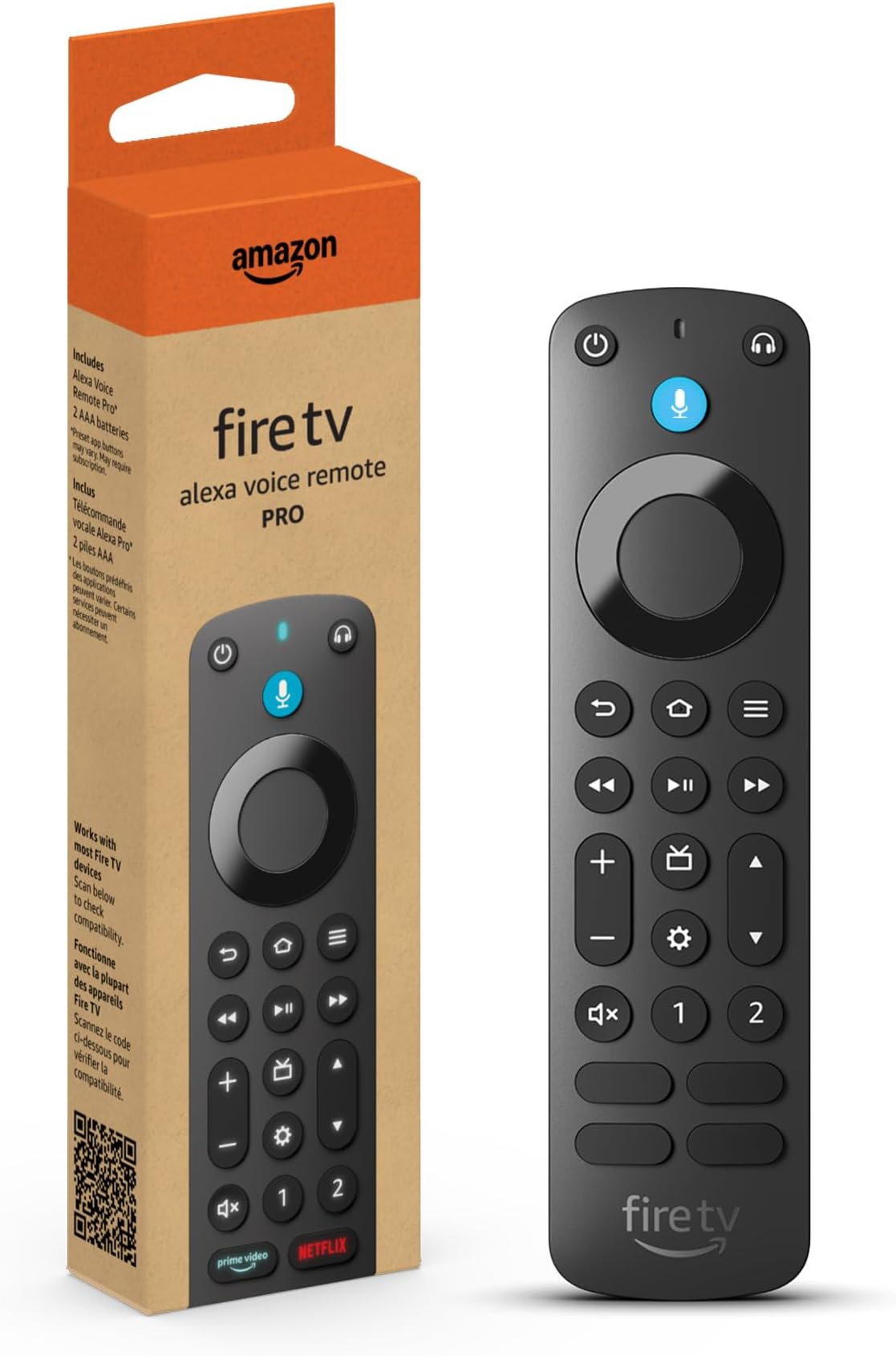
The Amazon Fire TV Alexa Voice Remote Pro is the ultimate companion for your entertainment experience. With features like a remote finder, backlit buttons for easy navigation, customizable shortcuts, and integrated TV controls, this remote is designed to enhance your viewing pleasure. Compatible with most Fire TV devices, it also includes a dedicated headphone button for quick audio pairing. Say goodbye to the hassle of searching for your remote and hello to effortless control.
| Size | 38 x 148 x 18 mm |
| Weight | 54 g (without batteries) |
| Batteries | 2 AAA (included) |
| Technology | Bluetooth, IR |
| Compatibility | Compatible with most Fire TV streaming media players, Amazon Fire TV smart TVs, and smart TVs with Fire TV built-in. Check compatibility with Fire TV devices. |
| Warranty and service | 90-Day Limited Warranty and service included. Use of Fire TV is subject to the terms found here. |
| Included in the box | Alexa Voice Remote Pro, 2 AAA batteries, Quick Start Guide (PDF / Accessible HTML) |
S**S
“Better than I hoped it would be”
Ok, I have had this remote now for a good few months and I gotta say, I haven’t ran across any issues what so ever. The voice function works good. The (find my remote) alarm works great. And that function alone is worth buying this thing. These little fire remotes always seem to get lost. They can slide down in couch cushions, get wrapped up in blankets, fall behind beds, or just misplaced in general. So having the ability to ask Alexa where the remote is and she turns on an alarm on the remote itself so you can track it down is perfect. This remote also has back lit keys so you won’t be fumbling around in a dark room trying to make sure you’re hitting the correct buttons. Now the lighted keys only turn on when your fingers brush over the keys. So I’m sure that helps out with battery life, however, this is the only issue I have came across that does put a damper on the remote, is that this thing will drink up batteries very quickly. Not sure how often you will be using your remote, but I can drain a set of triple AAAs in a couple weeks in this remote. Now I shouldn’t have to tell you that batteries in remotes can last for many many months. I have even had some that last for over a year. So when I blow through a set in 2 weeks, you know it’s gonna start costing you. I decided to order a couple sets of rechargeable batteries so I always have a good set to toss in. One thing to note here is if you just leave your remote sitting on your couch or in your bed, some items coming into contact by brushing up against the keys, can cause the lighted keys to turn on. Now this is another reason the batteries can die out more quickly. All in all, looking past these personal things, I still think this remote deserves a 5 star rating. It is definitely better than the old stock remotes that came with the old sticks and cubes. And the added blank buttons that allow you to program in what apps you want to open for personalization is a game changer. Do I think this remote is a bit overpriced? Yes. But like most things, if you really want it, you pay the price. Would i suggest this to others? Yes. And I already have gotten a few of my friends to upgrade to this remote. They dig it also. Just make sure that if you buy a cover for this, that it is the correct cover to fit this remote specifically. Covers for the other fire remotes will not fit this one as they are about a half inch different in length, and the button layouts are different. I do hope this review helps some of you out trying to decide if this is worth buying.
A**R
Perfect replacement, especially when on sale
So one of my crazy cats knocked my remote off the counter and was throwing it all over the place playing with it. Somehow the internal microphone must have broken as it no longer responded to voice commands (everything else worked fine). I picked up one of those super cheap ($6) no name remotes that supposedly works with my fire cube (the pop-up message stated that it works with all my fire devices). It did technically work for simple commands but none of the multi-button press shortcuts worked. I use “voice view” amazons built in screen reader for the blind. There are many times when that feature needs to be toggled on or off and the easiest way is by pressing and holding down the “back” and “menu” buttons simultaneously for a few seconds. Anyway, it seems that only the legit Amazon branded remotes can perform these tasks. So I had to order up this one as it was n sale for less than the basic version at the time (still pricy considering that for a few dollars more you can get a fire stick and remote). This remote pairs instantly, much faster and easier than with the no name remotes. As soon as it paired, it immediately asked to update the remotes software so I did. It also immediately generated an Alexa app message on my phone that a new device was found. I’ve never had that happen with a remote before. Ends up that’s part of the “find remote” feature that this remote has. It’s also backlit which is nice. With an Amazon branded remote everything, including the multi-button shortcuts work flawlessly. The only thing that I miss (having low vision) was the colored app buttons as those were easily identifiable. These buttons have the app name printed over a standard black button. At least the microphone button is still colored blue so I know which way is up at a glance.
C**Y
A backlit fire stick remote? Yes.
I like this remote because all the buttons are back lit so it’s perfect at night time when you’re trying to find the right button. It does have a one and two button that can be used as speed dial for your favorite app. It does have an option for Bluetooth headphones that connect to this remote as well. With this being said, I don’t know what this remote frequency is because every time I use microphone button, it changes my HDMI input every time. Not sure if it’s the remote or the TV but it runs on a certain frequency and it changes my HDMI input. For reference I use the 86 inch LG. Keep this in mind.
TrustPilot
3 周前
2 周前