We remain fully operational. Our teams are working around the clock to ensure your deliveries continue safely.

下载应用程序


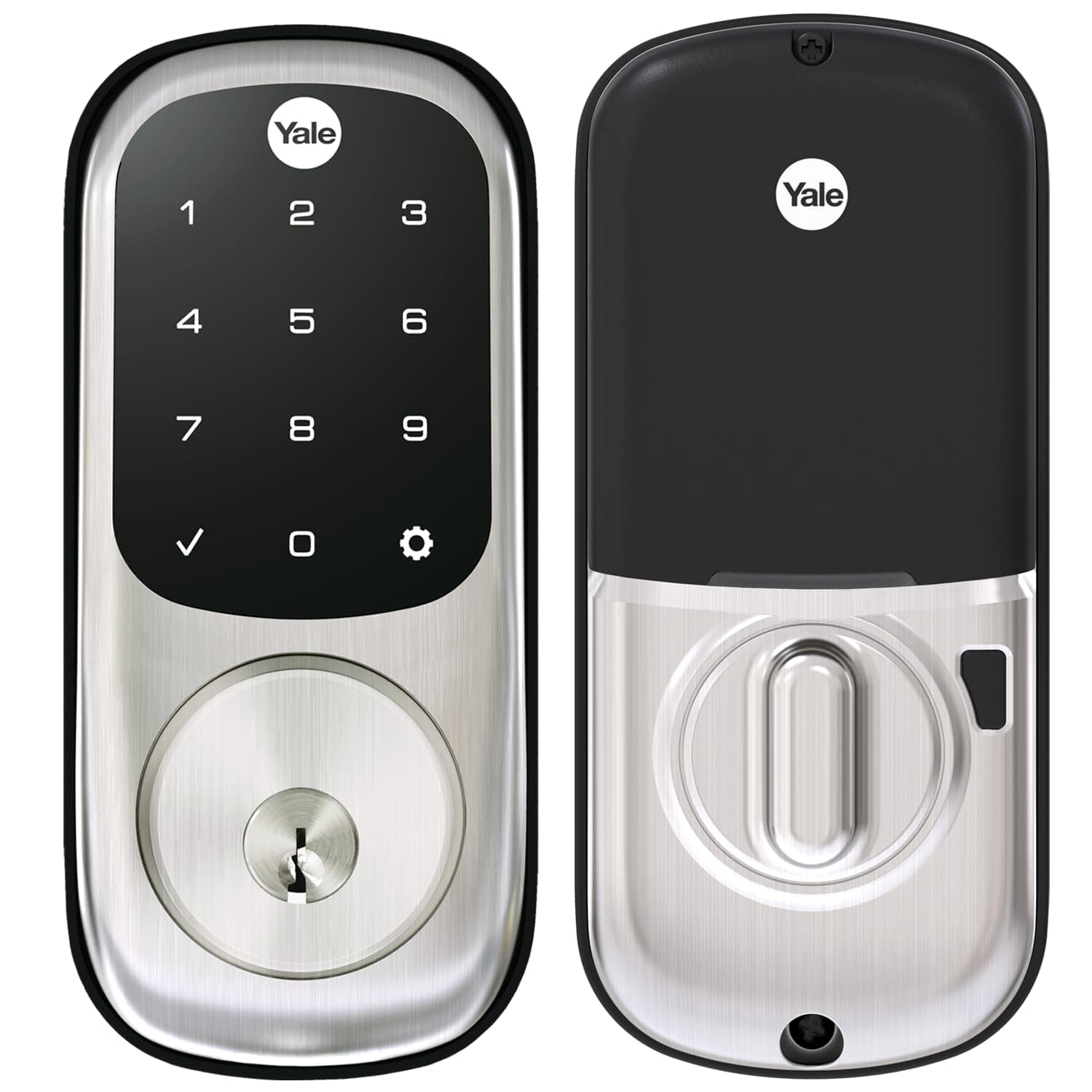
🔐 Unlock the future of home security—smart, sleek, and totally key-free!
The Yale Assure Deadbolt Lock with Touchscreen offers a Grade 2 certified, keyless entry solution featuring a backlit electronic keypad, auto-lock functionality, and easy installation on standard doors. It supports unique access codes for multiple users and can be upgraded to smart home connectivity with an optional Yale Access Kit, combining traditional security with modern convenience trusted since 1840.


| Best Sellers Rank | #42,570 in Tools & Home Improvement ( See Top 100 in Tools & Home Improvement ) #199 in Deadbolts |
| Brand | Yale |
| Customer Reviews | 4.4 out of 5 stars 2,963 Reviews |
| Item dimensions L x W x H | 5.5 x 5.5 x 10 inches |
| Lock Type | Deadbolt |
| Material | Metal |
| Recommended Uses For Product | Door |
| Special Feature | Auto-Lock |
A**R
Great device when paired with the August Connect module for HomeKit integration!
I have installed several Yale Assure deadbolts as well as HomeKit enabled smart locks from other brands, and this is by far my favorite! The black finish is very sleek and it matches our matte black hardware quite well. For those who want to control this with a Smartphone, the Connected by August Kit is required for HomeKit integration. Alternatively, you can purchase the Yale Assure Lock SL with August Connect which simply is these same two components placed into a larger box, and with a $80-90 higher price tag. Installation of this lock requires you to completely remove and replace the existing deadbolt. This is typically done with a phillips screwdriver, and is a very simple 2 minute operation. Once that is removed, the Yale Assure tapered deadbolt latch is installed in the door and the deadbolt mounted around it. After installing so many of these, it takes me less than 2 minutes to do these steps as well. It includes the required four AA batteries, and I suggest replacing them with lithium ion batteries when they expire. The next part can require some extra work, depending on how well aligned your deadbolt is with respect to the latch for the handleset in addition to how well the door seals when it is closed. I suggest attempting to lock the deadbolt with the existing deadbolt strike plate to see how things work before making any changes. I have found that I often have to adjust the handleset strike plate so that it latches with the door squeezed tighter against the seal - this typically requires a chisel to physically relocate the handleset strike plate. Once that is done, install the new deadbolt strike plate such that there is no interference with the deadbolt latch. This step is important, as if the deadbolt rubs against the strike plate it will at best wear your battery prematurely and at worst get jammed. Once that is complete, you can sit back and enjoy the beauty and simplicity that is the Yale Assure Lock SL. I really like that this lock does not have a keyed access. There are quite a few options that you can set on this device, such as volume (including off) and one-touch lock which simply requires you to touch the keypad with your hand to lock the deadbolt - such a timesaver when heading out! I installed the Connected by August module ( sold separately ) and that allows me to control this from my iPhone directly from the August iOS app as well as with HomeKit. From the August app, I set up geofencing, so it unlocks when I return home. From HomeKit, I use “Hey Siri” from my iPhone or Apple Watch to unlock the deadbolt. I should note, I also have an August Wi-Fi Smart Lock, 4th Generation , and I MUCH prefer this Yale lock over that. The Yale Assure Lock SL simply works better (more reliable WiFi) and has the ability for me to unlock with the keypad.
M**L
Recommended deadbolt
Very good deadbolt lock. I have another deadbolt from Eufy that is wifi connected and very often it doesn’t work. This one is my favorite, it works like a charm
D**R
3rd Purchase of this Same Lock
These locks are reasonably priced and very easy to use. I had them professionally installed, so no comment there, but I've got them on 2 houses now and it makes life so much easier! I can just give people the code and I don't have to worry about losing house keys or giving them to guests. I have a DIFFERENT combo lock on my primary residence and it's much too complicated and as a result it's really difficult to use correctly and I'm the only person in my household who can actually use it. That's why I love the Yale Assure Deadbolt. Highly recommended.
R**L
Battery Life is Short, Warnings Useless
The lock does what it is supposed to do. Easy to set up, to install, to program. My only note is that the batteries, used daily, last about 2 months, perhaps 2 and a half months. But you will not get ample warning when the batteries fail. The lock simply will no longer respond. You may see a red battery icon but by then the lock is no longer operable. You must have a key available when the lock fails or you will be locked out. A major design flaw in this lock.
I**F
Convenient, Secure, and Easy to Use
The Yale Security Deadbolt Lock is a fantastic upgrade to my home’s security! The satin nickel finish is sleek and complements my door perfectly, giving it a modern, stylish look. The keyless entry feature is incredibly convenient, allowing me to easily enter my home without fumbling for keys. The digital keypad touchscreen is intuitive and responsive, making it quick to set my personal code for access. I love the security and peace of mind that comes with the lock. The code entry system means I can grant access to trusted individuals without worrying about lost or stolen keys. Plus, the lock is easy to install and doesn’t require complex wiring or professional installation. This product offers great value for money, excellent functionality, and is easy to use. If you're looking for a secure, modern, and convenient door lock, I highly recommend the Yale Security Deadbolt Lock! Highly recommend!
J**Z
Great Lock
This is my second Yale digital lock. This one has even smaller front and additional button to disable keyboard - handy when locking door for a night. We replaced high security (flat key) lock just to avoid carrying keys. Installation is very easy, but I made mistake by installing batteries too early to program it before installing on the door. When first powered lock is checking if door is left or right hinged and being on the desk it guessed wrong. It was easy to rectify and it was my fault for not following instructions. It is amazing that this lock speaks helping to set it up. Also hardware for all door sizes is included. My previous Yale still works fine for almost two years on the original four alkaline AA batteries. Having two digital locks and garage opener keypad eliminates keys and is very safe, especially when Yale lock can be powered with 9V battery from the outside. My older Yale is on the door facing West and gets extremely hot with direct Florida sun but works flawlessly. Great product.
F**T
Great on paper but completely lacks reliability !
We bought these "smart" keypads for our home by the beach where we also host guests on occasion. They have been installed by a professional handyman to make sure there would be no hiccups. To say our experience with Yale is a disappointment is a major understatement ! 1. Beware these locks do not have any remote capability without a WiFi bridge and module. And each lock needs its own WiFi bridge/module. Those bridges only connect on 2.4Gh networks and regularly disconnects 2. some essential functions are not accessible remotely. To simply turn on/off auto-lock you need to be present and use your BT connection 3. If you program a temporary code for a guest, it will pick on the time zone you are in and not where the lock is registered 4. Now we get to where things go really bad, it's the complete lack of RELIABILITY of these devices. The locks regularly disconnected and needed a full reset several times. Because the bridge needed to be so close to the lock and is so sensitive to interference it took us some figuring out to find a spot where they operate with only minor inconvenience (still disconnect but reconnects itself without reset). We had to return one lock and one WiFi bridge because they stopped working. That simple! Then one keypad just got dead after 5 months and we had to call a locksmith to get in ($184 out of our pocket). For those thinking it, it was not the batteries...plain dead, unresponsive keypad and no key hole. Then last night another keypad started acting out and refused to engage a valid code. And remotely opening the door didn't work...All Yale customer service is their apologies and send a new lock. STAY AWAY from those keyless locks, they will cause you more troubles than anything. Will replace the three of them with a Schlage, never Yale again !
R**H
If you're hesitant to buy this ZWAVE lock, don't be.
This is by far the best smart lock I've installed and/or operated. I've installed and operated both Kwikset and Schlage locks, and this one out performed them all. It paired instantly, worked wonderfully, and the battery life is incredible. I have these linked to a Vera home controller and it's aces. The only instance where it might get funky, which really isn't even Yale's fault, is if the door isn't perfectly aligned or you have to press the door by hand to compensate for any trim seal around the frame. That issue aside, it is quiet, super easy to use and program, and looks awesome. The bolt is actually tapered, so it can help make up for a little misalignment, but try to have a smooth action if you can. You'll thank yourself. I have 4 of these for my house and they were worth every penny to automate those locks. TIPS: 1 - Always make sure you have an easy to access door into your house if you're going to go fully keyless. If these locks ever fail, the only way to unlock them would be to do so from the inside. If you have multiple ones of these that are easy to access, the likelyhood of all of them failing at the same time is PRETTY slim, but make sure you have a fallback plan in case that actually was to happen. 2 - Make sure you "hand" these locks AFTER you install them. That's when the lock determines if your door is right handed, or left (the direction in which the bolt actually locks). It's a slight pain in the butt to rehand these locks, as I found out the hard way. The instructions are actually clearly lacking this information, so just follow them step-by-step and you'll be fine. UPDATE 1/25/22: These are still the best smart locks on the market. So much so that I've given them as gifts and everyone loves the reliability and versatility. After almost a year and half of constant use with manual and automated locking and unlocking, I just had to replace the batteries in my locks. They still work as if they were brand new and haven't failed or lost connection once.