We remain fully operational. Our teams are working around the clock to ensure your deliveries continue safely.

下载应用程序




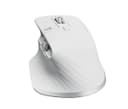


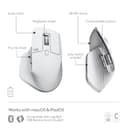
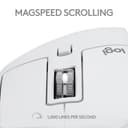



🚀 Elevate your Mac setup with the MX Master 3S — where precision meets silent power!
The Logitech MX Master 3S for Mac is a premium wireless Bluetooth mouse engineered for macOS and iPadOS users. Featuring an ultra-precise 8K DPI track-on-glass sensor, MagSpeed scrolling that’s 90% faster and 87% more precise, and 90% quieter clicks, it delivers unmatched productivity and comfort. Its ergonomic design supports natural wrist posture, while 7 customizable buttons and multi-device Bluetooth connectivity streamline workflows. Quick USB-C charging offers up to 70 days of use, and a complimentary 1-month Adobe Creative Cloud subscription enhances creative potential. Crafted with recycled materials and carbon-neutral packaging, it’s a sustainable choice for the modern professional.



| ASIN | B0BGPV5BTN |
| Antenna Location | Office |
| Are Batteries Included? | Yes |
| Are Batteries Required | Yes |
| Battery Average Life | 1 Months |
| Best Sellers Rank | #295 in Computers & Accessories ( See Top 100 in Computers & Accessories ) #24 in Mice |
| Brand | Logitech |
| Brand Name | Logitech |
| Button Quantity | 7 |
| Colour | Pale Grey |
| Compatible Devices | Personal Computer, Smartphone, Tablet |
| Connectivity Technology | Bluetooth |
| Country of Origin | China |
| Customer Reviews | 4.3 out of 5 stars 349 Reviews |
| Enclosure Material | Plastic |
| Hand Orientation | Ambidextrous |
| Hardware Platform | PC, Windows, PC, MAC |
| Importer Contact Information | Rashi Peripherals, Rashi Complex, Survey 186, Dongari Pada, Poman, Vasai (E) Thane, Maharashtra -401208, Registered Address - Rashi Peripherals Pvt Ltd, Aristo House, 5th Floor, Corner of Telli Galli, Andheri (E), Mumbai 400069, India |
| Item Dimensions L x W | 12L x 8W Centimeters |
| Item Type Name | Wireless mouse |
| Item Weight Unit of Measure | 143 Grams |
| Manufacturer | Logitech, Rashi Peripherals Pvt Ltd, Rashi Complex, Survey 186, Dongari Pada, Poman, Vasai (E) Thane, Maharashtra -401208, Registered Address - Rashi Peripherals Pvt Ltd, Aristo House, 5th Floor, Corner of Telli Galli, Andheri (E), Mumbai 400069, India Delhi: -110019 G-6, Raja House, 30-31, Nehru Place Delhi: -110019 |
| Manufacturer Contact Information | Rashi Peripherals Pvt Ltd, Rashi Complex, Survey 186, Dongari Pada, Poman, Vasai (E) Thane, Maharashtra -401208, Registered Address - Rashi Peripherals Pvt Ltd, Aristo House, 5th Floor, Corner of Telli Galli, Andheri (E), Mumbai 400069, India Delhi: -110019 G-6, Raja House, 30-31, Nehru Place Delhi: -110019 |
| Model Name | MX Master 3S |
| Model Number | 910-006574 |
| Mouse Maximum Sensitivity | 8192 Dots per Inch |
| Movement Detection | Optical, Track on glass |
| Movement Detection Technology | Optical , Track on glass |
| Network Connectivity Technology | Bluetooth |
| Number of Batteries | 1 Lithium Polymer batteries required. (included) |
| Number of Buttons | 7 |
| Operating System | macOS, iPadOS 14 or later |
| Packer Contact Information | Logitech Asia Pacific Ltd, Unit no. 1003, Tower 1, Cheung Sha Wan Plaza, Cheung Sha Wan Road, Kowloon, Hong Kong. |
| Power Source | Rechargeable Li-Po (500 mAh) battery |
| Product Features | Ergonomic Design |
| Range | 33 |
| Special Feature | Ergonomic Design |
| Style Name | MX Master 3S |
| UPC | 097855175403 |
| Unit Count | 1 Piece |
| Warranty Description | 1 year manufacturer |
I**A
Exceeded My expectations significantly
I recently got my hands on the Logitech MX Master 3s, and as a dedicated Mac user, I can confidently say that this mouse is a game-changer. In fact, it's not just a mouse; it's a masterpiece of engineering and design that has elevated my computing experience to a whole new level. From the moment I unboxed the MX Master 3s, I could tell that this was a premium product. The sleek, ergonomic design fits perfectly in my hand, providing unparalleled comfort even during long hours of work. The mouse's matte finish not only feels great but also complements the aesthetics of my Mac setup beautifully. One of the standout features of this mouse is the customizable buttons. With its innovative side-scrolling wheel and gesture button, I can easily switch between apps, navigate web pages, and execute various tasks effortlessly. It's like having a command center right at my fingertips, making multitasking a breeze. Plus, the horizontal scrolling wheel is a dream come true for Mac users, offering a seamless and intuitive way to navigate through documents and timelines. The precision of the MX Master 3s is nothing short of remarkable. The Darkfield sensor tracks flawlessly on any surface, including glass, which is a huge plus for me. It's incredibly responsive and accurate, and I can adjust the sensitivity on the fly to suit my needs, whether I'm working on detailed design projects or simply browsing the web. Logitech's attention to detail extends to the battery life as well. With a single charge, I can go weeks without worrying about running out of power. And when it does need a recharge, the USB-C port ensures a quick and convenient replenishment. As a Mac user, the MX Master 3s seamlessly integrates with macOS. Logitech's software allows for effortless customization of button functions and gestures, and I love how it recognizes the applications I use most frequently and suggests optimized settings. It's a small touch that enhances the user experience. In conclusion, the Logitech MX Master 3s is hands down the best engineered mouse ever for Mac users. It combines ergonomic excellence, customizable features, and precision tracking to create a productivity powerhouse. Whether you're a creative professional or a multitasking enthusiast, this mouse will revolutionize the way you interact with your Mac. It's an investment that pays off in spades, and I can't recommend it enough. Say goodbye to your old mouse and say hello to a new era of productivity and comfort!
S**P
Great Mouse. Insane battery life.
After 1 year of using this mouse, I'll say it has EXCELLENT battery life (I recharge it once in months, despite daily use --- monday to friday). The white colour of the mouse exterior has faded in places, and the item shows signs of age, but functionally it is doing great. No complaints. I carry it around in a hardshell case (hermitshell) in my laptop bag, JFYI. Another thing I'd like to add (and this may be specific to me) is that I've not managed to get in the habit of using the roller or the buttons available in the thumb area. Despite initially setting up custom actions e.g. close tab, refresh etc for the buttons and horizontal scroll for the roller. --- Disclaimer: This is a review written after just a few hours of use on day 1 (might update it later) Seems like a nice mouse, laden with features. I have no issues with bluetooth connectivity --- it works great (this is on a Macbook Pro M1 14") The customizability of the various buttons / rollers etc. on the mouse is wonderful. For instance the horizontal roller can be used to scroll between tabs in a window, which is super handy for me because I have a lot of tabs in most of my windows. I think I'm going to love this purchase. Note: There's no hard case in the package, only mouse + usb-c to usb-c cable. If you want to carry this around safely in your laptop bag, recommend getting a hard case separately. Note 2: This is a soft click mouse. Its left and right click are both soft and do not have much tactile feedback. They are also very quiet. If you want the regular kind of experience, you should buy the model without “S” (for Silent) in its name. Note 3: This mouse is moderately heavy. If you want a very light mouse, this is not a good choice.
V**Y
Very good.
Using daily for about 3 months with a MacBook Air for work. This is a very good mouse - responsive, versatile, and ergonomic. I had to charge it 2 times. I didn't give 5 stars only because it picked up stains. This is probably because I got the white one instead of grey and because the rubber covering on the sides feels good but can't be wiped clean like plastic. So I put a skin on it and now it looks good. Bottom line - great mouse. Go for it. I recommend the grey colour or get a skin for it.
A**I
Accurate
Best for pr editing , best than apple mouse as it’s accuracy is better than apple mouse. If you are finding any Gaming mouse you can go for this but it don’t have rgb lights.. it has decent weight comfort is next level mainly keys are noise less . So basically you can use it for gaming and editing
N**H
Logitech MX 3S Mouse for Mac - A Precision Tool for Productivity
The Logitech MX 3S Mouse for Mac is a perfect blend of performance, comfort, and style. As a Mac user, I was looking for a mouse that would complement my setup, and the MX 3S exceeded my expectations. The ergonomic design is incredibly comfortable, providing a natural hand position that reduces strain during long work sessions. The textured grip and sleek finish make it a pleasure to hold and use. The precision of the 8,000 DPI sensor is exceptional, offering smooth and accurate tracking on a variety of surfaces. Whether I’m working on detailed design projects or simply browsing, the responsiveness is flawless. The customizable buttons are a huge advantage, allowing me to set shortcuts for increased productivity. What truly sets the MX 3S apart is its ability to switch seamlessly between three devices using the “Easy-Switch” buttons. This is perfect for my multi-device setup, allowing me to easily control my MacBook Air, iPad, and desktop without missing a beat. The battery life is impressive, lasting up to 70 days on a full charge, and the USB-C charging ensures a quick recharge. Overall, the Logitech MX 3S Mouse for Mac is a fantastic accessory for any Mac user looking for precision, comfort, and enhanced productivity. It’s well worth the investment for anyone who spends long hours working at their desk. Highly recommended!
M**Y
Very poor experience with my Logitech MX Master 3S for Mac
Despite emailing the Logitech support desk, I haven’t received a single response. It’s disappointing to see such a lack of concern for customer support—especially when customers face issues after paying a premium price. I recommend avoiding Logitech devices based on this experience. Dear Logitech Support, I am having a very poor experience with my Logitech MX Master 3S for Mac. The mouse frequently disconnects, and I have to repeatedly reconnect it via Bluetooth on both macOS and Windows. Considering the premium price of this device, the performance has been extremely disappointing. Please provide a replacement or a solution to fix the ongoing Bluetooth connectivity issues. Thank you for your support.
G**D
What a wonderful little device!
I would often hear the reviews on Youtube but the price stopped me from buying. When i decided to purchase it, I was not disappointed. It is worth every penny. This device is built very solidly. I use it for my Mac Mini M1. I have an iPad as a 2nd monitor. This mouse feels more comfortable than the original Apple Trackpad whic I used before. The battery inside is reliable and lasts for many months. It has a type C USB for charging. You could use this same mouse for 3 devices. I am so satisfied!
K**A
Amazing mouse
It's so smooth. If you have been using a budget mouse for long like me, this will get your world shaken It's soo smooth and yeah it's expensive. Maybe u can. Treat urself or gift someone special
TrustPilot
1天前
2 周前