We remain fully operational. Our teams are working around the clock to ensure your deliveries continue safely.

下载应用程序


Buy anything from 5,000+ international stores. One checkout price. No surprise fees. Join 2M+ shoppers on Desertcart.
Desertcart purchases this item on your behalf and handles shipping, customs, and support to Taiwan.
🎥 Elevate your video presence—because your image deserves the spotlight.
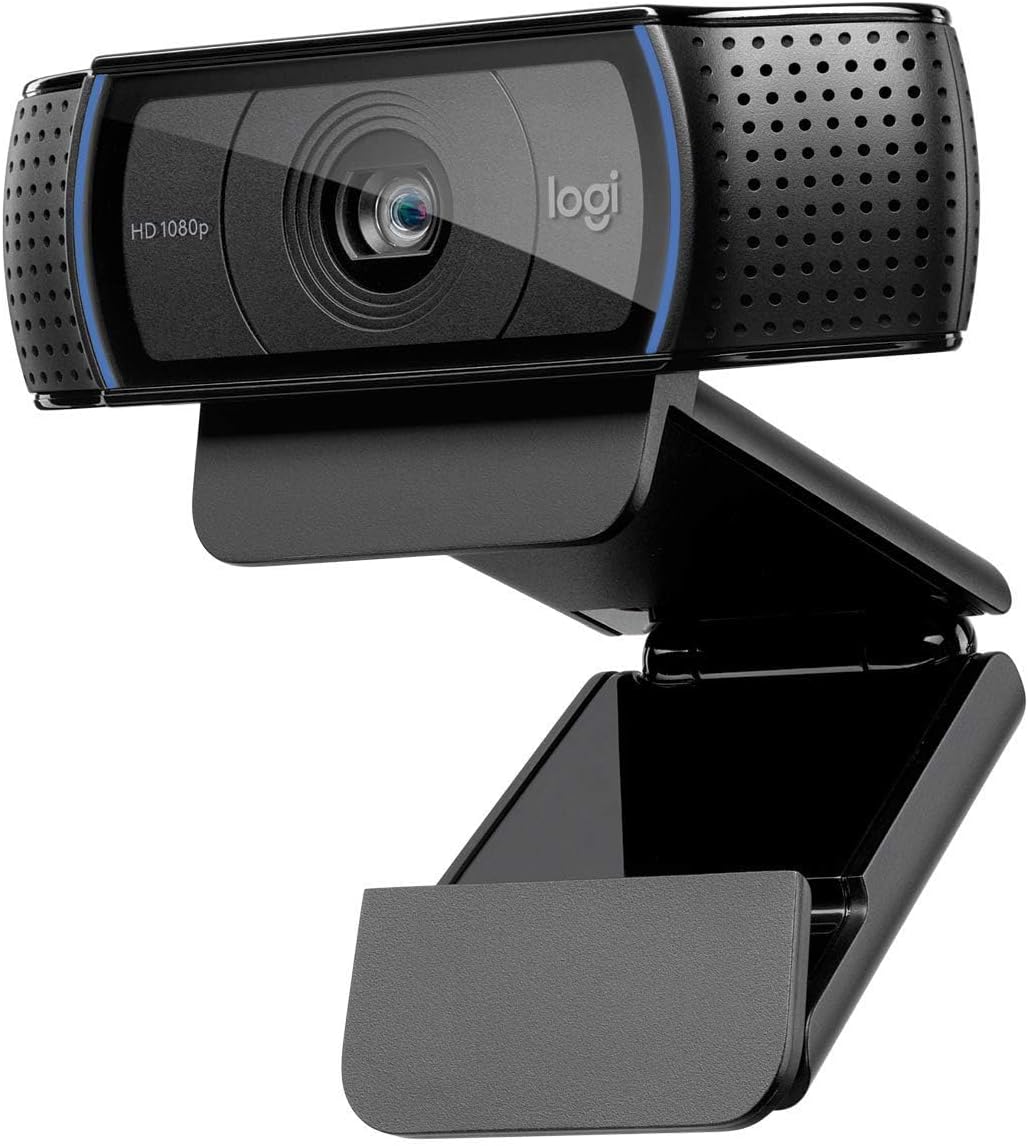
The Logitech C920 HD Pro Webcam delivers professional-grade 1080p video at 30fps with a premium five-element glass lens and 78° field of view. Its automatic HD light correction ensures bright, clear visuals in any lighting, while dual stereo microphones capture natural sound with noise reduction. Compatible across Windows, Mac, Chromebook, and popular video platforms, it’s the go-to webcam for polished video calls and streaming.


| ASIN | B006A2Q81M |
| Antenna Location | Laptop |
| Are Batteries Included? | No |
| Battery Average Life | 30 minutes |
| Best Sellers Rank | 289 in Computers & Accessories ( See Top 100 in Computers & Accessories ) 4 in Webcams |
| Box Contents | Camera Body, USB Cable, User Manual |
| Brand | Logitech |
| Brand Name | Logitech |
| Camcorder Type | Webcam |
| Colour | Black |
| Compatible Devices | Operating Systems: Windows 7, 8, 10, Mac OS 10.10 or later, Android, Chrome OS; Compatible with: Personal Computer, Laptop, Tablet, Smartphone |
| Country of Origin | China |
| Customer Reviews | 4.6 out of 5 stars 10,676 Reviews |
| Effective Still Resolution | 2 MP |
| Effective Video Resolution | 2 MP |
| Exposure Control Type | Automatic |
| File Format | MP4 |
| Flash Memory Bus Interface Type | UHS-I |
| Flash Memory Installed | 128 GB |
| Flash Memory Speed Class | C10 |
| Flash Memory Type | SDHC, SDXC |
| Flash Memory UHS Speed Class | 1 |
| Flash Memory Video Speed Class | V30 |
| Flash memory type | SDHC , SDXC |
| Focus Type | Auto Focus |
| Form Factor | Compact rectangular shape |
| Global Trade Identification Number | 05099206061309 |
| Has Image Stabilization | No |
| Image Aspect Ratio | 16:9 |
| Image Capture Speed | 30 fps |
| Image Stabilization Type | false |
| Item Dimensions D x W x H | 6.1D x 23.9W x 7.4H centimetres |
| Item Type Name | Full HD Webcam |
| Item Weight | 0.16 Kilograms |
| Lens Type | Zoom |
| Log Gamma Curve | Logarithmic (Log) |
| Manufacturer | Logitech |
| Maximum Aperture | 3.5 Millimetres |
| Maximum Display Resolution | 1080p, 720p pixels |
| Maximum aperture | 3.5 Millimetres |
| Minimum Aperture | 22 f |
| Model Name | HD PRO Webcam C920 |
| Model Number | 960-001055 |
| Network Connectivity Technology | USB |
| Number of Batteries | 1 AA batteries required. |
| Operating System | Windows XP (SP3), Windows Vista, Windows 7 (32-bit/64-bit) |
| Optical Sensor Size | APS-C |
| Optical Zoom | 1 x |
| Photo sensor technology | Other |
| Product Features | Built-In Flash, Full HD, Internet connection required, Microphone Input, Mounting Type:Clip/Stand, Noise reduction, Photo feature, USB powered |
| Sensor Type | Other |
| Shooting Modes | Low Light |
| Style Name | C920 Webcam with Mic |
| Supported Audio Format | AAC |
| Supported Image Format | JPEG, PNG |
| Upper Temperature Rating | 100 Degrees Celsius |
| Video Capture Format | MP4 |
| Video Capture Resolution | 1080p |
| Video capture format | MP4 |
| Video capture resolution | 1080p |
| Viewing Angle | 78 Degrees |
| Water Resistance Level | Not Water Resistant |
| White Balance Settings | Auto |
| Wireless Compability | Bluetooth |
| Zoom | Optical, Digital |
P**E
Quality Webcam
I purchased this webcam for my elderly parents and they were able to set it up with ease. The picture quality is excellent and the mount makes it easy to sit on top of any monitor. The microphone isn't perfect and is quite sensitive which is somewhat expected of a webcam and I'd suggest purchasing a separate mic if you're planning on streaming. Its suitable for WhatsApp and Teams calls though.
M**.
Good quality product
Very happy with this item. Very good quality picture and, I am told, sound. Very east to set up (just plug into the USB) and appropriate sized packaging. Thankfully it arrived very quickly too. Good value ; quality product.
V**S
Decent product, slightly overpriced
The picture quality it delivers is good. One problem I had was it was losing the focus during teams meetings and had to turn it off and then back on. To be fair, I am not sure this a camera issue or Windows. Point being other cameras I had did not suffer from it. Solution is to set the focus and disalbe the auto / dynamic mode. Overall decent product, but you can get cameras of similar quality for less.
D**S
Great quality from Logitech.
Superb, reliable Webcam with a good microphone. Works with a USB extension lead if you need it to.
T**T
Great quality starter web-cam.
Middle-grade quality for low-end prices. The camera quality is a bit grainy at times, but honestly, it's perfectly good for simple video-recording. I use it occasionally to stream, but I mainly use it as a microphone whilst I do not have space for my Studio-Microphone. The holder is great and stops the camera from slipping when placed on top of my monitor, and is generally very adjustable even when not on the top of the computer. The swivel being sperate from the base-plate makes this a really good product that can work at multiple angles. The camera has a soft blue light around the edges of the camera port. This can sometimes make the camera bad in the dark, and makes the quality a bit grainier at times, but when there is substantial lighting, it works great. Connection is a bit spotty, I've found. Despite being plugged in, sometimes the camera just simply won't work, even though the microphone portion of it works. Only solutions I have found are to turn the computer on/off, plug/unplug the camera, or just wait for it to sort itself out. Overall, really good product, very good price, and a great starter web-cam.
S**S
H.264 compression-on-the-fly: the solution for low-end computers
I own two ancient Macs from 2007. Both work flawlessly (one MacBook and one iMac) but, of course, they're terribly slow for today's standards. They also have early-generation built-in iSight cameras: a novelty back then, which used low-end cameras. These days, after many upgrades and software installations, it means that, at best, you can get 15 FPS out of those iSights, and you will need excellent light to get that. Using webcam chat, Skype, Yahoo, Hangouts, or similar technology means that the frame rate goes down. The bad lighting conditions at home can be offset by some software (like CamTwist) but there is a limit to what they can do. Current-generation webcams have much higher resolutions, and, in the case of the C920 HD Webcam from Logitech, a plethora of built-in enhancements (which do not require external software). The problem with current-generation webcams is that, obviously, they require much more CPU power to get a constant stream at high FPS. This is not an issue for most high-end contemporary systems, but... what about low-end, outdated computers like mine? Logitech offers in their C920 HD Webcam an alternative: H.264 encoding and streaming. All this is done by the webcam, not by the computer's CPU. Similarly, all hardware enhancements — from setting the light levels, hue, saturations, but also zoom, pan, tilt — are done by the webcam itself, leaving the CPU completely free. The result? Even on my low-level hardware, I get at least 720i video streaming at 30 FPS. Constantly. It doesn't matter how many applications are currently open or not, the webcam will not require much CPU power. It also means that saving videos to disk will consume far less disk space, as the captured stream is already H.264-encoded and, as such, it will be much smaller. The C920 HD Webcam is announced as a "teleconferencing camera". This means that not only it will capture the image from someone sitting in front of the computer perfectly (like any other high-end webcam), but it will easily capture a whole team around a desk. In my case, I live in a very small room and had huge difficulties of getting a full-body picture of myself — it meant using a timer and running away fast. The wide-angle lens is perfect for those situations. It's not usual to see a webcam to feature *both* wide-angles lenses *and* a zoom function, but the C920 HD Webcam has them both. There is also a treat. The (foldable) monitor grip (which will work on laptops, CRTs, flat-panel screens, or as a standalone mini-tripod; a "real" tripod can also be used, the webcam includes a standard orifice for that) puts the camera more or the less in a fixed position (i.e. there is no swivel function). *But* you can pan (move horizontally) and tilt (move vertically) the image *without* physically moving the camera: it's all done by software! What this means is that all usual adjustments can be done without moving the camera from its position. A plus if you have it on a fixed position and are unable to move it around a lot. This is the advantage of having a wide-angle camera: it actually captures a much larger area than what is displayed. Windows XP/7/8 software for all those features is available from Logitech's website. Mac users can either use the "default" settings or install a (free) tool from Logitech to get access to more advanced settings; it is designed for the C930e but works quite well with the C920. If you're willing to spend a few extra dollars, you can buy the app Webcam Settings from the Apple Store, which will give you much more control over all sorts of settings, apply noise reduction, fine-tune the webcam so you can use it to take screen pictures without annoying flicker, and store different profiles (useful if you have a laptop and use it at the office under fluorescent light, and move back home, where the light might be more yellowish, and enjoy webcamming outside, where the sun is shining). While every modern camera will automatically adapt to a degree, Webcam Settings will allow much more precise fine-tuning. An advantage of the Logitech C920 HD Webcam used on the Mac is that it will stream to many applications simultaneously (I think this is thanks to Webcam Settings also being on). This was previously possible with applications like CamTwist (free) or ManyCams, but apparently it works out of the box with the Logitech C920 HD Webcam. I managed to be simultaneously online on FaceTime, Skype and Google Hangouts+, while saving the same stream to QuickTime. Except for Google Hangouts, which shows slightly lower quality and much lower FPS (maybe due to the driver that Google uses), all others exhibited the same image, the same quality, all at 30 FPS, which is simply amazing. I've also tested it with popular Flash-based webcam chat sites online, with the same results (again, Google Hangouts has the lowest quality). The only application that didn't work with it was Yahoo Messenger. It correctly finds the camera on the settings for video, but when enabling it, Yahoo Messenger will always turn the iSight on, even if the configuration says otherwise! It could be a local problem. Then again, Yahoo hasn't updated the Mac version of Messenger for years, and that might be it. I couldn't validate the claim that this supports 1080i video streaming on Skype. Very likely, not on a Mac. Still, it's clear from the pan/tilt controls that you can get much more pixels than the ones showed. QuickTime correctly identifies this webcamera as being wide-screen and adapts itself to it. Other applications might not (Google Hangouts always turns the image into wide-screen, through software, thus probably a reason why it has fewer FPS than the other tools which just capture the stream raw). Also, don't let the webcam images fool you. The C920 is actually much smaller than it looks on the pictures: it's about 4" wide by 1" tall. The grip/clip folds neatly and allows it to be easily packed away. My conclusion? There are better webcams in the market — namely, Logitech's own C930e. There are other cameras with wide-angle lenses, some even with built-in LEDs to perform better in very low-light conditions. And there are cheaper ones. However, since the C930e has been launched, the C920 dropped in price considerably. It packs a lot of punch, doing all the hard work of processing HD video, and leaving the computer's CPUs free for other tasks. I'd definitely recommend this webcam to all users of low-end/old computers who really need the best webcam quality they can (obviously, high-end systems will still benefit from a smaller drain on resources and from saving videos already compressed, saving the need of post-processing them for upload/attachment).
A**R
Works very well
Excellent product
A**R
Top image, fiddly software
Great image as webcams go - I get good feedback from people I'm talking to. Easy to set up and the monitor clip works fine. The software side of things is a bit more convoluted, you can't get the best picture out of the software supplied with the webcam - after some research I found out that there is a better software option on the Logitech website. However, in messing around with settings on two separate bits of software, I've turned off the inbuilt microphones and can't find the setting to turn them back on, so I've defaulted to my Jabra headphones with built-in mic arm. For the money, if all you care about is the image, you can't go far wrong.