We remain fully operational. Our teams are working around the clock to ensure your deliveries continue safely.

下载应用程序


Buy anything from 5,000+ international stores. One checkout price. No surprise fees. Join 2M+ shoppers on Desertcart.
Desertcart purchases this item on your behalf and handles shipping, customs, and support to Taiwan.
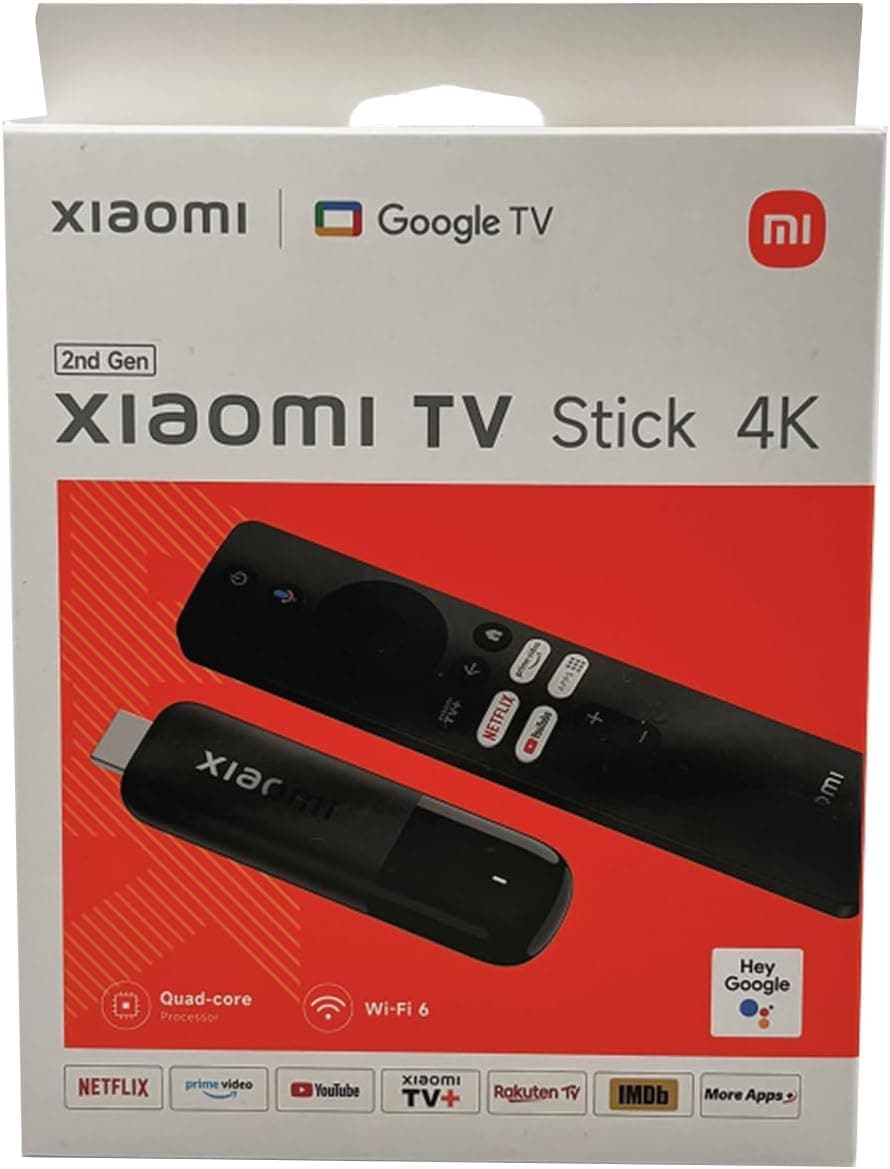
🔥 Elevate your binge game with Xiaomi Mi TV Stick 4K – Stream smarter, live sharper!
The Xiaomi Mi TV Stick 4K is a compact streaming device featuring Android TV 11, 2GB RAM, and 8GB storage. It supports 4K Ultra HD resolution with HDR and AV1 codec, offers built-in Chromecast, Google Assistant voice remote, and dual-band WiFi plus Bluetooth 5.2 for seamless connectivity. Perfect for turning any screen into a smart entertainment hub with access to thousands of apps and streaming services.


| ASIN | B0B6894XGM |
| Best Sellers Rank | #216 in Electronics ( See Top 100 in Electronics ) #4 in Streaming Media Players |
| Brand | XIAOMI |
| Built-In Media | 4K TV Stick |
| Color | Black |
| Compatible Devices | Smart TV, Tablet, Smartphone |
| Connectivity Technology | Bluetooth, Wi-Fi |
| Connector Type | Micro USB |
| Controller Type | Remote Control |
| Customer Reviews | 4.0 4.0 out of 5 stars (1,158) |
| Form Factor | TV Stick |
| Item Dimensions L x W x H | 30L x 15W x 107H millimeters |
| Item Type Name | Xiaomi Mi TV Stick 4K Ultra HD Streaming Device, Android TV 11 with Google Assistant Voice Remote Control Streaming Media Player, Chromecast Built-in, 2GB 8GB HDR/AV1/2.4G/5G WiFi/BT 5.2, 2022 Latest |
| Item Weight | 0.01 Pounds |
| Manufacturer | Xiaomi |
| Memory Storage Capacity | 8 GB |
| Mfr Part Number | LC-XMVRMBK |
| Model Name | Mi TV Stick 4K |
| Model Number | Mi TV Stick 4K |
| Other Special Features of the Product | Chromecast |
| RAM Memory Installed | 2 GB |
| Resolution | 4k |
| Supported Internet Services | Netflix, Hulu, Amazon Prime Video, Google Play Movies & TV |
| UPC | 190997001255 |
| Video Codec | HDR, AV1 |
| Video Output Resolution | 3840 Pixels |
| Warranty Description | 1 Year Warranty |
P**L
Very good
Excellent product.
P**P
excellent
Bargain. Xiaomi tv app doesn't work in uae so would be great to be able to repurpose that button on the remote but apple, prime, netflix, jellyfin, emby and kodi all there. Perfect for my usecase which was the above.
A**Z
Poor product
Product not working properly and not connecting to wifi. Waste of money. It’s lagging and not responding fast
A**L
Wonderful
Sooo easy to install and start using. Flawless operation now for months. I wanted to review after waiting to see if it worked for extended period. Yes! Very happy, great product. Amazon Prime, Netflix, youtube and even voice command on google! So many easy to use features. Remote needs a bit of tape to keep battery in though as back keeps falling off. Other than that great 👍
A**.
Excellent product
Awesome product, turned my old tv into a smart tv. I love the voice commands and responsive interface. Plus we got 1000 channels free - came as a pleasant surprise
Z**D
Brilliant. This stick > Most Android Boxes
It syncs perfectly with my Samsung TV which I wasn't expecting so it's cut me down from two remotes to one which was a pleasant surprise. The bluetooth/casting/all features work perfectly, the 4K resolution is also perfect. And its so much faster than my Gen 2 Mi Box (in another room). Cant imagine why Id need the 3rd Gen Box when this is literally perfect.
N**.
Sound Has Suddenly Stopped Working
I’ve had the media player since June 23. Great product easy to use and set up. Really happy with it until 3 days ago when the sound has completely stopped working. It’s always been low but now nothing. Any help available? Quick Update on the above. When you set the MiTV Stick up it askes to pair with your TV remote which i did. The issue i had was that i must have turned the sound on the TV down and the MiTv stick sound was turned all the way down instead. When i then tried to use it the sound was permanently muted and the volume control only operated the tv sound. Anyway, i unpaired it and can use the Mi remote to turn the sticks volume up and down and the TV remote to turn it off and on.
B**.
Great experience
10 months now, very very happy from the purchase. Great experience, the responsiveness, feel and experience is super good. It also works from an app, forgot the name of the app.
م**د
ممتاز حرفيا 👌
C**E
Excellent quality product. Works exactly as it should. Very happy with.
J**E
I recently purchased the Xiaomi Mi TV Stick 4K Ultra HD, and it has truly exceeded my expectations. The device is compact and lightweight—perfect for minimal setups. Once plugged into the HDMI port, it basically disappears behind the TV, which keeps everything tidy. Setup was incredibly simple. Just connect to power, plug into the HDMI port, and follow the on-screen instructions to connect to WiFi and log into your Google account. The stick runs on Android TV 11, offering a clean, user-friendly interface. You get access to the Google Play Store, so I was able to quickly install all my favorite apps like Netflix, YouTube, Disney+, and more. One of the standout features is the voice-controlled remote with Google Assistant. It’s responsive, comfortable to hold, and makes searching super easy. I can say things like “Play Stranger Things on Netflix” or “Show me the weather,” and it works instantly. Performance-wise, the 2GB RAM and quad-core processor handle 4K HDR streaming smoothly. I tested multiple 4K videos on YouTube and Netflix, and the playback was sharp, colorful, and lag-free. The built-in Chromecast feature also makes screen mirroring from my phone seamless. Overall, this little device is a game changer—especially for older TVs that don’t have smart features. Highly recommend it for anyone looking to upgrade their streaming experience without buying a new TV.
U**1
Excellent device Recomended
M**Y
Does not include Australian power adapter