We remain fully operational. Our teams are working around the clock to ensure your deliveries continue safely.

下载应用程序


🚀 Capture Every Detail, No Distortion, No Limits!
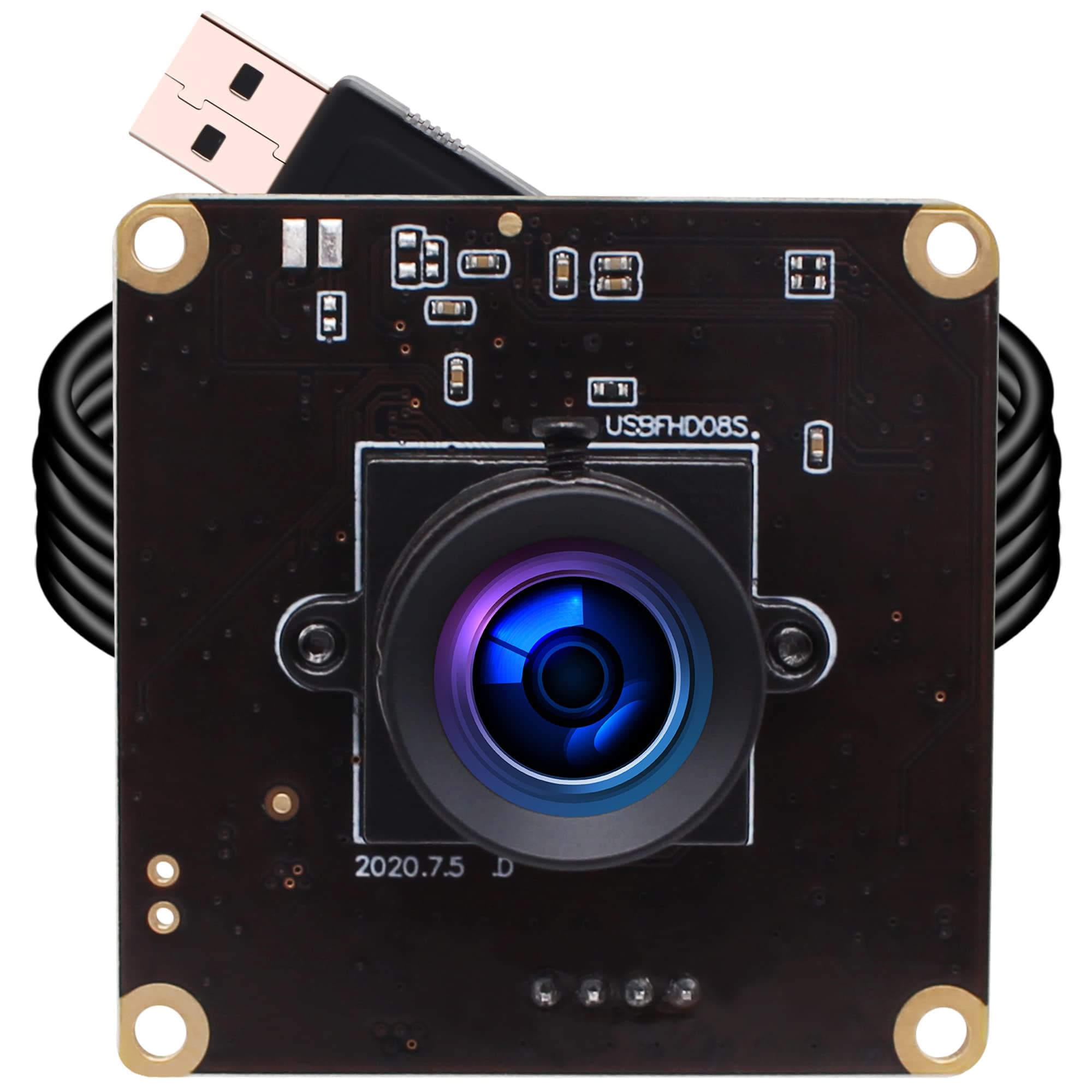
The ELP High Speed USB Camera Module offers professional 1080p Full HD video with a premium 2MP CMOS sensor and a distortion-free 100° wide-angle lens. Its standout feature is ultra-high frame rates up to 260fps for smooth, detailed motion capture, ideal for machine vision, surveillance, and embedded applications. Plug & play compatibility across major OS platforms and a compact form factor make it a versatile choice for tech-savvy professionals seeking precision and speed in a miniaturized USB camera.


| ASIN | B0BHWHMPKH |
| Antenna Location | Dashcam, Home surveillance system, Monitoring 3D Printer, Object recognition and tracking, Observing golf, Recording golf videos using Kinovea or Uneekor View, Video conference, car driving system, high speed video shooting device, monitoring 3D scanner, robot and machine vision |
| Are Batteries Included | No |
| Best Sellers Rank | #1,126 in Webcams |
| Brand | ELP |
| Built-In Media | 1 high frame rate 260fps usb camera module, 1 meter usb able, 1 using manual |
| Camcorder Type | Webcam |
| Color | brown |
| Compatible Devices | Android phones ELP USB Camera Module 260fps High fps 2megapixel 1080p cmos ov4689 Webcam Board Module,2MP Wide Angle 100degree Web Cam Module 60fps 120fps 260fps USB Cameras Module, Desktop ELP USB Camera Module 260fps High fps 2megapixel 1080p cmos ov4689 Webcam Board Module,2MP Wide Angle 100degree Web Cam Module 60fps 120fps 260fps USB Cameras Module, PC ELP USB Camera Module 260fps High fps 2m… |
| Connectivity Technology | USB |
| Customer Reviews | 3.5 3.5 out of 5 stars (27) |
| Display Resolution Maximum | FHD Pixels |
| Effective Still Resolution | 2 MP |
| Effective Video Resolution | 1080 Pixels |
| Exposure Control Type | AEB support ELP USB Camera Module 260fps High fps 2megapixel 1080p cmos ov4689 Webcam Board Module,2MP Wide Angle 100degree Web Cam Module 60fps 120fps 260fps USB Cameras Module, AEC support ELP USB Camera Module 260fps High fps 2megapixel 1080p cmos ov4689 Webcam Board Module,2MP Wide Angle 100degree Web Cam Module 60fps 120fps 260fps USB Cameras Module, Auto exposure ELP USB Camera Module 260fps… |
| Features | 1080P, Camera with UVC for computer, laptop, pc, Lightweight, Mini Size, high fps 260fps |
| File Format | M-JPEG |
| Flash Memory Speed Class | C10 |
| Flash Memory Type | SD |
| Flash Memory Video Speed Class | V10 |
| Focus Type | fixed lens ELP USB Camera Module 260fps High fps 2megapixel 1080p cmos ov4689 Webcam Board Module,2MP Wide Angle 100degree Web Cam Module 60fps 120fps 260fps USB Cameras Module |
| Form Factor | super mini ELP usb camera module 60fps 120fps 260fps high fps 2mp webcam board 1080P cmos ov4689 webcamera 100degree no distortion lens web camera 2megapixel embedded monitoring security usb with camera web cam Windows Linux Mac Raspberry usb camera module |
| Has Image Stabilization | Yes |
| Image Aspect Ratio | 16:9 |
| Image stabilization | optical ELP USB Camera Module 260fps High fps 2megapixel 1080p cmos ov4689 Webcam Board Module,2MP Wide Angle 100degree Web Cam Module 60fps 120fps 260fps USB Cameras Module |
| Item Dimensions D x W x H | 1.49"D x 1.49"W x 0.91"H |
| Item Type Name | ELP-USBFHD08S-LC1100 ELP usb camera module 60fps 120fps 260fps high fps 2mp webcam board 1080P cmos ov4689 webcamera 100degree no distortion lens web camera 2megapixel embedded monitoring security usb with camera web cam Windows Linux Mac Raspberry usb camera module |
| Item Weight | 0.09 Kilograms |
| Lens Type | fixed lens wide angle |
| Manufacturer | ShenZhen Ailipu Technology Co., Ltd |
| Maximum Aperture | 1.2 f |
| Maximum Focal Length | 2.8 Millimeters |
| Minimum Focal Length | 2.8 Millimeters |
| Model Name | ELP-USBFHD08S-LC1100 ELP usb camera module 60fps 120fps 260fps high fps 2mp webcam board 1080P cmos ov4689 webcamera 100degree no distortion lens web camera 2megapixel embedded monitoring security usb with camera web cam Windows Linux Mac Raspberry usb camera module |
| Model Number | ELP-USBFHD08S-LC1100 |
| Operating System | ANDROID, Raspberry Pi, Linux with UVC, Mac-OS X 10.4.8 or later, UBUNTU, CHROME OS, WinXP/Vista/WIN7/WIN8/WIN9/WIN10/WIN11, etc |
| Photo Sensor Size | 1/3-inch |
| Screen Size | 14 |
| Sensor Type | CMOS |
| Shooting Modes | Rolling shutter |
| Style Name | ELP 1080P USB camera module high speed 260fps pc camera for computer |
| Supported Image Format | JPEG, YUY2 |
| Upper Temperature Rating | 70 Degrees Celsius |
| Video Capture Format | MPEG/YUY2 |
| Video Resolution | 1080p |
| Viewing Angle | 68 Degrees |
| Warranty Description | 30 days free return and replacement |
| Water Resistance Level | Waterproof |
| White Balance Settings | Auto |
| Zoom | fixed lens ELP USB Camera Module 260fps High fps 2megapixel 1080p cmos ov4689 Webcam Board Module,2MP Wide Angle 100degree Web Cam Module 60fps 120fps 260fps USB Cameras Module |
J**T
A semi-high-speed camera with a good lens
I have another ELP camera, and my main complaint about it was that the lens is so wide-angle, it can't help but distort the picture. Not the case with this one. It has a narrower angle of view, but if you take videos that have straight lines in them, the lines will be straight in the video. This camera will work with any software that works with webcams, so Zoom and OBS are definitely usable. However, the main feature I was interested in is the high frame rates, and these do work, if you can find an application that lets you set the frame rate to these high speeds. Which neither Zoom nor OBS can do. The only thing I've got that does support these frame rates is ffmpeg, which is a utility used mainly for converting video formats, but which is also useful for capturing video in a file, and for streaming. Just google "ffmpeg capture webcam" and add either "windows", "macos", or "linux", and you will find lots of help on how to use it. This is just a circuit board with the camera, lens, and USB cable (which is USB2 by the way), so you'll want some way of mounting it to protect the chips and wires. I haven't mounted mine yet, but will probably go with the "plexiglas sandwich" approach, where pieces of acrylic sheet cut to just a bit larger than the circuit board are mounted on both sides with the camera in the middle, using screws and standoffs. A 3D-printed enclosure would be almost a no-brainer, so that might be even better. I don't plan on using this in rough environments, so it won't be exactly a replacement for a GoPro.
A**R
Worked for a minute.... maybe.
This camera was highly recommended as a good USB cam to use for my golf sim. I bought 2 ELP cams. My first one is still working great but this one has been malfunctioning I started using it. Regrettably I bought it and it sat for two months while I set everything up so my 30 Amazon window has closed or I would have returned it. It starts to work okay but then starts to jutter, pause and then weird blue lines. I added some photos. Maybe the badly soldered connection in the photo? Not recommended.
B**U
Much nicer picture than expected
Almost passed on this feeling 2mpx was kinda low, but opted to try it. Got it for recording / streaming my 3D printer and saving videos/pictures for time-lapse videos. Out of the box and just plug and play it had a really nice picture that tracked motion fairly well. It seems to find focus fairly well too, but I haven't honestly been able to test it too extensively yet - I'll definitely update once I do get to. Totally would recommend checking this out if you wanted a simple plug and play USB webcam without a shell for custom casing and mounting. I tried taking apart a cheap "Action camera" in the past and it simply wouldn't work w/o its screen connected too and was a bit of a hassle to keep everything connected securely in the wild. This one definitely doesn't have the latter problem, nor the former given it doesn't have or come with a screen. (Attached a short video using it no special lighting or settings, just plugged into a USB port on my PC and recorded with Windows Camera app).
B**T
This product has me conflicted
This product is one about which I am conflicted. On the one hand, it definitely does do 1080p60 and 720p120, but, on the other hand, the picture quality is mediocre at best. It has fine detail resolution, but there's quite a bit of noise in the image and the colors appear very washed out. Very little contrast, and messing with the adjustment sliders in software did not help matters at all, as far as I can tell. It is also, at least on Windows, only usable with automatic exposure and brightness, since turning off auto exposure made the picture way too dark and adjusting gain did almost nothing. This is a bit of an issue because it tends to blow out or over-expose the brightest parts of the video, which is usually whatever you have the camera pointed at, such as a well-lit face. Perhaps with better software this could be mitigated. An old GoPro has better picture quality. I mean the ones you can find used on eBay for like $30, like a Hero 3 Silver or similar. Maybe not an equitable comparison, but it's frustrating that a ~15 year old GoPro has better picture quality than whatever this is trying to be. If what you need is high framerate and you're not looking for a webcam but a project camera, this is a neat little product. For most people, I think this is probably a pass.