We remain fully operational. Our teams are working around the clock to ensure your deliveries continue safely.

下载应用程序



Buy anything from 5,000+ international stores. One checkout price. No surprise fees. Join 2M+ shoppers on Desertcart.
Desertcart purchases this item on your behalf and handles shipping, customs, and support to Taiwan.
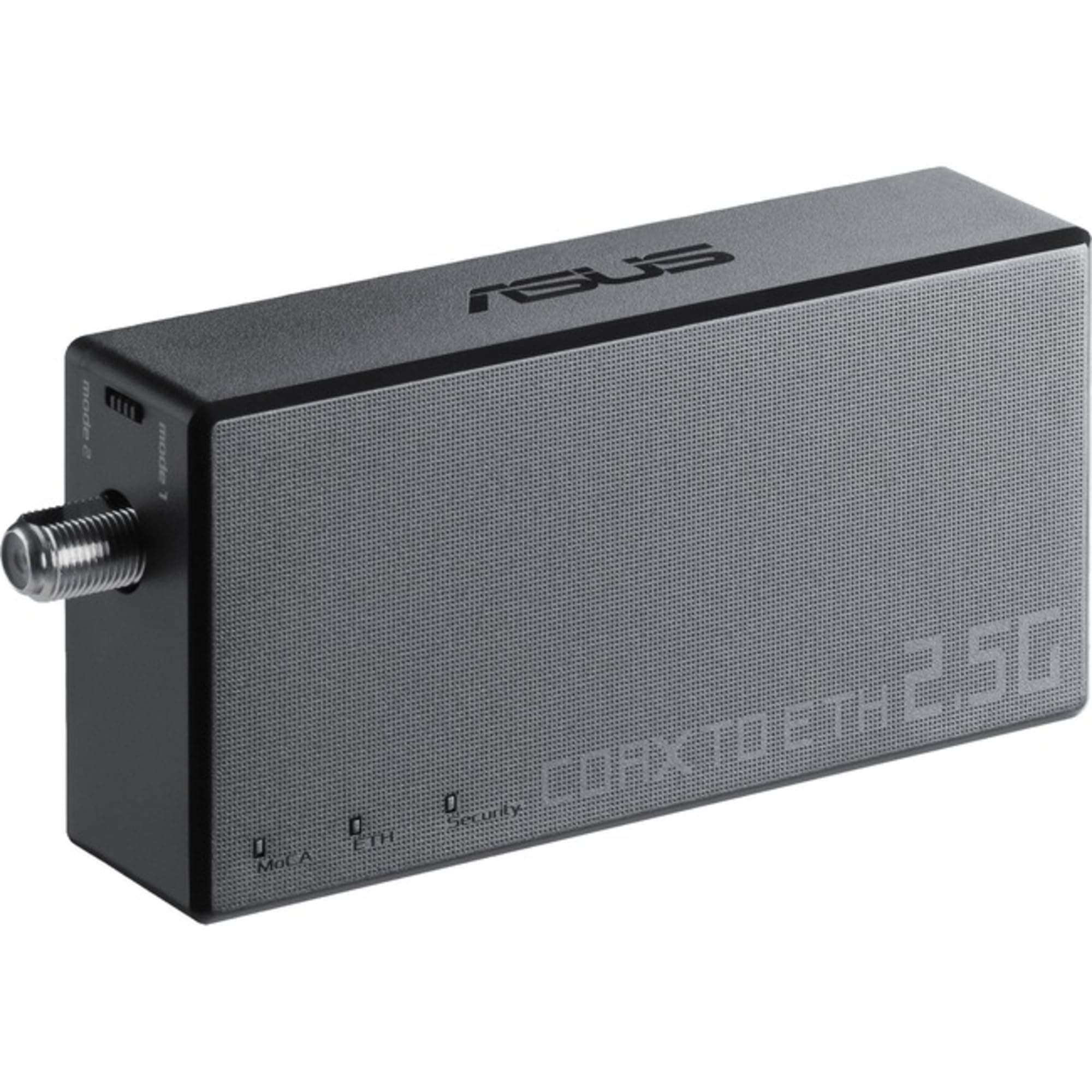
⚡ Upgrade your network game with ASUS MA-25 — speed, security, and sustainability in one sleek adapter!
The ASUS MA-25 Ethernet Over Coax Adapter leverages existing home coaxial wiring to deliver up to 2.5Gbps MoCA 2.5 network speeds, ideal for lag-free gaming, high-quality TV streaming, and robust mesh WiFi backhaul. Featuring easy one-touch MPS security, interference reduction technology, and a sustainable design with recycled materials, this wall-mountable adapter ensures a reliable, eco-friendly upgrade to your home network.










| ASIN | B0BL5RBNDB |
| Antenna Location | Gaming |
| Best Sellers Rank | #62 in Powerline Network Adapters #213 in Computer Networking Switches |
| Brand | ASUS |
| Built-In Media | Coax Cable, Ethernet Cable, F-type Male to F-type Male 90º Angle Connector, MA-25 adapter, Power adapter |
| Color | black |
| Compatible Devices | Desktop |
| Connectivity Protocol | MoCA |
| Connectivity Technology | Ethernet |
| Control Method | Touch |
| Controller Type | Switch |
| Customer Reviews | 4.0 4.0 out of 5 stars (78) |
| Data Transfer Rate | 2500 Megabits Per Second |
| Frequency | 2.4 GHz |
| Frequency Band Class | Dual-Band |
| Is Modem Compatible | Yes |
| Item Dimensions L x W x H | 4.25"L x 2.13"W x 0.91"H |
| Item Type Name | Ethernet adapter |
| Item Weight | 0.21 Pounds |
| LAN Port Bandwidth | 2500 megabits_per_second |
| Manufacturer | ASUS |
| Maximum Upstream Data Transfer Rate | 2500 Megabits Per Second |
| Mfr Part Number | MA-251-PK |
| Model Name | MA-251-PK |
| Model Number | MA-251-PK |
| Number of Ports | 2 |
| Operating System | ZyNOS |
| Other Special Features of the Product | WPS |
| Security Protocol | WPS |
| UPC | 195553705080 |
| Warranty Description | 3 years warranty |
| Wi-Fi Generation | WiFi 3 |
| Wireless Compability | 802.11b, 802.11g, 802.11n |
J**.
Better Internet Connection
You may need at least 2 of these to work with one device. Set up is easy. Used with a streaming capable TV; internet connectivity is better than WiFi. Works with an Xfinity router.
S**L
Works Great
These are very easy to install and set up and work very well. I have 2Gbs internet service and these handle it just fine.
A**√
Better than many
Speed and performance are great. Main complaint is the power cable slips out very easily. Setup instructions were ...ok. Muddle through and try a few times and it works . Did not try a three or four setup just a straight one to one run.
L**.
DOESN'T WORK
i don't know if it's just my luck or what, but I bought it twice, thinking it may be just that one bad one. Both not working. The two bundle kit one work flawlessly, but I want to add one more to another room. Both turn one for like a second or two them completely off, plug in ethnet cable, only ethnet light stays on. I plugged in the one came with the kit, same cable, same everything, just works with no problem at all. I called the tech support, no one picks up. Why put a "STOP" label to contact support if there is no support?
L**Y
Internet across the home
Worked great full speed from myb1 gig connection across the house without having to run cables or fight wifi deadspots
R**D
No support, poor instructions—thought it was defective but figured it out! Read if it won't pair.
I'm a big fan of Asus but this experience was aggravating...I ordered the Asus XC5 and two of these adapters solely because it's one of the routers with MoCA built-in. Originally I ordered two Hitron MoCA adapters ($20 cheaper per pair thinking MoCA was standardized) but those were not compatible due to the Asus MPS security so I ordered 2x MA-25 adapters next. I plugged in included coax cable to the router and the MA-25 and powered it up but the 3x led's would illuminate briefly then turn off. I pressed the MPS pairing on the router, pressed the pair button on the MA-25 but nothing. I cycled the power, pressed the pair buttons again, nothing. Rebooted the router, same thing. I tried multiple times and then called Asus support but they had NO idea what MoCA was nor what this device did. They wanted me to add it to the router as a node. After 10 minutes of explaining their product to them they said 'sounds like it's defective' so I returned and re-ordered. Next order, same thing! What did I miss? I HAD TO PLUG IN AN ETHERNET DEVICE FOR IT TO PAIR. 1-Plug in the coax cable to both devices 2-Plug an ethernet device (laptop, PC, etc) to the adapter 3-Power up the adapter and wait for the middle led to remain steady 4-Press the pair button on the router (I assume the 2nd MoCA device if you're using these end to end) 5-Enjoy ethernet backhaul speeds and reliability (at least I hope long term) I don't know why this is necessary nor why it's not specified in the instructions. This was so frustrating that this simple detail would've saved me so much time.
K**S
Everything
Working perfectly, cut down on my bill.
L**S
Verizon FIOS CR1000A seems to be ok at Mode 2 + ethernet to WiFi Router
For Verizon FIOS I was able to connect from their CR1000A ONT , from CoAx, to the ASUS MOCA MA-25, then to Ethernet. FIOS comes into the garage, but WiFi does not go through the cement block well, there is existing coax connection to the inside of the house where the WiFi Router is. Reading the specs on the CR1000A mine said it 1125-1625MHz, which lines up with the switch on the MOCA MA-25 being set to MODE 2. I also understand the MA-25 won't try to connect unless the ethernet is already connected. When I powered it on and ran to the garage and then to the router and then I was already on the internet. I couldn't believe how well it worked, usually I have to turn everything on and off and luckily the router was not fighting with something else for an IP address so far so good.
P**B
Easy to setup. Used this a couple of times over the years. Does the job.
G**.
Bought a house made in the early 2000s, and there is no internal wiring for LAN cables. However - there are old tv aerial sockets everywhere! Bought three of these to send the signal throughout the house to networked devices and as a wired backhaul for mesh wifi. There has been no data drops or needs to reset any of the devices. The only downside is there is no way to log into them to change any settings. Shame they are just not as well used in the uk as they are in the USA.
TrustPilot
1 个月前
2天前