We remain fully operational. Our teams are working around the clock to ensure your deliveries continue safely.

下载应用程序









🎯 Dominate your game with precision and style — don’t get left behind!
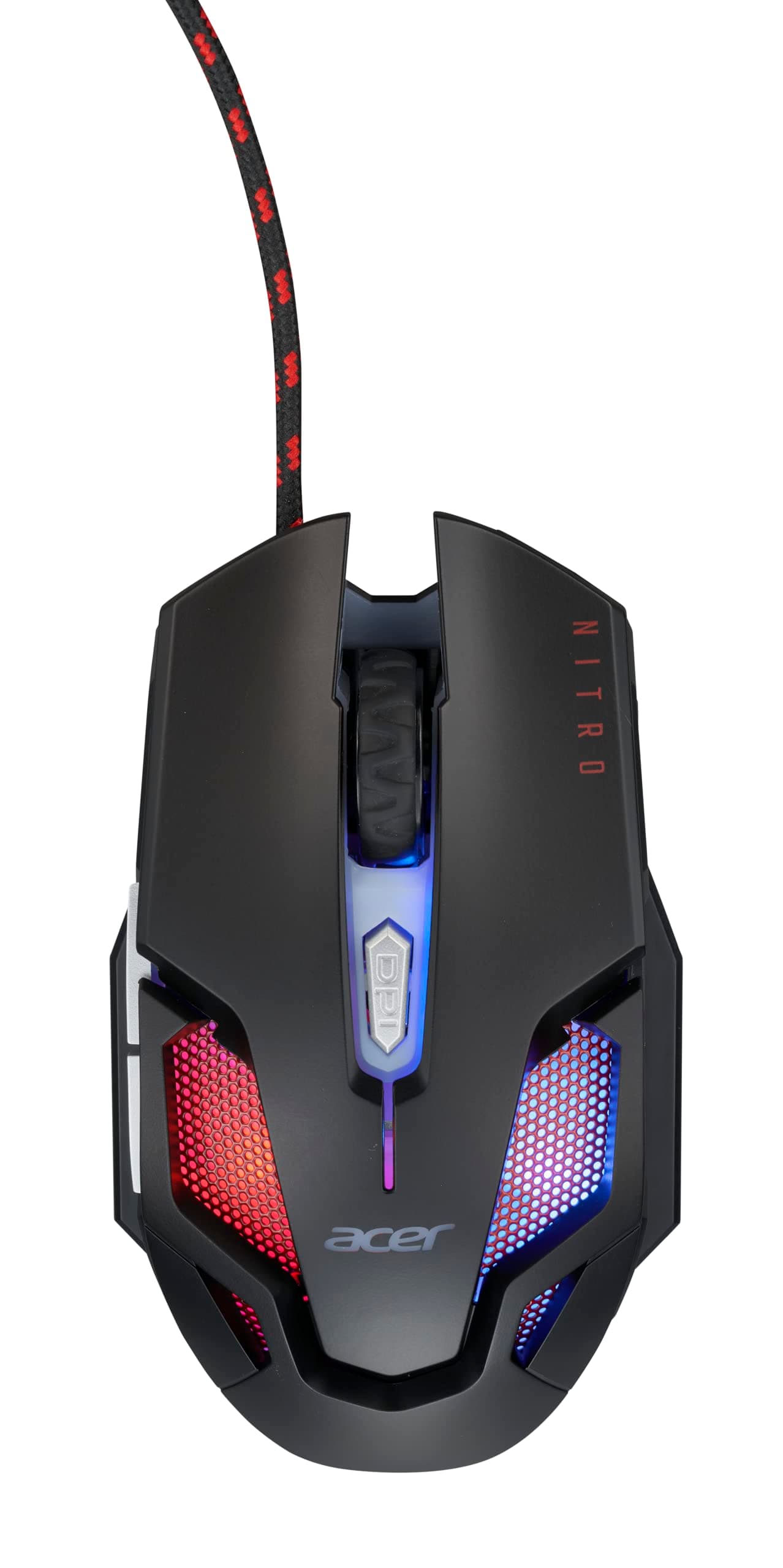
The Acer Nitro Gaming Mouse III is a high-performance 6-button optical mouse featuring a 125MHz polling rate and 6 adjustable DPI levels (800-7200) for precise control. Its ambidextrous design is enhanced by 7 colorful breathing LED lights and a durable braided USB cable with magnetic ring and gold-plated connector. Ideal for gamers seeking responsive, customizable hardware with eye-catching aesthetics.


| ASIN | B0BHL92SD5 |
| Additional Features | Programmable Buttons |
| Antenna Location | Gaming |
| Are Batteries Included | No |
| Are Batteries Required | Yes |
| Battery Average Life | 50 Hours |
| Best Sellers Rank | #96,088 in Computers ( See Top 100 in Computers ) #2,664 in Computer Mice |
| Brand | acer |
| Built-In Media | GP.MCE11.02N |
| Button Quantity | 6 |
| Color | black |
| Compatible Devices | Personal Computer |
| Connectivity Technology | USB |
| Customer Reviews | 4.6 4.6 out of 5 stars (254) |
| Embellishment Feature | Lighted Logo |
| Enclosure Material | Plastic |
| Finish | Glossy |
| Hand Orientation | Ambidextrous |
| Hardware Platform | PC |
| Item Dimensions L x W | 12.5L x 7.3W centimeters |
| Item Weight | 249 g |
| Manufacturer | Acer |
| Model Name | Acer Nitro Gaming Mouse III |
| Model Number | NMW200 |
| Mouse Maximum Sensitivity | 7200 Dots per Inch |
| Movement Detection | Optical |
| Operating System | Windows OS (Windows 7 y superior) y MAC OS |
| Pattern | [Colorful Lights] |
| Power Source | Corded Electric |
| Range | 5.0 meters |
| Style Name | Nitro Mouse III |
| Theme | Video Game |
| UPC | 195133167208 |
J**S
UPDATE: This mouse drives me crazy from a few design issues, so I'm dropping a star from the rating. I do not like how the scroll wheel isn't the center click button like almost every other mouse. If you accidentally click the scroll wheel it switches between freewheeling and clicky scroll. Well, at least it's supposed to, but sometimes, it doesn't change modes. The other annoyance, is that the mouse won't turn on when I power on my laptop. I have to unplug the mouse and plug it back in, once the computer has booted up. I've never experienced that with any mouse! ------------------- I was in the market for a new mouse, so I decided to go with this gaming mouse. The specs of the Acer Predator Cestus 335 are impressive, and the DPI performance and functionality of the mouse is good, but not great. It's a good looking mouse and the LED lighting and button customization functionality of the mouse is pretty good. The scroll wheel changes from infinity scrolling to clicky scrolling by pressing down on the scroll wheel. While a neat function, it seems to interfere with actually using the scroll wheel button. The software to configure the mouse only appears to be available for Windows, and if you follow the URL listed in the product manual, it downloads a version of software which didn't recognize the mouse on my 64bit Win10 system! I had to uninstall it, and go to the support section of the Acer website in order to find the version for my OS, and that one worked. I use Linux as my primary operating system 98 percent of the time, and there unfortunately doesn't appear to be a utility provided by Acer to support my preferred OS. The software itself offers a lot of features, but it clunky in the way it works with the set number of presets. I thought it was okay, until my son had me compare the setup software for his Logitech gaming mouse, and the Logitech software was much nicer. I then compared the Acer Predator Cestus 335 to my son's Logitech G502 gaming mouse. First off, the Logitech just feels better, as if the plastic has a nicer texture. The scroll wheel lock on his mouse has a separate button, which I like much better than the Acer, as it doesn't interfere with the click function. The weight of the G502 seems nicer and more balanced then the Cestus 335. What surprised me after using the Cestus 335 for a while, is that it is slight too wide for my big hands (size XL gloves). Although I didn't realize it at first, the extra width was annoying, and would be even worse for someone with smaller hands. As I mentioned earlier, the Acer setup software is just a bit clunky. It lets you set all of the features (if you're running Windows), but the Logitech software was much easier to use. I do like the braided USB cord of the Cestus 335 mouse, and the plug seemed pretty beefy. I guess that I'm not a gamer, as I see no need for the ridiculous high DPI of the mouse. I asked my son, who is a gamer to use the mouse for a bit, and he immediately customized all of the DPI values to be below 1000. I asked why you would need the high DPI values, and he said he doesn't. He said the mouse seemed nice, but he preferred his Logitech G502.
C**O
Chegou perfeitamente!
A**A
Though a little bit more expensive than I expected, this product worked well for my grandson's gaming activities. It was lightweight and comfortable to use. I'm not sure about the value.Because I thought that it was expensive. It was responsive though in its use.
B**N
Works well.
D**M
Muy cómodo, buena sensibilidad, y bonitos los colores.
TrustPilot
1天前
2 周前