We remain fully operational. Our teams are working around the clock to ensure your deliveries continue safely.

下载应用程序


Buy anything from 5,000+ international stores. One checkout price. No surprise fees. Join 2M+ shoppers on Desertcart.
Desertcart purchases this item on your behalf and handles shipping, customs, and support to Taiwan.
🌟 Unlock Ultimate USB-C Power & Speed — Stay Connected, Stay Ahead!
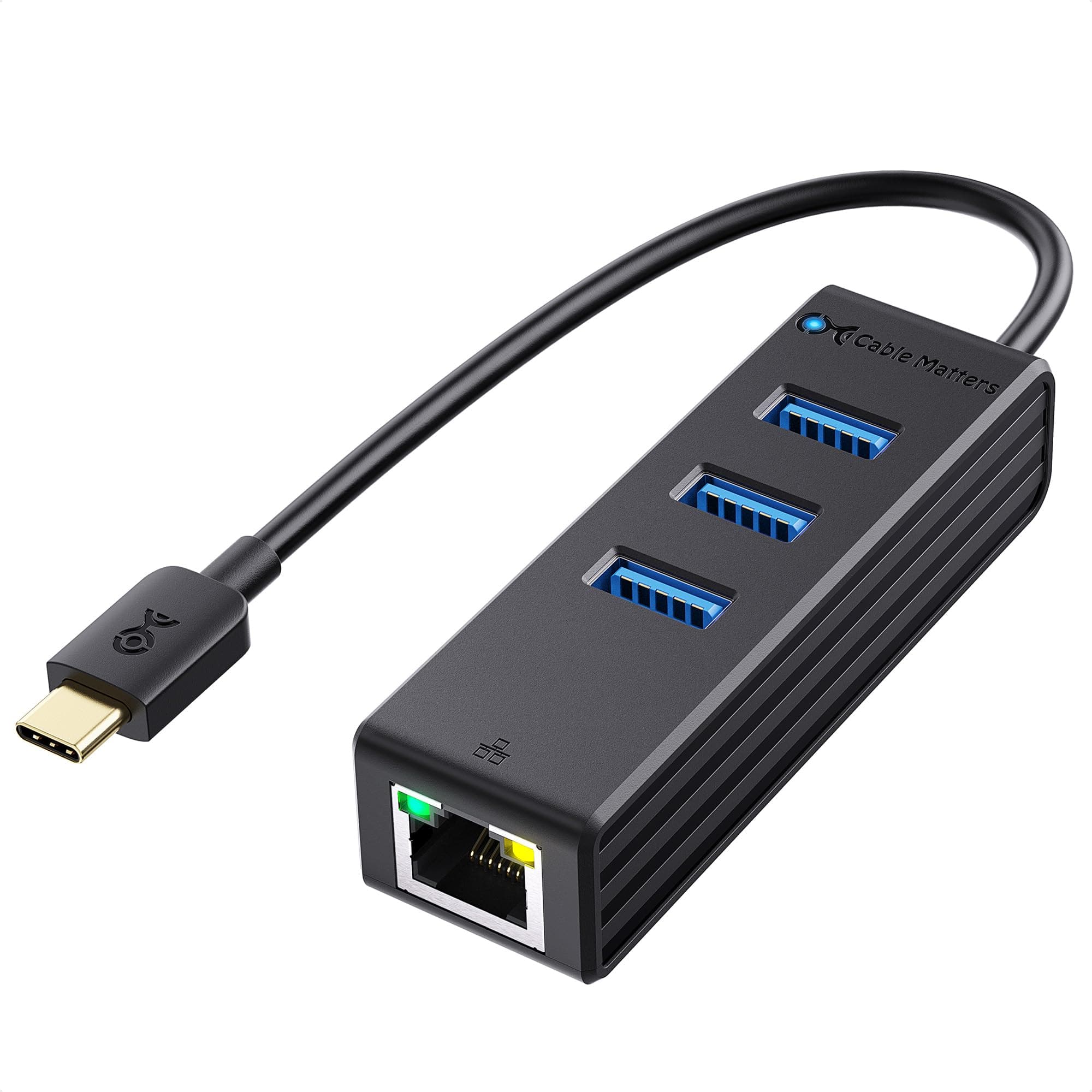
The Cable Matters 4-in-1 USB C Hub Ethernet is a compact, lightweight adapter that converts a single USB-C or Thunderbolt 3 port into three USB ports plus a Gigabit Ethernet connection. Supporting data transfer speeds up to 5 Gbps and network speeds up to 1000 Mbps, it ensures fast, secure, and stable wired internet access. Compatible with a wide range of popular laptops and devices, this hub is ideal for professionals seeking reliable multiport expansion and enhanced connectivity in sleek, portable form.


| ASIN | B075NKWPLZ |
| Best Sellers Rank | #60,648 in Electronics ( See Top 100 in Electronics ) #17 in Computer Networking Hubs |
| Brand | Cable Matters |
| Color | Black, Gold |
| Compatible Devices | Keyboard, Laptop, Mouse |
| Customer Reviews | 3.9 3.9 out of 5 stars (322) |
| Data Link Protocol | Ethernet, Gigabit Ethernet, USB |
| Data Transfer Rate | 5 Gigabits Per Second |
| Hardware Interface | Ethernet, Thunderbolt, USB |
| Item Weight | 39.69 Grams |
| Manufacturer | Cable Matters |
| Mfr Part Number | 201020-BLK-N |
| Model Number | 201020-BLK-N |
| UPC | 818707022122 |
A**N
Great for USB, issues for the Internet - Issue resolved
This thing works great as a USB-C to USB-A adapter splitter. It also provides a quite fast wired Ethernet connection; however it frequently loses it's DNS connection, making the Internet suddenly useless. Reboot works, but it's easier to disable/re-enable the adapter within Windows. It's annoying to be working away when all of a sudden everything reports no Internet connection. Device I have uses the Realtek chip and driver (which driver is already in Windows) and at this writing I have the current Windows 11 64 bit driver. Adding an update to my review above: Cable Matters responded by email when I posted the above. Their customer service person provided me with a number of suggestions to address this problem. One of those suggestions was to update the driver on my PC with the one on their website. The driver I got from their website had the same revision numbers as the one on my (Win 11) PC, but I downloaded it anyway and it has fixed the issue. So if you are running Win 11, you will likely need to do that, but once you do, this device works just fine.
M**T
Perfect functionality for 2 years
I have been using this since late 2018 when I bought my new laptop. The laptop came with only 2 USB-A ports and no ethernet port, as is the trend for sleeker laptops with a USB-C port. This adapter was (and still is) perfect for my needs. It's small enough that I can keep it safely tucked away in my computer bag when not needed, and it's a snap to plug in and be immediately available. It has worked flawlessly for almost 2 years, and with its excellent value and functionality, I'm getting another one for my daughter's new computer.
M**Y
Stiff USB ports
USB hub was detected and working fine on my Ubuntu laptop. The reason for the one star was because the actual USB ports on this hub were stiffer than my grandpa's liquor cabinet. It unfortunately broke my wireless mouse dongle which I now have to replace on top of finding another hub... I would not buy again
P**Y
Works as advertised, sort of cheap feeling.
This works as advertised. No speed reductions noticed on Speedtest, and reconnects to internet after waking from sleep. Feels sort of cheap compared to other hubs. Plastic body instead of metal like a lot of other ones. Also, the ethernet indicator lights are obnoxiously bright compared to other dongles like this.
A**R
I was searching for a USB C Hub for 3 months, and this works perfectly.
I'm gonna tell my story with the USB C Hubs. I bought a Mac Book Pro 2019 with a HUB that I found on Amazon ... When I tried this, one day was enough to know it wasn't perfect. The big problem with the HUBs: heating issues. After that, I started to search on internet for one witch dosen't have this problem, but almost all have one issue like this, even the most expensive. After a huge investigation, I was thinking to buy one wich have a lot of ports ... the only problem was the internet reviews were divided: a lot or people said it was perfect and other ones said that had heating issues or compatibility ones. I tired of that and decided to buy a cheaper one, with good ports and good brand. I tried Cable Matters before (I have the USB C to HDMI and it's perfect too). And this works perfect. All ports works perfect, even working with them simustanisly. I think it's better to have differents adapters than a super big HUB, and the best of all: it doesn't have heating issues. Thank you Cable Matter for make good stuff.
H**R
Works Great and Installation was plug and play
This USB C hub provides one Ethernet and three USB 3 ports. I plugged it into the USB C port on my HP Envy-15 laptop running Windows 10. The USB C hub was immediately detected and the drivers were loaded automatically. There was nothing I had to load to make it work. I tested the Ethernet connection and the throughput was good for the 1 GB/s Ethernet port. The three USB 3 ports worked as well. This is a good device to have for a laptop without an Ethernet port built in.
N**U
Does not stay connected
Recently just bought this product and believed in the idea of plug and play... well it plugs, for like 5 minutes and then it disconnects. I did so much troubleshooting and NOTHING has worked, then I thought about it, WHY DO I HAVE TO DO SO MUCH TROUBLESHOOTING FOR THIS THING TO WORK??? So, I give up.
G**M
Great Value. Works like a charm
My sleek HP laptop has only three ports which includes one usb port. I needed this adapter to attach all of the drives and other accessories. I bought two different ones and this one worked. The other did not work at all. Inexpensive and does the trick.
L**E
M1iMac購入したのは良いが、USBポートが全てThunderboltなのでこの商品を購入しました。 LANケーブルと外付けHDDとBlu-ray対応の外付け光学ドライブ。それからオーディオインターフェースを繋げてます。 これらは問題なく作動しています。 難点を言えば、当方Logic pro XでのレコーディングではLANケーブルからノイズを拾っちゃう事です。 欲を言えば、USBポートもう一個欲しいところです。 これらの事情から、星2つ減点します。 特にMacでDTMやる人は参考にしていただけると嬉しいです。
K**N
Device was delivered without damage. Use it on my HP Envy x360 15" laptop which has no RJ-45 port. I use the dongle to plug into an ethernet port and it works GREAT! Also plug USB drives and mouse into and works no problem. Love when it is sitting on the table, the USB ports are facing up, so very easy to plug drives and connectors into the top opening. Would definitely recommend this device.
A**R
Ethernet is stable and bandwidth is as expected, and most importantly no lag on USB devices plugged in this adapter. I had terrible experiences with adapters from other brands where the Logitech Unify Adapter would be super slow (mouse and keyboard lagging up to a few seconds). This one is as transparent, same as plugging in the laptop port.
S**J
As an IT support person, I need solutions easy to deploy to my users. I am replacing ten laptops in one of our offices and the new laptops do not have an Ethernet adapter. In the description of this product, this item says "SIMPLE INSTALLATION with no Ethernet drivers or external power required". ** This is 100% inaccurate. ** Across multiple manufacturer laptops including Lenovo and Asus, this unit did not work until a driver was downloaded... but guess what? Try finding the drivers! Turns out this is a re-branded RealTek product and their website for driver downloads expires the download link within minutes and requires email authentication to obtain. Honestly what should be a simple solution becomes a cost of time, patience, and effort. Very frustrated...
D**X
Received item and very satisfied
TrustPilot
1 周前
2 周前