We remain fully operational. Our teams are working around the clock to ensure your deliveries continue safely.

下载应用程序




⚡ Upgrade your network, upgrade your hustle!
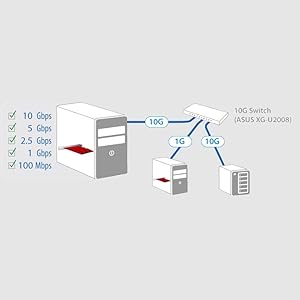
The ASUS XG-C100C is a high-performance 10GBase-T PCIe network adapter delivering up to 10Gbps speeds with backward compatibility across multiple Ethernet standards. Featuring integrated QoS for traffic prioritization, it ensures smooth, lag-free connectivity for professional and gaming environments. Compatible with Linux and Windows, this compact adapter offers plug-and-play convenience and reliable operation within standard temperature ranges.





| ASIN | B071JR2ZW8 |
| Best Sellers Rank | 25,050 in Computers & Accessories ( See Top 100 in Computers & Accessories ) 295 in USB Computer Network Adapters |
| Box Contents | Network Adapter, Manual |
| Brand | ASUS |
| Brand Name | ASUS |
| Color | 10 Gigabit Ethernet |
| Colour | 10 Gigabit Ethernet |
| Compatible Devices | Desktop |
| Compatible Operating System Family | Linux, Windows |
| Compatible devices | Desktop |
| Customer Reviews | 4.1 out of 5 stars 1,033 Reviews |
| Data Link Protocol | Ethernet, Fast Ethernet, Gigabit Ethernet, IEEE 802.1p, IEEE 802.3 |
| Data Transfer Rate | 10 Megabytes Per Second |
| Data link protocol | Ethernet, Fast Ethernet, Gigabit Ethernet, IEEE 802.1p, IEEE 802.3 |
| EU Spare Part Availability Duration | 1 Years |
| Global Trade Identification Number | 00889349620069, 04712900620061 |
| Hardware Interface | Ethernet |
| Hardware interface | Ethernet |
| Item Dimensions L x W x H | 12L x 8.4W x 2.5H centimetres |
| Item Type Name | Network Adapter |
| Item Weight | 1 Grams |
| Manufacturer | Asus |
| Manufacturer Part Number | XG-C100C |
| Minimum Required Operating System Version | Windows 10 |
| Model Number | 90IG0440-MO0R00 |
| Product dimensions | 12L x 8.4W x 2.5H centimetres |
| UPC | 718929128209 889349620069 |
| Unit Count | 1.0 count |
T**M
Worked immediately, great throughput
Worked immediately in my Linux PC, with 64 CPU, no drivers needed ~ lan was the bottleneck Make sure the short slot on your motherboard is PCI3 and not PCI2, sometimes a short slot will be downgraded to a PCI2 by the manufacturer while all the other longer slots are PCI3. You can of course put it in a longer slot to obtain PCI3 and that's exactly what I have had to do and move one of my cards down to the PCI2 short slot - it's a USB 3.1 Type C card and still has ample bandwidth to provide 10Gbits to my external hardware even though it's now in a PCI2 slot. Before you complain of slow throughput consider where the data you are transmitting is being stored, if it's a standard spinning HDD then they max out between 200~250Mb/s, SATA SSD or SATA NVME maxes out at 500~600Mb/s, mine goes to PCI Bus mounted NVME in PCI3 mode ~ which in my system max out at 2GB/s, that's 2 GigaBytes / s, not 2 Gigabits / s, generally speaking if a measurement is in Gb/s it's Giga bits ( small b ), if its GB/s its Giga Bytes ( capital B ) but not everyone sticks to this convention. Rule of thumb - MegaBytes/s are approx 1/10th of the Gigabits, keep that in mind and the speeds in your system are easier to envisage.
R**E
It’s alright
Works great with Windows Server once the drivers are installed. Would be better if it was already recognised on an ASUS motherboard without drivers but here we are. Sits nicely in the case, easy to install and get drivers to recognise the card, haven’t tried on Linux or Proxmox yet but definitely want to
P**G
Works well, but check SFP+ alternatives before buying
Its a little strange but yes, ASUS produces one of the cheapest 10GbE RJ45 out there and here it is. Just like other consumer grade 10GbE NICs, this is an Aquantia AQC-107 cards, which had recently fall under the Marvell umbrella - which is quite a big name in corporate NICs space. In case you need to know - that's the same chip as Apple uses in their iMacPro and Mac Mini - so macOS has drivers for this chip out of the box. Don't ask me why that matters... Tested in Windows, Ubuntu and unRAID and it records a 9.4-9.5Gbps with iperf using a Mikrotik CRS305, so that's pretty good. Build quality is good as you would expect from ASUS; comes with a half height bracket for swapping, just in case you need to fit it in a 2U rack, or in my scenario, a Lenovo M920q tiny node. I was pleasantly surprised by how small this thing is - the picture makes it looks bigger than it is. If you look closer you'll see that the card finishes by the end of a x4 slot - so that's very short indeed. The real question here is - whether you actually need a RJ45 NIC? If you are buying one of these, presumably you'll be needing a 10GbE Switch. Apart from a couple of 8xGbE+2x10GbE offerings from Netgear etc, most switches are still corporate offerings which primarily focuses on SFP+. So if you buy one of these with a SFP+ switch, you'll need to throw in an extra SFP+RJ module which are like £50-60. Also worth mentioning is that these modules run at 70-90ºC at 3V+ - I kid you not - its not really designed for your desktop use. Then it begs the question - why not use a SFP+ NIC? A Mellanox ConnectX-3 is just <£40 from China, and a SFP+ Patch cable <£20. Then you have a connection costing less than this ASUS NIC while also not being a finger burner. Worth a thought really. Its worth noting that there is a SFP+ equivalent of this card from ASUS too in form of XG-C100F. However while that is priced similarly to its RJ45 sibling, its more than double the cost of other SFP+ competitors. So unless you really need a SFP+ NIC on AQC-107... for some macOS related reasons... then you probably wouldn't want that.
B**E
10GB Ethernet over PCIe Gen 4.
The Ethernet card was simple to install without any drivers on Windows 11 Pro. The card is one of the few PCIe 4 cards on the market in 2023, and I wanted to keep my internal bus working as fast as possible, thus reducing waits and improving overall system response time. Real world data through put is 6GBs without jumbo frames and about 9GBs with Jumbo frames. Which is the limit for 10GB networking anyway. So speed isn’t an issue. It was nice to get this as a copper Ethernet adapter rather than an SPF+ slot. But the next generation of networking looks like it will all be optical anyway. So I’ll probably have to upgrade to a SPF+ slot 25GB or faster network card in the next few years.
P**I
Don't bother!
Whilst i note some people have had success with this card, most are not trying to use it at the advertised speeds. This is the 2nd card with the same chipset (different model) I have tried and it works for a short while before becoming unresponsive until you reboot. On researching a possible fix it seems many have had similar issues with a wide range of PC configurations so I returned and refunded. Note, I even tried running the card at 5Gig and it still failed. I've since found a better spec'd Intel card for the same price on ebay and have had no issues whatsoever.
J**Y
Worked out of the box on Ubuntu, and very fast too. Choose your PCIe slot carefully.
I bought 2 of these adapters to evaluate against some (more expensive) alternatives in a small Linux cluster running Ubuntu. Unlike some of the other cards, where I had to compile the device drivers from C source code, these cards worked out of the box. It's also very fast and I am achieving 9.42Gbs which is close to the theoretical maximum allowing for overheads. Benchmarks attached. I've installed it in a spare PCIe 3.0 x8 slot and I've noticed that a few reviewers have commented that they are achieving much lower speeds and I did some research and experimentation to find out why. This card ideally needs to be placed in a PCIe 3.0 slot with x4 speed to achieve its potential. I moved it to a PCIe 2.0 slot, in the same computer, and the bandwidth dropped to 7.4 Gbs. This isn't a fault of the card, the same thing would happen with other 10 Gbe adapters. On some motherboards some of the PCIe slots are wired for lower speed than their physical width, or installing multiple PCIe cards can reduce the number of available channels across the entire bus, for example installing a powerful GPU may reduce, or even disable, other slots. So I advise you to consult your system manual for the configuration and select the slot carefully.
J**S
Affordable 10GbE
This is the cheapest 10GbE ethernet adaptor on the market by some margin, hence the 5 stars. I have used it in both Linux and Windows systems and had no problems so far, the performance is dependant on the PCIe slot though. Intel-based cards may offer superior performance but for home users, this is more than enough. In Windows, you have to install a driver, which is disappointing as everything I have installed in recent times works natively. Therefore I had to leave the original NIC plugged in while I downloaded the drivers etc. In Linux, it was recognised immediately, so I only needed to change the config settings in Netplan.
P**D
Pretty good, but I couldn't get it past 6G/bit. Price of 10G switches kills it though.
Cheap enough for a 10G/bit Card. But in practice (in multiple machines) I couldn't get it's transfer speed much above 6-7G/bit for large sequential file transfers from NVME, at which point using multi-lane 4-port 1G/bit card in the server is way cheaper (mainly due to cheap 48-port Gigabit switches. I've done a lot of digging and whilst the Intel x550 T2 cards seem to reach full 10G/bit, the cost is substantially higher. So a mixed bag on this one really.
TrustPilot
3 周前
1天前