Desert Online General Trading LLC
Dubai, United Arab Emirates
Desert Online General Trading LLC
Dubai, United Arab Emirates


🚀 Elevate Your Network Game!
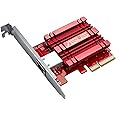
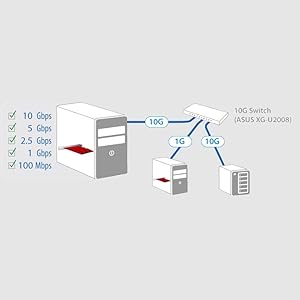
The ASUS XG-C100C is a high-performance PCIe network adapter that delivers blazing-fast 10Gbps speeds while ensuring backward compatibility with existing network setups. With integrated QoS technology for gaming and seamless integration with Windows and Linux, this adapter is designed for professionals who demand speed and reliability.





| Brand | ASUS |
| Product Dimensions | 12 x 8.4 x 2.5 cm; 60 g |
| Item model number | 90IG0440-MO0R00 |
| Manufacturer | ASUS |
| Series | ASUS (XG-C100C) ADAPTATEUR RÇSEAU PCIE 4XIEEE 10G BASE-T *0061 /A |
| Colour | Multi-Colour |
| Computer Memory Type | DIMM |
| Graphics Chipset Brand | ASUS |
| Graphics Card Ram Size | 10 GB |
| Graphics Card Interface | PCI Express |
| Number of Ethernet Ports | 1 |
| Power Source | Hand Operated |
| Operating System | Linux,Windows 10 |
| Are Batteries Included | No |
| Item Weight | 60 g |
| Guaranteed software updates until | unknown |
T**M
Worked immediately, great throughput
Worked immediately in my Linux PC, with 64 CPU, no drivers needed ~ lan was the bottleneckMake sure the short slot on your motherboard is PCI3 and not PCI2, sometimes a short slot will be downgraded to a PCI2 by the manufacturer while all the other longer slots are PCI3.You can of course put it in a longer slot to obtain PCI3 and that's exactly what I have had to do and move one of my cards down to the PCI2 short slot - it's a USB 3.1 Type C card and still has ample bandwidth to provide 10Gbits to my external hardware even though it's now in a PCI2 slot.Before you complain of slow throughput consider where the data you are transmitting is being stored, if it's a standard spinning HDD then they max out between 200~250Mb/s, SATA SSD or SATA NVME maxes out at 500~600Mb/s, mine goes to PCI Bus mounted NVME in PCI3 mode ~ which in my system max out at 2GB/s, that's 2 GigaBytes / s, not 2 Gigabits / s, generally speaking if a measurement is in Gb/s it's Giga bits ( small b ), if its GB/s its Giga Bytes ( capital B ) but not everyone sticks to this convention.Rule of thumb - MegaBytes/s are approx 1/10th of the Gigabits, keep that in mind and the speeds in your system are easier to envisage.
A**S
Works best with fibre SFP+
Handy tip follows. I purchased the SFP version, and I havent really much more to add than many of the other 4 and 5 star reviews, except the following: I originally used a 10GB copper SFP, and encountered- The card takes a long time to inmstall the driver / connect to the network, often with an almost unresponsive PC at startup (12 core Ryzen 9 7900X 64GB), and a spinning blue pointer...- Under continuous load (ie transfering >30GB across the network), the card drops off the switch. I suspected this was due to heat.Migrating to DAC eased this issue, but not eliminate it. Hower, using a fibre SFP+- ALL the issues went away. Completely. PC is back to booting in seconds, instantly usable, no delay.- NO issues with continuous sustained transfers, such as pushing 400GB of data to the NAS- Power consumption is slightly reduced (fibre SFP+ uses a few Watts less power than copper SFPs), and heat is much lower.True, one can buy used Intel X520/X540 cards on ebay for less money, although neither supports multi-gig, or an X550 or X710, which do support multi-gig (2.5/5Gb ethernet), and with corresponding less power draw. The drawbacks are finding a card version with a Win11/Linux driver (this seems to be hit and miss), or the price of X710 cards even on Ebay, where sellers are starting to raise prices. However, if multi-gig support and rock solid drivers are paramount...All in all a great wee card, although Im not 100% sure its worth £115; OEM cost of the 10gb chip is new a few quic, and all Asus are doing is adding the PCB, PCIe interface and chipset, and a heatsink. But it works, out of the box, under Win10/11 which is perhaps most important to the majority of users.My only advice is therfore buy the SFP version and use fibre, or DAC if fibre is not an option.
P**G
Works well, but check SFP+ alternatives before buying
Its a little strange but yes, ASUS produces one of the cheapest 10GbE RJ45 out there and here it is. Just like other consumer grade 10GbE NICs, this is an Aquantia AQC-107 cards, which had recently fall under the Marvell umbrella - which is quite a big name in corporate NICs space. In case you need to know - that's the same chip as Apple uses in their iMacPro and Mac Mini - so macOS has drivers for this chip out of the box. Don't ask me why that matters...Tested in Windows, Ubuntu and unRAID and it records a 9.4-9.5Gbps with iperf using a Mikrotik CRS305, so that's pretty good.Build quality is good as you would expect from ASUS; comes with a half height bracket for swapping, just in case you need to fit it in a 2U rack, or in my scenario, a Lenovo M920q tiny node. I was pleasantly surprised by how small this thing is - the picture makes it looks bigger than it is. If you look closer you'll see that the card finishes by the end of a x4 slot - so that's very short indeed.The real question here is - whether you actually need a RJ45 NIC?If you are buying one of these, presumably you'll be needing a 10GbE Switch. Apart from a couple of 8xGbE+2x10GbE offerings from Netgear etc, most switches are still corporate offerings which primarily focuses on SFP+. So if you buy one of these with a SFP+ switch, you'll need to throw in an extra SFP+RJ module which are like £50-60. Also worth mentioning is that these modules run at 70-90ºC at 3V+ - I kid you not - its not really designed for your desktop use.Then it begs the question - why not use a SFP+ NIC? A Mellanox ConnectX-3 is just <£40 from China, and a SFP+ Patch cable <£20. Then you have a connection costing less than this ASUS NIC while also not being a finger burner. Worth a thought really.Its worth noting that there is a SFP+ equivalent of this card from ASUS too in form of XG-C100F. However while that is priced similarly to its RJ45 sibling, its more than double the cost of other SFP+ competitors. So unless you really need a SFP+ NIC on AQC-107... for some macOS related reasons... then you probably wouldn't want that.
B**E
10GB Ethernet over PCIe Gen 4.
The Ethernet card was simple to install without any drivers on Windows 11 Pro.The card is one of the few PCIe 4 cards on the market in 2023, and I wanted to keep my internal bus working as fast as possible, thus reducing waits and improving overall system response time.Real world data through put is 6GBs without jumbo frames and about 9GBs with Jumbo frames. Which is the limit for 10GB networking anyway. So speed isn’t an issue.It was nice to get this as a copper Ethernet adapter rather than an SPF+ slot. But the next generation of networking looks like it will all be optical anyway. So I’ll probably have to upgrade to a SPF+ slot 25GB or faster network card in the next few years.
TrustPilot
2 个月前
2 个月前
3 周前
2 个月前