We remain fully operational. Our teams are working around the clock to ensure your deliveries continue safely.

下载应用程序


Unleash Your Creativity! 🎨
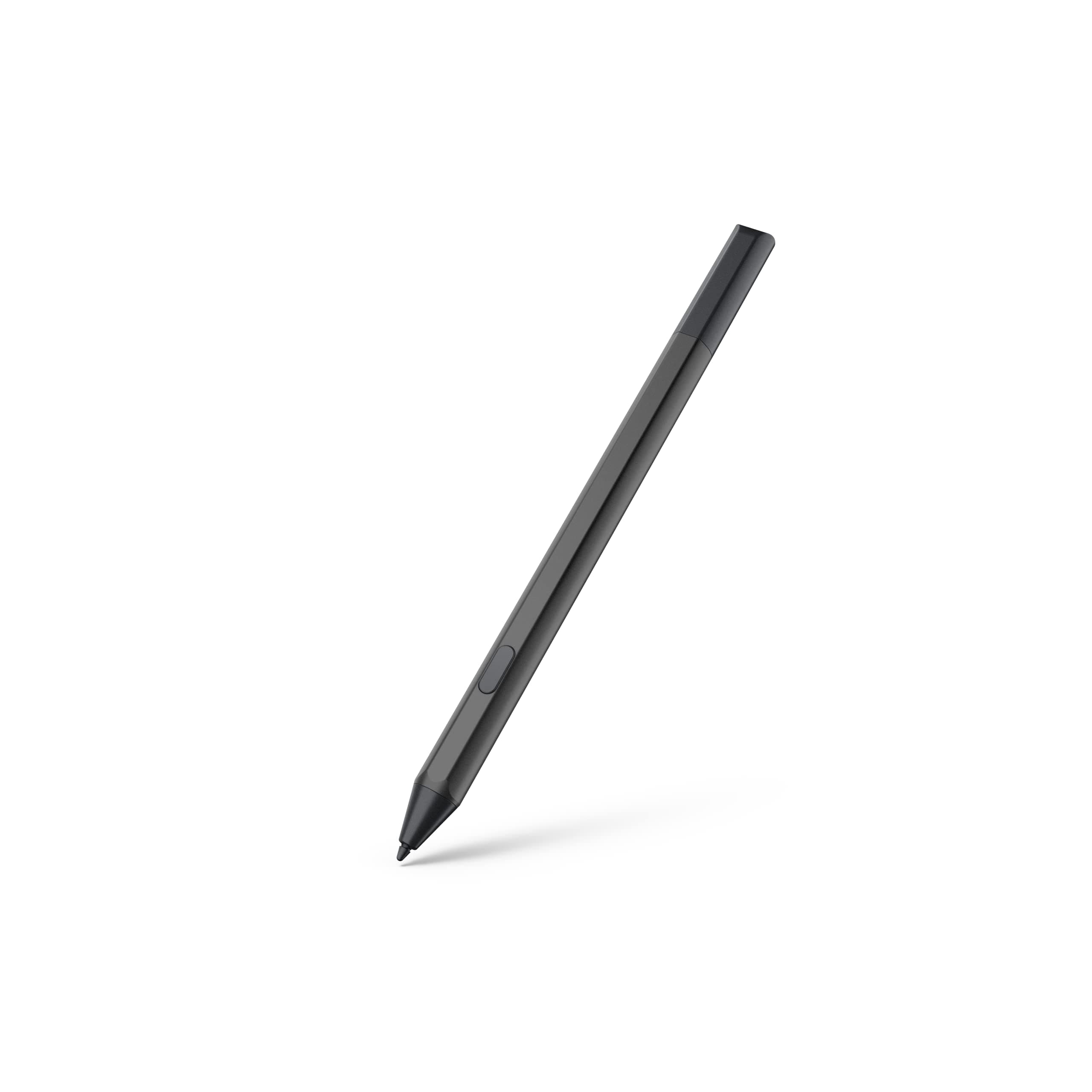
The Made for Amazon Stylus Pen is designed for the Fire Max 11 and Fire HD 10 tablets, offering a seamless drawing experience with no pairing required. With USI 2.0 certification, it features impressive 4096 pressure sensitivity and tilt support, ensuring precision in every stroke. The stylus conveniently attaches magnetically to your tablet and boasts a long battery life of up to 6 months, making it the perfect tool for artists, students, and professionals alike.
I**T
I am a huge fan
I got this to go with my Fire Max 11. I am a terminal note taker. I have bits of paper everywhere with notes and numbers and figures on them. It's messy. This works GREAT on my Max 11. Now, to be clear I put Google on my tablet the first thing. In fact if Amazon does anything in the tablets to interfere with the end user putting Google on it, I will stop buying them. The amazon app store is just pitiful and this tablet isn't worth it with what is there. With google the world opens up and makes it a credible play and work tool. It works great, any problems I've encountered were the apps. I have tried several apps. I have Inkredible as my first budget choice. You can designate backgrounds for it and I got several different pictures and backgrounds and made my own backgrounds to write on- See those pictured- I made/configured those (some I just slapped in there as backgrounds, others I made a picture first- added in the elements in photoshop where I wanted them and one it was how I wanted, then put them in there as a background- make them PDF's and then in Inkredible import the pdf's for trouble free use). This makes it interesting and if you group certain kinds of notes per different background it is easy to know which to click for those kind of notes. I must have a dozen by now. I stopped, not because of lack of material but, really, how many different ones do I really need? The possibilities are endless. That app is pretty customizable. You can purchase, for a couple dollars, different bells and whistles in this program I bought a few extras, a couple bucks for a set- the base program and functioning is free. I recently paid for the paid version, one time $10...I can manage that and I use it enough, I owe it to them to pay for it. My next in line is Squid, only because it wants a yearly fee to have all the options. It does have more sheet options in addition to customizing backgrounds..ones for music, ones for drafting.....a whole lot more, but I don't need those. If I did, the price per year is very reasonable- about $14. They have a base version that is free and that is what I have as an option. Then is Microsoft Whiteboard. You can also do custom backgrounds but it is better suited to drawing or what it was made for...marking up pages that are made a background by the program and pdf's like a teacher might do. Still it is an option and it is free. My last choice is one note. I don't like the navigation stuff as much and the way they organize and do it. But for taking notes...it will work fine. I have tried other Stylus on this Max 11- they are out there, and they work, some better than others, this one still works the best though. I like it so much I am buying spares to have around for my and my son's max 11's.
A**N
Works exactly as intended and feels natural to use
This stylus is a great match for the Fire Max 11 and Fire HD 10 (13th Gen). It pairs easily, responds accurately, and feels smooth whether you’re writing, scrolling, or sketching. No lag, no skipping, and pressure feels consistent for note-taking and everyday use. Battery life is solid, and the pen itself is lightweight and comfortable to hold for longer sessions. It’s a huge upgrade over finger input and makes the tablet far more useful for productivity, reading annotations, and casual drawing. If you want a reliable stylus that actually works with Fire tablets—without fighting compatibility issues—this one does the job. Simple, responsive, and worth buying.
J**B
Great pen out of all the pen 🖊 touchscreens!
Size is perfect...like a real pen or pencil. Its weight is so nice. There isn't any foldability? Looks very professional 👌! The installation was ... a no brainer!... not much protection though. It is magnetic to the Kindle but it falls off a lot. The magnet is strong enough but the place it is stored, it just often gets knocked off.
D**R
I changed my mind...again...
My convoluted relationship with this Fire 11 stylus pen continues. If only I had a dollar for every time I’ve unpackaged it and re-packaged it for return. CLEARLY, I WANT to like it, I just keep wrestling with the practicality of it…will I actually USE it enough to make it worth the cost? Probably not, but then I paid far more for the Apple Pencil I purchased with my iPad Air 3 years ago, and I’ve certainly not used IT enough to merit its cost either. In my initial review, I noted the absence of palm rejection as a deal breaker for me. Then I decided to search for note taking apps for further experimenting. Was not impressed with Amazon’s app store offerings, so went to Google Play. Yes, there IS a way to install Google apps on your Fire 11 2023, but that’s for another review of the Fire 11. For now, suffice to say, one of the apps I downloaded actually had some options in the settings for how I could customize the stylus pen functions…palm rejection was one of them…making my Fire 11 Stylus pen work just as I wanted it to! The other app did not have the same detailed settings, but palm rejection seemed to be working just the same. At this point I can’t remember what apps I had used the pen with initially that caused the frustration during my earlier assessment, but I do remember they were not designated as note taking apps specified for handwriting. SO, no more deal breaker! Another concern I’d had was the iffy strength of the magnetic attachment of pen to tablet. I use a clear, minimalist cover on my Fire 11 to protect the back from scratches. As with most similar covers, it DOES allow for a magnetic connection to a stylus pen, but it is not what I would call a very dependable one…it can get bumped off quite easily. I have the same issue with my iPad and Apple Pencil when using a similar cover. When using my iPad keyboard case, the magnetic strip is not covered, and the Apple Pencil sticks like glue. I discovered the same holds true for the Kindle Fire 11 pen…when I remove the cover and expose the magnetic strip, the pen sticks like glue, just like the Apple pencil. Of course, the issue here is that most folks are going to want a cover of some sort on their tablet, and unless the cover leaves a bare space over the magnetic strip, the security of the holding power will be iffy and undependable. The $50 magnetic cover made just for the Fire 11 would eliminate this issue, but it’s too expensive and I don’t like the flap style cover…I find these cumbersome and annoying when using the tablet for relaxed reading. I’ve yet to find a cover that would protect the back of my Fire with a minimalist covering, while leaving the exposed edge for the pen. Maybe I can live with this. My other concern was the annoying little tool necessary for changing out nibs. No more than I would actually use the handwriting or drawing features of this pen, I would likely not have to do this often, but should the time come, I will likely whine about it. Would it have really been that much more difficult to just make a screw on nib Amazon?! Bottom line of my reassessment, will I keep this thing or return it? I still don’t know. Although I don’t anticipate much need of having a comfortable and accurate tool for handwriting on this tablet, having this pen WOULD offer those capabilities should I change my mind…and as you can see from this overly lengthy review, I tend to change my mind often. I will also say that when using a wireless keyboard and tapping the screen to place the cursor or make selections, it is far more accurate and easy using the stylus pen than a regular stylus…rubber, fiber or even disc precision requires applying more pressure…big plus for the stylus pen. Do I anticipate a lot of use for it? No. Yet all practicality aside, it’s clear that I WANT it, practical or not. And if you’ve stuck with me throughout this review, maybe I’ve offered enough info for you to decide if you also want it. You can read on starting with the next paragraph, but it isn’t really necessary, as this re-review makes mention of all of the things I didn’t like initially. And yeah, I’m keeping it. Not practical for me personally, but I’m keeping it anyway. The first review, if interested, is as follows: It took me a little over a week to adjust to this thing (I also use an iPad Air with an Apple Pencil, so there were some adjustments to differing platforms, etc.), but eventually I felt like I could be happy with this product…BUT… First let’s cover everything BUT the but. This pen feels good in the hand, albeit a bit heavy. In an age of rechargeables, I thought it a bit weird that it uses batteries that must be replaced. Not my preference, but I felt I could live with it. Replacing the tip didn’t seem like something I would be looking forward to either. It would require the use of an odd teeny little “tool” (included with the pencil, that would be oh so easy to lose!). According to testimonials on the web, neither the tool nor the process could be considered “effortless” (as in the ease of unscrewing the old nib and screwing on a new one on the Apple Pencil), but I assumed I could handle it, as I would not be using this pencil or tablet as my primary tablet workhorse anyway. Magnetism is fair. Though the pencil does stick, if you handle the tablet a lot with the pencil stuck on it, it will fall off more frequently than you may like. Almost the same could be said for the Apple Pencil as well though…it sticks only slightly more securely, but that is likely because it isn’t as thick and heavy as this Fire 11 pen. I tend not to handle tablets with pens being held on with nothing but magnets except for short trips (from one room to the next) for the reasons just mentioned. I’m not sure how many times either the Fire 11 pen or the Apple Pencil can hit the floor without messing up functionality, and I don’t want to find out, so I err on the side of caution. Now, let’s move on to the BUT… …the absence of palm rejection, which ultimately became the deal breaker for me. My initial assumption before purchasing was that SURELY, EVERY serious tablet pen/pencil would come fully equipped with palm rejection as a staple feature. With a tablet the size of the Fire 11 Max 2023, how on earth can anyone use the pen for handwriting or sketching without some other part of your hand touching the touch screen at some point (and I have SMALL hands!)???!!! After about a week of being annoyed with the Fire 11’s erratic and unwanted responses to other parts of my hand touching the screen during attempts to use the Fire 11 pen for precisely the reasons you would WANT a PEN vs stylus for, I was just DONE. The Fire 11 pen is going back to Amazon and I’ll be returning to my old dual nib stylus pens with rubber or fabric on one end and a precision disc nib on the other. Works just as perfectly as the Fire 11 pen, withOUT the constant annoyance of unwanted responses from the screen being touched with other parts of my hand. Dear Amazon innovators, if you really want to compete with the big boy tablet accessories, (come on out of your cave and join the rest of the world of technology…), you certainly DO have the capabilities of doing so. Palm rejection for a device used for writing and drawing on a generously sized touchscreen device is simply a no-brainer.
J**A
Excellent writing Implement that doesn't actually right but a great choice for the Kindle
The style works pretty darn good just like using a pen looks nice easy to hold on to works well with my Kindle the only thing I recommend is a little bit better instructions on putting the battery in I had it in wrong for the first 3 days
P**S
Amazon Stylus Pen for Fire Max HD 10
It's a nice stylus, but way too big. It's like the size of a pen. To be honest I have lost my share of Stylus Pens for your phone and those are at reasonable price. If I was to lose this type a Stylus Pen I would cry. It's like at what almost $40. I don't know about you all who is reading this , but I don't have that type of money to buy a replacement. I thought this would be a stylus that you could put into you Fire Table, just like how you would place into your phone. No, I was completely shocked really. When you see the picture's everyone writing whit it to me it's miss leading. Maybe I'm the only one who thinks this. That's fine with me I'm just pointing out my point of views. I'm sending it back for these reason. Thank you
M**M
works fine at first but some issues made it completely inert
I've had this pen since August 2024, and at first it worked wonderfully. I have a refurbished Fire Tablet 10 (2023 version), and the tablet itself has been doing fine. Tried another stylus supposedly made for it, didn't work. I was excited for this one because I use it for marking up readings for class and taking notes, and I can rest my hand on the screen without my hand leaving a mark or the screen jumping around. The button towards the bottom is super helpful for a quick erase function, I use it all the time. The problems started around December 2024. The cap twists off pretty easily, which caused the connection with the screen to skip around. I kept having to tighten the cap before I wrote with it, and it became worse and worse. I would have to tighten the cap to write, and if I moved my hand to rest for a minute (like if I was listening in class), I'd have to retighten it, even if I didn't put the pen down. I have to have it taped to hold it together, and that still doesn't really work. I have to tighten it every. single. time. I wondered if it might be the battery that was going out, since I've had it for 5 months now. I don't use it all day every day, but batteries do run out eventually. I just tried to change batteries (AAAA, so prepare for that), and it straight up won't work. I put the old battery in, works just fine. New battery, absolutely no connection to my tablet. The old battery has enough juice in it to keep kicking so I can finish my reading for class tomorrow, but how long is that going to last? I still have to tighten it so it'll work. I'm looking at ordering another one and hopefully it'll work like this one did at the beginning. If not, I'll resign myself to buying one of these about every six months. Or, hopefully my next one will take batteries like everyone else's have.
M**R
Make my Kindle Fire an affordable alternative to an iPad!
It took me two tries to get this one right. My first pen was defective and, for some reason, had its battery preinstalled. And it had to be returned. The second time around totally changed my experience with my new Kindle Fire. I now have an affordable alternative to an iPad! The pen itself has some weight to it and feels pretty solid in my hand. It's about as thick as a high-quality mechanical pencil. My Kindle immediately recognized both pens without any hassle or setup. There's a button that, depending upon the program, comes in handy. I just wish you could customize the pen and its button. It does have full pressure sensitivity and tilt. That's on the level of an Apple Pencil or a Wacom stylus. The only problem is that the pressure and tilt are often dictated by the app. I've been playing with quite a few different apps thanks to the Google App Store. Some apps don't take full advantage of the pen. Amazon's App Store is pretty weak when it comes to digital art programs. I was hoping Adobe would have had an app available, but no luck. Beyond that, it's very affordable, and I have no regrets purchasing it a second time. It's transformed my tablet into a usable alternative to an iPad, which is awesome.