We remain fully operational. Our teams are working around the clock to ensure your deliveries continue safely.

下载应用程序


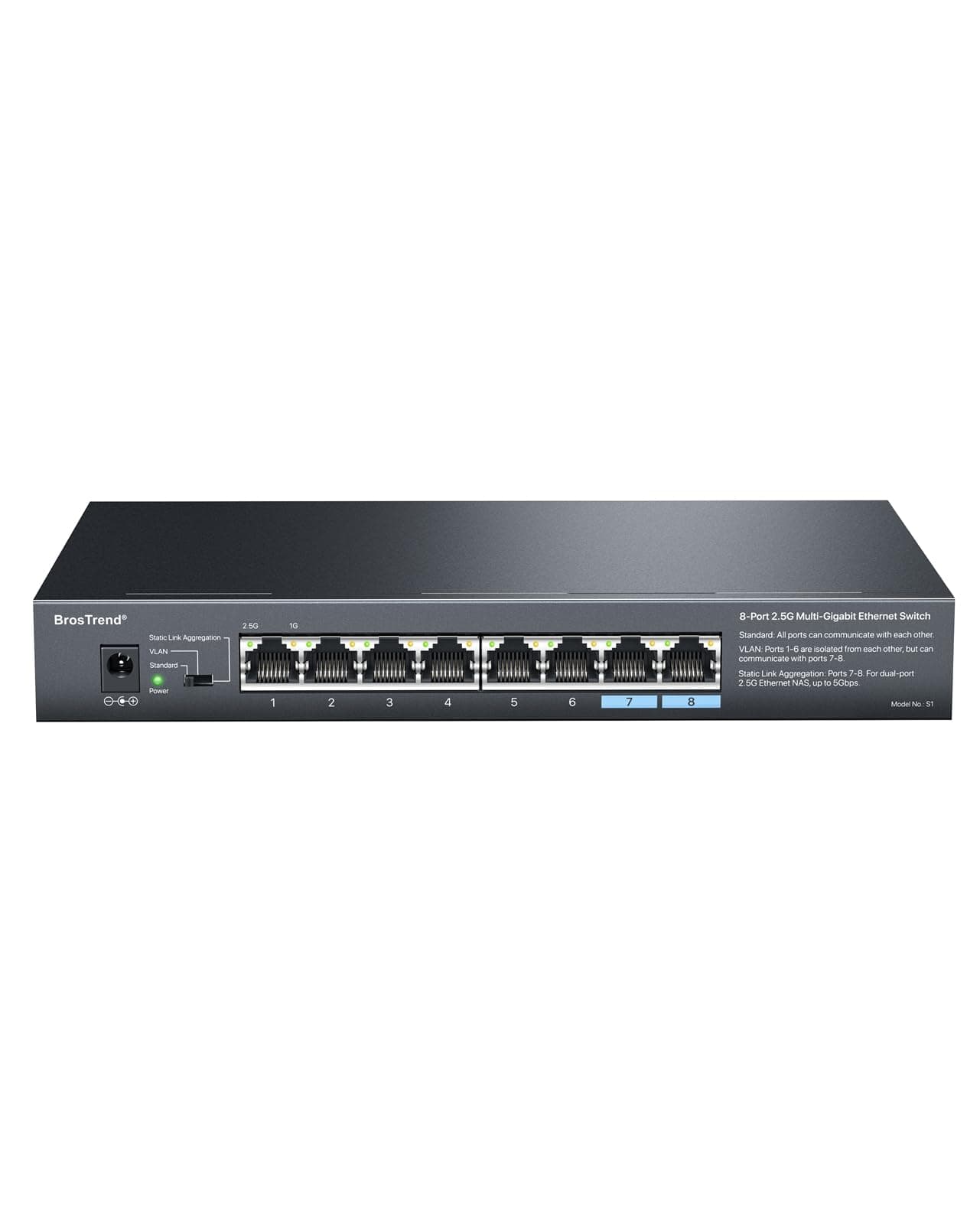
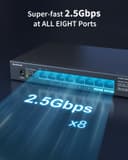
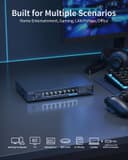
🚀 Elevate your network game with BrosTrend’s 8-port 2.5G powerhouse!
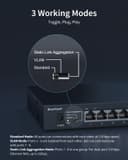
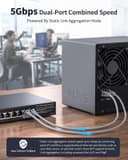
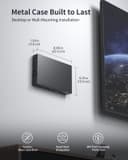
The BrosTrend 8-Port 2.5G Ethernet Network Switch delivers multi-gigabit speeds across all ports, supporting static link aggregation for up to 5Gbps bandwidth. Its fanless metal design ensures silent, durable operation, while plug-and-play functionality with three working modes (Standard, VLAN, Static Link Aggregation) requires no software setup. Ideal for gamers, small offices, and tech-savvy professionals seeking reliable, high-speed wired connectivity with flexible mounting options and limited lifetime protection.


| ASIN | B0BZHWMXBD |
| Best Sellers Rank | 70,962 in Computers & Accessories ( See Top 100 in Computers & Accessories ) 450 in Network Switches |
| Box Contents | 1 x Ethernet Switch, 1 x Power Adapter, 2 x Screws, 2 x Expansion Bolts, 1 x Quick Installation Guide |
| Brand Name | BrosTrend |
| Case Material Type | Metal |
| Color | Black |
| Compatible Devices | Compatible with Any Devices with an Ethernet port, such as Gaming Computers, PCs, Desktops, Laptops, Game Consoles, TVs, Wireless Access Points (AP), NAS, Servers, Blu-ray Players, Printers, VoIP Phones, Ethernet Switches and MUCH MORE |
| Customer Reviews | 4.5 4.5 out of 5 stars (403) |
| Data Transfer Rate | 2500 Megabits Per Second |
| Interface | Ethernet |
| Item Dimensions L x W x H | 22.1L x 13.5W x 3H centimetres |
| Item Type Name | Ethernet Switch |
| Item Weight | 0.77 Kilograms |
| Manufacturer | BrosTrend Technology LLC |
| Manufacturer Part Number | 8-Port 2.5G Network Switch |
| Maximum Power | 24 Watts |
| Model Number | 8-Port 2.5Gbps Ethernet Switch |
| Number of Layers | 2.00 |
| Number of Ports | 8 |
| Platform | Not Machine Specific |
| Product Warranty | Register for Limited Lifetime Protection |
| Switch Type | Unmanaged LAN Switch |
| Voltage | 12 Volts (DC) |
G**Y
Recommended
I’m impressed! , Good value and features for the price. Link aggregation is a killer feature on an unmanaged switch, enabling me to double the speed of an olde QNAP NAS (linux kernel v4) which does not support the latest 2.5G dongles. Uses 6 watts idle + 1 watt for each active conection. Switch gets warm but not hot unless fully loaded with approximately 14 watts of heat to dissipate. Most 2.5G switches seem to get very hot or are unstable , but I am very pleased with this switch so far. Will update review if any problems are encountered….
M**R
Will nolonger work with Virgin Media Hub 5
This was working perfectly in my network until a couple of weeks ago. All of a sudden it stopped working. My entire network broke. I called Virgin Media support and even had an engineer around. I We were unable to get it working. I've since found out that a Virgin Media Hub 5 update has broken the 2.5 gbps port. The workaround is to disable the energy efficiency mode on the switch, which there is no way to do on an unmanaged switch, such as this. I'd recommend not buying one of these if you have Virgin Media 1 gbps service because it might not work. I replaced mine with the 8 port TP-Link 8 port 2.5 gbps switch and that works.l, fortunately. Although it is significantly more expensive. Note, this is not actually the fault of this switch. It's actually Virgin Media's Hub 5 that's at fault. Hopefully they will fix the firmware soon. I hope someone finds this useful.
Q**D
the switch works really well.
After a long long though, I finally purchased the BrosTrend 8-Port 2.5G Ethernet Network Switch, and I couldn't be more satisfied with its performance. As someone with multiple computers and devices that require reliable internet connectivity, this switch has truly been a game-changer. Setup and Design: The installation was a breeze! I simply plugged it in and connected my devices, and it was ready to go. The sleek design with fanless really suits me well as shown in the pictures. Performance: The speed and reliability of this unmanaged switch are impressive. With 2.5G support, I noticed a significant boost in network speed between my two computers as shown in the video. Overall, the BrosTrend 8-Port 2.5G Ethernet Network Switch is an excellent investment for anyone looking to enhance their network's performance. If you have multiple devices and need reliable connectivity, I highly recommend this switch. It has exceeded my expectations and made my network experience much more enjoyable!
M**4
Bond
Has agregate feature to bond your 2 LANS on your NAS which gives better throughput but unfortunately was the wrong kind for my NAS 🤷
P**R
2.5 multigig switch
Great product and speedy delivery
D**G
Does what it says on the tin
Great bit of plug and play kit. Simple to set up. Good value for money and excellent for the home and intermediate user. Be nice to have a managed version available.
D**D
Good quality
Nothing all good
A**D
Perfect, lets me connect all my devices through the router.
You would want an unmanaged network switch so it automatically manages it for you, otherwise a managed network switch would require configuration. This device is perfect for what I need it for, connecting all my devices into ports 2-8 so 7 ports of devices whist port 1 is connected to my router, this ports in standard mode all other RJ45 slots to the internet and is automatically managed thus plug and play, literally simple. If I could pick anything negative to say about this I guess would be it didn't come with any RJ45 ethernet cables. Your going to need a few if you intend to connect everything up. You can use it for eg/ with ps2, ps3, ps4, ps5, xbox, xbox360, xbox one, xbox series x, Nintendo Switch, Nintendo Wii-U, Computers, Mac/PC, anything with an RJ45 ethernet slot that can connect to the internet via the network port RJ45. This can also do NAS Network attached storage a computer data storage server to access a group of clients, so can be great for hooking up computers together to share storage, or link up for games. Standard- Is what I use and lets me connect the internet to share with 7 other devices. VLink- ports 1-6 are isolated from each other but communicate with ports 7 and 8 preventing network broadcasting storm. Static Link aggression- Ports 7 and 8 in the same group, is used to connect dual ethernet ports for devices using a NAS server with the combined ethernet power to get speeds supto 5gbps instead of 2.5gbps this also is automated failover and failback connection. Either way port 1 is best used for the router to access the internet, you pick what you want to do with the rest, I choose the standard mode as it gives me access to 7 internet ports, basically extending the router's current 4 ethernet ports for internet connection. Since I don't have NAS I don't need to use the other mode. This is a top product that worked out of the box, I have mainly good things to say about it, but yeah of course it would be nice if there was a few RJ45 cables included, but it's not enough to make me want to rate lower.
S**E
Chauffe vraiment très peu, voir pas. Acheté pour rajouter des prises internet supplémentaires à ma box, car peut de connections chez le fournisseur Fr.. . Mais me sert aussi, grâce au voyant, à identifier, à l'aide du voyant vert, que je suis en 2.5G, et orange, à - d'1G. Pas de wifi intégré sur cette appareil, je ne sais pas pourquoi, à l'édition du commentaire, il demande de noté les étoiles. Je recommande.
D**E
I decided to purchase this 2.5Gb switch when I got a new Wi-Fi 7 router that could handle the extra bandwidth. My old switch was a reliable TP-Link 1Gb that worked great, but did not provide the fastest speed for my desktop that had a 2.5Gb port. Plus, I was not sure if my Cat 5e cables in the walls could handle the extra speed (depends on their quality and length). Thankfully, my Cat 5e cables work just fine. I have 2500/2500 listed for my ethernet speed connection to the switch. Pros: 1) Everything you need is on the front of the device - 8 ethernet ports, lights to tell you the speed connection for each port, a physical switch to provide VLAN and link aggregation, and the power cord port. This allows you to reach any of the cables as needed. The device is fanless as well, so no noise will come from it. 2) Device is made of metal. This provides a cooler experience for the switch as the heat will dissipate better than with plastic enclosures. Also, it has one side with all slotted vents and the other a circular small vent. I have the switch laying on its side in my media enclosure with the slotted side pointing up. Seems to keep the device cool. 3) Reliability. I haven't noticed any slow downs or connection issues. I am using all 8 ports and the connection is almost immediate for each one when I plugged them in. I get 2.5Gb using Cat 5e cables as well. I have a 1Gb fiber connection, but AT&T overprovisions it to 1.3Gb. I can get the full fiber speed now as I am not limited to 1Gb. 4) Link Aggregation. If you connect two ethernet cables to Ports 7 and 8, you can get up to a 5Gb connection to your router. My router has link aggregation as well, but I have not tested it on either device. This will help though if (or when) you get a connection up to 5Gb. Although, Ports 1-6 only give out 2.5Gb connections and cannot be combined. Cons: 1) Not cheap. 2.5Gb switches seem to have a big premium in cost compared to 1Gb switches. Even though 2.5Gb (and up) ethernet ports are more prevalent now in many devices. I went with this switch as it was not the cheapest nor ridiculously priced like the name brand stuff. 2) Brand name. This is not a name I recognize, so YMMV on whether it is reliable or not. Other reviews say that it is, but we shall see. Of course, name brands like TP-Link, Netgear, etc. cost almost double the price. 3 ) Size. This switch is probably on the small side compared to many switches. But my 1Gb TP-Link with the same amount of ports was probably 1/3 smaller. I wish they would stack the ports in rows of 4 to give switches less space. I had to rearrange my media enclosure some to make room for the extra length of the switch. That's a small nitpick though. Overall: I would highly recommend this switch if you want 2.5Gb ports without breaking the bank. If you have Cat 5e or better, it gives you full speed. The device is easy to setup by just plugging in the ethernet cables and the power cord. The device overall feels quality as it has some heft for a switch and is made of quality metal. Grab it without hesitation!
A**X
Simple setup. I have a heap of devices connected together now thanks to this. It's got a few different modes, so make sure you read the instructions!
I**M
Very good quality
P**E
Super produit qui correspond à toutes mes attentes. J’ai pu raccorder mes appareils( tv, ampli, dvd,...) et mes disques n'as en réseaux. Tout fonctionne parfaitement. Et de plus livré très rapidement.