
🖨️ Elevate your 3D prints with the ultimate dual-surface build plate—because your creations deserve the best!
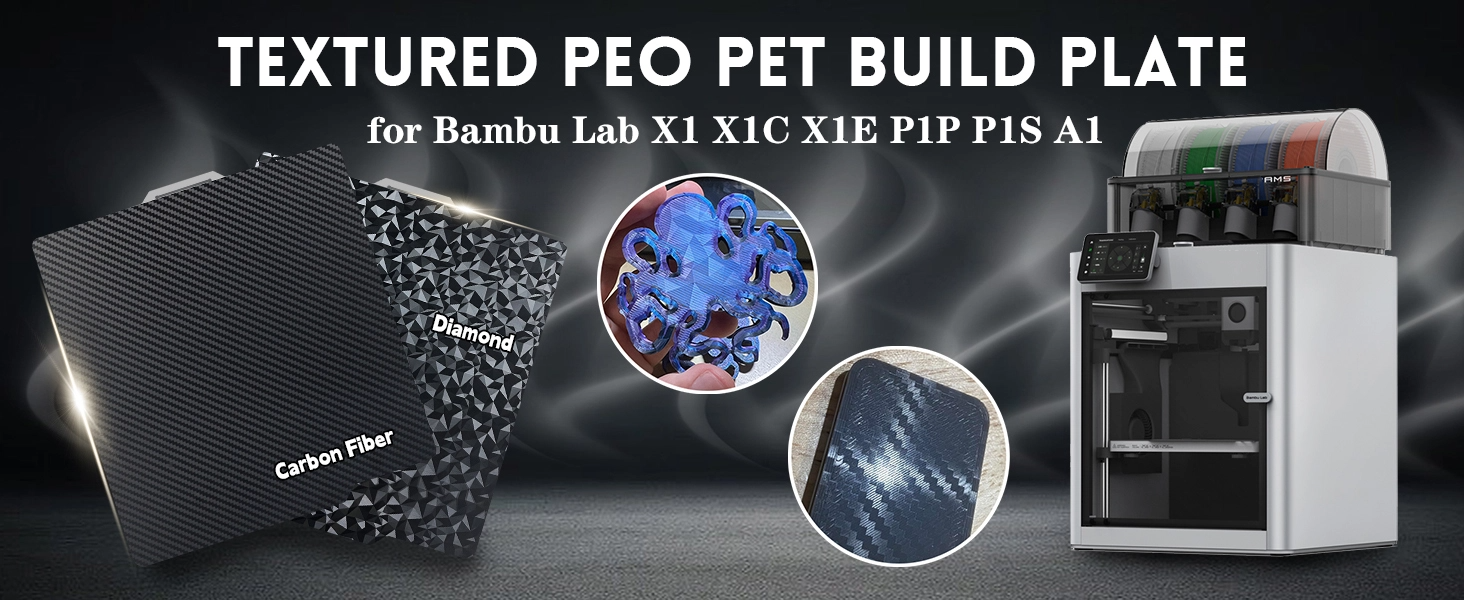
The IdeaFormer-3D PEO PET Smooth Build Plate is a premium, flexible spring steel sheet designed for Bambu Lab X1, X1C, X1E, P1P, P1S, P2S, and A1 3D printers. Featuring a unique dual-surface design combining PEO and PET, it offers superior flatness, warp resistance, and optimized adhesion for PLA and PETG filaments. Easy to maintain with IPA cleaning, this build plate ensures consistent, high-quality prints and seamless integration with your advanced 3D printing setup.


| ASIN | B0CLRQ4DCF |
| Best Sellers Rank | #2,174 in Industrial & Scientific ( See Top 100 in Industrial & Scientific ) #2 in 3D Printer Platforms |
| Date First Available | October 25, 2023 |
| Item Weight | 13.2 ounces |
| Item model number | PEO-PET-257-A |
| Manufacturer | Bell Tech |
| Product Dimensions | 10.12 x 10.12 x 0.24 inches |
N**L
Good print surface, leaves cool pattern on prints
Works as expected. I don't scrape my print surfaces so i can't speak to the toughness under a scrapper, but i've used this plate maybe 100 times so far and there's no evidence I've used it at all. Works fine with my bambu p1s.
D**H
Great plate for smooth printing
I was looking for a smooth PEI plate for my Bambu X1C, and this combo plate looked like a good value. Two days of printing so far and everything adheres perfectly, with or without glue-stick. Printed some ASA yesterday (plate temp 105-110C) and currently running a PLA print (55C) and both worked beautifully. ASA (+glue stick) popped right off the plate with a quick flex as soon as it cooled a bit, and a test print of PLA had the same results. Great smooth surface for those that don't want a textured base. Fits the X1C heatbed perfectly, barcode sticker (a batch included in the package) seems to function, but will probably wash off after 2-3 washings so long-term it's best to disable build plate checking so the X1C will ignore the lack of barcode. I've washed it once, and was no more difficult than washing any other plate in that a little dish soap and warm water is all it really took.
@**H
Love this bed, use it on both my Bambu Lab X1 and Ankermake M5, fits both
I ordered this bed to replace using diffraction grating film or 3m vinyls. The product arrived same day and packaged nicely for safe transport. I absolutely love PEI beds and love this bed for the unique diffraction pattern it produces on the first layer of my prints. Previously I used diffraction grated film taped onto my beds, or 3m vinyl wraps like carbon fiber or forged carbon fiber, however the longevity of usage is not so great with film or vinyl. When I use these beds with the diffraction pattern side up (it has dual sides, normal PEI textured or the diffraction grating side (triangles) ) I mostly stick with PLA and TPU. Ideaformer states that you should only use PLA, TPU, PETG, or ABS, however I have limited success with PETG and ABS due to poor bed adhesion. The maximum rated temp for these beds is a solid 180c and I don't know many people that ever set their bed past 100c, most printer beds are not even capable of going over 110c. I have no issues with PLA and TPU adhering to the bed. I set bed temp to 65c for both PLA and TPU. I use this bed on both my Bambu Labs X1 and my Ankermake M5. On the Ankermake M5 it is a little larger than the bed itself but this hasn't been an issue at all. I have completed several hundred prints on the Ankermake M5 using these beds with zero issue. Some people cut the bed to perfect size but I find that unnecessary, plus I can swap the bed from my Bambu to Anker printer without issue. Ideaformer makes these beds with 3 different patterns, small triangles (this one), carbon fiber look, and "starry night". I own all 3 and love them! To ensure the best results... hopefully your first layer game is on point! I would definitely recommend this to others!
D**P
Works well, with one caveat
I'm not having the adhesion issues that others reported. I just coat the bed in a layer of Bambu Labs liquid glue, and everything has worked out great. Pattern gets applied well to parts and looks really cool. There is one issue that I haven't seen anyone else mention though: The nozzle cleaning tab on the back of the build plate is sharp. Because the plate has to slide into the X1C bed at an angle, the sharp tab scrapes the rubbery coating on the bed. I'll probably end up printing a little TPU cover for it to prevent the scraping.
I**Y
This one did not worked for me, no adhesion at all!
Maybe this build plate has worked for other people, but for me it has been the worst build plate I’ve used, returning it right away, I did all the tests and the suggested adjustments, and for me had zero adhesion no matter what, I really had some hopes for it his one, but sadly it didn’t ended nothing well, I thing I will go to my previous one that is more expensive, but works. I have plenty of different build plates that work really well just out the package, I did my best with this one switching between plate type and Z distances, and different filaments, nothing worked.
W**.
Works with my Bamboo Labs printer.
Works with my bamboo labs P1S. No issues in using and has good texture on my prints.
R**D
Very good effect plate
Amazing plate the quality is very good and I had no problems with filament not sticking
T**H
Best off-brand build plates for Bambu A1
Great build plate! I’ve ordered at least 5 or 6 by now, but that’s only because I keep ruining them by printing PETG on the smooth surface and forgetting to use glue.
し**た
んーバリがありビルドクオリティは低いですが、用途的には十分使えます。値段を考えれば、まぁギリギリ許せる感じ。
S**N
I had a previous review here, but this is better... I have the carbon fiber and diamond patterns both. The plate thickness is very similar to the Bambu originals. I struggled to get good adhesion to both of these plate designs. I put aside the diamond (which I found marginally worse) and focussed on the carbon fiber design as I had an application need. First - you do need to disable bed position detection in Bambu studios. Lots of help online on that and really just a box to click so no big deal. The included instructions suggest adhesion problems can be overcome by moving from the recommended smooth plate selection to a textured plate selection and then if that fails to solve the problem, as a final step, modifying the g-code. I tried all of these (the g-code sounds daunting, but it isn't too bad once you do some online searching); however, none of these sorted my adhesion problems (yes - I did detergent wash the plates too - avoiding even 99% isopropyl alcohol dilutant residue). So - back to basics. After some experimentation I did have good success in getting a nice carbon fiber look bottom layer. The trick for me on my Bambu X1 Carbon (latest version @ 15 July 2024) was to make the following changes: 1) increase bottom layer thickness from 0.2 mm to 0.25 mm, 2) decrease the speed for the bottom layer perimeter from 50 to 20 mm/s, and 3) decrease the bottom layer infill speed from 105 mm/s to 20 mm/s.
S**N
Love / hate this bed. I struggled with adhesion when using it on my Bambu P1S, but it works flawlessly with my Bambu A1. Of course I started by washing the bed with soap and water, twice. I don't know what it is with the P1 series but I've just struggled with adhesion using this bed. If you have an A1, or more patience than me, I think this bed is worth the money. I love the smooth glass like texture, and the pattern it leaves on the print always catches an eye. Build quality seems on par with Bambu brand but I've only gotten a couole of prints out if it so far.
A**R
I was excited to try this plate, but my experience was very disappointing. No matter what I try, I just can not get PETG to stick to this plate. After cleaning it with Dawn and hot water, I have tried different build plate selections (as recommended by the seller), different build plate temperatures, different Z-axis offsets, different first layer speeds, and nothing works. Not sure if I have just got a defective plate or if there is some secret setting I have missed, but I just can't recommend this plate. Shame I can't leave zero stars. EDIT Ideaformer's customer service was excellent. After I returned this plate, they sent me a new one with advice to reduce the Z offset to -0.06. I had to set it to -0.07, and increase the bed temperature to 70, but then the filament (Sunlu PETG) stuck without issues. Upgraded to 5 stars. Hope it keeps on working.
S**W
The reason prints don't stick to this, if that's what you are experiencing, is the surface needs to be 100% clean and dust-free. Clean using Dove dish soap and water, clean and wash thoroughly and dry using clean cloths. I use microfiber cloths, it works. Using PLA I run the bed temperature at 60 and 210 hotend. First layer MUST be run slow, I've had nothing fail running first layer 25. Second and the rest can go to 125/150 outer wall, 150-175 inner. Using a Bambu Lab P1S with AMS. Based on my results I can happily recommend this. The seller has also reached out to me to see if I was having any problems and I have been impressed with their commitment to the product and my satisfaction.
TrustPilot
1天前
5天前



