We remain fully operational. Our teams are working around the clock to ensure your deliveries continue safely.

下载应用程序


Buy anything from 5,000+ international stores. One checkout price. No surprise fees. Join 2M+ shoppers on Desertcart.
Desertcart purchases this item on your behalf and handles shipping, customs, and support to Taiwan.
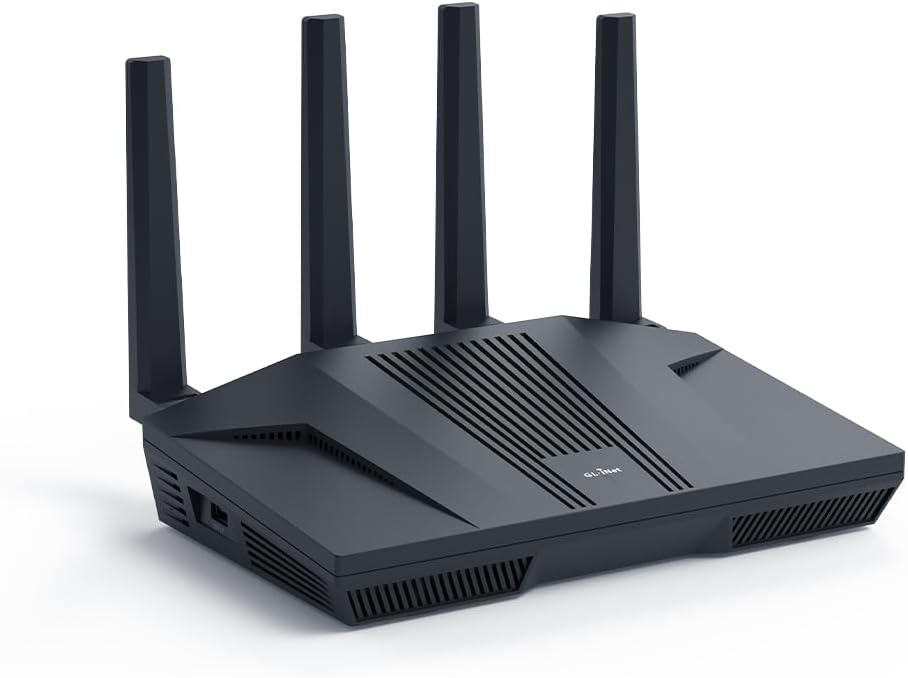
🚀 Elevate your network game with Flint 2 — speed, security, and control in one sleek package!
The GL.iNet GL-MT6000 (Flint 2) is a high-performance WiFi 6 router delivering up to 6 Gbps speeds with 8-stream technology, dual 2.5G ports, and robust VPN support. Designed for gamers, streamers, and professionals, it supports over 100 devices, integrates AdGuard Home for ad-blocking, and offers a user-friendly OpenWRT-based interface with regular firmware updates, ensuring long-term reliability and security.


| ASIN | B0CP7S3117 |
| Antenna Location | Business, Gaming, Home |
| Antenna Type | Retractable |
| Best Sellers Rank | 4,954 in Computers & Accessories ( See Top 100 in Computers & Accessories ) 41 in Routers |
| Box Contents | Ethernet Cable, GL-MT6000 router with 2-years warranty, Power Adapter (EU+UK Plugs), User Manual |
| Brand | GL.iNet |
| Brand Name | GL.iNet |
| Colour | Black |
| Compatible Devices | Personal Computer |
| Compatible devices | Personal Computer |
| Connectivity Protocol | Wi-Fi |
| Connectivity Technology | Wi-Fi |
| Control Method | App |
| Controller Type | App Control |
| Country of Origin | China |
| Coverage | Long Range |
| Customer Reviews | 4.5 out of 5 stars 2,485 Reviews |
| Data Transfer Rate | 6000 Megabits Per Second |
| Frequency | 5 GHz |
| Frequency Band Class | Dual-Band |
| Frequency band class | Dual-Band |
| Has Internet Connectivity | Yes |
| Has Security Updates | Yes |
| Is Electric | Yes |
| Is Modem Compatible | No |
| Item Weight | 761 Grams |
| LAN Port Bandwidth | 2.5 Gbps |
| Manufacturer | GL.iNet |
| Manufacturer Part Number | GL-MT6000 |
| Maximum Upstream Data Transfer Rate | 6000 Megabits Per Second |
| Model Name | GL-MT6000 |
| Model Number | GL-MT6000 |
| Model name | GL-MT6000 |
| Number of Ports | 6 |
| Operating System | Linux |
| Other Special Features of the Product | 8 Stream Wi-Fi 6 |
| Product Warranty | 2 years |
| RAM Memory Installed | 1 GB |
| Router Firewall Security Level | Basic |
| Router Network Type | Wireless and wired |
| Security Protocol | WPA3 |
| Special feature | 8 Stream Wi-Fi 6 |
| Unit Count | 1.0 count |
| Voltage | 5 Volts |
| Wi-Fi Generation | WiFi 6 |
| Wireless Compability | 802.11ac, 802.11ax, 802.11b, 802.11g, 802.11n |
| Wireless communication standard | 802.11ac, 802.11ax, 802.11b, 802.11g, 802.11n |
A**H
Amazing value, much improved our home network
Brilliant router. Often available on offer so great value for money. Wifi range is great and fast, 2.5gb ports work nicely. Router doesn't looked ridiculous like some of the gaming ones available and has holes in the back for wall mounting, so this is easy to hide away. User interface is a nice layer over openwrt and all the openwrt settings are available too. Support is good with regular firmware updates and because it's based on openwrt, this will keep running and be updatable even after the manufacturer stops supporting it.
B**N
A brilliant piece of kit
I do a lot of streaming via apps on a Nvidia Shield TV Pro and decided to look for a router which could host a VPN client due to the consistently low VPN speeds I was experiencing on the Shield. With a 500 Mbps broadband service the best speed I could achieve on the Shield with the NordVPN app installed was 130 Mbps. Trial with a different VPN provider produced similar results. After some homework the thought was moving the VPN app from the Shield to a router could possibly resolve the issue so I bought the GL-MT6000 Flint 2 because along with most of the major VPN providers it natively supports NordVPN. The results were amazing, 475 Mbps on the Shield with NordVPN activated on the GL.iNet router. It also has Adguard Home built in and natively supports NextDNS, all in all just perfect for my needs and best of all it just works. For the price a surprisingly fast processor, loads of RAM with fully customisable firmware via a very intuitive interface. Fully recommended.
D**.
Amazing piece of networking tech
I am using it as my main router, and a VPN client utilising split tunnelling. It's been nothing short of phenomenal - very reliable and high-performing. I've observed max protocol speeds using both OpenVPN & WireGuard, where the limiting factor was the VPN Host rather than this magnificent device. UI is simple to understand and navigate. It is also extremely versatile - if you are a casual user, the setup is very straightforward. At the same time, if you want to dive deeper, there is no limit to how granular a setup you want to make. Imo, this is a very capable and stable VPN-focused router.
A**Z
Way better than your bog standard ISP router
Bought this router because our ISP router barely gives you any features or control over your network. The UI is very easy to navigate and has lots of useful features, one that I especially like is the ability to install SQM and fix bufferbloat for gaming. I have no issues with WiFi signal strength and the connection is stable. I recommend it for anyone looking for a 3rd party router
B**S
Beautifully Done
This review is for the people who are sick of their providers router! This router is brilliant, easy to set up from a pc, laptop or phone. the interface is clean and intuitive. it's signal strength is miles beyond most ISP provided devices. if you want a router that is easy to use, will last a long time, isn't massive and ugly, and isn't (in the grand scheme of things) extremely expensive, then this one is absolutely ideal! and for more technical users: there's plenty of other reviews on here, it's a great bit of kit with a lot of power user features! I don't think anyone could be disappointed unless their expectations are off or they get bad hardware.
M**L
Finally, a router that performs!
Fantastic router! Literally night and day difference over isp-supplied router. Setup was very straight forward. Plug it in, turn it on, run an update and the router was ready to go. If like me, you’re isp is locked to the supplied router, this isn’t a problem as the isp routers MAC address can easily be cloned over to the MT6000 and everything is plain sailing from there. Coverage is fantastic. Previously I had a mesh system setup that still struggled with delivering advertised speeds throughout my house (five bedroom, large property). The MT6000 however easily covers the whole house and gives far better speeds throughout. Tonnes of additional features such as a variety of VPN and cloud services that I’ll probably never use, but nice to haves. Build quality is also excellent, much better than anything I’ve previously owned. To summarise, if you’re after a replacement router from your isp supplied one to improve performance, then I highly recommend the IG.Net MT6000.
C**L
Flint2, good router, good customer support, ... but issues with Surfshark WireGuard VPN Client
Follow Up on my initial review: Unfortunately I had to return the Flint2: I really wanted to love this router, but sadly, I’ve had to send it back. The main issues stemmed from the Surfshark WireGuard VPN client, which became increasingly unreliable and caused the router to freeze completely. Even restarting didn’t help—I had to dig out an Ethernet cable and connect my laptop directly to the router just to access the Admin Panel, only to find there was no internet connection at all. The router was completely unresponsive, stuck in a frozen state. The problem seemed to occur when both the Surfshark WireGuard VPN client and AdGuard were running at shutdown. Even if I managed to enable AdGuard after the VPN connected, I’d have to remember to disable it before turning the router off—something we do whenever we leave the house. Another frustrating issue was that if I needed to switch VPN locations, disconnecting and reconnecting the Surfshark VPN would often cause it to hang indefinitely—even after disabling AdGuard first. The only fix was a full router reboot before the VPN would connect again. Even when everything did work, the Surfshark WireGuard VPN took an extremely long time to connect—usually 5–7 minutes, and sometimes much longer. I don’t want to place all the blame on GL.iNet, as the issues were clearly triggered by the Surfshark WireGuard VPN client. That said, Surfshark is one of the VPN providers offered as a quick-setup option in the Flint2’s native Admin Panel, so compatibility should ideally be smoother. It’s a real shame—I had high hopes for this router, and I truly appreciate GL.iNet’s prompt customer support. But in the end, the constant freezes left us without internet, and the troubleshooting process was too complicated for my family to handle. For now, it just wasn’t the right fit for us. Flint2 is a good quality router with great customer support by GL.iNet: A Brilliant Bit of Kit: My Thoughts on the GL.iNet Flint 2 Router I've been thoroughly impressed with the Flint 2 router – it's a truly well-built device with some fantastic functionalities. From the moment you unbox it, you can tell it's a quality piece of kit. My only minor grumble is the lack of a power button, meaning you have to unplug it to switch it off completely. It's a small detail, but a power button would certainly add a touch more convenience. Admin Panel and Customisation The Flint 2 Admin Panel is excellent, offering a good range of settings to tailor the configuration precisely to your preferences. While it doesn't quite offer the same granular level of control, especially in security settings, that some other brands provide in their admin panels, it's still very user-friendly. I'm hopeful that the upcoming firmware update (version 4.8 BETA) will bring some welcome improvements in this area. For those who crave more advanced control, there's the option to switch to the LuCi interface via OpenWrt. It's worth noting that the included OpenWrt version isn't the very latest, and updating it to the newest release isn't as straightforward as a standard firmware update for the native Flint 2 Admin Panel – and, from what I understand, doing so would mean losing the native panel. Signal Strength and Support In terms of signal power, I've found it to be absolutely excellent for my house, even reaching right into the backyard with no issues at all. It's certainly a strong performer in that regard. I did encounter a few temperamental issues with the WireGuard Client, particularly struggling to connect consistently when changing locations. However, this led me to experience the outstanding GL.iNet support. Bernard and Barry were incredibly helpful, always available via both email and chat, assisting me in diagnosing the problem. It turns out the issue stemmed purely from Surfshark having DNS resolution problems when AD Guard was enabled. This was clearly demonstrated when GL.iNet support provided an alternative VPN for testing, which worked flawlessly, proving that the problem wasn't with the Flint 2's native firmware at all. A big shout-out to them for their patience and expertise! Knowing that you can rely on such responsive and helpful support from GL.iNet is definitely a massive plus and adds significant value to the product. Overall, the Flint 2 is a solid choice, offering great performance and backed by brilliant customer service.
C**W
Secure, Powerful, and Worth the Effort
This router has truly proved to be an efficient, powerful, and remarkably flexible piece of kit. I initially planned to use the Flint 2 simply as a VPN front-end for my existing Google Nest WiFi mesh system, allowing the Google hardware to handle the Wi-Fi. However, once I started the setup, I quickly realized the Flint 2 was capable enough to stand on its own, and I opted to remove the entire Google mesh network and use the Flint 2 exclusively. The performance has been exceptional. Performance & Features VPN Excellence: The WireGuard client performance with my Surfshark subscription is stellar. The ability to run full-speed VPN and configure Domain-based Split Tunneling (to exclude services like Netflix, Disney+, BBC iPlayer, ITVX, and Channel 4) directly on the router is a game-changer for UK streaming. AdGuard Home: The integrated AdGuard Home feature provides network-wide ad and tracker blocking, creating a cleaner, faster browsing experience across all devices. Network Segmentation: I appreciate the ability to use a Guest Network for low-trust IoT devices (switches, smart plugs) for superior security, keeping my high-value devices segregated on the main network. The Learning Curve (Why it's not 'Plug and Play') To be transparent, this is not a product for beginners. It is a powerful piece of hardware that requires an understanding of network principles to unlock its potential. As the manufacturer states, it's not a plug-and-expect-everything-to-work device. It has taken a couple of days of focused tweaking to get every setting perfectly optimized (especially integrating the VPN, AdGuard, and resolving connectivity issues on devices like Google Nest Hubs due to advanced Wi-Fi features). The Gemini Advantage: This is where modern AI assistance (specifically Google Gemini) made setting things up a breeze. By feeding the logs from both the Flint 2 and AdGuard directly into Gemini, I received simple, step-by-step instructions and troubleshooting advice to resolve tricky blocking and Wi-Fi compatibility issues. As someone with a technical background, Gemini made the configuration process highly efficient and straightforward. Conclusion: I absolutely do not regret buying this. It has replaced a complex mesh network with a single, highly capable device. The flexibility and raw performance are outstanding, and I am confident that my home network is now fast, highly secure, and optimized for both privacy and streaming performance. If you have some technical knowledge and want the absolute best control over your home network, the Flint 2 is the clear choice.