We remain fully operational. Our teams are working around the clock to ensure your deliveries continue safely.

下载应用程序


Buy anything from 5,000+ international stores. One checkout price. No surprise fees. Join 2M+ shoppers on Desertcart.
Desertcart purchases this item on your behalf and handles shipping, customs, and support to Taiwan.
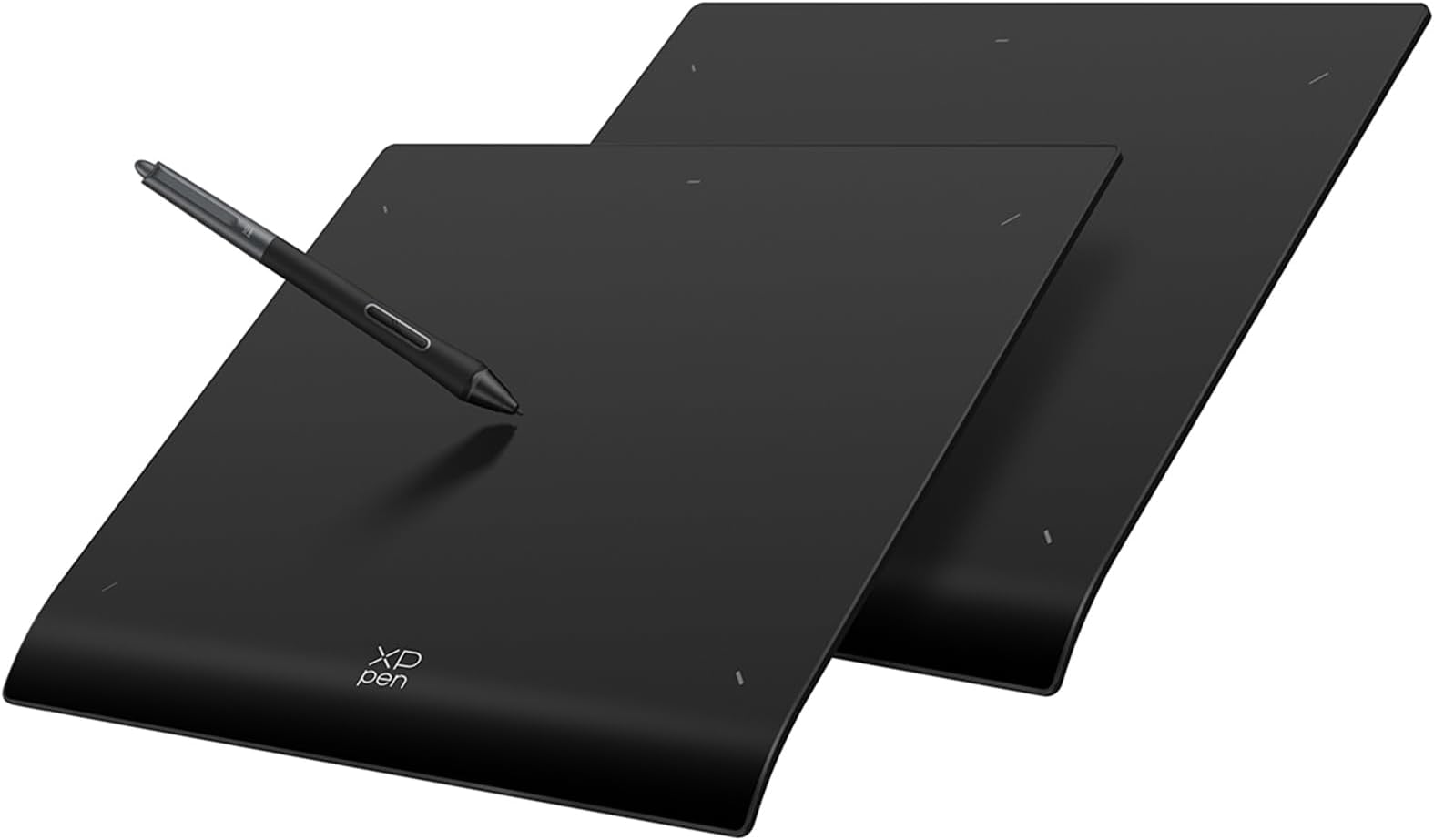
🎨 Elevate your art game—draw, design, and dominate wirelessly with precision and style!
The XPPen Deco Pro LW (Gen 2) is a premium wireless drawing tablet featuring an 11x7 inch active area, industry-leading 16K pen pressure sensitivity, and Bluetooth 5.0 connectivity that pairs with two devices simultaneously. Designed with an ergonomic wrist rest and a sleek metal back, it offers over 10 hours of battery life and a customizable shortcut remote. Compatible with multiple operating systems and major creative software, it’s the ultimate tool for professional illustrators, designers, and 3D artists seeking precision and freedom.





| ASIN | B0C3R3JVBD |
| Active Surface Area | 11 inches (length) x 7 inches (width) = 77 square inches |
| Best Sellers Rank | 39,560 in Computers & Accessories ( See Top 100 in Computers & Accessories ) 86 in Graphic Tablets |
| Box Contents | X3 Pro Smart Chip Stylus, Ergonomic X-Edge Wrist Rest, customized pen case, Bluetooth 5.0 technology |
| Brand Name | XPPen |
| Colour | Black |
| Compatible Devices | Desktop, Laptop, Smartphone, Tablet |
| Country of Origin | China |
| Customer Reviews | 4.4 4.4 out of 5 stars (163) |
| Display Type | LCD |
| Item Dimensions L x W | 33.3L x 25.8W centimetres |
| Manufacturer | XPPen |
| Model Name | Deco Pro LW (Gen 2)+ACK05 |
| Model Number | Deco Pro LW (Gen 2)+ACK05 |
| Native Resolution | 16K levels per inch |
| Network Connectivity Technology | Bluetooth, USB |
| Operating System | Android 10.0 (or later, Chrome OS 88 (or later), Windows 7 (or later), iOS (works only with certain apps), macOS 10.10 (or later) |
| Product Features | Portable, Full Lamination |
| Product Warranty | 2 year manufacturer |
| Screen Size | 11 Inches |
| Specific Uses For Product | 3D Modelling, Designing, Drawing |
| Target Audience | 3D modeling artists, Designers, Professional illustrators |
| Unit Count | 1.0 count |
N**B
Seems to be a very good product.
I bought this for my son. He uses it all the time, and not just for drawing. He writes on it and does his maths prep using it. This is a versitile tablet. But that is as far as i can go. I have not used this myself.
B**G
Love it
My son loves it and use it for Art homework
D**K
Graphic drawing pad..
Just what was needed, great quality. Easy set up, packaging good not too much to rid off, manual easy to follow. Would had been great if a nice carrier was designed for portable use.
E**N
XP-Pen Deco Pro MW Gen 2, great replacement for Wacom Intuos Pro M
I've had a Wacom Intuos Pro M tablet for around 8 years and it finally wore out. Both the tablet and the stylus had reached the end of their lives. To be honest I was getting frustrated by having to wait a few minutes for the Wacom driver to wake up every time I started up my computer. Added to this the huge price of the new model (£340) just feels like a rip off. So I looked around and eventually found the Gen 2 XP-Pen Deco Pro MW. It has the same size working area as the Wacom, but twice the sensitivity. Also the tablet controls are in a separate module, not on the tablet. I have never used this on the Wacom, and they were just in the way. I sometimes caught them by accident. The Deco Pro tablet has a nice sloped front edge, the stylus is good in the hand, sensitivity is great, and as soon as I switch my Mac Studio on it starts to work. Downloading the driver and setting up was easy. I've only had it two days, but it seems perfect for it's intended job. If you're wanting a Graphics tablet for photo editing at less than half the price of the Wacom, and with greater sensitivity, this is the one to buy. I wanted to add something. Another customer gave a one star review because they thought that the tablet they received was worn. This is not the case. The tablet arrives with a protective film cover on the surface, which you need to remove before use. it is this film that gives the appearance of wear. Unfortunately we can't reply to other peoples reviews.
X**K
Next level
Having used a range of tablets over the tears, this is something else; after working with Brighton Pavilion, it was an invaluable tool in bringing out some of the incredible decorative detail in the Royal adjacent palace. The extra contact points make a difference, and the soft tip nibs work as needed and give the security of not scratching the surface; it would be great if they could create a cover for it. But if you are a photographer looking to wow your clients or a digital artist, you really can't go wrong with this one!
P**W
High quality
I really like this drawing tablet. I needed a smaller tablet as I wanted to do art sat on my sofa. I have a Wacom Intuos Pro large but it was too large to be comfortable. I wanted a cheaper tablet so took the plunge with Xp-pen and I am glad I did as this feels as good if not better than my Wacom.
B**K
You either like display-less tablets or you don't.
I barely use it and kick myself for not opting for a tablet with a screen. " You'll get used to the hand-eye coordination" they said. No. You. Won't. I used it with my old windows 10 PC & Photoshop, no connection issues. I would definitely consider Xpen again - but one with a display.
M**E
Pros and Cons
Pros. 1. Price: reasonably cheap compared to Wacom Intuos pro. 2. Very pretty design, smooth edge so it doesn't bother wrists when you use. 3. No over heating issues I found so far. 4. Pen is pretty sensitive and I like it. Now, issues I found so far. 1. It doesn't support touch controls meaning, you need to manually rotate the screen. If you have used either Wacom Pro series or display tablets such as Cintiqe or ipad, you might find it incredibly annoying. 1.1. It should support rotation function by using the wheel - however, it doesn't work. Something is wrong. 2. Poor App. Once you do any updates, it just reset all the settings you have saved. Look it up on Reddit. 3. Bluetooth - it is not really a problem but you need to change your Bluetooth setting to Advanced search otherwise it won't come up on the list. If anyone having the same issue on Windows, please go to setting and change your setting to Advanced instead of default. 4. THE REASON IM RETURNING IT.... look at the video. It occasionally just do this. It goes worse when the connection is via Bluetooth, and when I use dual monitors or sidecar between Mac and Ipad. Since this happens on both PC and Macbook I am assuming the tablet or pen has some issues. It is most likely just I'm unlucky and got a faulty device. However, not supporting touch control is bit critical for me so I don't think I can use this model. It would be great alternative option for people who don't need rotation and zoom frequently like me. At the end, it's cheap and sensitivity is as good as other Pro model graphic tablets
T**O
I own the MW 9 inch and the XL 15 inch. I bought my XL months ago and never had any problems with it. Recently decided to buy a travel size MW 9 inch. Absolutely amazing as well. What I am confused about is some of the reviews. *cough* two star rant *cough*. To start make sure to download the latest drivers for the correct device and have it open while you use it. In the application of the XP-pen you can adjust the work space and sensitivity of the pen pressure, so it's perfect for the light drawer like myself. yes it can detect all 16K pressure points, you just need to calibrate it to your liking. it doesn't need to be forced for some detection. The pen stabilization is a great feature when using it outside out of painting applications and you can turn it off or on. Not sure why it's labels to be bad. So if you got shaky hands, this might be good, if you got smooth hands, even better. Another thing, idk why but using two of the same pens from each one Xl and the MW I don't have any wobble, at all. Slow or medium, fast, nothing. I have owned previous drawing tablets including those with a screen, and yet I haven't to detect the wobble from this one. I get smooth straight lines when I draw it. ANOTHER point, hover feature, don't know why you need 30cm above your tablet to draw, you are drawing, not playing darts. Just having your hand resting on the device and the pen distance from your tablet shouldn't even be that far to begin with. Customer service is good, I've had some problems with my devices before in the past and they gladly replaced with what I needed. Cable doesn't work? Got it replaced in 3 days. Screen faulty? Got it replaced in less than a week after returning my faulty one. (FYI from their official website if you don't want to go through amazon) Last thing, never gotten the issue of "broken line". Again, I'm so confused how this person such got such a bad experience and I would like to share my own in case anyone is wondering if this is really good or not. And read first, this tablet doesn't have a screen. in the end, I do recommend this, it's great, it feels smooth, quality is great. Been drawing since 2020. Yes there are much cheaper options out there and you may not need all the fancy stuff this tablet offers, so if you are on a budget, maybe go with the deco pro 1. Wired is much cheaper btw. Or even a regular deco or deco fun which are even cheaper. Thank you for reading this long wall of text.
A**.
Das Grafiktablett ist echt eine Erleichterung beim retuschieren von Bildern.
F**A
Estuve a punto de comprarla. Vi un montón de reseñas, comparativas, vídeos... y todo apuntaba a que es una muy buena tableta gráfica por su precio. Diseño pro, buena sensibilidad, inalámbrica, y compatible con mil programas. Pero siendo honesto: no me animé porque ya tengo otro modelo que cumple y sé que la acabaría dejando aparcada. No por la calidad (que parece top), sino porque hay que ser realistas con lo que uno realmente va a usar. ✅ Pros (según lo investigado): diseño elegante, rueda táctil muy precisa, buena duración de batería, muy cómoda para dibujar o retocar. ❌ Contras (lo que me echó para atrás): algo grande para mi escritorio, y me pareció demasiado avanzada para el uso básico que realmente le doy. Si estás buscando una tableta seria para diseño, ilustración o edición, creo que esta es una apuesta segura. Yo no la compré, pero estuve muy, muy cerca.
K**A
very good product absolutely recommend it
M**E
Easy to install and works great. Working with it is pleasant and very accurate.