We remain fully operational. Our teams are working around the clock to ensure your deliveries continue safely.

下载应用程序


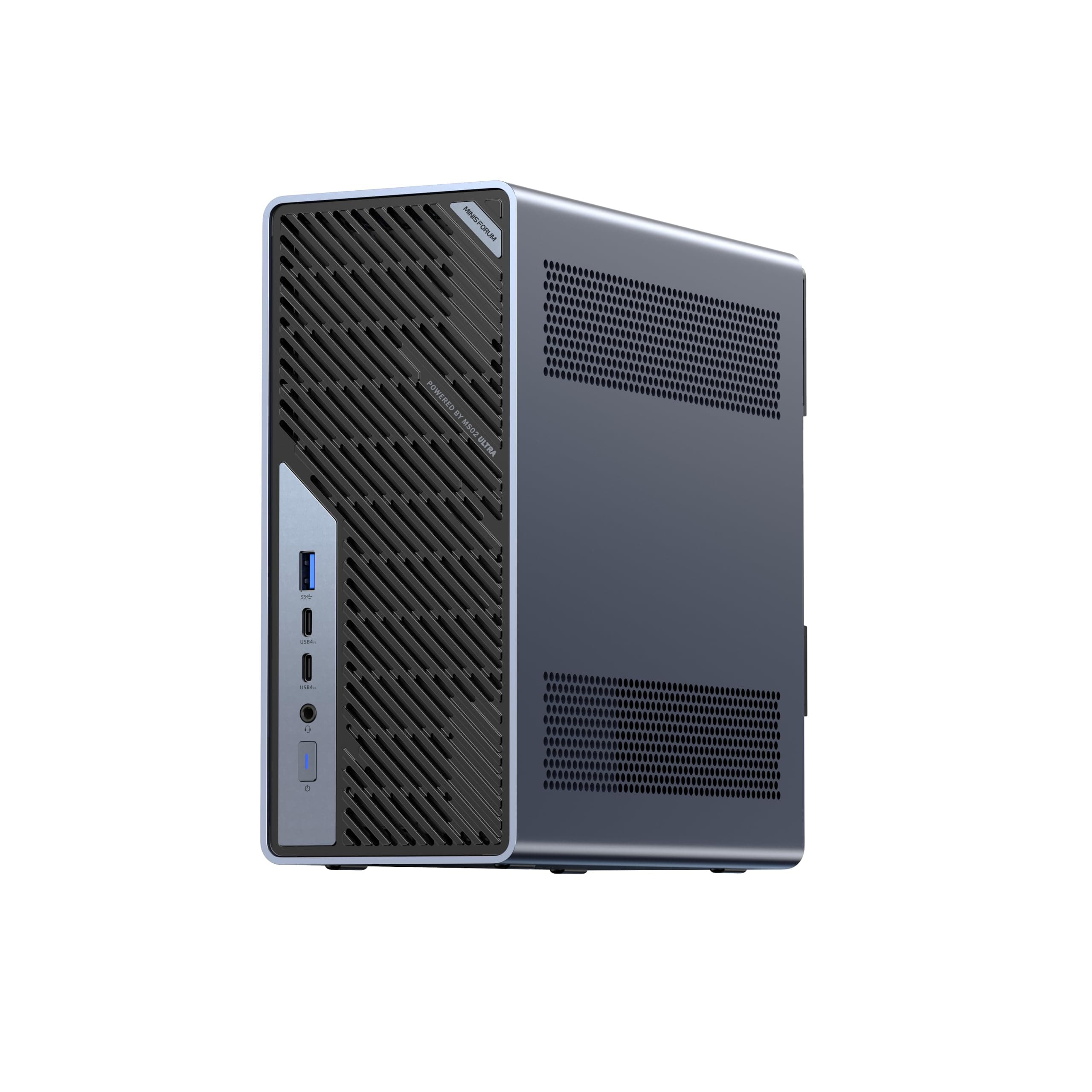





🚀 Powerhouse Mini Workstation: Big Performance, Tiny Footprint, Zero Compromise!
The MINISFORUM MS-02 Ultra Mini Workstation is a compact yet powerhouse barebone PC featuring an Intel Core Ultra 9 285HX processor with 24 cores and 5.5 GHz turbo. It supports up to 256GB DDR5 RAM and offers four PCIe 4.0 M.2 SSD slots with RAID support, enabling massive storage expansion. Dual 25G SFP+ ports alongside 10G and 2.5G RJ45 ensure ultra-fast networking. With four 8K-capable video outputs and advanced server-grade cooling, it’s engineered for professional-grade workloads including video editing, 3D rendering, and virtualization — all in a whisper-quiet, space-saving design.





| ASIN | B0GL2FRDCC |
| Best Sellers Rank | #4,338 in Computers & Accessories ( See Top 100 in Computers & Accessories ) #131 in Mini Computers |
| Brand | MINISFORUM |
| Built-In Media | 1x HDMI Cable, 1x MS-02 Ultra 285HX Mini Workstation, 1x Manual, 1x US Power Adpapter |
| CPU Model Number | Core Ultra 9 Processor 285HX |
| Color | Black |
| Connectivity Technology | Bluetooth, Ethernet, HDMI, USB, Wi-Fi |
| Cooling Method | Fan |
| Customer Reviews | 4.3 4.3 out of 5 stars (100) |
| Display Resolution Maximum | 3840x2160 Pixels |
| Graphics Card Interface | Integrated |
| Graphics Coprocessor | Intel Graphics(up to 2GHz) |
| Graphics Description | Integrated |
| Hard Disk Description | SSD |
| Hard Disk Interface | PCIE x 4 |
| Hardware Interface | 3.5mm Audio, Bluetooth, Ethernet, HDMI, Headphone, USB, USB Type C |
| Manufacturer | Micro Computer (HK) Tech Limited |
| Memory Speed | 4800 MT/s |
| Model Name | DeskMini |
| Model Number | DeskMini |
| Native Resolution | 3840 x 2160 |
| Number of Component Outputs | 4 |
| Operating System | Support Windows |
| Personal Computer Design Type | Mini PC |
| Processor Brand | Intel |
| Processor Count | 24 |
| Processor Series | Intel Core Ultra 9 |
| Processor Socket | FCBGA2114 |
| Processor Speed | 5.5 GHz |
| RAM Memory Technology | DDR5 |
| RAM Type | DDR5 SDRAM |
| Ram Memory Maximum Size | 256 GB |
| Resolution | 3840 x 2160 |
| Specific Uses For Product | Business, Education, Everyday Use, Office and Home Work, Multimedia, Video Conference,Home Theater, Digital Signage, Video Conference |
| Total Number of HDMI Ports | 1 |
| Total Usb Ports | 4 |
| Video Output Interface | HDMI, USB4, USB4 V2 |
| Video Processor | Intel |
| Wireless Compability | 802.11ax |
| Wireless Technology | Bluetooth, Wi-Fi |
J**C
Very happy with my choice.
I had reservations about buying this mini workstation. I was concerned with power and expansion but this thing screams. I use it for photo editing and video production. It keeps up with me. I have been very happy with it. No issues. Easy memory and storage upgrades.
H**Y
Excellent Mini server
I have two of these in a proxmox cluster. I added 64 GB of RAM and a 4TB NVME and smaller NVME for the boot drive. Both SFP+ ports are being used one for VMs and one for NFS storage. Connectivity and stability have been rock solid. VMs are very snappy most Linux based and the system has been up 24x7 since I got them and no issues. Run cool with current workload. They are running a nine node K8S cluster. I plan to add a third unit for full high availability and then the K8S cluster will be evenly distributed across the machines. I also have a few other VMs that are running on them too. Highly recommend for anyone wanting to setup a home lab and minimize their power bill.
S**N
Fantastic for Virtualization
This is an amazing little machine. I chose to upgrade to this as my previous virtualization machine was a cruddy 6-core CPU thin client that barely did the job. Since I share an office with my significant other I can't just get a big system, or a datacenter server, so this is the best option. This thing is a beast. I threw in the maximum 96GB of RAM and filled all of the NVME slots, installed a low profile Nvidia GT 1030 GPU, and installed TrueNAS Scale on it. I'm able to run a handful of my VM's, as well as quite a bit of the applications available from the TrueNAS app library, and this thing has had zero issues. I would highly recommend this if you want some solid virtualization hardware in a small form factor.
M**N
Great Performance and Value for the $$$
My personal laptop died in late November of 2024 so I decided to replace it with the MS-01. I ordered the Core i9-13900H (32+1T) but in reflection should have ordered the Core i9-13900H (0+0) because I used the 1T NVMe from my dead laptop and ordered the 96GB upgrade kit ( Crucial RAM 96GB Kit (2x48GB) DDR5 5600MHz (or 5200MHz or 4800MHz) Laptop Memory CT2K48G56C46S5) which will arrive after this review. To begin the packaging this comes in is very nice and the padding is almost 2 inches thick making it very ship worthy. Access to the BIOS which is very clean and easy to use is accessed by hitting the DEL key when the Minis Forum logo appears. This unit recognized and booted effortlessly from the NVMe that was in my laptop. I examined the boot drive that came with my MS-01 and all drivers were loaded but downloading the Windows 11 drivers from the Minis Forums sites is a bit challenging but once you find the drivers they are all in one RAR file. The MS-01 is very quiet, sleeps well and wakes up easily. Under heavy load the fan is noticeable but not to the point of being obnoxious. I purchased this primarily for the dual NIC cards and the (3) NVMe slots as well as the (2) Type C ports and once the drivers are installed, they work flawlessly. The build in GPU is running a pair of LG Ultrawide monitors at 2560x1080 each and while the resolution is not quite as crisp as I hoped, it is still very clear and I suspect higher quality type C cables may help this. Screwless entry to open the case is great but there is one design flaw that I have found. One cannot access the button that opens the case with the CAT5e cables in place and one cannot access the locking clips that hold the CAT5e cables in place due to the case design. To remove the CAT5e cables one must use a tiny screwdriver to press down on the locking clips. I spent a few hours researching GPU’s that would fit in this case and the options are few, especially of you are not comfortable tearing down a GPU and installing a custom GPU Cooler. Overall I am very impressed with the unit.
S**N
Mini Marvel
I've been using this system for about a month now, and I'm really pleased with its performance. It replaced an older tower-case system as my main workstation. Once it's up and running, the system operates smoothly and handles demanding tasks without a hitch. I decided to max out the RAM and install fast SSDs, which has given the machine an impressive boost. While I opted not to use a dedicated graphics card—resulting in slightly lower benchmark scores—the unit still dominates in everyday performance. The setup process was generally straightforward. The most challenging part was realigning the fans on the underside after installing the SSDs—a task that required a bit of patience but was ultimately manageable. I did run into an issue early on, having to return my first batch of SSDs because their attached heatsinks prevented a proper fit. Fortunately, I found a suitable alternative without those extra components. One minor caveat involves a switch on the mainboard that needs to be set correctly depending on whether NVMe SSDs are being used. The English instructions in the online manual weren't very clear on this point, which led to a bit of confusion at first. Once I figured out the correct setting, everything fell into place.
T**N
Would love to give it more stars
This is a good machine, for a solid price and a nice design. It works well as a home server. First issue I ran into was while the machine has been off for some time as I was moving. The machine would not turn back on. I did get link lights on the back of the machine, but the power button did nothing. I only got the machine running back again by following some recommended steps on reddit saying to disconnect the CMOS battery (left it out for about 30 minutes or so). Then the machine was able to finally boot. But obviously the BIOS settings were lost. I did reach out to minisforum support and received a response right away offering a replacement for a barebones version. I did not take it as I did manage to get the computer to start back up, but followed up with a question regarding any known issues with the device or maybe an issue with the BIOS eating up the CMOS battery while the computer is off. I have not heard back on that yet. I wish I could give this machine 2 more stars as it is great, but this issue makes it less reliable.
C**S
I sent an email request for drivers after searching everywhere I could think of. I see there are some hacks on forums, but I feel I deserve something safe from the manufacturer that sells this system with Windows 11. (which I was planning on trying first) With no network drivers discovered in the Windows install drivers I feel up-the-creek. I emailed the manufacturer 4 days ago .... no dice! (no reply) I've never purchased a motherboard that didn't come with drivers, and this seems like a silly waste of my time.
TrustPilot
1 个月前
2 个月前