

🔥 Build Bold, Stay Cool, Show Off Your Power!
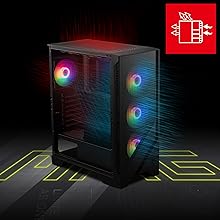
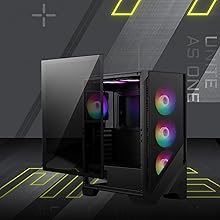
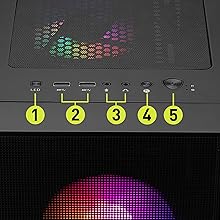
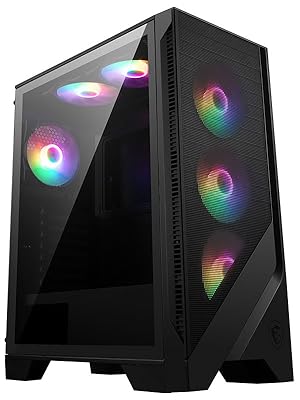
The MSI MAG FORGE 120A AIRFLOW is a mid-tower PC case designed for high-performance builds, featuring six pre-installed 120mm ARGB fans and a mesh front panel for superior cooling. It supports large RTX 40 series GPUs up to 330mm and 240mm radiators, includes a durable 4mm tempered glass side panel for component visibility, and magnetic dust filters for easy maintenance. With USB 3.2 Gen 1 Type-A connectivity and spacious internal clearance, it’s a perfect blend of style, airflow, and compatibility for professional and gaming setups.





| ASIN | B0CFYMC6SJ |
| Best Sellers Rank | 2,304 in Computers & Accessories ( See Top 100 in Computers & Accessories ) 1 in Computer Cases |
| Guaranteed software updates until | unknown |
| Item model number | 306-7G23A21-809 |
| Language | English |
| Manufacturer | MSI |
| Product Dimensions | 411.6 x 49.8 x 21 cm; 6 kg |
C**R
Banging Quality
Lots o fans included for a great price,very easy to install everything as the case had a lot of extra space and my tax board fit perfectly with enough space for cables.With 6 preinstalled fans and a space for a 240mm radiator,the cooling was beyond sufficient for such a cheap cse.Quality was great with nice malt build and very functional although one con is not being able to change fan speed or colour but one of the things you have to compromise with cheap cases and this one is absolutely worth it.
B**I
Amazing PC case
MSI MAG FORGE 112R Review: Bold Looks, Smart Cooling, and Great Value The MSI MAG FORGE 112R is a mid-tower case that blends aggressive styling with practical features, making it a top pick for gamers and builders who want performance without the premium price tag. 🖼️ Tempered Glass Elegance The 4mm tempered glass side panel is tool-less and easy to remove, giving you a clean showcase for your components. It’s sturdy, scratch-resistant, and perfect for builds with RGB flair. 🌈 ARGB Brilliance Out of the Box You get four pre-installed ARGB fans and a controller unit, allowing for synchronized lighting effects without needing a separate hub. The mesh front panel not only looks sharp—it also promotes airflow while letting your lighting shine through. 🧊 Efficient Cooling Layout With support for up to six fans and liquid cooling radiators, the 112R handles thermal demands well. It fits GPUs up to 330mm and CPU coolers up to 160mm, making it compatible with most mainstream components. 🔧 Spacious and Builder-Friendly Despite its compact footprint, the case supports ATX, Micro-ATX, Mini-ITX, and even E-ATX boards in a pinch. Cable management is straightforward, and the internal layout is intuitive for first-time and experienced builders alike. 💸 Great Value for the Feature Set At around £90, it offers more than many competitors in its class. While it lacks USB-C on the front panel and only includes two 3.5" drive bays, those are minor trade-offs for the overall package. If you're looking for a stylish, well-ventilated case with built-in RGB and tempered glass, the MSI MAG FORGE 112R delivers. It’s a bold, functional chassis that makes building fun and showing off your rig even better.
W**N
Very nice but I did encounter a quality problem with the power switch - updated
My first build for quite a few years meant embracing the more up to date case design with a PSU at the bottom rather than at the top and no 51/4in drive bays etc which given everything is now solid state is absolutely fine. So I chose this case it it seemed pretty spacious, I liked the feature list and the brand attached - MSI - is usually pretty reasonable. When it turned up the case was well packed and protected and entirely what I expected a well built quality item with suitable instructions and included fixings secured within one of the removable drive caddies at the bottom of the case. Building the case up ready for the prebuilt motherboard by removing the tempered glass panel and inserting the jack posts into which the motherboard screws would be inserted was easy. I did have to slacken off the fan above the rear connector hole to actually get the motherboard rear connector tucked under it correctly but as its only scrwed in that was easy. motherboard was easy to site and secure and then I began connecting the various headers from within the case built in wiring onto the motherboard. They all fitted fairly well though aligning the LED header was a bit of a fuff but pateince was exercised and it all wetn together neatly in the end. The front panel - well top panel on this case - individual connections like power switch, reset switch and the power and storage activity LEDs were the usual faff to get in but they always are - no idea why the industry can't do better like every other connector. Id id find a sounder in my PC bits box and added that as well to the same header and it works just as it should do. I then popped of the back panel and spent a bit of time inserting and securing the PSU and getting the PSU cables threaded through the various holes so I could connect to the motherboard, everything went together well and nothing was stretched or stressed as a result. The edges are nicley rounded and finsihed on the holes and so I didn't need to fret about any cable damage as a result of rubbing etc. The graphics card sent in next and seated nicely, and the case has a neat clamping mechanism that sists over all of the rear expansion card slots that is easy to use to help hold PCI type cards in place, as well as the usual screw holes for securingt the bracket fitted to such cards. I have to record a minor issue with some of the assembly but its mainly a problem of my own making working as I was in a black case, with a black motherboard, black cables, black connectors and black tie wraps was at times hard on my older eyes even in full daylight on the kitchen table and I did resort to a lantern style torch a couple of time to make sure I was getting everything correctly aligned - especially when plugging into small headers on the motherboard. Once aseembled and cable managed - and there are some useful low profile 'hoops' on the underside of the metal plate that supports the motherboard to which tie wraps can be attached - the whole thing looked quite tidy and presentable and I was quietly pleased with the whole thing. Time for first power up and this is where things didn't work as planned - the whole new PC was stone dead. I then spent quite some time testing with a different known working PSU, disconnecting things, removing the SSD and the RAM etc to try and figure out what was wrong. Finally I gave up and slept on it. Next morning I tried a continuity text on the power header with a simple volt meter I have and I saw the the power switch was extremely intermittent, only actually connecting about one time in 20 to 30 pushes although it always made the audible click sound when pressed. At least I had found the probem but it had costs me a fair bit of time as I had assumed that something as simple as single pole switch wouldn't be defective and would have been texted at time of manufacture. So what to do? I couldn't really face pulling the whole thing apart and returning the case which is really what the situation demanded so I took a good look at the power switch and demounted it from its home in the top panel and though about popping it apart to see if there was something I could fix inside. I also wondered if I could substitute it with another switch and inparticualr the other switch on the case at the top front panel which connects to the LED board that drives the various LEDs in the four case fans. Having demounted that switch I noticed it was the same as the power one and thus I was able to - with a small amount of fiddling - strip the defective power switch out including the cable and header that connects to the motherboard and then replace it with the LED switch and associated cable and connector. That worked immediately and the PC sprung to life and the LED fans all span up as did the CPU fan etc. So i then proceeded to get on with installing the OS and doing the rest of the build. A week on its been as good as gold and works very well. I did take the switch apart and its design is adequate but not great and I couldn't fix it, but I did find a pack of 5 on E-bay (not available via Amazon) and ordered them so as to be able to replace the defective switch and reinstate the LED switch on the case in due course. So four stars at this stage - lovely case marred by a crap power switch which is probably just the luck of the draw and I ended up with the one in n thousand that was defective. However it caused a lot of wasted time and unecessary work and to be honest I expect better from MSI and have always had better from them in the past. ****Update***** Just an quick update to say that the new switch has arrived from China and I have now been able to reinstate the LED switch functionality, so I can now enjoy the multi colour solid and fading LED fan effects which are great fun and another great aspect of the case and its capabilities.
W**M
A steal at £42
I bought this case as it came with fans and a it’s a well known brand. And it looks good. I spent last evening moving my build into it and I’m so impressed. The first thing that stood out to me was the space for your cables. I’m not going to pretend I tidy the cables round the back and I didn’t have to force the back panel back on. I know a lot of you know what I mean. The case has lots of room on the inside and the case has a good quality feel about it. Not flimsy like many cases I’ve bought that are only a tenner less. The LED fans are pre installed on the ARGB controller. I have a fan controller but if you don’t make sure you have 3 fan header on your board. It’s only the RGB it controls. The colours are all strong and can be changed using the LED button in the top. I can’t use the software side of it but I like the choices you get. Air flow is very good. Which is both good and bad. The front panel let’s lots of air though but there is no filter. I would have liked the option as it does come with a filter for the top of the case. Lots of dust will get in. But a bit more cleaning for good air flow is fine by me. It’s not, but I’ve got the case now. There is a removable bay around the back of the case for an SSD or laptop HDD which is a nice touch. Meaning 3 SSDs and 2 HDD can be fitted in total. You can always put more in where there’s the previously mentioned spacious room in the back. Overall very happy.
M**K
ATX anakart, 360mm sıvı soğutma ve uzun bir ekran kartı ile kullanıyorum. Hepsi çok rahat sığıyor ve hala kasada boş yer var.
M**.
Very nice looks and quality at an attractive price
J**N
Small tip for newbies. If the fans don't spin, most likely it's on silent mode in BIOS. Or use Fancontrol in Windows, works great too. Case looks amazing, it's pretty quiet on performance mode and I'm happy with it.
K**I
Worth every penny a beautiful case with ample space and ARGB Lighting and great Airflow. The only thing i found lacking was that there is only one HDD Shaft.
E**N
Kasa fazlasıyla geniş. Herhangi bir ATX anakart içine rahatlıkla sığar. Çift fan 4070 içinde cüce kaldı. Önde 2 arkada 1 fan var. Hava akışı güzel ve toz kapmasın diye manyetikli ızgara kullanılmış
TrustPilot
1 周前
1天前



