We remain fully operational. Our teams are working around the clock to ensure your deliveries continue safely.

下载应用程序


Buy anything from 5,000+ international stores. One checkout price. No surprise fees. Join 2M+ shoppers on Desertcart.
Desertcart purchases this item on your behalf and handles shipping, customs, and support to Taiwan.
⚡ Upgrade your network game—speed, stability, and style in one sleek card!
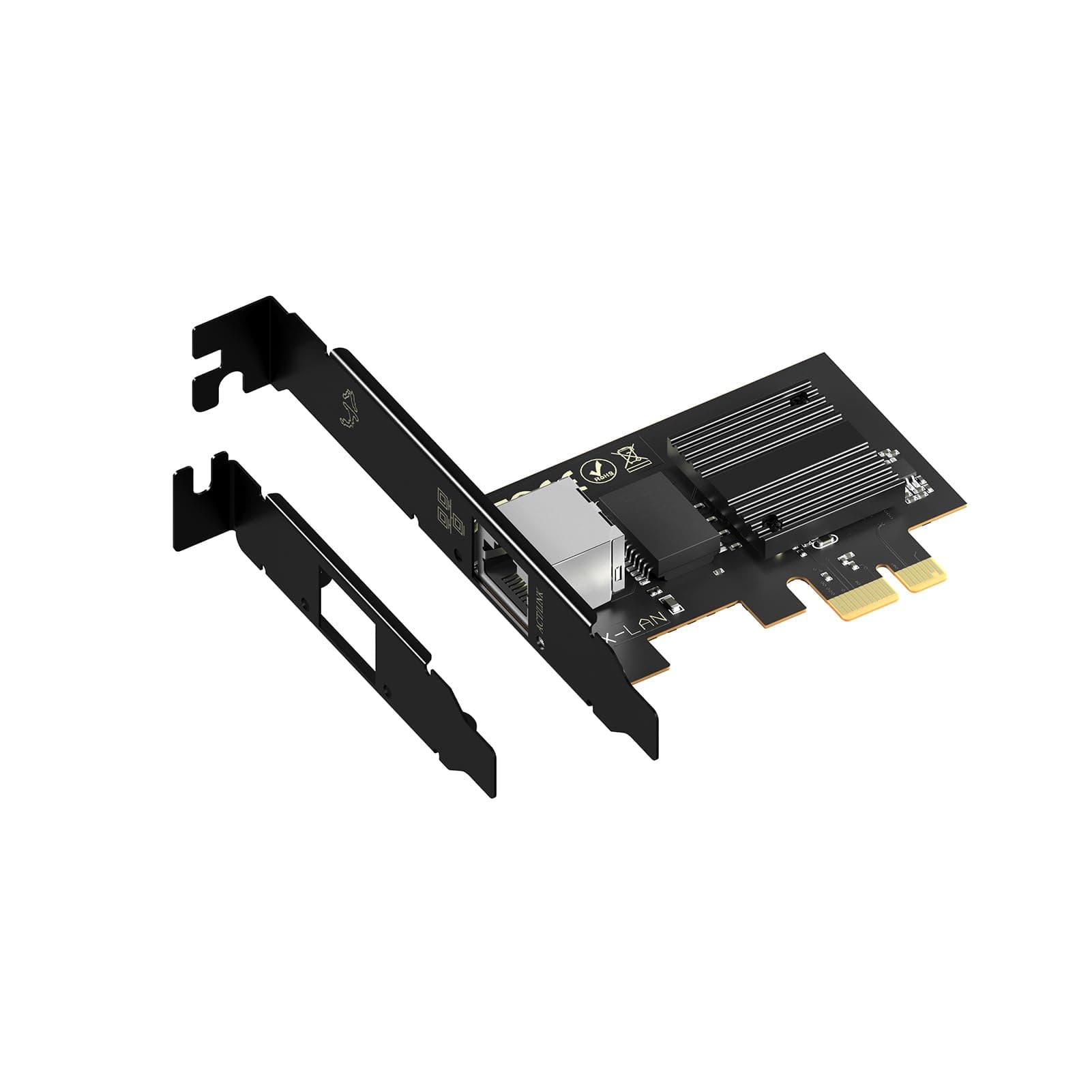
The XikeStor SKS-I226-2.5ET is a high-performance 2.5Gbps PCIe X1 network card powered by the Intel i226-v chip, designed for professional desktops. It supports multiple operating systems including Windows, Linux, and VMware, and features versatile bracket options for various PC builds. With gold-plated connectors and an alloy heat sink, it delivers reliable, stable connections and efficient heat management. Ideal for managers and tech-savvy professionals seeking a seamless, high-speed wired network upgrade.


| ASIN | B0CYB1GSHS |
| Best Sellers Rank | #49 in Internal Computer Networking Cards |
| Brand | XikeStor |
| Built-In Media | 2.5G PCIe Network Card |
| Color | Black |
| Compatible Devices | Desktop |
| Customer Reviews | 3.8 3.8 out of 5 stars (192) |
| Data Link Protocol | Gigabit Ethernet |
| Data Transfer Rate | 2.5 Gigabits Per Second |
| Hardware Interface | PCIE x 1 |
| Item Dimensions L x W x H | 3.07"L x 2.36"W x 0.71"H |
| Item Weight | 1.76 ounces |
| Manufacturer | Anhui Seeker Electronic Technology Co., Ltd. |
| Mfr Part Number | SKN-PCIE |
| Model Number | I226 2.5G RJ45 |
| Warranty Description | 1 year warranty |
J**Y
Works great with Proxmox
It was easy to install and comes with a little screwdriver so I could change the bracket for a small half height slot. Just needed to enable the PCI slot in the BIOS and it was seen by Proxmox and it works well with Ceph. It was recommended by Copilot and has worked well, better than the USB C 2.5Gb adapter. It was cheaper than the USB C adapter as well. Well packaged had a little cover on the PCI fingers, make sure you take it off before you try and install it. I works with HP and Dell SFF computers.
C**X
Terrible Performance
This card reports the connection speed as 2.5Gbps, but it performs close to 100 Mbps. See the iperf3 results: [ 5] 0.00-1.01 sec 7.50 MBytes 62.6 Mbits/sec [ 5] 1.01-2.01 sec 11.5 MBytes 96.5 Mbits/sec [ 5] 2.01-3.00 sec 11.2 MBytes 94.7 Mbits/sec [ 5] 3.00-4.00 sec 11.4 MBytes 95.3 Mbits/sec [ 5] 4.00-5.00 sec 11.4 MBytes 95.2 Mbits/sec [ 5] 5.00-6.01 sec 11.2 MBytes 94.3 Mbits/sec [ 5] 6.01-7.00 sec 11.1 MBytes 93.4 Mbits/sec [ 5] 7.00-8.00 sec 11.1 MBytes 93.5 Mbits/sec [ 5] 8.00-9.00 sec 11.2 MBytes 94.5 Mbits/sec [ 5] 9.00-10.00 sec 11.2 MBytes 94.3 Mbits/sec - - - - - - - - - - - - - - - - - - - - - - - - - [ ID] Interval Transfer Bitrate [ 5] 0.00-10.00 sec 109 MBytes 91.4 Mbits/sec sender [ 5] 0.00-10.05 sec 109 MBytes 90.6 Mbits/sec receiver A different card on the same computer and the same switch perform as expected. [ 7] 0.00-1.00 sec 283 MBytes 2.36 Gbits/sec [ 7] 1.00-2.01 sec 281 MBytes 2.35 Gbits/sec [ 7] 2.01-3.01 sec 280 MBytes 2.35 Gbits/sec [ 7] 3.01-4.01 sec 281 MBytes 2.35 Gbits/sec [ 7] 4.01-5.01 sec 281 MBytes 2.35 Gbits/sec [ 7] 5.01-6.00 sec 280 MBytes 2.35 Gbits/sec [ 7] 6.00-7.01 sec 281 MBytes 2.35 Gbits/sec [ 7] 7.01-8.00 sec 279 MBytes 2.35 Gbits/sec [ 7] 8.00-9.01 sec 282 MBytes 2.35 Gbits/sec [ 7] 9.01-10.01 sec 280 MBytes 2.35 Gbits/sec - - - - - - - - - - - - - - - - - - - - - - - - - [ ID] Interval Transfer Bitrate [ 7] 0.00-10.01 sec 2.74 GBytes 2.35 Gbits/sec sender [ 7] 0.00-10.01 sec 2.74 GBytes 2.35 Gbits/sec receiver
B**Y
Works well with Unraid host through a Unifi Cloud Gateway Max router
I have an older PC that has been repurposed to be my NAS using Unraid. I purchased this to replace an intel based 2x1Gbps card that was running as an aggregated LACP bond. It took a little bit to learn how to get Unraid to make this the primary NIC, but that's not the card's fault (it wasn't really that hard, I am just not familiar with Unraid just yet). After installing the card and getting it connected to my Ubiquiti Unifi Cloud Gateway Max, I ran In iperf3 test to another Unraid system on the network. I am no network engineer, but I'm getting "close enough" to the advertised maximum bandwidth to make me very happy. My iperf3 results are below: iperf3 -c 10.0.20.21 Connecting to host <targetIP>, port 5201 [ 5] local <sourceIP> port 58840 connected to <targetIP> port 5201 [ ID] Interval Transfer Bitrate Retr Cwnd [ 5] 0.00-1.00 sec 282 MBytes 2.36 Gbits/sec 0 311 KBytes [ 5] 1.00-2.00 sec 278 MBytes 2.34 Gbits/sec 0 308 KBytes [ 5] 2.00-3.00 sec 279 MBytes 2.34 Gbits/sec 0 311 KBytes [ 5] 3.00-4.00 sec 278 MBytes 2.34 Gbits/sec 0 305 KBytes [ 5] 4.00-5.00 sec 280 MBytes 2.35 Gbits/sec 0 308 KBytes [ 5] 5.00-6.00 sec 278 MBytes 2.33 Gbits/sec 0 305 KBytes [ 5] 6.00-7.00 sec 280 MBytes 2.35 Gbits/sec 0 308 KBytes [ 5] 7.00-8.00 sec 278 MBytes 2.33 Gbits/sec 0 311 KBytes [ 5] 8.00-9.00 sec 279 MBytes 2.34 Gbits/sec 0 308 KBytes [ 5] 9.00-10.00 sec 278 MBytes 2.33 Gbits/sec 0 5.66 KBytes - - - - - - - - - - - - - - - - - - - - - - - - - [ ID] Interval Transfer Bitrate Retr [ 5] 0.00-10.00 sec 2.72 GBytes 2.34 Gbits/sec 0 sender [ 5] 0.00-10.00 sec 2.72 GBytes 2.34 Gbits/sec receiver I may try to set up jumbo frames (I don't know if that' still a good way to increase throughput, but I seem to remember 'back in tha day' it being one way to improve performance) but I'm not sure. For now, it gave me what I wanted: a very affordable and fast speed boost on my small home network.
H**U
Aprés 2 mois d'utilisation la carte est hs. les 2 premières semaines, aucun problème, débit très correct. Du jour au lendemain la carte se désactive. Puis plus rien. Je ne sais pas si il y a un SAV, mais je ne le recommande pas pour l'instant.
A**S
Works well under FreeBSD/TrueNAS Core 13.3 out of the box. No drivers required. Arrived well packed. The set contains a short and a long bracket, a screw and even a mini screwdriver that you can see on the photo. More than expected. I recommend the seller.
り**た
ネットワークカード装着後、OSに認識されず、Windows標準のドライバー検索でもインストール不可。 既存NICのドライバー更新時に新規NICのドライバーも適用され、現在は2.5Gbpsで正常動作を確認。
S**T
Ottima scheda e funzionante con VMWARE ESXI in modalità plug & play senza fare altro.
T**K
I recently upgraded my server with the XikeStor 2.5Gb PCIe Network Card, and I couldn't be happier with the results! This network adapter, featuring the reliable Intel I226-V Chip, has been an absolute game-changer for my home network. Installation was incredibly straightforward – simply slot it into a PCIe 3.1 X1 or greater slot, and it was ready to go. What truly stands out is its exceptional compatibility. It worked perfectly right out of the box, delivering the promised 2.5GBase-T speeds without any fuss. Even more impressively, I tested it with both VMware ESXi 8.0U3 and Proxmox 8.4.1, and the card was picked up by both hypervisors without requiring any additional drivers installed – a huge time-saver! The performance uplift is immediately noticeable. File transfers are significantly faster and the system feels a lot more responsive than previously. The speeds have also been consistently excellent, running at full 2.5Gbps line speed, which is a true upgrade from standard gigabit Ethernet, providing that extra bandwidth for demanding tasks. If you're looking to future-proof your network connection and experience genuinely faster speeds, the XikeStor 2.5Gb PCIe Network Card is an outstanding choice. It's reliable, easy to install, and delivers on its promise of high-speed, stable connectivity across various operating systems and virtualisation platforms. Highly recommended for anyone seeking a significant network performance boost!