We remain fully operational. Our teams are working around the clock to ensure your deliveries continue safely.

下载应用程序


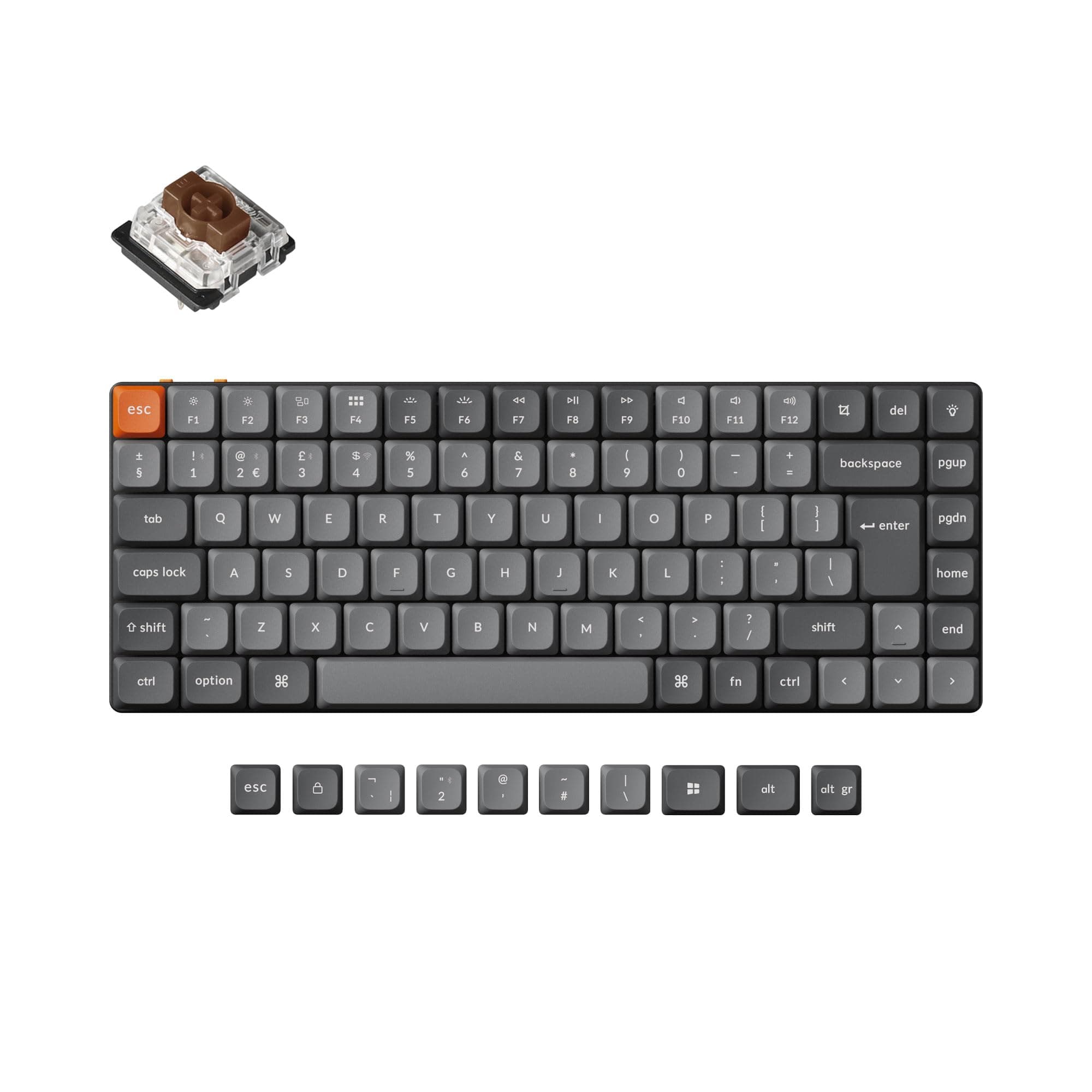
⌨️ Elevate your desk game with the ultra-slim, endlessly customizable Keychron K3 Max!
The Keychron K3 Max is a premium ultra-slim wireless mechanical keyboard featuring hot-swappable low-profile Gateron Brown switches, dual 2.4 GHz and Bluetooth 5.1 connectivity supporting up to 3 devices, and advanced QMK/VIA programmability. Designed for professionals who demand seamless multitasking and personalized typing experiences, it offers up to 78 hours of battery life (backlight off) and a compact 75% layout with durable LSA keycaps, compatible across Mac, Windows, and Linux systems.


| ASIN | B0CTH7V97N |
| Are Batteries Included | Yes |
| Batteries | 1 Lithium Ion batteries required. (included) |
| Best Sellers Rank | 18,569 in Computers & Accessories ( See Top 100 in Computers & Accessories ) 277 in Keyboards (Computers & Accessories) |
| Brand | Keychron |
| Colour | Low Profile Gateron Brown Switch |
| Customer Reviews | 3.8 3.8 out of 5 stars (28) |
| Date First Available | 29 Jan. 2024 |
| Delivery information | We cannot deliver certain products outside mainland UK ( Details ). We will only be able to confirm if this product can be delivered to your chosen address when you enter your delivery address at checkout. |
| Guaranteed software updates until | unknown |
| Item Weight | 840 g |
| Item model number | K3 Max |
| Lithium Battery Energy Content | 15 Watt Hours |
| Lithium Battery Packaging | Batteries contained in equipment |
| Manufacturer | Keychron |
| Number Of Lithium Ion Cells | 1 |
| Number of Batteries | 1 |
| Operating System | Linux |
| Package Dimensions | 32.9 x 15.9 x 4.5 cm; 840 g |
| Power Source | Battery Powered |
| Series | K3 Max |
S**N
best keyboard of its type
This is probably the best keyboard of its type on the market. Great quality.
A**O
A lovely keyboard to type on, with some quirks.
This is a real pleasure to type on, but of course, that's the main reason to purchase it. I have only had it for a short time so I cannot yet comment on durability but all keys operate flawlessly at this point and of course the whole purpose of keyboards like this is that the switches are easily replaceable in any case. However there are some nitpicks. Firstly although purchased as a UK keyboard and used under Windows, you have to swap quite a few more keys than just the two or three on the quick start guide to get the layout set up like a standard UK keyboard. You do, of course, get all the required keys with the keyboard along with a handy tool to remove key tops, so this is a fairly minor issue. Just a bit odd to be purchasing a keyboard marked as UK, and have to do this. Secondly the keyboard lacks an 'insert' key. Now this is quite important to me and after reading that supposedly pressing fn+del is supposed to be insert, I was very puzzled that this did not work. Subsequently I launched the KeyChron Launcher, which is a a browser-based tool for customising the keyboard. You must connect the keyboard either via WiFi or the supplied USB cable to use this utility. Then remember to switch to layer 2 if you are using Windows, otherwise changes won't work. It was then easy to repurpose the lightbulb key next to the del key as an insert key, since to be honest I really don't need the RGB backlighting, I just wanted the mechanical keyboard switches. Changes you make are permanent, you do not need to keep the launcher page open after you modify the keyboard mapping. A nice touch is that you have two layers of mapping each for Mac and Windows. This means you could set up an entirely customer layer for specific applications, which could be useful. Another issue to be aware of is that the caps lock key has no real visible indicator when it is on, because although the key LED lights up red when caps lock is pressed, you cannot see this from above. Note that the keytops do not have transparent (or indeed translucent) letters so the backlighting only appears around the edges of the keys. Also no matter what colours you set the backlight to, with the backlight off, the key cap LED is always red (not, as I said, that you can really see it). I am not really sure what the purpose of the backlighting is, to be honest, I get that it's a 'gamer' thing but while it would be useful in low light conditions that would only be the case if the keytop legends were translucent - which they are not. Finally you may find yourself accidentally hitting the print screen button as it's positioned just above backspace. Fortunately you can disable its default action to invoke screen snipping in Windows and still have ctrl+alt+printscreen to copy the screen to the clipboard. As I said, these nitpicks aside, it's a superb keyboard to actually type on, with proper mechanical keys and a decent travel. It's not too noisy and not 'clicky' like an old-school buckling spring IBM keyboard, but it is definitely not as quiet as a standard laptop keyboard.
A**N
A Truly Good Low-Profile Option
I'm a big mechanical keyboard guy. I've had many over the years, but recently I've been leaning more toward low-profile. I came from a Durgod Hades 68, which was great, but I wanted something wireless. My first port of call was the Lofree Flow Lite84. Can't say I was a fan. Looked and sounded delicious, but the switches were far too easy to press and accuracy really took a severe hit so I returned that. Next I went to the Logi (gross, I know, but here we are) MX Mechanical Mini and for all its faults, it hit the spot. It was accurate, didn't look too bad, and did the job. The sound, however, wasn't the nicest and it was somewhat flimsy. Recently, since OS Tahoe, the Logi app no longer works and Logi seem hellbent on losing customers by not fixing it and not responding to the issue in any way. I should have know better, to be fair. Enter this, the Keychron K3 Max. Fantastic. Looks good. Sounds good. Feels good. Accuracy is pin-point. The banana switches are, for me, the perfect middle-ground between clicky and not too loud. Honestly can't fault it so far.
P**T
Unusable after six months of regular use...
This keyboard was good to start with but after seven months of daily use for work it's now all over the place. Initially the 'E' would regularly issue two characters, so I swapped the cherry switch for a different button I don't really use. Now multiple characters are double triggering for a single press. It's ok if you type incredibly slowly but if you try to touch type at any sort of speed you just get random double characters and fullstops weirdly appearing after words when I've only pressed the spacebar. It's now happening so routinely that I'm going to have to get a new keyboard. It was a pretty reasonable keyboard for the first six months but it's hard to say it represents value for money when it needs either replacing or a new set of keys in just over six months. It's a shame really because other than being completely unreliable it was a good keyboard with lovely feel.
P**M
Business style low profile keyboard that can handle some gaming.
I am using the product to type this review. This is a second hand from warehouse but it is like new except for the outer package. I have a number of keychron product (K4, K5 max, K3 max and B1) and various logitech keyboard and a cherry mx keyboard. I feel like this one is identical to K5 max but a smaller footprint. If you want a low profile and do not care about modification (you cannot do much in low profiles), this should be your choice. I have logitech gaming keyboard, but all my keyboard is for office and accounting usage, so I cannot comment on how good or bad it is for gaming. Even rting claim it as the best low profile gaming keyboard. I think it would be more like a personal choice and really, go non low profile if you go gaming (even my son is using my K5 max for his gaming, instead of the K4) I purchase K5 Max in Keychron but there were 1 switch broken - it is a nightmare to get a replace - as you need to prove it and then they will ship the replacement from China. With amazon, something goes wrong, just return. Easy. I am using docking to my laptop so yeah, you can put it on top of the laptop and use it. But I will just dock it and use it separately. I do not take it around. If you plan to, make a case for it or your keycaps will be flying around.