We remain fully operational. Our teams are working around the clock to ensure your deliveries continue safely.

下载应用程序


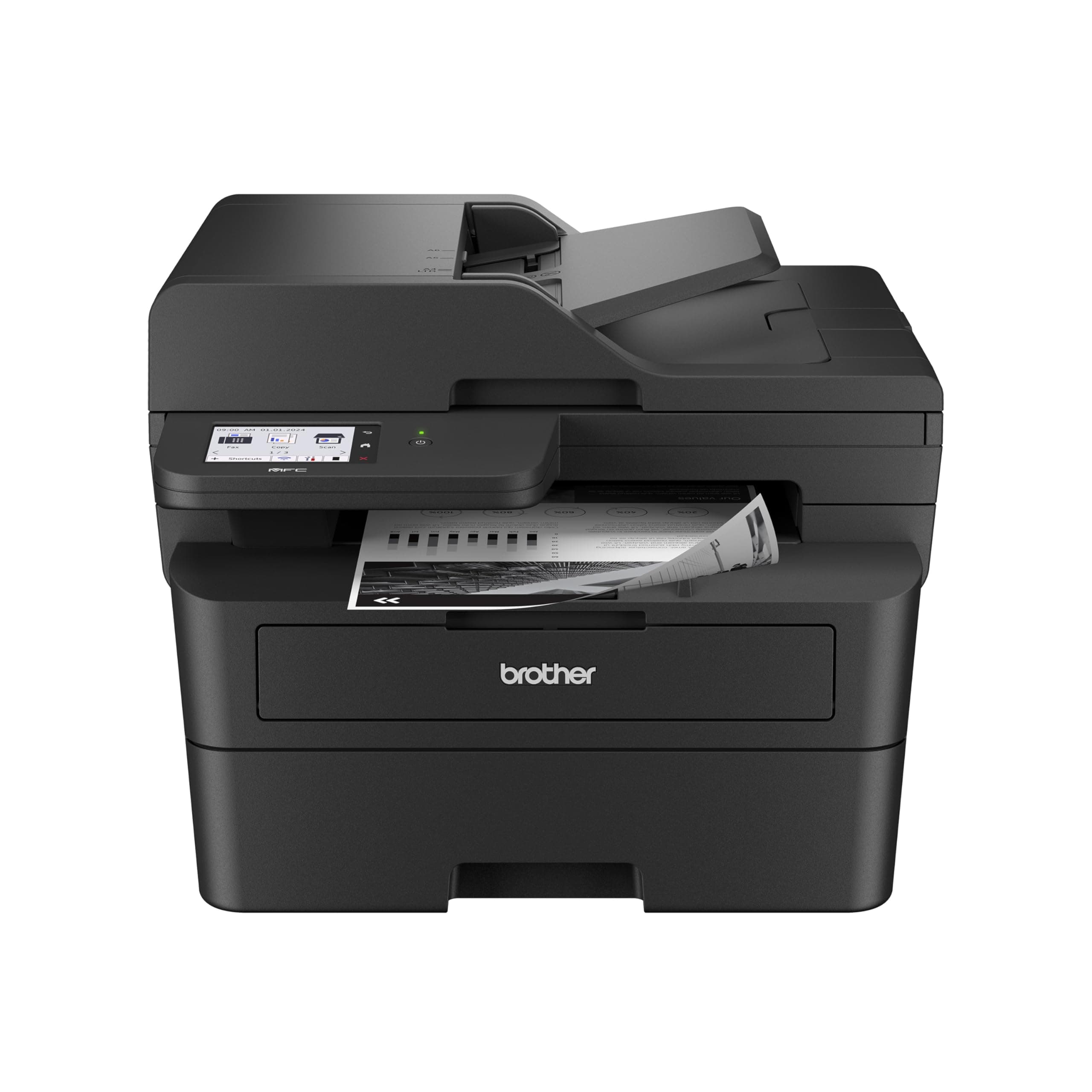
⚡ Print smarter, faster, greener — your all-in-one office powerhouse!
The Brother MFC-L2900DW is a compact, professional-grade monochrome laser printer designed for small businesses. It delivers rapid 36 ppm printing, automatic duplex printing and scanning, and versatile connectivity including dual-band Wi-Fi, Ethernet, and USB. Featuring a 3.5-inch touchscreen and cloud integration, it streamlines workflows while reducing energy consumption by 22%. With a 50-page auto document feeder and 250-sheet capacity, it’s built for high-volume efficiency and reliable, crisp black-and-white output.


| ASIN | B0D9ZMLK67 |
| Additional Printer Functions | All In One, Copy, Scan |
| B&W Pages per Minute | 36 ppm |
| Best Sellers Rank | #7,160 in Office Products ( See Top 100 in Office Products ) #111 in Computer Printers |
| Brand | Brother |
| Built-In Media | AC Power Cord and Telephone Line Cord, DR830 Drum Unit (15,000 pages), MFC-L2900DW Printer, Product Safety Guide, Reference Guide, Warranty Card, Quick Setup Guide, Starter Black Toner Cartridge (700 pages) |
| Color | Black |
| Color Depth | 1 bpp |
| Color Pages per Minute | 1 ppm |
| Compatible Cartridge | TN830, TN830XL, TN830V |
| Compatible Devices | IPhone, Laptops, PC, Smartphones, Tablets |
| Control Method | Touch |
| Controller Type | Android |
| Customer Reviews | 4.3 4.3 out of 5 stars (338) |
| Display Type | LCD |
| Dual-sided printing | Yes |
| Duplex | Automatic |
| Global Trade Identification Number | 00012502674085 |
| Hardware Interface | Ethernet, USB 2.0 |
| Initial Page Print Time | 6.9 Seconds |
| Ink Color | Black |
| Item Dimensions D x W x H | 16.1"D x 12.5"W x 16.6"H |
| Item Type Name | Multifunction Printer |
| Item Weight | 11.8 Kilograms |
| Manufacturer | Brother |
| Maximum Copies Per Run | 250 |
| Maximum Copy Resolution Black and White | 600 x 600 dpi |
| Maximum Copy Resolution Color | 600 x 600 dpi |
| Maximum Media Size | 8.5 x 14 inch |
| Maximum Print Resolution Black and White | 1200 x 1200 dpi Dots Per Inch |
| Maximum Sheet Capacity | 250 |
| Maximum print Resolution Color | 1200 x 1200 dpi Dots Per Inch |
| Model Name | MFCL2900DW |
| Model Number | MFCL2900DW |
| Model Series | MFC-L |
| Number of Ethernet Ports | 1 |
| Number of Trays | 1 |
| Other Special Features of the Product | Auto Document Feeder, Energy Star, Epeat Qualified, Single Pass Duplex Copy and Scan, Touch Screen |
| Paper Size | 8.5X14 Inches |
| Print media | Paper (plain) |
| Printer Connectivity Type | Ethernet, USB, Wi-Fi |
| Printer Output Type | Monochrome |
| Printer Type | Laser |
| Processor Count | 1 |
| Resolution | 1200 x 1200 |
| Scanner Type | Flatbed |
| Series Number | 2900 |
| Total USB 2.0 Ports | 1 |
| Total Usb Ports | 1 |
| UPC | 012502674085 |
| Unit Count | 1.0 Count |
| Warranty Description | 1 Year Limited Warranty |
| Warranty Type | Limited |
J**W
Amazing Laser Printer, Flawless Wireless Setup
An amazingly simple, flawless installation. I hate installing my printers because they usually require a lot of time and effort to get the wireless printer recognized by all devices , to get the scan feature properly set up and all the other things that most people are tortured with when setting up a new printer. The Air Print feature works flawlessly with my Windows notebook, my iPhone and my iPad. This is a quality made, durable printer that Brother is known for but this models particularly effortless setup , sharp printing quality with crisp, clear B&W copies is the best that I have seen in laser printers at this affordable price. I spent hours researching the different Brother printers and decided this model was the best based on ratings, reviews and online professionals. I love this printer and it’s so quiet when printing or scanning that I can’t even hear it printing out the document. I strongly recommend this model for those who are looking for a quality laser printer, scanner, fax, all in one machine. This model works better than more expensive laser machines and you will enjoy the simplicity of its wireless setup and never need to think about having quality printer performance ever again. There is no mandatory toner subscription plan which is a plus as you can buy Brother OEM toner or off brand compatible toner whenever you want to purchase them. It comes with a starter OEM toner that does 700 pages and there are high performance 3000 page toner’s that are available to buy once the starter cartridge is used up. Great high quality product in a world of other manufacturers garbage printers.
D**E
Excellent printer
Excellent printer. Easy to set up. Crisp, clean results.
R**3
Great Connectivity, Print Quality and Ease of Use without Requiring Extra Drivers
Saw complaints about connectivity with the occasional complaint of print quality. My unit has a problem with neither. In fact, it was the easiest thing to add to workflow. I connected it to my Wi-Fi without any issues. I then went on my Windows 11 PC and went to the "Add a printer or scanner" in the Printers & scanners settings. After that, it started appearing as a selectable device. The print quality is exactly what you'd expect quality-wise; clean and clear. I also have an Macbook Pro M3. Once again, all I did was go to the Printers and Scanners menu in Settings and click "Add Printer, Scanner, or Fax...". I used the scanner on MBP, which is great because you can select the feed tray or glass bed, and that was all it took. So there you have it. No extra drivers are necessary. There is zero hassle with connectivity (my girlfriend even prints from her iPhone though I haven't bothered to try from my Android device). You just get an amazingly convenient product. I know we all have varying levels of tech savviness and my experience won't necessarily be the same as others, but the setup process seemed relatively bulletproof to me as far as places to go off the rails. I don't think I could have messed it up if I tried.
C**S
Buggy. Low Quality.
This printer was relatively easy to set up and printed one and two sided jobs OK. I have it connected via wired Ethernet. Note that it's plugged in directly to an AC outlet with no DC adapter. All of a sudden the printer voice is warning about a "battery low" condition. Huh? What battery? No help from the Brother website about this nonsense. I'll donate this junk to charity after finding a quality replacement.
H**B
Easy installation and ready to go
Perfect, inexpensive printer for our basic needs
J**N
Great printer
I like this printer and I'm a fan of Brother products. Pros. - Quick startup - Fast prints - Fast copies and scans. - Single pass where it scans both sides of the page at once is an upgrade to the ADF I had on the previous printer. - Good quality crisp looking prints. - Decent security. - Is usable from wired, wireless and from several cellphone/ tablet app. - Semi portable - don't need the moving squad - Quiet - Efficient and economical - didn't notice lights dimming. - Great scanning software. - easily to install - Cartridges for replacement ink are easily to find and there's a good 3rd party supply and opportunity. Cons (or nits): - ADF jams easier than other brands/models. There is very flat opening on the feeder side of the ADF so slightly creased pages or pages that are creased on the leading edge will get caught or torn and caught by the ADF. - Color screen is great however navigation keys are not illuminated so difficult to see the keys in a darker room. - Software in the printer takes a bit of getting used to. Overall the printer provides better black ink on white paper prints on letter and legal size standard copy paper than some of the larger printers that also do just black on white. If you do mostly printing black ink on white office paper then this is a great printer. The issues with the ADF or local display shouldn't really stop a purchase. 36ppm more than plenty for most of what we use the printer for. I had the previous printer also from brother for more than 15yrs. It still works, but doesn't connect easily with cell phones or wifi. I'm hoping to get similar trouble free operation and longevity.
A**R
Excellent and fabulous value
This replaced my Brother MFC 7840 which died after 17 years of faithful service. This printer is slightly noisier which is more than compensated by being much faster. Also has duplex (two sided printing) capability. Scan is also much faster. Overall, I am delighted with it and I’m half glad that my previous printer died. (May it rest in peace.!).
W**S
Overall I’m pleased
It is very nice to be able to print and scan both sides of a document. This scanner will even scan both sides of multiple pages (I believe up to 25+ pages at a time). I would be perfectly happy with this printer if the print quality was a little better. Documents are not as crisp as those from my previous inkjets (yes I know this is not an inkjet). It gets the job done.
R**S
The Brother MFC-L2900DW has exceeded my expectations! It’s a compact, yet powerful all-in-one printer that handles printing, scanning, copying, and faxing effortlessly. The print quality is sharp and professional, and the speed is perfect for my home office needs. I really appreciate the wireless connectivity—it works flawlessly with both my laptop and phone. Setting it up on Wi-Fi was simple and quick. The automatic duplex printing is a nice bonus and saves paper without extra effort. Overall, this printer is fast, quiet, and very reliable. If you’re looking for a cost-effective all-in-one laser printer with dependable performance, the MFC-L2900DW is a great choice. Highly recommended!
D**Z
Really good printer. Print quality is excellent and printer is very quiet compared to what I'm used to. My main reason for getting this printer was the fact it has duplex scanning from the feeder. Also scanning in color could come in handy for any scans I need to keep in digital format. Setup of the printer was fairly straight forward although was a little confusing when setting the app on a 2nd phone. You just need an option to register printer rather than install it again. Printing from the phone is great as well.. very quick.
T**N
I paired this printer with my Apple Mac Studio. The set up was seamless and the instructions were easy to follow. Unboxing to printing took approximately 10 minutes. I was hesitant about purchasing a brother printer for some reason but I am impressed with the quality, the intuitive setup and functionality. I’m a fan!
S**A
So far, it works really well and meet my expectation for sure! I like the fact that it can scan in colour and scan in duplex (double-sided) too! Really convenient and easy to use.
J**V
I like this printer because it's Coste effective for a student that need to print a lot of papers. Also because it's a Lazer printer when you highlight, it's doesn't smear
TrustPilot
2天前
4天前