We remain fully operational. Our teams are working around the clock to ensure your deliveries continue safely.

下载应用程序




⚡ Power-Test Like a Pro — Know Your Battery’s True Potential!
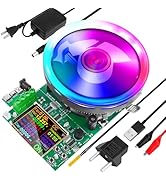
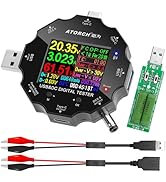
The MakerHawk Battery Load Tester is a high-precision electronic load tester featuring a 2.4-inch HD color display and a professional 4-wire system for accurate voltage measurement. Supporting up to 180W power, 200V voltage, and 20A current, it offers four adjustable discharge modes and intelligent temperature-controlled cooling. Compatible with Android, iOS, and PC apps, it’s designed for detailed battery health diagnostics, ideal for professionals and enthusiasts who demand reliable, real-time battery performance insights.















| ASIN | B0D83M84B2 |
| Best Sellers Rank | #212,237 in Tools & Home Improvement ( See Top 100 in Tools & Home Improvement ) #23,320 in Electrical Equipment |
| Brand Name | MakerHawk |
| Color | Blue |
| Customer Reviews | 3.9 3.9 out of 5 stars (59) |
| Included Components | 180W Battery Load Tester |
| Item Dimensions | 7.87 x 5.51 x 7.87 inches |
| Manufacturer | MakerHawk |
| Minimum Operating Voltage | 200 Volts |
| Model | 180W |
| Power Source | Corded Electric |
| Style Name | 4-Wire System USB Load Tester Adjustable Constant Current Intelligent Temperature Control High Precision Calibration 180W 200V 20A |
| Upper Temperature Rating | 80 Degrees Celsius |
E**E
Fantastic 180 Watt Load Tester with a Brilliant Color Display
Testing the actual health and true capacity of lithium cells and portable power banks requires putting them under a sustained electrical load. I needed a reliable and highly adjustable electronic load tester to verify if my batteries were actually delivering their advertised power ratings or if they were degrading over time. This unit sits permanently on my electronics test bench. I hook up questionable power banks and individual lithium cells to run full discharge cycles. It allows me to monitor the exact voltage drop and total amp hours delivered before the battery shuts down. Pros: • Four Wire System: This is a massive advantage for diagnostic work. It measures the voltage directly at the battery terminals which completely eliminates the cable resistance from your final readings. • Excellent Screen: The 2.4 inch color display is incredibly crisp and easy to read. It shows realtime voltage, current, power, and total capacity all on a single screen. • Robust Cooling: The oversized heatsink and integrated cooling fan do an amazing job of keeping the unit thermally stable even when pulling heavy wattage for several hours straight. Cons: • No USB-C PD Negotiation: The included hardware does not have the capability of negotiating USB-C Power Delivery voltage levels. Out of the box, you can only test standard 5V output, meaning you cannot natively test the higher and faster charging modes from your usb power bricks. I had to buy a little adapter that does PD negotiation separately shipped from China to test those higher voltages. • Menu Complexity: Because the device is so feature rich, navigating the menus to set specific cutoff voltages or time limits requires some research. • Inadequate Documentation: The device comes with barely any useful instructions in the box. When you try to search for tutorials or manuals online, almost all the available resources are in Chinese. I actually had to use ChatGPT online just to get some clear instructions on how to properly operate the menus. The Verdict: If you work with custom battery packs or just want to test if your USB power supplies are truly delivering their promised output, this load tester is an incredibly valuable tool, while knowing if you want to properly test the fast charging modes from your usb-c plugs and batteries, you’ll need to buy the ATORCH DL24B-XSP16 board separately. Other than that, this tester provides phenomenal precision testing for the price.
S**N
Does the job
I started making my own battery packs & rebuilding them too. This works well and connects to my phone for display… was a bit of learning to use it, but now I’m very happy with it! Great for smaller batteries! Will do bigger batteries just would take a while for results.
R**0
Excellent tool, though with a few lessons learned
First off, this is an excellent battery load tester, if perhaps not for the faint of heart, but then perhaps the sort of person who's likely to want to do this sort of device testing will be used to this sort of rough-and-ready experience. This model is the more featureful one, and given that even as a novice I ended up using a bunch of the features not otherwise provided in the cheaper models, I would suggest that you get this one, rather than one of the slightly cheaper ones. This product seems to be excellent value for money, and I think that getting a cheaper one would be a false economy, especially if you factor in your own time. The product itself is well constructed, but not exactly what you would call sturdy, since it's just a circuit board with a bunch of components soldered on, and standing on four standoffs for legs. If you drop it, it may well be toast, so be careful. In my case, so far I've been using it to measure the capacity of cordless tool batteries, and the output of USB power supplies, both of which tasks it's performed with aplomb, though I had to futz around a fair bit, doubtless because of stupidity on my part, but also because of the issues outlined below. When testing 20V batteries, I had no trouble running them at 7A, so 140W, and the device had no trouble keeping cool (see thermal images). The attached graph shows the Win app's display after one such run. The battery topped out at 2.8Ah (it claimed to be 7Ah). It's worth noting that the save results button, which is just below the "Is:" display on the top left gives an option to save the graph, but it doesn't end up saving all of the results above the graph, which is silly. Screen shots are a better idea. From the same menu, you can also save out a CSV with second-by-second data. As I said, I think that this is a great product at a great price. Still, I would have preferred to have had the opportunity to pay a little more to get a better product. Here are the problems I had: * One important thing to understand about this product is that it has experienced a modicum of badge engineering. As far as I can tell, the manufacturer is really "aTorch", so searching for "MakerHawk" has limited utility. * My version came without any documentation whatsoever. I don't know if this is a systemic problem or just a packaging issue in my case. I was stuck googling around, but mostly came across (really terrible) docs for the older/cheaper models with knobs. I eventually found the manual. I can't give the URL here, but if you google you ought to be able to find it with this search term: site:device.report "atorch bw150 user manual pdf" * I found that I had no trouble getting the device to connect to an Samsung Galaxy Tab A (SM T580) Android tablet using the "SmartLife" app, which I happened already to have installed. Having said this, it's pretty clear that the Bluetooth connection/control method is less desirable than the real Windows app. The app can be got from the URL in Section 6 "Online Instructions" of the above-mentioned user manual PDF. This gets you a zip file with a directly executable Windows application (no installing required), and definitely works for me under Win 11. * The device comes with no power supply. This is (kinda) documented in the manual, but it would have been nice to know that before getting it. You can power it from a USB port in the middle on the back, or from a DC12V power source also connected at the back on the left. I happened to have a spare DV12V power wall wart supply, so I ended up using that. The device does come with a USB-A -> USB-C cable, which you could use to power it, but you'll need that to connect to your PC so as to get a direct connection to the app mentioned above. This latter connector is mounted on the right-hand side near the front of the device. * You're kinda on your own to figure out how to use the device, though you may find a tutorial video or two, if you're lucky. I found that the display on the app was definitely the best way to see what's going on, but editing the parameters in the app never seemed to take effect. I suspect that having the Bluetooth/Android connection running at the same time was getting in the way. I did find that there's no visible means to reset all the counters using the Windows app. I hunted pretty hard, but failed to find anything. I did, however find it possible at least some of the time to reset the counters using the Bluetooth/Android method. Not sure what's going on there. I ended up figuring out how to change parameters by using the four buttons on the tester device itself. This was a really weird UI experience, and nothing like any suggestions I saw on YouTube. I kept hearing that doing multiple clicks and long clicks would work, but that definitely did not work. I eventually found that clicking the top button seemed to move a little underbar cursor along the parameter value to be changed, and the left/right (+/-) buttons would change the value for that specific digit. That is, each digit had to be selected with the underbar, and then edited individually. This isn't a huge burden. It just took a while to figure it out. So, the bottom line is that this device definitely worked for me, and was definitely worth it. Above and beyond the mysteries of the documentation and UI I discussed above, there are two other things which I wish I had a chance to throw a little more money at: * I wish that there was an option to get it in a box. This would definitely have been worth another ten bucks to me. Yes, I could get a box myself, but installing it would actually be very hard, since all of the connectors, controls and the screen are directly mounted on the PCB. It would be tough to move all of these, or remotify them in some way. It would be a simple matter to make these indirectly wired to the PCB at manufacture time, in which case getting it into a box would be simple. * The first task I wanted to tackle was to test cordless tool batteries. These batteries are carefully designed to make it hard to reach the contacts accidentally, making it hard to short out a battery in your toolbox. There's no way that I could get the clips for the two leads provided to connect to the test samples I had. If the product came with another upsell of a pack of test probes of different types, I would have snapped it up. Again, yes, I can make my own test probes and get them to fit, but the cost of my time to do so is wildly greater than what they would have charged for a diverse pack of probes. I couldn't wait, so for my task, I ended up jamming paperclips into the battery terminals, and connecting to those. Kinda terrifying, but it got the job done.
L**N
died in less than an hour
Right out of the box, it looks great and has a pretty good looking display. I plugged it in and used my e-bike charger to test it, it worked fine for the first 15 or 20 minutes running at about 130 w. My ebike charger is rated at 67V and 2.5A, so I started pushing up the power .1A at a time. when I went from 2.3A to 2.4A (around 140 to 150 'ish watts) I tripped the overpower protection, which should have been fine all the way up to 185W. After I unplugged my charger to clear OPP, I want to reattach it to see if that was some weird issue or if this is truly cheap garbage. When I attempted to reconnect the alligator clips to the wires on the charger, it combusted into a blinding flash. I can only assume, whatever flaw tripped OPP must have caused a permanent Short circuit effectively killing this admittedly nice looking but ultimately useless piece of garbage.