We remain fully operational. Our teams are working around the clock to ensure your deliveries continue safely.

下载应用程序


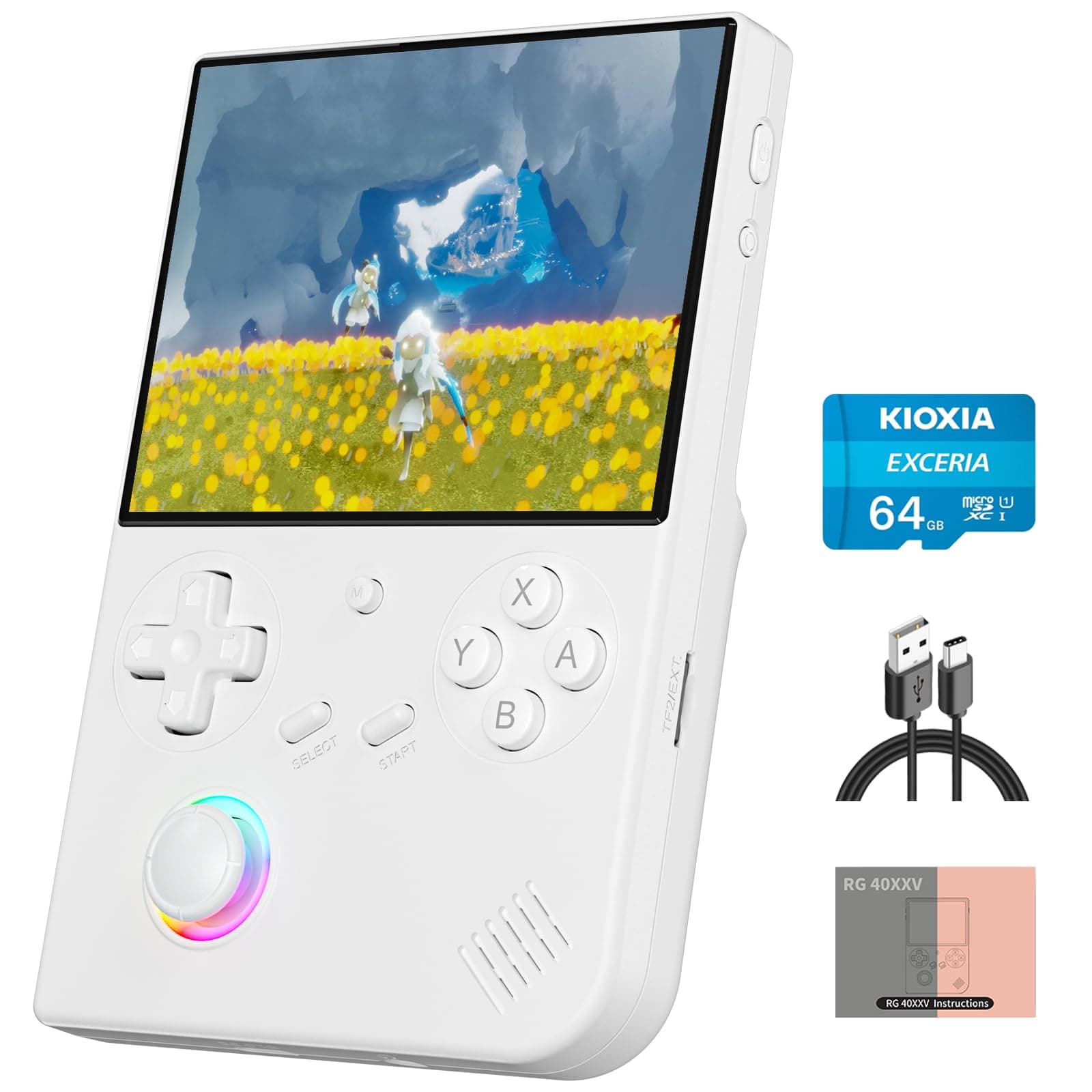
🎮 Level up your retro game with style and stamina!
The RG40XX V is a Linux-based portable handheld console featuring a 4-inch IPS display, 64GB of preloaded classic games, and a quad-core processor. It supports multiple game simulators, offers dual-band WiFi and Bluetooth 4.2 connectivity, and includes a high-precision joystick with customizable 16M RGB lighting. Powered by a 3200mAh battery, it provides up to 6 hours of continuous gameplay, making it a versatile and stylish choice for retro gaming enthusiasts on the go.


| ASIN | B0DH1QS2Z4 |
| Battery Average Life | 6 Hours |
| Battery Description | Lithium-Ion |
| Best Sellers Rank | #85,141 in Toys & Games ( See Top 100 in Toys & Games ) #162 in Plug & Play Video Games |
| Brand Name | Doriteney |
| Controller Type | Joystick |
| Customer Reviews | 4.3 4.3 out of 5 stars (125) |
| Display Type | LCD |
| Form Factor | Handheld |
| Hardware Interface | HDMI |
| Included Components | RG40XX V |
| Is Assembly Required | No |
| Item Dimensions | 5.46 x 3.61 x 0.86 inches |
| Item Weight | 0.37 Kilograms |
| Manufacturer | Doriteney |
| Manufacturer Maximum Age (MONTHS) | 960.0 |
| Manufacturer Minimum Age (MONTHS) | 168.0 |
| Manufacturer Part Number | C3-RG40XX V-White |
| Material Type | Plastic |
| Memory Storage Capacity | 64 GB |
| Number of Players | Multiplayer |
| Operation Mode | Manual |
| Platform | Linux |
| Power Source | Battery Powered |
| Screen Size | 4 Inches |
| Size | 4 inches |
| Unit Count | 1.0 Count |
H**.
A Retro Warrior That Needs a Little TLC
I recently grabbed the Anbernic RG40XX V, and honestly, it’s scratched that retro itch perfectly. This little vertical handheld is a solid piece of kit right out of the box, but the real magic happens when you dedicate an hour to setting it up properly. First off, the emulation performance is exactly what I signed up for. Everything up through the 32-bit generation—think PS1, SNES, Genesis, and GBA runs like butter. Seriously, smooth frame rates and great audio fidelity across the board. For the price point, it’s an absolute winner for 8-bit and 16-bit classics. Now, let's talk about the software. Ditching the stock firmware for MustardOS was a complete game-changer, and thankfully, the process was almost completely painless. It took me maybe 15 minutes total. Download the image, use a good flashing tool (I used Raspberry Pi Flasher, but Rufus would work too) to put it on a new card, pop it in, and boot up. The interface is clean, quick, and just makes navigating your library a joy. If you’re nervous about flashing custom firmware, don't be. This specific process is extremely user-friendly. Speaking of cards, if you buy this thing, consider this your non-negotiable step one: trash the included SD card. Seriously, toss it immediately. Anbernic uses the cheapest, slowest card possible, and it’s notorious for failing right when you’re deep into a playthrough. Spend the extra $20 on a reputable, high-quality, high-speed card (like a Samsung or SanDisk), and flash your OS and ROMs onto that. It ensures better stability, faster load times, and complete peace of mind. Overall, it's a fantastic device that brings classic gaming to life in a comfortable vertical form factor, provided you're willing to handle the minor, but necessary, DIY steps. It’s easily one of the best budget retro experiences out there once fully configured. So far the battery life seems excellent. I played Tetris for several hours one day, and didn't even realize it, checked the battery and I'd only lost 30 or so percent. The screen is crisp too, and plenty bright no matter what. I haven't had a chance to test it outside, but under very bright florescent lights it was incredibly usable.
M**E
Excellent Console for the money.
Excellent console for the money. Made well and controls work perfectly. Great screen, tons of games. My only negative is it’s missing many Nintendo games but that can be fixed by downloading roms online.
R**C
A Solid Vertical Platform, but be Prepared to get Technical to Maximize the Devive
The Verdict: If you want a vertical handheld that feels like a premium GameBoy for the modern era, the RG40XX V is a high-quality piece of hardware. I bought this as a gift for my 11-year-old daughter, and while she loves it, you should know that you’re buying a platform, not a finished "out-of-the-box" toy. It nails the ergonomics, but you’ll need to put in a day of work to make the software match the build quality. The Pros- Display & Build: The 4-inch IPS screen is excellent. Colors are vibrant, and the 640x480 resolution makes retro titles look incredibly crisp. The vertical form factor is nostalgic but updated with rounded edges that make long play sessions comfortable. Performance: The H700 chipset is a workhorse. It runs everything up to and including PS1 flawlessly. No frame drops or stuttering in the games we tested. User Experience: Surprisingly kid-friendly. Once the initial setup was done, the interface was easy enough for my daughter to navigate without help. Audio: Usually, these budget units have tinny speakers; this one is surprisingly loud and clear. Battery: Holds a charge well for several hours of continuous use. The Cons- Middling Library: The preloaded game selection is "mid" at best. There are no real powerhouse titles included. To get the most out of this, you’ll need to curate your own ROM library. Storage Warning: The included microSD card is poor quality. It’s not a matter of if it will fail, but when. Replace it immediately with a reputable brand like Samsung or SanDisk. It’s a cheap fix, but essential for data integrity. The "Setup" Barrier: This is not a "plug and play" device if you want it to be great. Expect to spend a few hours figuring out quirks—like how to handle multi-disk PS1 games (e.g., creating .m3u files so you can swap disks in the emulator menu without a crash). Developer’s Quick-Tips (See My Photos/Video): PS1 Handshake: I’ve included a video of Final Fantasy VII to show the performance. Even in cutscenes, it’s smooth. Custom ROMs: In my photos, you’ll see the custom library I added. It’s worth the effort to replace the stock "mid" selection. Card Swap: Don’t even boot the stock card more than once. Clone it to a high-end card and enjoy the peace of mind. TITLES SHOWN IN MY PICTURES AND VIDEO NOT PRELOADED ONTO DEVICE. I used them to show what is possible
T**N
Game on
Super dope! Does everything it supposed to do and looks amazing
C**O
high quality
high quality
B**N
Poor Battery Life
Right out of the box it only holds a 90% charge on a full charge. Been charging the device using 5v charger as instructed in the manual and will not hold a charge higher then 90%. Very disappointing.
R**N
Best retro game console!
Ok, I have tried a few retro consoles, I’ve even tried openemu on my Mac, I’ve done retro gaming on my kindle fire with an 8 bit do controller! But this handheld emulator is so much fun!!! Easy step by step on YouTube on how to add games! I’m Playing Zelda Ocarina of Time!!!! It works really well, battery lasts a long time and for the amount of games the price is not too bad. It’s sturdy and strong.