
下载应用程序



🚀 Elevate your mini PC with powerhouse graphics — don’t get left behind!
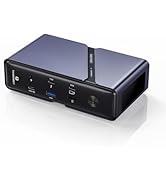
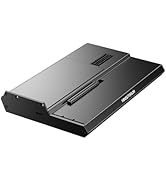
The MINISFORUM DEG1 eGPU Dock is a high-performance external GPU enclosure designed for RTX 4090 and AMD RX 7900 XTX cards. Featuring PCIe 4.0 x4 Oculink uplink/downlink, it supports both ATX and SFX power supplies for flexible power solutions. Optimized for MINISFORUM Mini PCs with a follow-start function, this sleek metal dock offers a plug-and-play experience to dramatically boost your mini PC’s graphics capabilities.













| ASIN | B0DPGYKH7G |
| Best Sellers Rank | #19,829 in Electronics ( See Top 100 in Electronics ) #343 in Laptop Docking Stations |
| Customer Reviews | 4.2 4.2 out of 5 stars (52) |
| Date First Available | December 3, 2024 |
| Item Weight | 2.64 pounds |
| Item model number | DeskMini |
| Manufacturer | Micro Computer (HK) Tech Limited |
| Product Dimensions | 10.64 x 6.87 x 1.6 inches |
A**6
Outstanding simple egpu dock!
Outstanding simple egpu dock! Pros: -Well made solid metal design -Simple features with Power on button, gpu connection, and power connection -Works great with my Gpd Win Mini 2023 connected to an Rx 6080xt Cons: -Doesn't seem like Nvidia Gpus work out of the box with a gpu setup.
C**Y
Out of the box... just works!
This works exactly as stated. Works pretty much out of the box as long as you have the right supplies (video card & power supply).
Z**D
Plug and Play
I was worried I'd have to fiddle with the settings to get everything to talk to each other, but it fired right up and worked right out of the box once everything was wired up properly. Note I'm using another Minisforum as the base PC, so YMMV. Hardware: - Minisforum UM-890 Pro w/64gb of RAM - Radeon RX 6950 XT - MSI MAG 650w PSU Software: - Bazzite (that's it, OCulink handled the GPU same as it would on a desktop)
E**Y
GPU Will Be Loose
No riser support bracket for the GPU. PCIe connection is wobbly and loose. I don't recommend if you plan to use for prolonged periods. Better to buy an enclosure with actual support for GPU stabilization.
B**S
Great external GPU dock
I bought this Minisforum external GPU dock to house a Nvidia RTX card, along with a power supply. Connection to the PC is via an Oculink cable that came with unit. Attaching the power supply and the video card was very easy. You just plug them in. Connection speed is fine, as measured with a benchmark app. The unit is turned on and off from the PC; very convenient. The whole setup works flawlessly and for $99, it is a good value.
A**R
If you feel the need...the need for situational speed...
I was really skeptical about trying this thing out. Had an urge to get a minisforum because I wanted a desktop that could serve as a laptop but also have high end graphics when I'm home. Also didn't want to spend money on a giant rig and a top end laptop. So this thing was the crucial piece in making that pipe dream come true. So far, and it's been a couple months, so good. It's built really well. I dropped a corsair power supply on there and a 4070 Ti Super and it's been rock solid. I'm getting really good throughput with oculink. Uningine Heaven getting minimum 100fps, often 250. I'm pretty much maxing out game graphics. bus interface pinned at x4 4.0 so i'm not seeing any degradation of throughput - full speed pcie gen 4 bandwidth. It's a little weird to see the card just out in space like it is but i keep it on the back corner of my desk and kind of like the way it looks. If it ever gets hot, which it hasn't yet, I can blow a fan right on it. Oculink card install in the minisforum was simple. Worst case, buy a case and use the graphics card there. I hate giant cases - it's one way around it.
G**B
Works Great!
Using this with a 16GB Radeon RX7600 XT and a Minisforum UM890 Pro running Arch Linux for local AI inference. Picked up a Corsair 650W power supply (reviewed elsewhere) and it was easy to set up and get running with the ROCm tools under Arch. For me, one big advantage is that, once you've done the initial setup, you no longer have to deal with the "turn on the eGPU, then she main system" procedure, as the mini-PC and this dock negotiate that for themselves, so the occasional reboot is seamless. Can't speak to graphics, or any gaming stuff, as this unit runs headless and only does AI inference
B**T
Great eGPU dock
Nice and compact. Nice that it supports both SFX and ATX power supplies. Performance over Oculink seems equal to my previous build with the same GPU installed directly on PCIe. I noticed a few reviews complain about the GPU being wobbly. Unsure if these people missed the included bracket piece that attaches to the upper screw holes of the PSU... With that installed, the GPU is perfectly secure.
D**S
It took all of five minutes, probably less, to get the power supply and the GPU plugged in, the cables, neatly tied and the oculink connecter plugged into the mini PC. I got a low profile dual 4070 super, a very quiet Corsair PSU with a manual dial adjust for the fan and you can’t even hear it. One of the reasons I returned the oneXGPU was because the tiny fans inside were far too loud. You could hear it three rooms over. The 4070 Super is a solid mid-tier card, and it out-performs the 7800 all day long. While the set up might be slightly larger for an EGPU than the ONEXGPU, the trade-off in quiet and AAA performance - not to mention the fact that it was half the price to put together - more than makes it brilliant. This dock is plug-and-Play. Highly recommend it if you’re doing an eGPU with oculink. And you can swap the GPU to upgrade anytime too. A+
A**R
Using the Minisforum DEG-1 GPU dock with an Minisforum UM890 Pro (stock: 64GB DDR5, 1TB SSD), MSI 4070 Super 12G Gaming X Slim GPU, and a Corsair RM850x power supply. Very quiet setup. Very impressed with the performance for 1200p gaming. Non-gaming is noticeably snappier too. Setup was difficult, as the UM890 Pro required a CMOS reset several times in the process or it would hang and not boot, e.g. after moving HDMI cable to GPU. Works fine after that; the UM890 Pro BIOS must be doing some auto configuration that only works with one specific setup.
J**L
Does not work with MS-01 or any of the 3 PCI, m.2 adapters I purchased. Save your money.
C**S
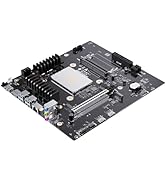
Performance is great with the correct desktop pcie oculink adapter. We initially paired ours with the "red" adapter cards commonly for sale and it didn't work at all. We then ordered one of the cards with the triangular black PCB board (comes with regular and low profile brackets). Worked perfectly. One notable and dangerous "feature" is that the dock is apparently supposed to "auto-on" when paired with certain MINI-PCs. While potentially that is fine because the dock needs to be on before the PC powers on, when paired with our desktop pcie oculink card the dock's power button is apparently overridden and it thinks it should be auto-on even if the PC is off. This means you can't turn off the dock using the dock's on/off button and you need to actually use the power supply's manual switch. This is incredibly dangerous if you are using the dock for testing PCIE cards rather than permanently attaching a GPU because you might accidentally attempt to remove a card from the dock without realizing it is still powered. The dock should be redesigned to have 2 buttons, one to control the power mode (manual or auto), and one to be a hard-off by physically cutting power to the 16x connector.