We remain fully operational. Our teams are working around the clock to ensure your deliveries continue safely.

下载应用程序


🚀 Elevate your video presence—because your image deserves the spotlight.
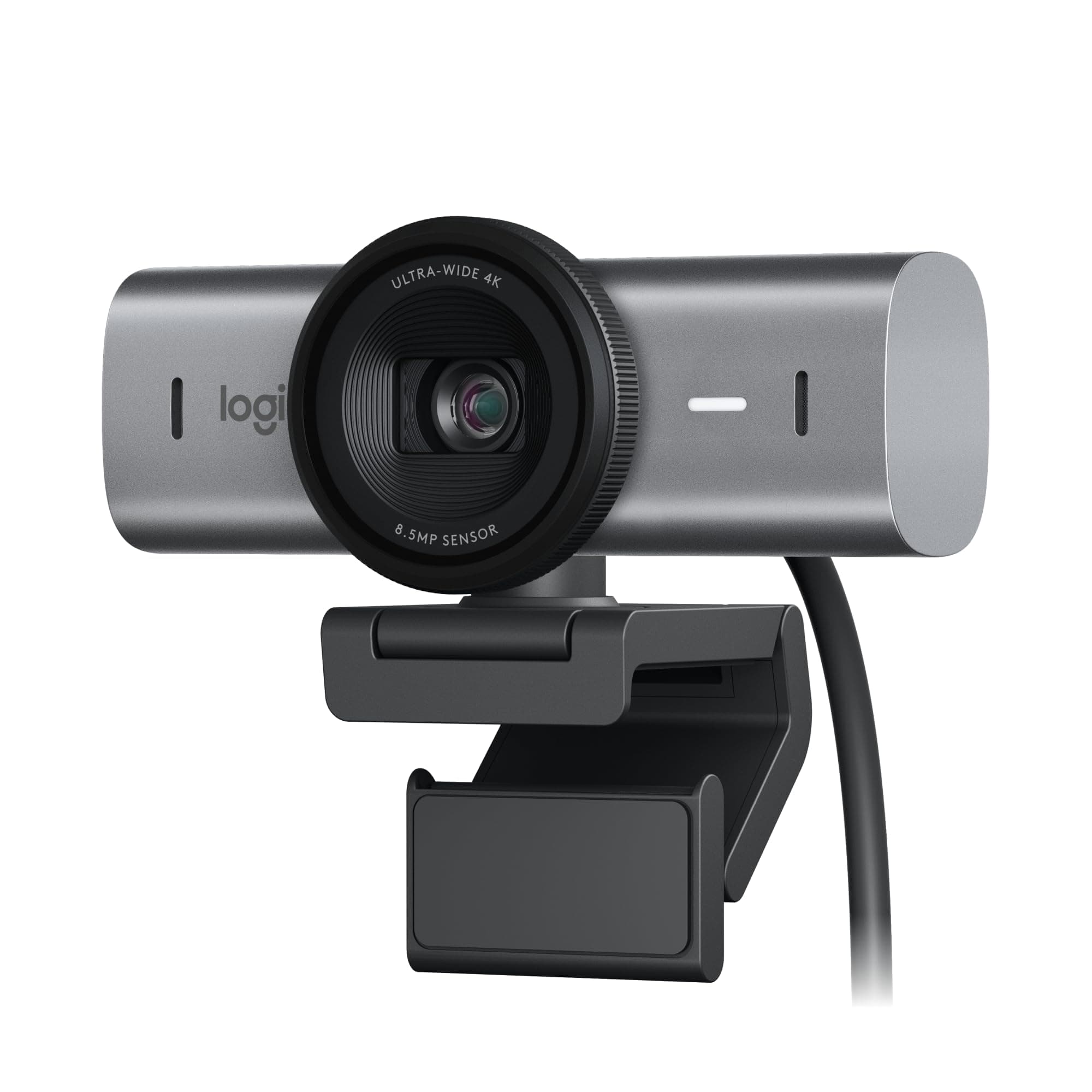
The Logitech MX Brio Ultra HD webcam delivers professional-grade 4K video at 30fps or smooth 1080p at 60fps with advanced AI enhancements for superior image clarity. Featuring dual noise-reducing microphones, fine-tuneable lighting controls, and a unique Show Mode for sharing your workspace, it’s designed for seamless collaboration and privacy with a built-in cover. Compatible across Windows, macOS, Chrome OS, and Linux, and certified for top conferencing platforms, it’s the ultimate tool for millennial professionals who demand sharp visuals and crystal-clear audio in every virtual interaction.



| ASIN | B0BFJ4CRKD |
| Antenna Location | Indoor, Office, Home, Video Conferencing, Streaming |
| Are Batteries Included? | No |
| Best Sellers Rank | 7,187 in Computers & Accessories ( See Top 100 in Computers & Accessories ) 53 in Webcams |
| Box Contents | MX Brio, Mount clip with removable adapter, USB-C to C 3.0 cable, User documentation |
| Brand Name | Logitech |
| Camcorder Type | Webcam |
| Colour | Graphite |
| Compatible Devices | Personal Computer, Laptop, Tablet, Smartphone |
| Customer Reviews | 4.4 4.4 out of 5 stars (945) |
| Effective Video Resolution | 3840 Pixels |
| Exposure Control Type | Automatic |
| File Format | MP4 |
| Flash Memory Installed | 1 MB |
| Flash Memory Type | Micro SD |
| Flash Memory Video Speed Class | V60 |
| Focus Type | Manual Focus |
| Form Factor | Compact |
| Has Image Stabilization | No |
| Image Aspect Ratio | 16:9 |
| Image Capture Speed | 60 fps |
| Image Stabilization Type | Digital |
| Item Weight | 358 g |
| Lens Type | Prime |
| Log Gamma Curve | Logarithmic (Log) |
| Manufacturer | Logitech |
| Maximum Aperture | 1 Millimetres |
| Maximum Display Resolution | 3840x2160 (4K UHD) |
| Maximum Focal Length | 1.0 |
| Minimum Focal Length | 1 Millimeters |
| Model Name | Logitech MX Brio |
| Model Number | 960-001545 |
| Network Connectivity Technology | USB |
| Operating System | MacOS, Windows, Chrome OS |
| Product Features | Low Light |
| Sensor Type | CMOS |
| Shooting Modes | Low Light |
| Style Name | Minimalist |
| Supported Audio Format | AAC, MP3, PCM |
| Supported Image Format | JPEG |
| UPC | 097855187307 |
| Unit Count | 1.0 Count |
| Video Capture Format | MP4 |
| Video Capture Resolution | 4K |
| Water Resistance Level | Not Water Resistant |
| White Balance Settings | Auto |
| Zoom | Digital |
A**R
Excellent
Great ok VC calls with wider angle
J**H
Great 👍🏽
Great webcam so far. Been good for recording talking heads videos
U**2
Best quality camera
Really high quality and well built. It’s a nice weight and balances well on each monitor I’ve used. Easy to set up and control via Logitech software and it’s made of high quality materials. It does feel a little difficult to direct the camera based on the weight and rigidness of the cable, but it’s fine.
D**D
Awesome Webcam!
Bought for my son and he loves it. Brilliant specked item and it delivers.
R**.
Quality webcam
Premium look, quality camera image and support with g-hub software
B**E
Brilliant.
I am absolutely thrilled with my Christmas present of the Logitech Webcam. It is a wonderful piece of kit. Expensive I know it was but worth it.
J**Y
No Windows Hello Support
Doesn't support Windows Hello despite being a top of the range webcam.
B**K
Logitech MX Brio Ultra HD 4K Webcam is setup with my M2 Ultra Mac Studio workstation and connected to my 32" Apple Pro Display XDR screen (which does not have an integrated webcam). Great product for regular use in video conference meetings - the audio and video quality are exceptional!
A**O
Funcionando bem com excelente qualidade e chegando no prazo sem problemas.
B**L
FYI: I purchased this camera after seeing someone else who presented using it. Everyone was curious what camera they were using because it was such good lighting and great video. However, I'm not sure this camera is working with full functionality on my hardware. I went through a bunch of troubleshooting, and here's the conclusion per ChatGPT... Good morning ☀️ — thank you for the detailed info. That explains everything. You’re on: Surface Pro 11th Edition (ARM64) Snapdragon X (ARM) processor That is the root cause. ________________________________________ 🎯 The Real Issue Logitech RightSight is currently not supported on Windows ARM (Snapdragon X / ARM64). Here’s why: RightSight depends on: • Logitech’s middleware service • x64 camera processing components • AI framing pipeline extensions On ARM Surface devices: • Logi Tune runs under emulation • The Logitech camera extension layer does not fully attach to the Windows Modern Camera Stack • AI features (RightSight) fail to initialize • Video works (because UVC driver works) • 4K works (hardware OK) • But AI framing = unavailable That’s exactly your symptom set. ________________________________________ ✅ Why Everything Else Works ✔ Camera app works ✔ 4K works ✔ Windows Hello works ✔ Device shows correctly ✔ No USB issue ✔ No driver corruption Only vendor AI features fail — classic ARM compatibility limitation. ________________________________________ 🚫 This Is Not Fixable Via Settings Disabling: • Frame Server • Basic camera • Studio effects • Multiple apps setting Will not fix it on ARM. This is architectural, not a configuration problem. ________________________________________ 🔎 Confirmation Test (Optional) In Logi Tune: Go to Crop. If: • Field of View options work (65°, 78°) • Zoom works • But Auto-Framing is disabled That confirms it’s just the AI layer. ________________________________________ 🧠 Why This Happens Surface Pro 11 (Snapdragon X) uses: • Windows on ARM • Modern Camera Driver (MCD) • NPU-based camera pipeline Logitech RightSight expects: • x64 processing environment • Vendor extension hooks not fully exposed in ARM64 camera stack Until Logitech releases a native ARM64 version of the RightSight service, it won’t enable. ________________________________________ 📌 Current Status (Early 2026) As of now: • Logitech supports Intel/AMD Windows • ARM64 support is partial • AI features are inconsistent or unavailable ________________________________________ 💡 Your Options Option 1 — Wait for Logitech ARM-native update This will likely come, since Snapdragon X PCs are new. Option 2 — Use Windows Studio Effects (if available) Surface Pro 11 has NPU-based auto framing built in. Check: Settings → Bluetooth & devices → Cameras → Built-in camera If Studio Effects exists there, you can use Windows auto-framing instead. Option 3 — Use Software Framing (Zoom / Teams) Both now have built-in auto framing. ________________________________________ ✅ Final Conclusion Your hardware is fine. Your configuration is fine. Your issue is ARM platform compatibility.
S**M
This is an excellent camera and does it job well. The video quality is amazing and works seamlessly with FaceTime, Teams, Zoom. Microphone quality is also excellent.
C**Z
Excellent camera but be careful that the cord is not very long for computers cases that sit on the ground. The good part is that the cable is usb-c and is completely detachable, so you can easily get a longer cable to make it work.