We remain fully operational. Our teams are working around the clock to ensure your deliveries continue safely.

下载应用程序


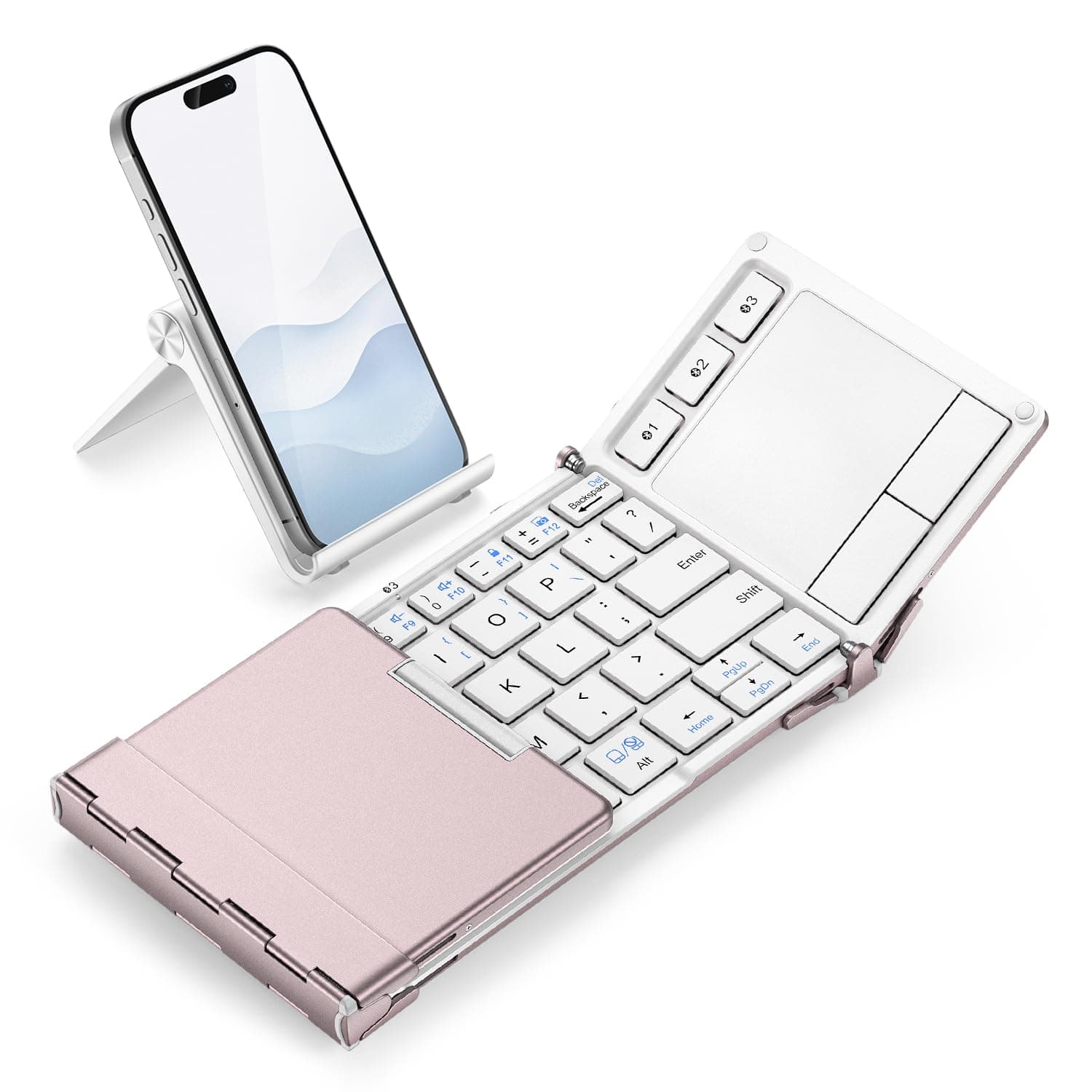

⌨️ Work Anywhere, Fold Everywhere — Your Mobile Office Just Got Sleek!
The iClever BK08 is a premium 65-key tri-fold Bluetooth keyboard featuring a built-in precision touchpad, durable aluminum frame, and multi-device connectivity. Designed for professionals on the move, it offers laptop-style quiet scissor-switch keys, USB-C fast charging with up to 60 days of battery life, and a pocket-sized form factor that fits effortlessly into your daily carry. Compatible across iOS, Android, Windows, and macOS, it transforms smartphones and tablets into full mobile workstations—perfect for remote work, travel, and café setups.


| ASIN | B0DPH1V5K7 |
| Additional Features | Built-in touchpad, pocket-size fold, 3-device switch, USB-C fast charge (210mAh, 2-hour auto-sleep), aluminum frame, lightweight, hotkeys for Windows/Mac |
| Antenna Location | Travel typing, remote work, café setup, wrist-friendly mobile keyboard, everyday use, business, student, education, multimedia, programming |
| Best Sellers Rank | #82 in Computer Keyboards |
| Brand | iClever |
| Built-In Media | Carrying Bag, Foldable Keyboard, Stand Holder, USB Cable, User Manual |
| Button Quantity | 65 |
| Color | Pink White |
| Compatible Devices | Laptops & Desktops (Windows 10 +), MacBook & iMac (macOS 10.13 +), iPad (10.2/Pro/Air), iPhone — keyboard use only, Android phones & tablets (Android 8 +), Chromebooks Compatible Devices Laptops & Desktops (Windows 10 +), MacBook & iMac (macOS 10.13 +), iPad (10.2/Pro/Air), iPhone — keyboard use only, Android phones & tablets (Android 8 +), Chromebooks See more |
| Connectivity Technology | Bluetooth Low Energy , wireless only (no USB receiver, no wired mode) |
| Customer Reviews | 4.3 out of 5 stars 4,771 Reviews |
| Enclosure Material | Aluminum |
| Hand Orientation | Ambidextrous |
| Item Dimensions L x W x H | 6.23"L x 3.54"W x 0.59"H |
| Item Weight | 7.05 Ounces |
| Keyboard Description | 65-key tri-fold Bluetooth keyboard with touchpad, aluminum frame, non-backlit laptop-style keys (<50 dB), 3-device switch Keyboard Description 65-key tri-fold Bluetooth keyboard with touchpad, aluminum frame, non-backlit laptop-style keys (<50 dB), 3-device switch See more |
| Keyboard Layout | QWERTY |
| Manufacturer | iClever |
| Model Number | BK08 |
| Number of Keys | 65 |
| Power Source | Battery Powered |
| Recommended Uses For Product | Travel typing, remote work, café setup, wrist-friendly mobile keyboard, everyday use, business, student, education, multimedia, programming Recommended Uses For Product Travel typing, remote work, café setup, wrist-friendly mobile keyboard, everyday use, business, student, education, multimedia, programming See more |
| Special Feature | Built-in touchpad, pocket-size fold, 3-device switch, USB-C fast charge (210mAh, 2-hour auto-sleep), aluminum frame, lightweight, hotkeys for Windows/Mac Special Feature Built-in touchpad, pocket-size fold, 3-device switch, USB-C fast charge (210mAh, 2-hour auto-sleep), aluminum frame, lightweight, hotkeys for Windows/Mac See more |
| Style Name | Contemporary |
| Switch Type | Scissor |
| Unit Count | 1.0 Count |
| Warranty Description | 12-months Warranty |
S**R
Killer Product for the Mobile Office Work Crowd
Ever try to use a laptop at a crowded airport bar during a flight delay? Or on an airplane with increasingly shrinking seat space? Now you don't have to. Remember the netbook craze where you ended up with a very underpowered laptop and low resolution screen? They call those mini/micro-laptops now and they are still underpowered with low res screens. Wireless keyboards aren't new, and portable bluetooth keyboards seem to be a dime a dozen... So what does the iClever BK08 offer that the countless other pocket bluetooth keyboards don't? True productivity in a pocket form factor. If paired with a screen that can display full-sized apps then you might have a real-deal laptop replacement. I am tired of lugging my laptop around, or having to keep a car nearby just to hold my computer and accessories in case I need to do work. Don't even get me started on a "lapdock" for a smartphone that has all the form factor drawbacks to a laptop with none of the processing horsepower. After getting fed up with my trusty but slightly flawed smartphone after a 10 minute unexpected work task took 30, I decided to upgrade to a folding phone so I could do no-kidding office work on my phone and display the level of detail I needed. After about a week I knew I was keeping the phone, but the onscreen keyboard was doing quirky things here and there I wasn't quite appreciating. For short periods of time it was fine, but if I wanted to do real productivity work the onscreen keyboard wasn't going to do. So I decided I needed a separate keyboard that was ultra-portable. After an hour of hour of looking around on Amazon, there was only one real option for me. The iClever BK08 had a touchpad with two physical buttons. Click and drag with one hand? Check. Right click for a context menu? Check. Right shift key? Check. All the keys you'd expect to have (Ctrl, Alt, Tab, F1-F12, etc)? Check. Being able to do office work productively anywhere without lugging around a tech pack? Check. And that's priceless. The keyboard was a little bigger than I was hoping for. After all this is a keyboard I bought to fold and go in a pant pocket. But after a couple of times actually walking around with it and unfolding it at a bar during happy hour (or on a random concrete pillar to type something out before I got distracted and forgot) the size of the keyboard actually became an advantage. One thing I noticed after only a couple of uses was that my typing speed was about the same as when using my laptop. On a lark I actually laid the iClever keyboard down by my laptop keyboard (coincidentally where the trackpad sits) and it has a typing surface that is about the same size. Not bad for something that fits in a pocket. I live in a walkable community, and one of the things that is going to be right next to my keys for when I am on the go is this keyboard. Definitely a game changer. Match this keyboard up with the right smartphone (and maybe a cheap, lightweight phone stand) and you have laptop replacement that bypasses the tablet device class altogether. You can use this with any device that accepts bluetooth keyboards, though, including tablets. For context I have included photos of the iClever BK08 keyboard placed by a foldable smartphone with unfolded screen, a tablet, and a laptop keyboard. The laptop has a 15" screen and the keyboards are roughly the same size. While using the keyboard I have had no issue with character pickup on the bluetooth connection, and trackpad has been accurate. The keyboard does not seem to have a power level indicator but I have not had an issue so far with battery life. I actually purchased two of these products, and one of the keyboards stays in my car in case I need to take an unscheduled meeting or work stop. The pack in phone/tablet stand works well, but I use a smaller product that folds a little flatter the cost me about $6. I keep the stand in my car in case I need to set my phone on an uneven surface. One improvement I would suggest is to have a multi-touch capable trackpad, but if using this with a touchscreen smartphone like I am it isn't really noticed because I zoom from the touchscreen. I only tested for multi-touch after reading a 1-star review that mentioned they could not scroll with two fingers. That is the first time I even thought to try it, so hadn't noticed. Also, another item for the wishlist would be backlit keys. But compared to the productivity boost this keyboard has provided me those are minor omissions. As a final side note: for gaming you would probably want to adhere some type of no-skid surface to the bottom of the keyboard. Bottom Line: This product combined with the right mobile device (smartphone, tablet, etc) can provide a laptop replacement-level productivity boost in a pocket form factor. This is a killer product for those want a mobile office without all the bulk.
K**E
4.5 Stars, but rounding up!
Pros: + Keyboard works well and was easy to connect to multiple devices. + Metal frame and keys all have a high quality feel. + It is a compact design ideal for storage and travel, but not too small; I have above average size hands, so long periods of typing or gaming would not be the most comfortable, but it is perfect for keeping my hot laptop off of my lap. Cons: - The folding joints don't lock into place, so if the keyboard is on a less-sturdy surface (such as resting on your knees if they are more than 4 inches apart), typing in the center section will cause it to fold in on itself and possibly drop if you're not careful. - The non-slip feet are not the best, so the keyboard can occasionally slip on smooth surfaces while using the track-pad. - The light to indicate the keyboard is charging is not visible while it is folded.
S**N
Smaller than I thought and I don't like where they put all the keys
I suppose I should have looked closer at this keyboard before I bought it. Portable it definitely is. Very portable and pretty darn good considering how small it is. I'm actually pretty accurate with it too. But I'm pretty messed up with the layout. On a standard sized keyboard, I can type over 60wpm. There's no way to come close to that with this little thing. Sure it's not meant for speed. It's meant more for portability but when you shrink the backspace and put the '/" key 1 row above where it usually sits on standard keyboard, I'm constantly hitting Enter when I want to put an apostrophe. That gets frustrating after a while. But considering this keyboard is probably about 75% the size of a regular keyboard, I'd still use it when on the move. I hated the keyboard and trackpad on my lenovo Miix. So this was being bought to act as a substitute for that. I probably type better on this as the keys are more responsive even though they are smaller. The trackpad is really nice. It's responsive and accurate. Pairing it to the devices was a breeze. I took a guess how to initiate pairing mode and I got it on the first try. Didn't even need to read the manual. It can pair to 3 devices and switching is actually a breeze. At one point, I was switching between my tablet and laptop and it was operating perfectly. Very little delay in the switch. I'm typing this review on my tablet and the I clever keyboard right now and the biggest issue isn't the size. It's the apostrophe button. Whoever thought to move that up to where it is needs to take a second look. For that, I can't give this 5 stars. It's a pretty darn good design. It folds up quite nicely. The 2 wings fold in and cover up the keyboard. The folded unit is small than the galaxy note 9 that my wife has. It's thicker but the footprint is smaller. If you are looking for a solid portable keyboard option for anything, this is a great option but I do have to warn you that it's a shrunken keyboard and the keys are placed in some weird spots. Other than that, I'm fairly happy with this. maybe I'll read the directions to see if maybe there is a way to remap a key or 2. Wishful thinking...
J**R
Best portable Bluetooth keyboard ever!
I would give 10 stars if I could. I’ve been using the iClever Foldable Keyboard BK08 for almost two years now, and honestly, it’s been solid from day one. It feels really sturdy and well-built—not like some cheap foldable keyboards that feel flimsy and break easily. I’m impressed that even after all this time, it still functions perfectly without any hiccups. One of the best parts is how easily it syncs with up to three devices. Switching between my phone, tablet, and laptop is seamless, which makes working on the go way more efficient. The touchpad is also super responsive, so I don’t have to carry around a separate mouse, which is a huge plus for portability. Battery life has been great too. I barely have to charge it, and when I do, it charges up pretty quickly. This keyboard is a fantastic companion if you need something compact, reliable, and easy to carry around. Definitely worth it if you’re often working away from your desk.
T**N
Between this and the Jelly Comb foldable keyboard with touchpad, this wins HANDS DOWN! so happy
I had been debating between all the main foldable keyboards with touchpad for tablets for awhile now, and I narrowed down my choice to the Jelly Comb keyboard and this iClever keyboard. The Jelly Comb keyboard was only $29, had a higher average star rating, and seemed like it's main issue was missized keys at the fold of the keyboard. The iClever keyboard was more expensive at $45 and I read reviews saying the keyboard required the Fn key for some common keys. I decided to go with the Jelly Comb keyboard for the price and to avoid the Fn common keys issue. When I got the Jelly Comb, I was relatively happy, it worked okay and I finally had a keyboard for my tablet. The only issue I really saw was that the "a" key was not responsive unless I hit it in a specific way. I knew immediately I had to return it but I was thinking about getting a replacement of the same, I figured I just got a dud. However, because I wasn't super impressed with the other aspects of the keyboard (it felt a bit fragile at the joints, the keys weren't the most responsive, also a little superficial but I thought the font of the Jelly Comb logo made it look a little junky and also I saw typos in the instruction booklet which also gave me the same feeling) I decided to just go ahead and order the iClever keyboard instead. I'M SO HAPPY I DID! I'm very glad the first keyboard had issues, because this iClever keyboard is a different level of quality. The keys are so much more responsive and its just a whole different feel, it feels like a sturdy, legit keyboard that doesnt bend at the joints like the jelly comb did. I like the added touchpad buttons, and just overall look of the keyboard (it looks like alot of thought and effort was put into its design, all space is utilized). It is also more compact than the jelly comb, and I like the little pouch it comes with. The Jelly Comb has a manual power button while the iClever turns on and off automatically when it folds/unfolds. The issues I had so far are like other people have stated, when using the ' or " or ? keys my muscle memory makes me mess up, but if I actively remember I'm using this new keyboard it's not too hard to type them. Also, sometimes I've accidently hit the Printscreen button instead of the delete button since it is normally where backspace would be. I've only been using the keyboard for maybe an hour and I'm already getting used to the keys so I'm sure it will be fine. I feel it is more convenient than having the T or other letter buttons missized at the crease which the jelly comb had. I'm sorry if I appear to be hating on the jelly comb, for $29 it actually seemed like a very good product and if this hadn't been an option I would have reordered a non faulty one. It is just that after experiencing both keyboards, the iClever one just feels so much better to use and is exactly what I was looking for, and I was so excited I wanted to write a review which I don't normally do. Thanks making this keyboard, it's great :D
B**S
Great and frustrating
This is a hard one. First, it's a solid built device that almost made perfectly as it will not collapse in your lap or soft surfaces. Everything about it feels premium. Pros: the build quality, hinges and actual mouse buttons, which are rare and a great feature for Android and users wanting a bit more ease for text select and other functions. The track pad works great and is easier and more accurate than a 20 buck alternative. Cons: if you are a home row typist you'll chuck it within first use as they moved a few keys and shortened (very much) the backspace and enter buttons. The question mark moved above the enter (if you are used to writing questions using AI platforms, it's frustrating as hell). And if you use contractions, you'll find the apostrophe moved up (another most frustrating thing for typists). I would love this build but because these keys are out of place, I can't use it. I wasn't too return it but accidently threw away the box and cable. If you are a casual typer and just need something to travel with - it's a 5 star device. If you are a home row junky, you'll throw it fast and far and regret your purchase - and then angry you can't find the same device build without the adjustments to fit small form. Ugh!!
T**R
Very awesome portable keyboard!
So far, this keyboard is freaking awesome!! The size is something to get used to, but that’s expected after using a full-sized keyboard to type for so long. It functions like it should, all the keys type super well, and it is quiet enough that it doesn’t disrupt anyone in a room! The keyboard is built very sturdily despite the majority plastic build and doesn’t weigh much at all. I’ve only had it for about a day now though, so take this comment with a grain of salt. No backlit keyboard which is great for me. The bluetooth connectivity worked surprisingly well and connected incredibly fast. I haven’t had the chance to see if connectivity is affected when the battery life decreases, but I haven’t had to worry about that because the battery hasn’t decreased at all… So great battery life as of now!
S**N
Excellent, solid, compact portable keyboard
I tested the iClever IC-BK08 tri-folding Bluetooth keyboard in a couple of apps on an Android smartphone that's a couple of years old, updated to Android v. 6.0.1. Physically, the keyboard is slightly heavier (about half an ounce) than another one that I have used, but this gives it a solid, stable feel in use. The tri-fold design makes for easy closure and carrying; it folds up small enough to slip into a shirt pocket or smartphone slot in a purse. A clever magnetic closure automatically turns the keyboard off when it is closed and on when opened. Feet at each end of the keyboard can be lowered to make a low, stable stand. The aluminum back makes for a smooth, metalic finish and feel when it's closed. Once it had been paired, the keyboard connected instantly to the device after having been turned off. The keyboard is compact, of course, so that I had to be attentive to hand and finger placement when coming from a full-size keyboard. Typing with the iClever keyboard requires a bit of force to move the keys, but has a very solid feel, not the least bit flimsy. The spacebar in particular has to be given a definite push, not just a quick swipe. The keys have a noticeable travel. I'm a pretty good touch typist, but as with all small bluetooth keybboards, I had to type more slowly and carefully to avoid errors. Key arrangement and assignments are good overall. The B key is properly placed so that it can be typed with the left index finger, not the right. Having ' , " , and ? as Fn combinations on the L, ; , and ] keys, respectively, takes getting used to. The availability of copy, paste, and cut functions as Fn combinations on the 3-5 keys is convenient, though the standard Ctrl+C/V/X also work. The touchpad with left and right buttons at the right end of the keyboard proved extremely useful in brief testing. I like to type with as little need to take my hands off the keyboard as possible. I found that on my Android device, the mouse pointer activated by the touchpad was able to access menus and make selections, so that I didn't have to use the touchscreen. In some apps (but not Evernote, unfortunately), it is possible to use the touchpad to hold and drag to select text. I like this keyboard a lot, and I hope that it will hold up well as I get used to using it. UPDATE: After a few months of use, my experience continues positive. I recently bought a Note 8 with Android 7.1.1. I had no trouble pairing the keyboard with it, and found that now even in Evernote I can drag with the touchpad and left button to select text (whether that's due to an update in Evernote or in Android). I did develop a problem where keypresses were getting doubled, llikee tthiss. I went to the iClever support page and reported this, and got a quick response with advice that worked (basically unpairing, restarting Bluetooth or the whole phone, and re-pairing). So still a great tool, and good customer support as well.
TrustPilot
1 个月前
1天前