We remain fully operational. Our teams are working around the clock to ensure your deliveries continue safely.

下载应用程序



Buy anything from 5,000+ international stores. One checkout price. No surprise fees. Join 2M+ shoppers on Desertcart.
Desertcart purchases this item on your behalf and handles shipping, customs, and support to Taiwan.
🖱️ Elevate your workflow with ergonomic precision and unstoppable comfort!
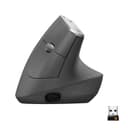
The Logitech MX Vertical Wireless Mouse is a scientifically designed ergonomic mouse featuring a 57° vertical angle and natural handshake position to reduce wrist and forearm strain by 10%. Equipped with a 4000 DPI high-precision optical sensor, it requires 4x less hand movement, enhancing accuracy and reducing fatigue. It supports seamless switching between three devices via Bluetooth or USB receiver, and boasts a rechargeable battery lasting up to 4 months with quick-charge capability. Its textured rubber surface and thumb rest provide superior comfort, making it ideal for professionals seeking to boost productivity while protecting their posture.


| ASIN | B07FNJB8TT |
| Additional Features | Wireless |
| Antenna Location | Office |
| Are Batteries Included | Yes |
| Are Batteries Required | Yes |
| Battery Average Life | 4 months |
| Best Sellers Rank | #27 in Computer Mice |
| Brand | Logitech |
| Built-In Media | mx vertical, quickstart guide, receiver, usb C cable |
| Button Quantity | 4 |
| Color | GRAPHITE |
| Compatible Devices | Windows + macOS + iPadOS |
| Connectivity Technology | USB |
| Customer Reviews | 4.4 4.4 out of 5 stars (14,800) |
| Enclosure Material | Graphite,Rubber |
| Global Trade Identification Number | 00097855144461 |
| Hand Orientation | Right |
| Hardware Platform | Laptop, PC |
| Item Dimensions L x W | 7.5"L x 6"W |
| Item Type Name | Logitech MX Vertical Advanced Ergonomic Mouse, Wireless via Bluetooth or included USB receiver |
| Item Weight | 8 ounces |
| Manufacturer | Logitech |
| Model Name | MX Vertical Advanced Ergonomic Mouse |
| Model Number | 910-005447 |
| Mouse Maximum Sensitivity | 4000 Dots per Inch |
| Movement Detection | Optical |
| Number of Batteries | 1 Lithium Polymer batteries required. (included) |
| Operating System | Windows 10, 11 or later, Linux, Chrome OS, macOS, iPadOS, Android |
| Power Source | Battery Powered |
| Range | 10.0 meters |
| Style Name | Right-Handed |
| Theme | Computer Accessories, Ergonomic Design, Office |
| UPC | 097855144461 |
| Unit Count | 1.0 Count |
| Warranty Description | Manufacturer’s warranty can be requested from customer service. |
J**S
Finally, a comfortable vertical mouse for guys with large hands!
I've been using the Logitech MX Vertical Wireless Mouse for about 8 years now, and I love it. Any time I have to use a traditional mouse it's an uncomfortable disappointment. If you haven't used a vertical mouse yet, there are a couple things you need to know. First - this is just a normal mouse, but it's turned about 60-degrees to the right. This let's your hand rest on the mouse in the natural position your arm wants it to be in without any effort to rotate. Second - you will knock it over, repeatedly, for a few weeks. Because you're used to a mouse that's a just an inch and a half or so tall, your natural movement from keyboard to mouse is going to be interrupted by the height of the MX Vertical. In time, you will get used to this, but for a week or two, you will knock it over when moving to the mouse, and when moving back to the keyboard. Don't worry, your muscle memory will change and this will stop. Third - once you get used to using the MX Vertical, you won't want to use any other mouse. It's a dramatic change in ergonomics, and you will feel the strain your wrist and forearm are under any time you have to use a traditional mouse. There are other verticals that are also great, but as a guy with large hands, this is the best I've found. I have 4 of these now - one at my office, one at my dining room table, one at my desk, and one that travels in my backpack. I don't need all of these, but its handy having them where I need them. Another reason for this is the mouse can pair with 3 devices. I have different devices in each of these locations, so it's handy not having to re-pair when I move between locations. The MX Vertical fits my hand perfect, and all buttons are where my fingers and thumb are naturally positioned. I've dropped them, knocked them down, bumped and tossed them and they keep on working properly, so from a durability standpoint, this will last. It's easy to pair with a push of a button - working with my Windows computers, MacBook, android phone and iPad. This thing just works great! The only downside I'd mention is the coating. After a couple of years, the coating tends to migrate where you apply pressure. This is most apparent where the thumb and pinky finger rest. This doesn't cause any functional issues, and is entirely cosmetic, but just be aware that after a couple years it won't look pristine. All-in-all, this is the vertical mouse to buy if you're a guy with larger hands. Get one, get used to it, and you won't regret it.
A**R
Relief for hands and wrists, plus great for multiple computer use!
Bought this Logitech MX Vertical Wireless Mouse for my home office on a lark and a splurge. Boy, am I glad I did! And my old arthritic hand and carpal tunnel wrist say it was well worth the extra $$. At the end of the first day, I was pleasantly surprised to find that I did not have the usual fatigue and achiness that I usually experience at the end of the day with my old, high quality, but horizontal mouse. This mouse has a nice heft and smooth button action, making it quick and easy to glide and click. It has a button on the thumb side that toggles between open windows, but I have not gotten into the habit of using it yet. It also has a button on the top of the mouse where you can adjust the speed of the mouse, minimizing the amount of wrist action needed to move the pointer across the screen. This also means less space required on the top of the desk for mouse operation; helpful when you are mousing across several computers, with multiple monitors. Being able to mouse across to a completely separate computer means one less mouse on top of the desk as well. Set up for this was easy. Get out the instructions just in case, then plug the USB wireless adapter in, and a dialog box opens up. I have it plugged into my personal laptop and I am able to move the mouse pointer over to my work laptop screen and it's external monitor and mouse there too. The mouse works on my work laptop even when my personal laptop of powered down. Woohoo! This would be an awesome mouse to use for making presentations on the big screen in the conference room from your laptop. I put it on the charger overnight before trying it out the following morning. I plugged in the adapter and it was ready to go. It took a little longer to get it to work on the second computer, only because I had to go find the box with the instructions in it. With instructions in hand, setting up the second computer only took a minute or two. I use the mouse five to seven days a week, 10-18 hours a day. In the eight months that I have had it, I think I have recharged it maybe three times. It recharges pretty fast. When the little red light by your thumb comes on, it is time to plug it in. I was able to use the mouse while it was charging. Well, except for the one time I let the battery run down completely before plugging it in. Oops... After seven months of using this mouse while working from home, I returned to my work office, with my work desktop computer and my old horizontal mouse. I only lasted for an hour before the wrist pain and hand fatigue came back with a vengeance, and had me running to HR, asking for a physical accommodation. They supplied me with the cheapo model vertical mouse. Yes, it was technically a vertical mouse, but the buttons were so clunky and hard to manipulate that my hand had to work twice as hard to click them, causing my mousing to be inaccurate. The inefficiency and frustration of the many mis-clicks required extra time, not in my busy schedule, to fix a lot of things that got clicked by mistake. It was more physically demanding than the horizontal mouse, defeating the purpose of providing relief to my hand and wrist. I stuck it out and did my due diligence and gave myself two weeks to get used to it, but at the end of the two week period and a lot of ibuprofen, the cheapo model had to go. Having given the cheapo a chance, HR relented and let me purchase a second Logitech MX Vertical Wireless Mouse to bring in to the work office. - Quality counts! - I now happily mouse using the Logitech MX Vertical Wireless Mouse both at home and at work. Financially, yes, it cost a little more, but it is cheaper in the long run, both physically and financially, and more preferable than the cost of having another carpal tunnel surgery, and the pain and suffering included in that process. I am a very satisfied customer and highly recommend this mouse to those who have hand issues, or to those wanting a really spiffy mouse to wow their friends and co-workers with when they use it with multiple computers.
S**E
Ergonomic, Comfortable, and Highly Functional Mouse
The Logitech MX Vertical Wireless Mouse is an outstanding ergonomic mouse that truly reduces wrist and forearm strain. Its vertical design feels natural and comfortable, even during long hours of use, making it a great choice for anyone concerned about repetitive strain or discomfort. The mouse connects seamlessly via Bluetooth or the included USB receiver, and the ability to switch between three different devices is incredibly convenient for multitasking. The precision and smooth tracking make it excellent for both work and creative tasks. Overall, this mouse combines comfort, functionality, and versatility in one sleek package. It’s well worth the investment for anyone looking to improve ergonomics and productivity.
A**Y
Great product for bigger palms. Reduces the strain in the wrist.
N**A
Excelente mouse, tengo una lesión en el brazo que se extiende hasta la muñeca, con este mouse puedo trabajar sin molestias y manteniendo la posición adecuada para que no me duela mi lesión.
M**R
Estou com este mouse a 5 anos e foi a melhor decisão da minha vida.Hoje ele sai em promoção e me pergunto se eu nao deveria comprar outro. Ergonômico, nao sinto incômodo usando por horas, é agradável configurável pelo logi options... esse aqui os estudos dos engenheiros valeram a pena 👌🏾🤌🏾
R**.
One of the best if not the best mouse i have owned.
H**D
One of the best, alot of options that make every thing so easy
TrustPilot
2 个月前
1天前