We remain fully operational. Our teams are working around the clock to ensure your deliveries continue safely.

下载应用程序


Buy anything from 5,000+ international stores. One checkout price. No surprise fees. Join 2M+ shoppers on Desertcart.
Desertcart purchases this item on your behalf and handles shipping, customs, and support to Taiwan.
🎯 Label Like a Pro, Stand Out Everywhere
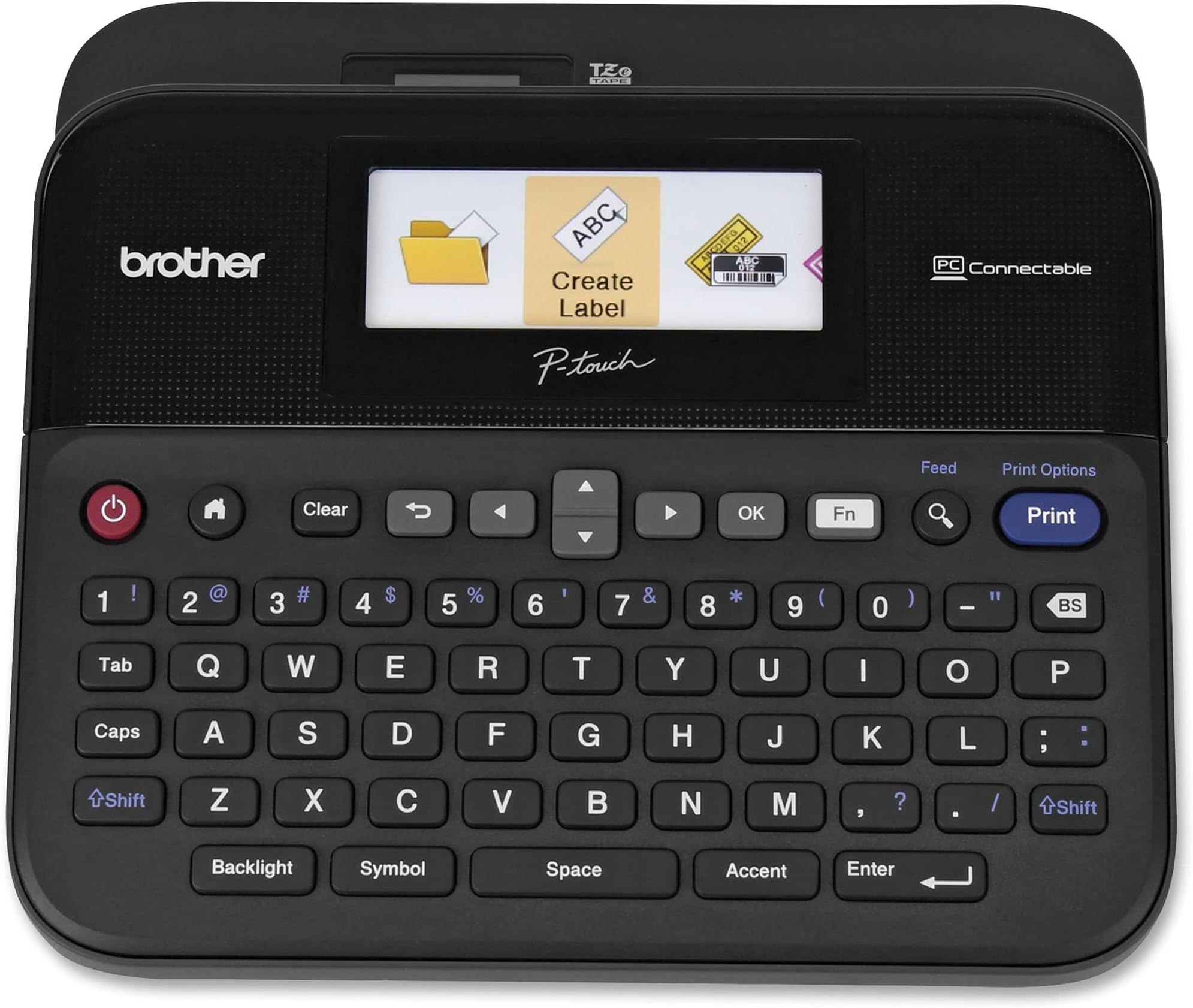
The Brother P-Touch PTD600 is a sleek, PC-connectable label maker featuring a large keyboard and vibrant full-color backlit display. It offers high-resolution 400 dpi printing, supports multiple tape widths, and includes a built-in memory for saving labels. Compatible with both PC and Mac, it enables professional, customizable label creation with over 600 symbols and barcode options. Durable laminated tapes ensure long-lasting, water- and fade-resistant labels, perfect for busy professionals who demand speed, precision, and style.


| ASIN | B00OCEKCB2 |
| Additional Printer Functions | Print Only |
| B&W Pages per Minute | 1 |
| Best Sellers Rank | #71,501 in Office Products ( See Top 100 in Office Products ) #82 in Label Makers |
| Brand | Brother |
| Built-In Media | 24mm x 4m black on white Brother TZe durable, Labelmaker, Laminated tape cassette, Power Adapter, USB Cable |
| Color | Black, Grey |
| Color Depth | 24 bpp |
| Color Pages per Minute | 1 |
| Compatible Devices | PC, Mac |
| Control Method | Touch |
| Controller Type | iOS |
| Customer Reviews | 4.7 4.7 out of 5 stars (3,795) |
| Display Type | LCD |
| Dual-sided printing | Yes |
| Duplex | Automatic |
| Global Trade Identification Number | 00012502639411, 00638084552537 |
| Hardware Interface | USB |
| Ink Color | Multiple (black, red, blue, etc.) |
| Item Dimensions D x W x H | 7.6"D x 7.9"W x 3.4"H |
| Item Type Name | Brother PT-D600 PC-Connectable Desktop Labeler |
| Item Weight | 2.1 Pounds |
| Manufacturer | Brother Printer |
| Maximum Copy Resolution Black and White | 400 dpi |
| Maximum Copy Resolution Color | 300 dpi |
| Maximum Media Size | Paper Roll |
| Maximum Print Resolution Black and White | 400 dpi |
| Maximum Sheet Capacity | 1 |
| Maximum print Resolution Color | 300 dpi |
| Model Name | PTD600 |
| Model Number | PTD600 |
| Model Series | PTD |
| Number of Trays | 1 |
| Other Special Features of the Product | Display Screen, Internal Memory |
| Output sheet capacity | 1 |
| Paper Size | 0.94 inches |
| Print media | Labels |
| Printer Connectivity Type | USB |
| Printer Output Type | Color |
| Printer Type | Thermal |
| Resolution | 400 x 400 dpi |
| Specific Uses For Product | versatile for both business and personal labeling needs |
| Total USB 2.0 Ports | 1 |
| Total Usb Ports | 1 |
| UPC | 125026394114 800188055577 638084552537 012502639411 |
| Unit Count | 1.0 Count |
| Warranty Description | 2 years limited warranty |
| Warranty Type | limited warranty |
W**O
Good Replacement for Older Ptouch Label Maker
Brother at least for MacOS drivers, obsoletes the driver and with it the supported label maker. Thus I have now purchased three label makers not because they broke, only because Brother does not support newer operating systems. Note this does not appear to apply to Windows where Brother support is very good. This label maker requires newer label cartridges, but there are third party alternatives sold on Amazon where the results are just as good as OEM Brother label material. The label maker supports BlueTooth, though can use USB. With BlueTooth and the included AC power supply, as well as the fact that the software reads the label size from the cartridge making the label maker largely mindless to use. Note there is a minimum length of the label with the internal cutter. For smaller label lengths, cutting the labels by hand is required.
R**L
PTD600 Great Label Maker... but don’t forget to remove second lcd protective film covering
This label maker/printer just flat out rocks! It works great and is so much fun to use. The only issue I had was unpacking it, really, unpacking it. Look, I am no dummy but I missed an important step that caused a lot of angst. When I first got it, l took it out of the box and bag, removed the plastic film on the lcd and tape windows, put 6 AA batteries in, I powered it up and got this weird rainbow diagonal line pattern. What the heck, no one else had complained about this, no complaints about about how crappy the display looked. Searched Amazon and Brother sites and FAQs, no help. I even bought a second unit at a local office supply store ... exact same problem, fuzzy rainbow pattern. Brother to the rescue... sent Brother an email and they shared with me there was a second transparent film covering the lcd display. This film is impossible to see, there is no “remove me” note or a pull tab like on a cell phone. You have to use a finger nail to scrape a corner of the lcd and get the film to roll up. Peeled off the film and viola, all was right with the world. Super crisp bright color display. Thank you Brother Customer Service, but oh Brother couldn’t you give us a clue that there are two layers of protective film on the lcd display. I cannot be your first complaint. Now I am doing my Happy Dance but it took a while to get here.
A**E
PTD600: a great tool for my conifer nursery.
The Brother PTD600 is an outstanding label maker. I run a small nursery and I have used Brother and Dyno devices in the past to create labels for plant tags. I decided to upgrade to the PTD600 because I wanted our logo on the tags. The outputs are outstanding, especially when you select High Resolution in the printer menu. Set up was easy and I was up and running in 5 minutes, including loading the P-Touch Editor software on my Win7 PC. Another 5 minutes and I had figured out how to input my logo and adjust for tape size, and I was off to the races. I created several species templates and saved them, making it easy to recall a species template and just change the variety/cultivar, acquisition date, etc. What a time saver. I use aftermarket label tape ( https://smile.amazon.com/gp/product/B07HQD8N9P/ ) and it works great. My labels are subjected to four seasons of weather exposure and all have survived over a year with no fading or peeling. I do make sure that the receiving surface (in my case, metal plant tags) is pristine before applying the tape. So, in conclusion, very happy with the PTD600 for my plant nursery operation. Money well spent!
T**N
WARNING: So good that using it is addictive
You might want to consider if you should buy a label maker or not. It's not quality, this thing is just fantastic. It's a little tank and keeps on printing. it's so good you'll find yourself prowling around the house looking for things to slap a label on. It gets a bit addicting. Worse well with the power supply or batteries. I'm getting comic book collection organized (>20,000 comics) , and slapping a label on a divider just makes everything look that much extra awesome. BTW, I bought some 3rd party JARBO labels. A 4 pack of White and a 5 pack with multiple colors. The colors are reflected on the screen just like the official label tapes are. I was constantly swapping between three labels: Thick white labels that came with the printer, thin white ones, and a color. The only problems I had is the red label tape got jammed up, but it was over half used up by that time. I've used 3 white ones and half the yellow w/o any problems. Considering how inexpensive the JARBO labels are, I recommend that you look into them. They are the perfect complement to the printer. The only downside is you have LOTS of label tape, so you'll go around looking for MORE THINGS to label. I spent an afternoon hunting up every power supply/adapter in the house and slapping a label on them. When you slap a "labelmaker" label on the label maker's power supply, you know you've got a problem. Don't say I didn't warn you!
P**A
Must have for people who love to organize. However, the tapes are expensive to buy
C**K
Necesitaba una etiquetadora para algunos productos, así que compré esta después de revisar muchas marcas y estilos y leer muchas reseñas. Cuando llegó, había algunos rasguños en la pantalla y la carcasa de plástico, así que llamé a Amazon y me atendieron en un santiamén. ¡Gracias, Amazon por su generoso y rápido servicio! ¡Esta etiquetadora es un gran artilugio! Me gusta que se conecte a mi computadora y puedo enchufarlo para no tener que usar baterías. Tiene un tamaño agradable que se coloca discretamente al lado de mi computadora de escritorio. Descargué la aplicación para Mac para que sea más fácil hacer las etiquetas en una pantalla más grande y guardarlas en mi computadora. Me sorprendió el costo de las etiquetas de Brother, así que pedí un paquete de 5 etiquetas transparentes Anycolor (Amazon's Choice) a un precio más razonable. A los pocos días de la entrega, ya había etiquetado mis productos con marcos con volantes alrededor del texto y puse etiquetas simples en muchas cosas en la casa. Acabo de pedir otro paquete de 5 etiquetas blancas de la misma empresa para poder seguir etiquetando todo lo que tengo a la vista. Por extraño que parezca, recibir esta etiquetadora me animó a deshacerme de algunas pertenencias y hacer una organización seria. ¡Es un poco adictivo en realidad! Creo que finalmente voy a poner mi casa en orden, simplemente porque es muy divertido usar esta rotuladora. Lo recomiendo altamente.
H**W
Very easy to use, you can change the sizes so its very convenient for all your labeling Wires, fuses, instructions etc.
D**R
Excellent product very easy to use. Works very well in stand alone mode as well as connected to a computer.
A**O
Dude al principio vs varios modelos en el mercado. Es super sencillo de usar, tambien conectarlo a la PC. Lo que ,as me inquietó son los cartuchos, si bien son caros, lo entendi por la calidad de la etiqueta. Si requieres hacer una inversión es buena opcion, en mi caso lo compre para etiquetar el material escolar de mis dos hijos y mis dos sobrinos, si solo deseas etiquetar de forma temporal, busca otra impresora más accesible. Imprime varias lineas de buena calidad, puedes ajustar los tamaños, el corte, crear códigos de barras, Qr, etc. Lo recomiendo ampliamente.
TrustPilot
1天前
2天前